Chatbase: An Overview
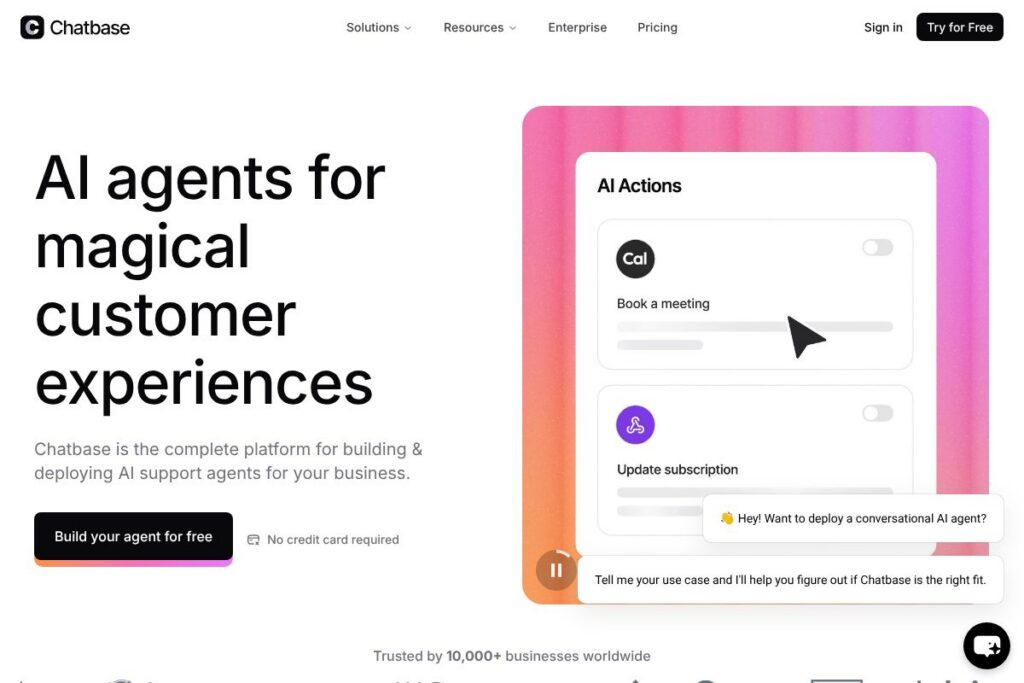
Chatbase is a platform for building AI customer support agents that respond to customer queries, surface relevant knowledge base content, and take actions across connected systems. It focuses on conversational experiences for support channels, with tooling to train agents on product documentation, ticket history, and structured data to resolve issues autonomously.
Compared with incumbent helpdesk vendors like Zendesk and conversational-first platforms like Intercom, Chatbase centers on agent-level automation rather than ticket management workflows. Unlike open-source stacks such as Rasa, Chatbase provides a managed environment with enterprise-grade security and connectors meant for production support use cases. All of this makes Chatbase a practical choice for teams that want off-the-shelf AI agents combined with control over training data and integrations.
Chatbase is positioned at the intersection of AI, knowledge management, and support automation, so it tends to suit mid-market and enterprise teams with structured documentation, high ticket volumes, and a need for security controls. For platform details and signup options, see the Chatbase homepage.
How Chatbase Works
Teams start by connecting knowledge sources, such as help center articles, product docs, and historical tickets, into the platform. Chatbase ingests and indexes those sources, then provides a training workflow where you label examples, tune responses, and define agent behavior for escalation and follow-up.
Once trained, agents can be deployed across channels including web chat, messaging apps, and support consoles, where they answer queries, suggest articles, and trigger workflows. Admins monitor performance through analytics, adjust training data, and add guardrails to control actions the agent can take against backend systems.
Chatbase features
Chatbase organizes core capabilities around building, deploying, and governing AI support agents. Core functions include knowledge ingestion, agent training tools, multi-channel deployment, analytics, and enterprise security features. The platform emphasizes features that let support teams reduce routing and repetitive requests while maintaining oversight of agent behavior.
Knowledge ingestion and indexing
The platform pulls from help centers, documentation, and ticket exports, creating a searchable knowledge index that agents use to surface answers. This reduces manual knowledge lookups and keeps agent responses consistent with your canonical content.
Agent training studio
A visual training interface lets teams create intents, supply examples, and refine responses without deep ML expertise. That studio supports iterative improvement through review workflows and example-based tuning.
Multi-channel deployment
Agents can be deployed on web chat widgets, messaging platforms, and inside support consoles so customers get consistent support across touchpoints. Channel adapters handle formatting and session management to keep conversations context-aware.
Automation and action triggers
Agents can execute actions such as creating tickets, suggesting knowledge articles, or initiating account lookups by calling connected systems. Built-in workflows reduce the number of manual handoffs required to resolve common issues.
Human handoff and escalation
When an agent cannot resolve an issue, the platform provides structured escalation paths and context transfer to human agents. This keeps conversations intact and shortens resolution time.
Analytics and feedback loops
Dashboards surface metrics like deflection rate, answer accuracy, and time-to-resolution so teams can quantify impact. Feedback tooling routes misclassified queries into retraining queues to close gaps quickly.
Integrations and connectors
Prebuilt connectors and APIs let Chatbase link with ticketing systems, CRMs, and identity stores so agents can perform context-aware actions. Common integration targets include support platforms and messaging channels.
Enterprise security and compliance
Chatbase supports encrypted data storage and controls for access, auditing, and data handling to meet enterprise requirements. The platform advertises SOC 2 Type II certification and GDPR alignment to help meet regulatory obligations.
With these features, Chatbase aims to reduce ticket volume by automating repetitive interactions while providing the governance and integrations enterprises require for production support.
Chatbase Pricing
Chatbase uses a custom enterprise pricing model rather than publishing standard consumer tiers; pricing is typically determined by usage, features, and integration needs. Organizations should expect a conversation-based or seat-and-usage model aligned to production support volume and compliance requirements.
For current pricing options and to request a quote, view the Chatbase homepage and contact sales for tailored plans and deployment guidance.
Chatbase Use Cases
Customer-facing support automation is the most common use case, where Chatbase answers FAQs, walks customers through troubleshooting steps, and pulls account-specific details to resolve requests. This reduces repetitive tickets and frees agents to handle complex cases.
Other uses include internal support for employees, onboarding assistants that guide new users through setup tasks, and escalation routing that captures context before handing over to human agents. Enterprise teams also use Chatbase for compliance-sensitive scenarios because of its security controls.
Pros and Cons of Chatbase
Pros
- Robust knowledge handling: Chatbase ingests a variety of content types and creates a searchable index so agents pull accurate, context-aware answers. This reduces the need for manual lookups and improves response consistency.
- Enterprise security and governance: Support for encryption, access controls, and audit trails helps organizations meet compliance and privacy requirements. That makes it a fit for regulated industries and large enterprises.
- Production-ready integrations: Connectors to ticketing systems and messaging channels let agents operate inside existing workflows and take actions that resolve tickets automatically. This lowers friction during deployment.
Cons
- Custom pricing model: Pricing is tailored and not publicly listed, which can slow initial evaluation for smaller teams that prefer transparent self-serve plans. Organizations need to engage sales to get concrete numbers.
- Operational overhead for training: Getting high accuracy requires iterative training and review, which needs dedicated subject matter input and ongoing monitoring. Teams without documentation discipline may see slower results.
- Dependency on data quality: Agent performance depends on the quality and structure of ingested knowledge; poorly organized docs or noisy ticket data can reduce accuracy until cleaned or curated.
Does Chatbase Offer a Free Trial?
Chatbase typically provides custom demos and trial arrangements as part of its enterprise sales process rather than publishing a self-serve free tier. Prospective customers can request a demo or pilot through the Chatbase homepage to validate fit and measure deflection before committing to a contract.
Chatbase API and Integrations
Chatbase provides developer APIs and connectors for ingesting content, querying agents, and handling session events; the API documentation describes endpoints for training, inference, and telemetry. Developers can automate content updates and integrate agent responses into web apps or support consoles.
In addition to APIs, the platform offers integrations with common support systems and messaging channels so agents can surface ticket context and take actions inside the tools agents already use. Integration setup is handled through connectors and webhooks that map data and events between systems.
10 Chatbase alternatives
Paid alternatives to Chatbase
- Zendesk — A full helpdesk platform with automation and Answer Bot features that integrate tightly into ticket workflows and self-service portals. Visit the Zendesk product pages for plan details.
- Intercom — A conversational customer messaging platform that combines live chat, bots, and product tours for customer engagement. See the Intercom platform overview for capabilities.
- Freshdesk — A cloud helpdesk with AI-powered automations, knowledge base, and omnichannel support designed for SMBs and enterprises. Explore the Freshdesk features for more.
- Ada — A chatbot platform focused on automated customer interactions and agent deflection with a no-code builder and analytics. Learn about Ada on the Ada product site.
- Kustomer — A customer service CRM that blends messaging, workflows, and automation for high-touch support teams. See the Kustomer platform for details.
- Front — A shared inbox with automation and integrated chatbots that centralize customer communication. Review the Front features.
- Drift — A conversational marketing and support platform that uses bots and routing to connect customers to the right resource. Check the Drift product pages.
Open source alternatives to Chatbase
- Rasa — An open source conversational AI framework for building contextual assistants you can self-host and customize. Visit the Rasa project for downloads and docs.
- Botpress — A developer-focused open source platform for building chatbots with a modular architecture and visual flow editor. Learn more at the Botpress site.
- Chatwoot — An open source customer engagement platform with chat, inbox, and automation capabilities for teams that want self-hosted support tooling. See the Chatwoot project.
Frequently asked questions about Chatbase
What is Chatbase used for?
Chatbase is used to build AI-powered customer support agents that answer questions and automate common support tasks. Teams deploy agents to reduce ticket volume, route queries, and speed up resolution by surfacing relevant knowledge.
Does Chatbase provide enterprise security features?
Yes, Chatbase includes enterprise-grade security and compliance controls. The platform supports encryption, access controls, and certifications that help organizations meet regulatory requirements.
Can Chatbase integrate with my helpdesk or CRM?
Yes, Chatbase integrates with common support systems and CRMs via connectors and APIs. These integrations let agents access ticket context and perform actions like ticket creation and updates.
How does Chatbase handle knowledge updates?
Chatbase ingests and indexes documentation and ticket history to keep agent knowledge up to date. Teams can push content changes through APIs or connector syncs and then retrain agents using the platform’s training studio.
Is Chatbase suitable for small teams?
Chatbase is primarily aimed at mid-market and enterprise teams with substantial support volume and compliance needs. Small teams may prefer simpler or self-serve chatbot tools unless they require the platform’s governance and integrations.
Final verdict: Chatbase
Chatbase excels at turning existing documentation and ticket data into production-ready AI agents that reduce repetitive work and keep support consistent, with enterprise-grade controls for security and governance. Its focus on integrations, analytics, and iterative training makes it a practical choice for organizations that need reliable automation rather than experimental pilots.
Compared with open source frameworks like Rasa, which are free to self-host and highly customizable, Chatbase trades DIY flexibility for a managed platform and integrated enterprise controls. If your priority is a supported, secure deployment with connectors and monitoring, Chatbase is well suited; if you need a no-cost, fully extensible stack and have internal ML resources, an open source option may be more appropriate.