What is ChatGPT
ChatGPT is a conversational AI that produces natural-language responses to user prompts. It is built on large language models and is used to draft text, answer questions, generate code snippets, summarize documents, and help with step-by-step problem solving through an interactive chat interface. Users interact via the web app, mobile apps, or third-party integrations to run iterative conversations and refine outputs.
Compared with Google Bard, Anthropic Claude, and Microsoft Copilot, ChatGPT is notable for its broad ecosystem of plugins, strong third-party adoption, and tiered access to more powerful models through subscription options. Bard focuses on direct search and Google integrations, Claude emphasizes safety-oriented assistant behavior, and Copilot integrates deeply into Microsoft productivity apps. All of these aim to provide conversational assistance, but ChatGPT balances ease of use with an extensible plugin and API ecosystem.
All of this makes ChatGPT a practical choice for people who want a conversational assistant for everyday tasks, technical work, and creative exploration. It works well for individual knowledge work, developer prototypes, and team workflows that benefit from rapid drafting and iteration with AI.
How ChatGPT Works
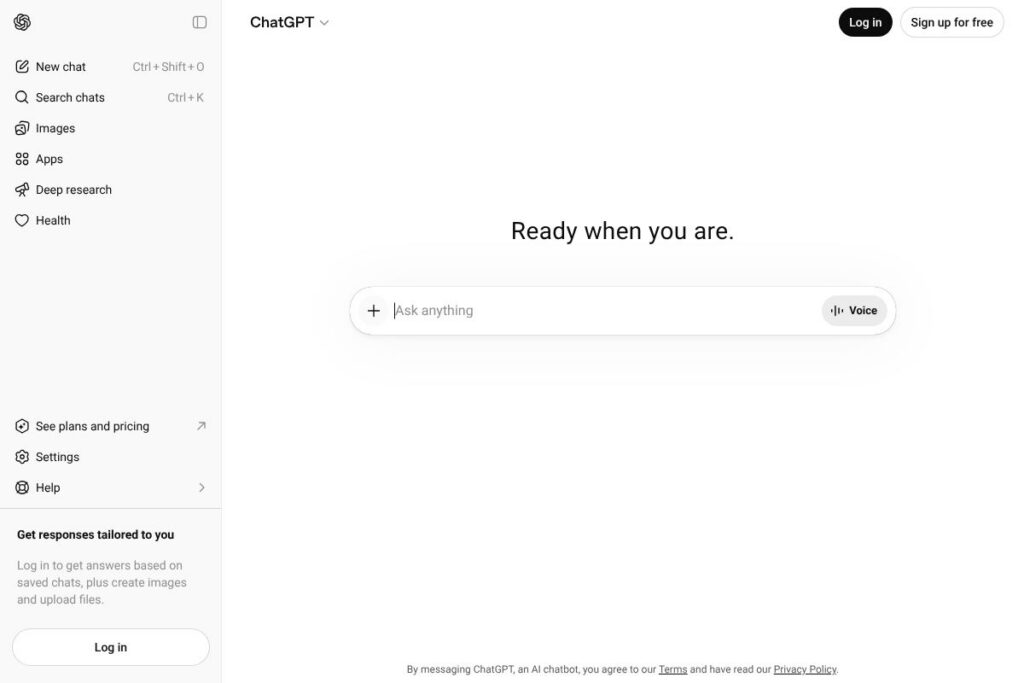
Users start a session in the ChatGPT web app or mobile apps and enter prompts; the system responds with generated text that can be refined through follow-up prompts. Conversations are token-based interactions with an underlying model that predicts the most likely continuations of text, and the interface supports system and user messages to shape tone and behavior.
Advanced workflows include uploading files for context, using tools such as browsing and code execution, and activating plugins that let ChatGPT call external services. For developers and power users, prompt design, system instructions, and conversation history are the primary levers to steer responses toward specific formats, depth, and reliability.
What does ChatGPT do?
ChatGPT organizes capabilities around conversational generation, model access tiers, and extensibility through plugins and integrations. Core features include natural language generation, code assistance, summarization, and tools for browsing or executing code in-session. Recent additions have emphasized plugins, model switching, and advanced data analysis functionality that increases use in research and development workflows.
The platform includes several powerful capabilities worth highlighting:
Conversational prompting
The chat interface supports iterative prompts and follow-ups, making it simple to refine outputs, ask for clarifications, or expand responses. This reduces friction when drafting content or exploring complex questions because you can correct, expand, or narrow the scope in natural-language steps.
Model tiers and access
Users can access different models with varying capabilities; higher-tier models provide more nuanced reasoning and creativity while standard models cover routine tasks. Access to more capable models is often gated behind subscription tiers, which is useful when you need better quality or faster responses for professional work.
Plugins and external tools
Plugins let ChatGPT call external APIs and services during a conversation, such as retrieving real-time data, executing actions, or querying third-party tools. This extends the assistant beyond static knowledge and enables workflows like booking, searching live data, or running custom integrations; see the ChatGPT plugins announcement for examples and guidance.
Code generation and debugging
ChatGPT can generate code snippets, explain algorithms, and assist with debugging through examples and stepwise reasoning. Developers often use the chat to prototype functions, translate code between languages, or receive inline suggestions that speed up development iterations.
Advanced data analysis and file handling
Built-in tools for data analysis and file uploads enable ChatGPT to summarize documents, extract structured data, and perform calculations or analyses within a session. These capabilities are useful for report drafting, research summarization, and processing CSV or JSON datasets.
Custom instructions and session memory
Custom instructions let users set preferences for tone and behavior across sessions, while limited session memory can retain context to reduce repetitive setup in ongoing conversations. These features make recurring workflows and personalization more efficient for frequent users.
With these capabilities, ChatGPT provides a flexible conversational layer that teams can adapt for content creation, technical assistance, research summarization, and interactive automation.
ChatGPT pricing
ChatGPT follows a mixed pricing model with a free tier for basic access, a consumer subscription that unlocks higher-performing models, and enterprise options with custom terms. Individuals can use the free plan for basic conversation and opt into a paid subscription for priority access and enhanced model performance. Organizations with advanced compliance, support, or scale needs typically pursue enterprise agreements with custom pricing.
Monthly Billing:
- Free Plan – $0/mo (Basic conversational access, limited model availability, standard response times)
- ChatGPT Plus – $20/mo (Access to higher-tier models such as GPT-4, faster response times, priority access during peak usage; see the ChatGPT Plus details for subscription specifics)
Annual Billing:
Annual billing for the consumer subscription is not publicly listed as a standard option; the primary consumer subscription is offered on a month-to-month basis. For organizations seeking volume discounts or yearly commitments, enterprise agreements are handled separately.
Enterprise
Enterprise – Custom pricing (Includes SSO, dedicated support, administrative controls, and enhanced security features). Larger organizations should consult the OpenAI enterprise page to request a tailored plan and pricing.
What is ChatGPT Used For?
ChatGPT is commonly used for drafting and editing content such as emails, articles, and marketing copy, where iterative prompts help refine tone and structure. Individuals also rely on it for learning concepts, getting explanations, and generating study notes or summaries of complex texts.
Teams and developers use ChatGPT for technical tasks like code snippets, API exploration, and prototyping automation; businesses use it for customer support drafts, internal documentation, and idea generation. Its plugin and API ecosystem allows integration into workflows that require live data, scheduling, or third-party service access.
Pros and Cons of ChatGPT
Pros
- Flexible conversational interface: The chat format supports iterative refinement, which is useful for drafting, brainstorming, and step-by-step problem solving.
- Access to advanced models: Paid tiers provide access to more capable models that deliver higher-quality writing, coding help, and reasoning for professional work.
- Extensible via plugins and integrations: Plugins allow ChatGPT to interact with external services and data sources, enabling real-time and actionable workflows.
- Developer and API ecosystem: The broader OpenAI platform and API enable developers to build custom applications and integrate model capabilities into other products.
Cons
- Cost for high-capability access: Access to the most capable models requires a paid subscription, which can be a barrier for some users who need reliable high-end performance.
- Inconsistent factual accuracy: The model can generate plausible but incorrect or outdated information, requiring user verification for critical tasks.
- Privacy and compliance considerations: Enterprise deployments require careful configuration and contractual terms to meet strict data protection and compliance needs.
- Limited persistent memory: While custom instructions and session features improve continuity, long-term memory and enterprise-grade knowledge management require additional tooling and configuration.
Does ChatGPT Offer a Free Trial?
ChatGPT offers a free plan and a paid subscription option. The free plan provides access to standard models with usage limits and basic features, while the paid ChatGPT Plus subscription adds access to higher-capability models, faster responses, and priority use. Organizations seeking expanded controls should contact sales for enterprise options with trial or pilot arrangements.
ChatGPT API and Integrations
OpenAI provides a developer API that exposes the same underlying models used by ChatGPT, enabling programmatic access to text generation, embeddings, and model management; consult the API documentation for endpoints and examples. The ChatGPT product itself also supports plugins and integrations that allow the chat to call external services during conversations, which are documented in the ChatGPT plugins announcement.
Key integrations and ecosystem touchpoints include Microsoft product integrations, third-party connectors, and plugin-enabled access to services such as calendars, databases, and web search. Developers typically combine the public API with custom tooling to embed conversational capabilities into apps and internal tools.
10 ChatGPT alternatives
Paid alternatives to ChatGPT
- Google Bard — A conversational assistant from Google that emphasizes live search integration and direct access to Google services.
- Microsoft Copilot — Integrated into Microsoft 365 apps to assist with drafting, summarization, and automation inside productivity tools.
- Anthropic Claude — An assistant focused on safety and controlled responses, positioned for enterprise and developer use.
- Jasper AI — A writing assistant geared toward marketers and content teams, with templates and workflow integrations.
- Perplexity AI — A conversational answer engine that blends web answers with citation-focused responses.
- Writesonic — A content-generation tool aimed at marketing, SEO, and short-form copy workflows.
- YouChat — A chat-based search and assistant that integrates answers with search snippets for quick reference.
Open source alternatives to ChatGPT
- Hugging Face Transformers — A library and model hub that lets teams run and fine-tune open models locally or in the cloud.
- GPT-NeoX — An open model family that organizations can deploy for custom LLM tasks with self-hosting options.
- BLOOM — A multilingual open model suitable for research, development, and deployment when hosted by teams.
- MosaicML / MPT — Open model and tooling options for organizations that want end-to-end model training and deployment control.
Frequently asked questions about ChatGPT
What is ChatGPT used for?
ChatGPT is used for conversational text generation, drafting, summarization, and coding assistance. People use it to brainstorm ideas, create content, prototype code, and get explanations of complex topics.
Does ChatGPT cost money to use?
ChatGPT has a free tier and a paid subscription called ChatGPT Plus. The free tier provides basic access while ChatGPT Plus costs $20/mo and unlocks higher-capability models and faster responses.
Can ChatGPT integrate with other apps?
Yes, ChatGPT supports integrations via plugins and the OpenAI API. Plugins let the chat call external services during conversations, and developers can use the OpenAI API documentation to embed model capabilities into apps.
Is ChatGPT suitable for enterprise use?
Yes, ChatGPT can be deployed for enterprise use through custom agreements and dedicated features. Enterprise plans provide administrative controls, security options, and enhanced support; organizations should consult the OpenAI enterprise page for details.
How does ChatGPT handle developer access?
Developers access similar models through the OpenAI API for programmatic use. The API provides endpoints for generation, embeddings, and model management and is documented in the API documentation.
Final verdict: ChatGPT
ChatGPT excels as a general-purpose conversational assistant that reliably handles drafting, coding help, and iterative idea development. Its combination of a user-friendly chat interface, access to higher-performance models via subscription, and an extensible plugin ecosystem makes it a practical choice for individuals and teams that need flexible AI assistance.
Compared with Google Bard, ChatGPT offers a more mature plugin and API ecosystem and a clear consumer subscription tier at $20/mo for higher-capability models, while Bard emphasizes tighter search and Google product integration and remains broadly available without a standard consumer subscription. For organizations that require security and administrative controls at scale, ChatGPT’s enterprise options provide the formal support and SLAs expected in business environments.
Overall, ChatGPT is a strong option for users who want a versatile conversational AI that integrates into existing workflows, supports developer extensibility, and scales from personal use to enterprise deployments.