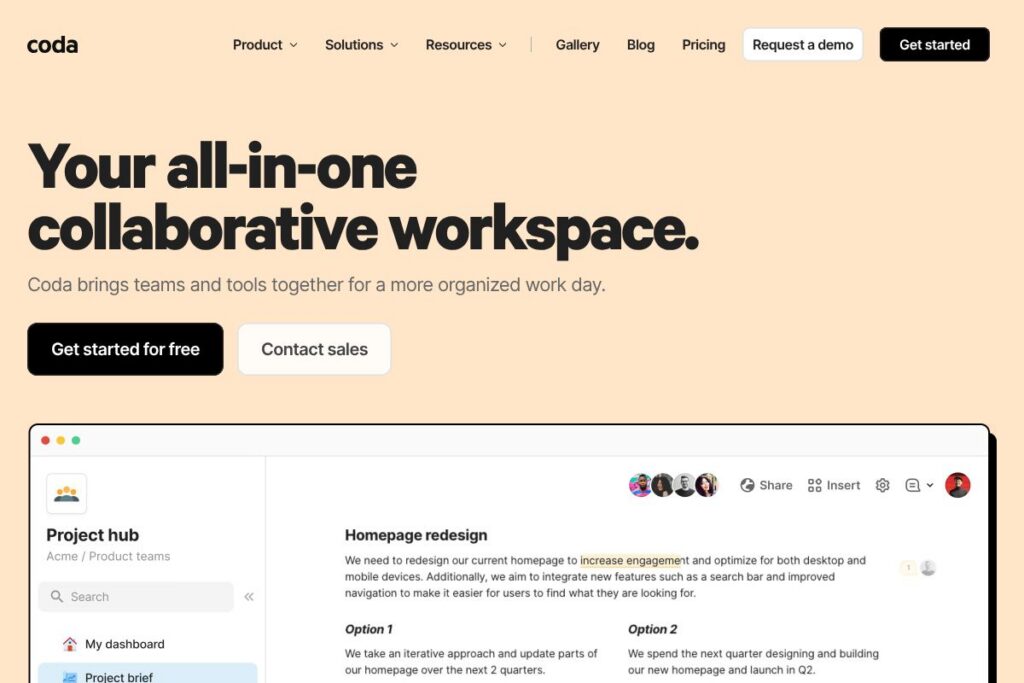
Coda: An Overview
Coda is a unified workspace that blends rich documents, relational tables, formulas, and modular building blocks so teams can create docs that behave like apps. It is designed for cross-functional work where notes, data, workflows, and lightweight automations need to live together and stay in sync.
Coda sits between simple documents and full databases. Compared with Google Docs, Coda adds structured tables and views that behave more like a database than a plain document. Compared with Airtable, it provides a more document-first canvas where tables are embedded alongside narrative content and UI elements. Compared with Notion, Coda emphasizes formulas, buttons, and automations that let teams build repeatable processes and small apps inside a single file.
All of this makes Coda especially well suited for product teams, operations groups, and cross-functional squads that need a single source of truth plus the ability to automate tasks without shipping custom software. It scales from simple meeting notes to full team hubs and custom trackers, and is often used to replace multiple specialist tools.
How Coda Works
Coda organizes work around flexible documents that can include text, tables, views, buttons, and embedded integrations. A single doc can contain a knowledge base, a tracker that writes back to other tables, and buttons that trigger automations or create new rows, so teams keep context and data together.
Typical workflows include turning meeting notes into action items that auto-appear in a team tracker, building a product hub that pulls calendar events and design files into one place, and creating a lightweight issue tracker with status views and email notifications. Teams connect external tools using Packs and the API to sync calendars, push updates to chat, or generate tickets in issue trackers.
Coda features
Coda groups document writing, structured data, automation, and integrations into one environment. Core capabilities include flexible rich-text canvases, relational tables with spreadsheet-style formulas, buttons and automations for in-doc actions, an AI assistant to summarize or generate content, and over 600 integrations to connect external apps. The platform also offers a public Gallery of templates and solutions created by other teams.
Let’s talk Coda’s Features
Rich documents
Coda supports full rich-text editing with headings, embeds, and media, while allowing tables and interactive elements to sit inline. This makes it easy to mix long-form planning and reference material with live data and controls.
Tables and relational data
Tables in Coda behave like lightweight databases with column types, linked records, and filtered views. Views let different teams see the same underlying data in formats that suit their needs without duplicating rows.
Formulas and logic
Coda formulas operate across a doc rather than a single cell, enabling calculations that reference other tables and views. This lets teams model workflows, compute roll-ups, and build conditional displays without external scripting.
Buttons and automations
Buttons perform in-doc actions such as creating rows, changing statuses, or invoking automations on a schedule or in response to changes. Buttons reduce repetitive clicking by turning manual steps into single actions.
Coda AI
Coda AI provides conversational and generative capabilities inside docs to summarize content, draft text, or generate tables from prompts. The AI assistant can accelerate content creation, produce meeting summaries, and populate table rows based on descriptions. Explore how teams use AI in the Coda AI overview.
Integrations and Packs
Coda connects to external tools through Packs and built-in integrations, enabling two-way workflows with calendar services, messaging apps, design files, and issue trackers. Common connections include Google Calendar, Slack, Figma, and Jira; view available connectors on the Coda integrations page.
Templates and Gallery
The Coda Gallery contains published templates and example solutions that teams can copy and adapt, from product hubs to meeting forums and voting exercises. Starting from a gallery template shortens setup for common team workflows; browse examples in the Coda Gallery.
Permissions, sharing, and publishing
Coda provides granular sharing controls at the doc and section level, with options to publish docs publicly or restrict access to specified users and domains. Version history and comments help with auditability and collaborative editing.
With these capabilities, Coda is strongest as a single place to write, structure, and automate team processes. It reduces the need for multiple point solutions by letting teams prototype and scale internal tools within documents.
Coda pricing
Coda uses a subscription model with tiered plans and enterprise offerings, but public pricing details are not listed in the content provided here. For the latest plan options, user seat models, and enterprise features, check Coda’s official pages for current pricing and plan comparisons.
View Coda’s pricing information to compare what each tier includes and to see any promotional or enterprise options.
What is Coda Used For?
Coda is used to build collaborative team hubs that centralize plans, calendars, and project documentation while providing actionable tables and automations. Teams use it to reduce context switching by combining reference material, task trackers, and lightweight applications in a single doc.
Common scenarios include product team hubs with decision logs and roadmaps, meeting forums that convert notes into tracked action items, and trackers that replace scattered spreadsheets. It is also used to prototype internal tools, like intake forms that generate tickets and dashboards that surface key metrics.
Pros and Cons of Coda
Pros
- Flexible canvas: Documents can contain narrative content, tables, buttons, and embeds so teams can build context-rich tools without switching apps.
- Powerful formulas and logic: Cross-table formulas and computed views let teams implement non-trivial workflows inside a doc with relatively low technical overhead.
- Extensive integrations: Packs and connectors allow Coda to pull in calendar events, push notifications to chat, and create tickets in external systems, reducing manual syncing.
- Coda AI capabilities: The built-in assistant speeds up drafting, summarization, and data generation inside docs, which saves time on routine content work.
Cons
- Learning curve for advanced features: Building multi-table apps with formulas and buttons requires time to learn and can be challenging for non-technical users.
- Performance on very large datasets: Very large tables or highly complex formulas can slow down a doc compared with purpose-built databases or data warehouses.
- Seat-based and enterprise nuances: Organizations with specific procurement needs may find enterprise licensing and governance require extra coordination to implement at scale.
Does Coda Offer a Free Trial?
Coda offers a free plan and trial options for paid tiers. The free tier provides basic document creation and table features so individuals and small teams can evaluate Coda, while paid plans unlock advanced automations, increased usage limits, and enterprise controls; sign up and compare options directly on Coda’s site.
Coda API and Integrations
Coda provides a developer API that lets teams read and write doc data, manage rows and tables, and integrate Coda with external services programmatically. The Coda API documentation describes endpoints, authentication, and examples for automation and synchronization.
In addition to the API, Coda supports Packs and prebuilt integrations for popular services including Google Workspace, Slack, Figma, Jira, and Zapier, which makes it straightforward to build connected workflows without custom code.
10 Coda alternatives
Paid alternatives to Coda
- Notion — Combines notes, databases, and templates with a strong emphasis on content hierarchies and team knowledge bases.
- Airtable — Focuses on spreadsheet-database functionality with a grid-first interface and rich automation and app-building features.
- Google Workspace — Suite of collaborative documents, spreadsheets, and drives that integrates tightly with Gmail and Calendar.
- ClickUp — Project and task management platform that includes docs, goals, and native automations for team workflows.
- Asana — Task and project management tool with timeline, workload, and reporting features for cross-team coordination.
- Confluence — Enterprise documentation and knowledge management that integrates with other Atlassian products like Jira.
- Smartsheet — Spreadsheet-style work management with enterprise-grade automation and reporting.
Open source alternatives to Coda
- Nextcloud — Self-hosted collaboration suite offering file sharing, document editing, and integrations for teams that need data control.
- OnlyOffice — Open-source office suite that provides document, spreadsheet, and presentation editing with collaboration features.
- Etherpad — Lightweight collaborative editor for real-time drafting and meeting notes with simple deployment options.
- Appsmith — Open-source low-code platform for building internal tools that connects to databases and APIs.
Frequently asked questions about Coda
What is Coda used for?
Coda is used to combine documents, structured tables, and automations into single collaborative workspaces. Teams build hubs, trackers, meeting forums, and internal tools that reduce context switching between note-taking, data, and action.
Does Coda have an API?
Yes, Coda provides a RESTful developer API. The Coda API documentation explains endpoints for reading and writing tables, managing docs, and integrating with external systems.
Is Coda free to use?
Coda offers a free tier for individuals and small teams. Paid plans add larger usage limits, advanced automations, and enterprise features; check the main site for plan comparisons and trial details.
Can Coda replace Airtable or Notion for my team?
Possibly, depending on your priorities. If your team needs document-first collaboration with embedded tables and custom buttons, Coda is a strong fit; if you need strict grid-first database features or a particular UI, Airtable or Notion may be preferable.
How does Coda handle integrations with other tools?
Coda integrates via Packs, native connectors, and a developer API. Common integrations include Google Calendar, Slack, Figma, and Jira, and Packs allow syncing data and triggering actions across services.
Final verdict: Coda
Coda excels at combining narrative content, structured data, and simple app-like behaviors into a single, shareable file. Its strength is the ability to prototype and operate internal workflows without separate apps for notes, trackers, and automations, and its AI features speed up content and table generation.
Compared with Airtable, which offers seat-based plans and a grid-first interface, Coda emphasizes a document-first canvas plus in-doc automations and buttons. While Airtable provides strong database views and a clear pricing structure starting from $10/user/month for basic paid plans, Coda’s approach lets teams reduce tool count by building hubs and lightweight apps directly in docs, trading some database depth for greater flexibility and narrative context.
Overall, Coda is a practical choice for product teams, operations, and cross-functional groups that want a single environment for writing, tracking, and automating work with the option to extend via integrations and API access. For templates and real-world examples, explore the Coda Gallery and the Coda integrations catalog.