What is DLive
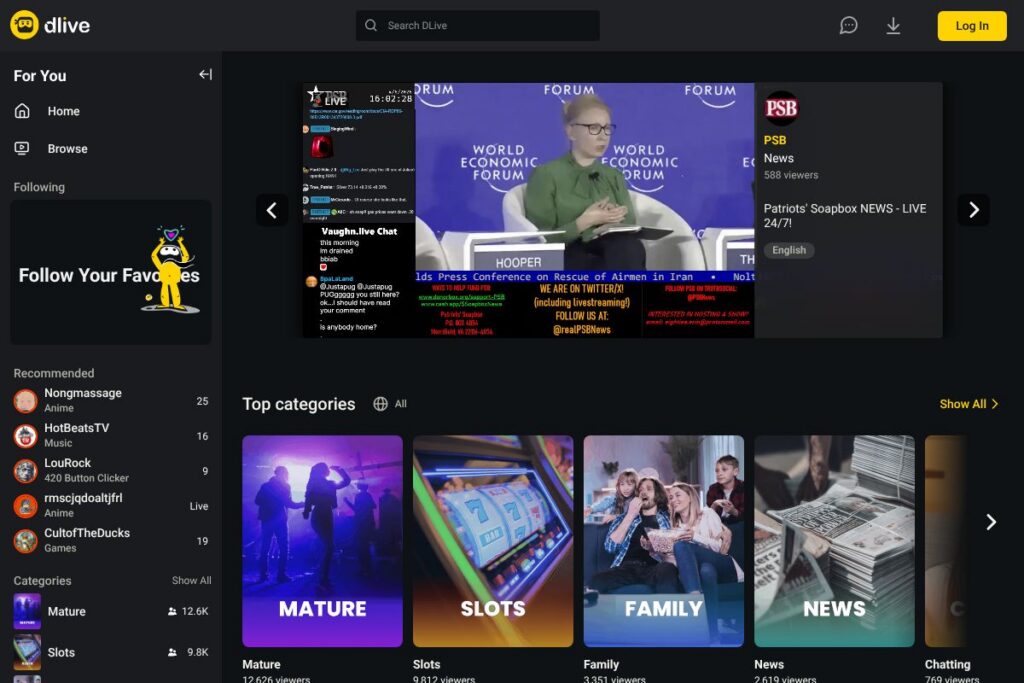
DLive is a live-streaming platform that lets creators broadcast video content to an audience, engage with real-time chat, and monetize through donations, subscriptions, and virtual gifts. The service emphasizes creator revenue opportunities and community interaction while supporting common streaming setups such as OBS and RTMP broadcasting. Viewers can follow channels, participate in chat, and support creators directly through platform-native tipping and subscription features.
Compared with Twitch and YouTube Live, DLive positions itself as a more creator-focused alternative with an emphasis on direct monetization and different revenue-sharing models. Twitch offers deep platform integrations, a large viewer base, and established subscription tiers such as $4.99/month for Tier 1 subscriptions, while YouTube Live benefits from Google account integration and broad discovery inside YouTube. DLive is often chosen by streamers who prefer a smaller, more community-oriented audience and a platform that highlights creator-first incentives.
All of this makes DLive a practical option for independent streamers, small production teams, and niche communities that prioritize direct audience support. It works well for broadcasters who want straightforward integration with standard streaming tools and an environment where chat and donations are central to the viewer experience.
How DLive Works
DLive accepts RTMP input from common encoding software such as OBS Studio and hardware encoders, which makes getting a stream live straightforward for creators. Streamers configure their broadcasting software with a stream key and server URL, go live, and use the DLive dashboard to monitor chat, view analytics, and manage monetization settings.
Audience interaction happens through a real-time chat overlay and gifting/subscription mechanisms; creators can moderate chat, assign moderators, and use community-driven features to reward supporters. Content discovery relies on categories, tags, and featured pages on the platform, and creators drive growth by promoting streams externally and within DLive’s browsing and following tools.
DLive features
DLive’s core features focus on live video delivery, audience engagement, and monetization. The platform supports standard RTMP broadcasting, viewer donations and subscriptions, chat moderation tools, and creator dashboards for stream management. Recent updates and ongoing platform changes tend to center on improving creator payouts, community features, and stream discoverability.
Live broadcasting and RTMP support
DLive accepts standard RTMP streams and is compatible with mainstream encoding tools such as OBS Studio and XSplit. That compatibility allows creators to use overlays, scenes, and multi-source inputs to build professional broadcasts while keeping setup familiar to most streamers.
Creator monetization tools
The platform provides multiple ways for creators to earn, including viewer tips, channel subscriptions, and virtual gifts. These monetization features let small and mid-size creators receive direct financial support from their communities during live events and ongoing programming.
Chat and community interaction
Built-in chat supports real-time messages, emotes, and moderator controls to manage conversations during broadcasts. Community features such as follows, channel pages, and on-stream acknowledgements help creators build and retain viewer relationships.
Moderation and channel management
Streamers can assign moderators, set chat rules, and deploy moderation tools to handle spam and disruptive behavior. Channel-level settings let creators control follower-only chat modes, slow chat, and other common protections used in live broadcasts.
Stream discovery and browsing
DLive organizes live streams by category and tags, and it surfaces recommended channels through browsing and following feeds. These discovery mechanisms help viewers find ongoing live content across a mix of popular and niche categories.
With DLive you get an approachable streaming setup that focuses on creator payouts and community engagement. The platform’s biggest practical benefit is its alignment with direct monetization and a straightforward broadcasting workflow compatible with standard streaming tools.
DLive Pricing
DLive follows a usage-based approach centered on free accounts for creators and viewers, combined with built-in monetization tools that handle donations, subscriptions, and virtual gifts. Specific revenue-share terms, fees, or detailed pricing for any premium services are set by the platform and are subject to change, so creators should review DLive’s official resources for the most current information.
For the latest details on revenue sharing, payout thresholds, and any potential fees, consult the DLive homepage and the platform’s help or support sections for current policies and account-level settings.
What is DLive used for
DLive is used primarily for live video broadcasting, real-time community interaction, and creator monetization. Typical uses include gaming streams, talk shows, creative work sessions, educational livestreams, and live event coverage where immediate audience interaction is important.
Small teams, independent creators, and niche communities use DLive when they want a platform that supports standard streaming tools while focusing on direct viewer support and a community-driven experience. It also serves as an option for creators who want alternatives to the largest platforms while retaining compatibility with common streaming setups.
Pros and cons of DLive
Pros
- Creator monetization options: Offers subscriptions, tips, and virtual gifts that allow viewers to directly support creators during live broadcasts. This provides multiple revenue streams for creators beyond ad-based models.
- Standard streaming compatibility: Works with RTMP and mainstream encoders like OBS Studio, making setup familiar and flexible for creators of all experience levels. Hardware encoders and multi-scene setups integrate without proprietary software requirements.
- Community-focused environment: Smaller, community-driven audiences can lead to stronger viewer relationships and higher engagement for niche creators. This environment can be preferable for creators who prioritize interaction over scale.
Cons
- Smaller overall audience compared to major platforms: The reach on DLive is generally less than on Twitch or YouTube Live, which can make growth and discoverability harder for some creators. Creators aiming for large-scale monetization may need multi-platform strategies.
- Variable discoverability and platform features: Platform discovery and discoverability tools are less extensive than on larger competitors, which can require more external promotion by creators to grow an audience. Feature rollouts and ecosystem changes may also alter monetization mechanics over time.
Is DLive Free to Try?
DLive offers a free plan for both viewers and creators, allowing anyone to create an account and start broadcasting without an upfront subscription fee. Monetization features such as tipping and subscriptions are available within the platform, and creators can enable those options in their account settings.
DLive API and Integrations
DLive supports standard streaming integrations and works with popular broadcasting software such as OBS Studio and third-party tooling for overlays, alerts, and chat bots. These integrations allow streamers to add on-screen alerts, donation widgets, and automated moderation without custom development.
For developers and advanced integrations, refer to the DLive developer resources or the platform’s support pages for API endpoints, webhook capabilities, and guidance on building custom tools that interact with channel events and chat.
10 DLive alternatives
Paid alternatives to DLive
- Twitch — Market-leading live-streaming platform with large viewer base, integrated subscriptions, and Twitch-specific community features. Known for strong discovery and a mature monetization ecosystem such as Tier 1 subscriptions at $4.99/month.
- YouTube Live — Live broadcasting inside YouTube with strong search and discovery through Google, broad device support, and integration with YouTube channel monetization options. Well-suited for creators who want video permanence and discoverability.
- Facebook Live — Social-first live streaming built into Facebook with tight social sharing and audience targeting inside Facebook communities and pages.
- Vimeo Livestream — Paid professional live-streaming solution geared toward events, corporate use, and paid broadcasts with built-in ticketing and higher-quality streaming options.
- Caffeine — Social streaming platform focused on low-latency interaction and casual live content with a simpler creator monetization approach.
- Trovo — Emerging streaming platform with features similar to Twitch including subscriptions and viewer rewards for creators.
- Restream — Multi-platform streaming service that lets creators broadcast to DLive and other platforms simultaneously, with paid tiers for advanced features.
Open source alternatives to DLive
- Owncast — Self-hosted, open-source live video and chat server that lets you run a personal streaming instance and retain control of data and monetization. Good for communities that want full hosting control.
- PeerTube — Decentralized video platform that supports live streaming via ActivityPub and federated instances, focused on open standards and community moderation.
- OBS Studio — While not a hosting platform, OBS Studio is a free and open-source encoder used by nearly every live streamer to send RTMP streams to platforms like DLive. It is central to most open-source streaming workflows.
- Ant Media Server (Community Edition) — Open-source media server that supports low-latency live streaming and WebRTC, suited for self-hosted live applications and private streaming setups.
Frequently asked questions about DLive
What is DLive used for?
DLive is used for live video broadcasting and community-driven streaming. Creators broadcast live content, engage with viewers through chat, and enable monetization options like tips and subscriptions.
Does DLive let creators earn money?
Yes, DLive provides monetization features for creators. The platform supports viewer donations, channel subscriptions, and virtual gifts that allow creators to receive direct support during broadcasts.
Can I stream to DLive using OBS?
Yes, DLive accepts RTMP streams from OBS Studio. You configure OBS with your DLive stream key and server URL to go live with overlays, scenes, and multi-source inputs.
Does DLive offer an API for developers?
DLive provides developer resources and integration options. Check DLive’s developer and support pages for details on available endpoints, webhooks, and integration guidance.
Is DLive free to use?
DLive offers free accounts for viewers and creators. You can create an account and start streaming without an upfront subscription fee; monetization features are enabled within creator settings.
Final verdict: DLive
DLive does well at offering a creator-centric streaming environment that supports standard broadcasting tools and multiple direct monetization options. Its practical strengths are ease of setup with OBS/RTMP, a focus on creator payouts, and a community-oriented browsing experience that suits smaller or niche audiences.
Compared with Twitch, DLive typically offers a smaller audience but a tighter community experience and different monetization emphasis. Twitch has broad discoverability and subscription tiers such as $4.99/month for Tier 1 that feed into a mature creator economy, while DLive is better for creators who prioritize direct audience support and platform alternatives to the largest services. For creators deciding between platforms, DLive is worth evaluating when community engagement and creator revenue features are top priorities; consult the DLive homepage for the latest account and monetization details.