Element: An Overview
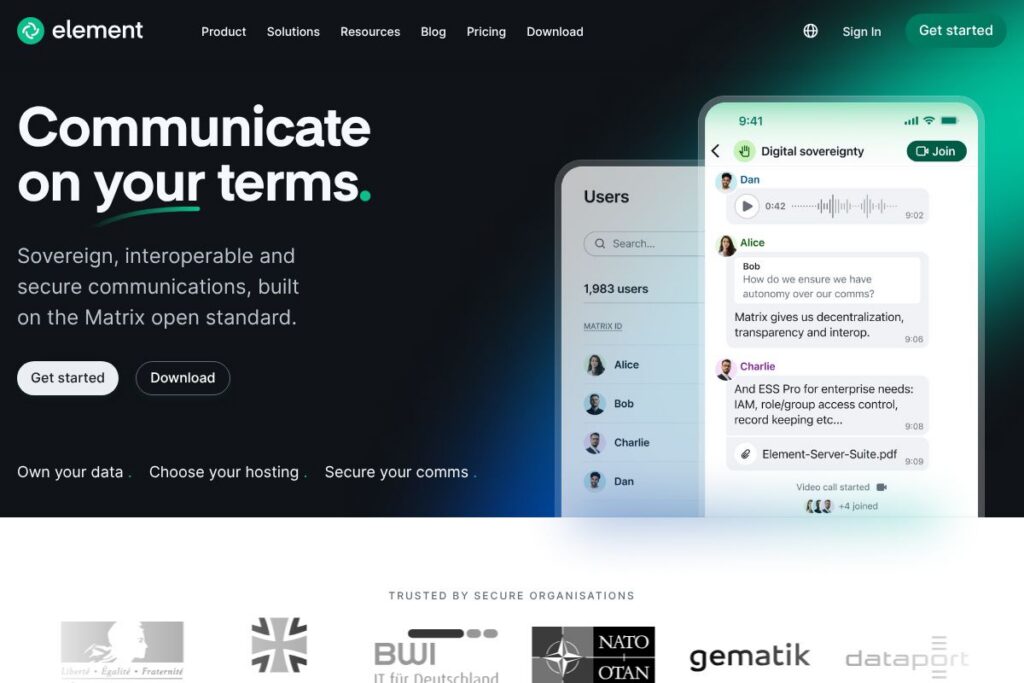
Element is a client and collaboration platform built on the Matrix open standard, providing end-to-end encrypted messaging, voice and video calling, and group collaboration across desktop and mobile. It supports both self-hosted deployments for organisations that require digital sovereignty and managed hosting via Element Matrix Services for teams that prefer an operated option.
Element competes with proprietary collaboration suites such as Slack and Microsoft Teams, and with open-source alternatives like Mattermost and Rocket.Chat. Compared with Slack, Element emphasizes decentralised federation and self-hosting rather than single-vendor cloud tenancy. Compared with Microsoft Teams, Element focuses on open standards and the ability to interoperate across different vendors via Matrix federation while Teams is tightly integrated with the Microsoft 365 ecosystem.
Element is particularly strong where control, interoperability, and compliance are required. It suits public-sector organisations, enterprises with strict data residency requirements, security-conscious teams, and communities that want vendor neutrality. The platform scales from single-server self-hosts to enterprise-grade deployments and supports bridges to connect with other messaging systems.
How Element Works
Element connects users through the Matrix protocol, which federates multiple servers so different organisations can communicate without a single central provider. Users run a Matrix client such as Element, which talks to a Matrix homeserver (for example Synapse or Dendrite) to store rooms, keys, and state while encrypted messages flow end-to-end between clients.
Teams can self-host Element and a Matrix homeserver inside their network to retain data ownership, or purchase hosted instances through Element Matrix Services. Administrators manage users, rooms, and retention policies via admin tools and integrate Element with identity providers and compliance systems for SSO and audit logging. Bridges expose other networks into Matrix rooms so organisations can collaborate with partners on different platforms while keeping a single secure conversation history.
What does Element do?
Element is organized around secure, federated real-time communication, with features for messaging, voice and video calls, file sharing, and integrations. Recent emphasis has been on enterprise-grade hosting, support for air-gapped deployments, and improved administration and compliance controls that help organisations meet regulatory requirements.
The platform includes several powerful capabilities:
End-to-end encryption
Element supports end-to-end encryption for one-to-one chats and group rooms using Matrix encryption protocols, protecting message content from server operators. Encryption keys are managed client-side, which helps meet privacy and compliance needs while allowing federated delivery of encrypted content across servers.
Decentralised federation
Matrix federation allows multiple independently operated servers to exchange messages and state, so organisations can communicate without being locked into a single vendor. This architecture improves resilience and gives teams the choice to host data where they need it.
Self-hosting and managed hosting options
Organisations can deploy Element and Matrix servers on-premises for full control, or use Element Matrix Services for hosted deployments with support and SLAs. This flexibility supports both digital sovereignty and operational convenience depending on organisational requirements.
Cross-platform clients
Element provides native clients for Windows, macOS, Linux, iOS, and Android as well as a web client, ensuring consistent experience across devices. Clients include features like message search, threads, reactions, and read receipts to support everyday collaboration.
Bridges and interoperability
Element leverages Matrix bridges to connect with legacy and third-party systems such as Slack, IRC, XMPP, and email, enabling mixed-technology collaboration with partner organisations. Bridges can be deployed alongside homeservers to translate messages and presence between networks.
Admin controls and compliance
Enterprise deployments include user and room administrative tools, retention and compliance controls, and integrations for enterprise identity and audit logging. These controls help organisations meet regulatory and internal governance requirements while retaining encrypted communication where needed.
Air-gapped and low-bandwidth support
Element and Matrix can be deployed in isolated, air-gapped environments for high-side or classified use, and the architecture supports low-bandwidth modes including mesh and satellite-assisted connectivity. This enables collaboration in constrained or isolated networks.
With Element you get a secure, federated collaboration stack that prioritises data ownership and cross-organisational connectivity. The biggest benefit is the combination of end-to-end encryption with federation, letting organisations protect sensitive content while still collaborating with external partners.
Element pricing
Element follows a hybrid model: the client and many Matrix server implementations are open-source and freely available for self-hosting, while managed hosting, enterprise support, and advanced services are offered through Element Matrix Services with tailored commercial plans. Organisations can choose free self-hosting, or purchase hosted and supported options depending on scale and operational requirements.
For details and the latest commercial offerings, view the Element Matrix Services information and the Element enterprise offerings pages for current hosting, support, and service options. Contact Element sales directly for custom enterprise pricing and service-level agreements.
What is Element Used For?
Element is commonly used for secure team chat, external partner collaboration across organisational boundaries, and replacing vendor-locked messaging platforms in regulated environments. Public sector organisations and enterprises adopt Element to meet data residency, audit, and compliance requirements while retaining real-time collaboration features.
It is also used for community-run chat servers, developer collaboration, and cross-platform messaging where interoperability matters. Organisations that need air-gapped or isolated deployments use Element for secure communications in networks without internet access.
Pros and Cons of Element
Pros
- Decentralised federation: Matrix federation lets different organisations run their own servers while still communicating, avoiding single-vendor lock-in and improving resilience. This supports cross-organisation workflows and preserves choice.
- End-to-end encryption by default: Strong client-side encryption protects message content and is suitable for regulated environments that require confidentiality and privacy controls. Key management is designed to keep keys with user devices.
- Self-hosting for sovereignty: Full self-hosting options let organisations retain full control of data, infrastructure, and compliance configurations, which is important for government and enterprise deployments.
- Broad interoperability: Bridges and the open Matrix standard allow Element to interoperate with other messaging systems and legacy platforms, easing migration and partner collaboration.
Cons
- Operational overhead for self-hosting: Self-hosted Matrix deployments require infrastructure, administration, and operational expertise, including managing homeservers, backups, and upgrades. Smaller teams may prefer managed hosting to avoid this burden.
- Feature parity with proprietary platforms: Some proprietary platforms offer richer built-in integrations and polished admin experiences out of the box; reaching the same level may require additional configuration or third-party services with Element.
- Managed pricing varies: Enterprise managed services and advanced feature bundles are sold with custom pricing, so organisations needing predictable per-user costs may need to contact sales for quotes.
Does Element Offer a Free Trial?
Element offers a free, open-source client and server software for self-hosting, and managed hosting options with enterprise support are available by request. The client and server code can be deployed at no licensing cost, while hosted and support plans are provided commercially; contact Element Matrix Services for trial or evaluation hosting arrangements.
Element API and Integrations
Element and Matrix expose standard APIs for client-server and server-server interactions; the Matrix specification documents these APIs and federation protocols. Developers can use Matrix SDKs and Element client libraries to build integrations or custom clients.
Common integrations include bridges to Slack, IRC, XMPP, and email systems, and Element supports enterprise identity providers for SSO. See the Element documentation for guidance on SDKs, bridge deployments, and integration patterns.
10 Element alternatives
Paid alternatives to Element
- Slack — A hosted team messaging platform with channels, app ecosystem, and searchable history; strong third-party app marketplace and polished UX.
- Microsoft Teams — Part of Microsoft 365, integrates tightly with Office apps, file storage, and enterprise identity; available under Microsoft subscription plans.
- Zoom — Primarily a video-first collaboration platform, also offers chat, webinars, and meeting integrations suited for large-scale conferencing.
- Cisco Webex — Enterprise communication suite with meetings, calling, and messaging targeted at regulated industries.
- Google Chat — Messaging and collaboration integrated with Google Workspace, with simple setup for organisations already on Google services.
- Workplace from Meta — Social and messaging features aimed at internal company communication with enterprise admin controls.
- Mattermost (hosted plan) — Open-core platform that also offers hosted enterprise plans for teams wanting more managed support.
Open source alternatives to Element
- Matrix (Synapse) — The reference Matrix homeserver implementation used to run federated Matrix networks and host Element clients; often self-hosted alongside Element.
- Mattermost — An open-source team messaging platform focused on self-hosting, with channels, threads, and integrations for developer teams.
- Rocket.Chat — Open-source chat platform with self-hosting options, federation capabilities, and enterprise features for compliance and SSO.
- Zulip — Open-source threaded group chat that emphasizes structured conversations and can be self-hosted for data control.
- Matrix (Dendrite) — A lightweight Matrix homeserver implementation designed for performance at scale, suitable for organisations building on Matrix.
Frequently asked questions about Element
What is Element used for?
Element is used for secure messaging, voice and video calls, and federated collaboration. Organisations use it to run self-hosted or managed communication platforms that meet compliance and data residency needs.
Can Element be self-hosted?
Yes, Element and Matrix server implementations can be self-hosted. Self-hosting gives organisations full control of data, deployment, and retention policies while supporting federation with other Matrix servers.
Does Element support end-to-end encryption?
Yes, Element supports end-to-end encryption for one-to-one chats and group rooms. Encryption keys are managed client-side to reduce exposure of message content to server operators.
Does Element integrate with other messaging platforms?
Element can interoperate via Matrix bridges with other platforms such as Slack, IRC, and XMPP. Bridges translate messages and presence so teams on different systems can collaborate in shared rooms.
Is Element suitable for government and public sector use?
Yes, Element is suited for government and public sector deployments that require digital sovereignty and compliance. It supports self-hosting, air-gapped deployments, and enterprise controls for audit and policy enforcement.
Final verdict: Element
Element excels at providing a secure, federated communication stack that foregrounds data ownership and interoperability through the Matrix open standard. Its strengths are decentralised federation, client-side encryption, flexible deployment options from self-hosting to managed services, and bridges that help organisations collaborate across technology boundaries.
Compared with Microsoft Teams, which is available as part of Microsoft 365 with entry plans starting at $6/user/month, Element offers a different cost and control model: self-hosting incurs operational costs but no per-seat licensing fees, while Element Matrix Services provides managed hosting and support with custom commercial pricing. For organisations prioritising sovereignty, compliance, and cross-vendor interoperability, Element is a strong option; for teams that prefer packaged per-user pricing and deep Microsoft 365 integration, Microsoft Teams may be a better fit.
Overall, Element is particularly well suited to public sector organisations, security-conscious enterprises, and communities that need vendor-neutral, standards-based communications with strong privacy and control.