Help Scout: An Overview
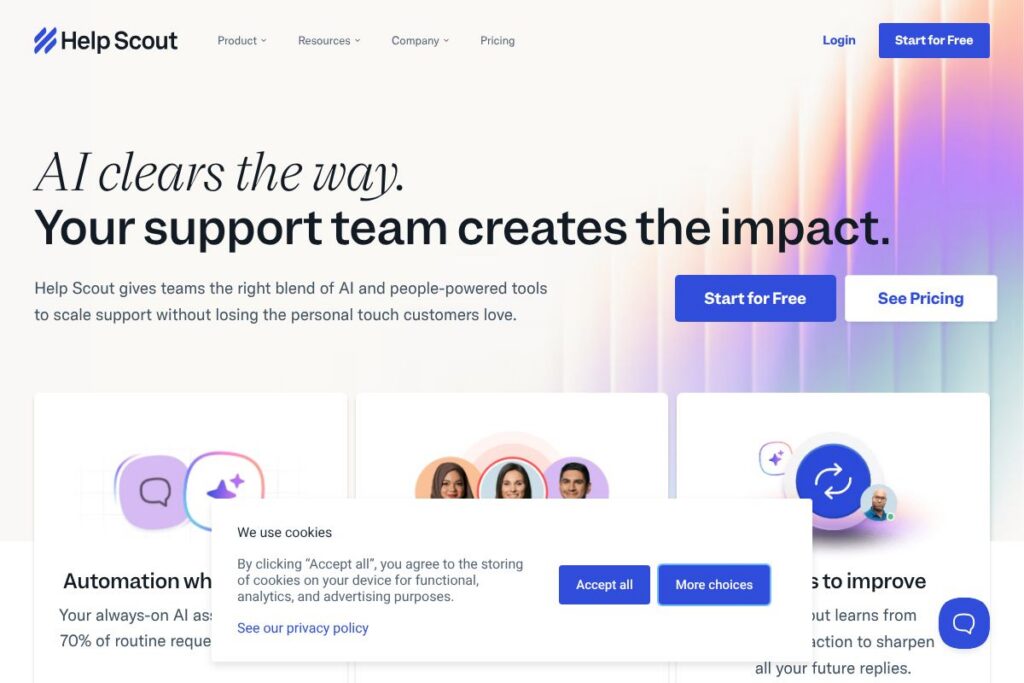
Help Scout is a customer support platform that combines a shared Inbox, Help Center, and live chat to manage customer communications from a single interface. It emphasizes conversational workflows, team collaboration, and contextual account management so support teams can handle email, chat, and social messages without switching tabs. The product also layers automation and AI features to reduce repetitive work while preserving human replies.
Compared with competitors, Help Scout sits between full-featured enterprise suites and lightweight help desks. Unlike Zendesk, which offers a larger set of omnichannel routing and advanced reporting, Help Scout focuses on a simpler shared-inbox experience and a knowledge base that integrates directly into the support workflow. Compared with Intercom, which centers on product messaging and in-app engagement, Help Scout prioritizes email-first support and a streamlined inbox designed for human-led conversations. Compared with Freshdesk, Help Scout leans toward clearer, less complex workflows for small to mid-market teams rather than extensive IT service management features.
Help Scout does well at making inbox-based support feel collaborative and contextual. Its combination of account/company context, saved replies, and routing makes it suited for small to mid-sized support teams, customer success groups, and companies that prefer email as the backbone of support. For teams that need omnichannel orchestration at scale, or advanced analytics out of the box, a different platform may be a better fit.
How Help Scout Works
The platform routes incoming messages into a shared Inbox where teammates can claim, reply, or collaborate on conversations. Messages from email, chat, social channels, and e-commerce platforms are funneled into a common interface with simple status flags and assignment controls so teams can work without silos.
Help Scout attaches contextual company and customer profiles to conversations so agents see purchase history, previous threads, and linked accounts while replying. Workflows and saved replies reduce repetitive tasks, and automation can assign or tag messages based on rules for faster triage.
AI features provide drafting and summarization tools inside the reply composer, so agents can generate first drafts, translate replies, or get concise recaps of long threads before sending a personalized response. Integration with third-party apps enriches messages with CRM or order details in real time.
What does Help Scout do?
Help Scout organizes customer communication around a few core areas: a collaborative shared Inbox, a searchable Help Center for self-service, and a live chat widget for real-time conversations. Core capabilities include routing and assignment, automation through workflows, saved replies, company-level context, and AI-assisted drafting and summarization.
Let’s talk Help Scout’s Features
Shared Inbox
The shared Inbox centralizes email, chat, and social messages into one view where teammates can assign, reply, and add private notes. It supports collision detection so multiple agents do not reply to the same conversation, and it is optimized for fast, conversational responses.
Help Center
The built-in Help Center provides a public knowledge base that teams can use to publish articles and guide customers to self-service resources. Content is searchable and can be suggested automatically when agents are composing replies to reduce repeat ticket volume.
Live Chat (Beacon)
Live chat appears as a lightweight widget for website visitors to start conversations or access help articles. Chat transcripts flow into the same Inbox as email so agents manage chats and emails in a unified workflow.
AI Assistant
The AI assistant can summarize long threads, suggest draft replies, translate messages, and automate routine responses. These capabilities are designed to speed up handling of repetitive requests while leaving ownership with agents for sensitive or complex issues.
Workflows and Automation
Workflows automate routine but critical tasks such as assigning conversations, tagging, or closing stale threads. They reduce manual triage and keep the Inbox organized without heavy rule configuration.
Saved Replies
Saved replies let teams store and reuse proven answers for FAQs and common situations, speeding response times while maintaining consistency across agents.
Company Management and Customer Context
Company-level profiles aggregate all contacts and conversations for an account so agents can support full accounts rather than isolated users. Contextual details like purchase history or linked tickets help with accurate and personalized service.
Snooze and Send Later
Snooze lets agents resurface conversations at a chosen time, useful for follow-ups or scheduled responses. Send later schedules replies so messages arrive at the most appropriate time for the customer.
Multiple Inboxes and Channels
You can create multiple Inboxes for different departments, products, or brands, and route messages into the relevant Inbox automatically. Channels let you bring messages from platforms like social networks and e-commerce stores into the same space.
Integrations
Help Scout connects with CRM, ecommerce, and collaboration tools through a library of integrations to provide richer context inside conversations. The platform advertises over a hundred integrations to help teams keep existing toolchains intact.
With these capabilities, the biggest benefit is a cohesive, email-first support workflow that keeps conversations personal while adding automation and AI where it reduces repetitive work.
Help Scout pricing
Help Scout uses a subscription pricing model with multiple plan tiers tailored to different team sizes and needs. Specific plan names and current rates are published on the vendor site and can change, so consult the vendor directly for up-to-date options.
For the latest plan details and any promotional offers, see the Help Scout homepage and the vendor’s current pricing options for exact tiers, seat counts, and feature differences.
What is Help Scout Used For?
Help Scout is commonly used for customer support, help desk operations, and customer success workflows that center on email and conversational responses. Teams use it to consolidate support channels, publish help content, and automate common tasks to improve response times.
It is well suited for small to medium-sized businesses, SaaS companies, and support teams that prefer an email-first approach with light live chat and a knowledge base. Companies that want simple collaboration features and clear customer context often choose Help Scout over more complex enterprise suites.
Pros and Cons of Help Scout
Pros
- Conversational, email-first design: The interface is designed around human conversations rather than ticket lifecycles, which makes agents feel more natural when replying. This reduces friction for teams that handle support primarily over email.
- Contextual company profiles: Company and contact context is surfaced directly in the inbox, enabling agents to support accounts rather than isolated tickets. This is useful for B2B support and account-level troubleshooting.
- Practical automation and saved replies: Workflows and saved replies reduce repetitive work and speed up responses without requiring complex rule sets. Teams can automate common triage steps while keeping control over final replies.
- Integrated Help Center and chat: Built-in knowledge base and a chat widget keep self-service and live conversations closely tied to agent workflows, lowering the need for separate tools.
Cons
- Less advanced reporting: Reporting is generally more basic than some enterprise help desks, which may limit deep analytics for large support organizations. Teams needing advanced, customizable analytics may have to pair Help Scout with external BI tools.
- Not a replace-all enterprise suite: For organizations needing extensive omnichannel orchestration, complex routing, or heavy ITSM features, Help Scout may feel intentionally lightweight compared to platforms like Zendesk.
- Per-seat scaling considerations: As a seat-based subscription service, costs can grow with headcount, so organizations should model user growth when evaluating total cost of ownership.
Does Help Scout Offer a Free Trial?
Help Scout offers a free trial for new users. The trial provides temporary access to core features like the shared Inbox, Help Center, and chat so teams can evaluate workflows and integrations before committing to a subscription. For up-to-date trial length and any free-tier promotions, check the Help Scout homepage.
Help Scout API and Integrations
Help Scout provides a developer API that lets teams fetch and manage conversations, customers, and Mailbox data programmatically; refer to the Help Scout API documentation for endpoints and developer guides. The API supports common automation scenarios, webhooks, and integration logic for syncing with CRMs or internal tools.
In addition to the API, Help Scout offers a wide array of prebuilt integrations for tools such as Slack, ecommerce platforms, and CRMs. Explore the Help Scout integrations library to see connectors for payment platforms, analytics, and team productivity apps.
10 Help Scout alternatives
Paid alternatives to Help Scout
- Zendesk – A full-featured, enterprise-ready support suite with extensive routing, omnichannel support, and advanced reporting. Good for large support operations needing scale.
- Intercom – Focuses on in-app messaging, conversational support, and product-led growth workflows with strong customer engagement tooling.
- Freshdesk – An affordable help desk platform with ticketing, automation, and multichannel support for teams of varying sizes.
- Front – A shared inbox built for teams that want tight collaboration and customizable routing for email and messaging channels.
- Salesforce Service Cloud – An enterprise-grade support solution tightly integrated with Salesforce CRM and advanced case management features.
- Zoho Desk – A cost-conscious help desk with multichannel ticketing, automation, and contextual customer profiles.
- Groove – A simpler help desk focused on small business teams that prefer minimal setup and easy shared inbox functionality.
Open source alternatives to Help Scout
- Chatwoot – An open source customer engagement suite with shared inboxes, chat, and social channel support that you can self-host.
- Zammad – A web-based open source help desk and ticketing system with multi-channel support and customizable workflows.
- osTicket – A widely used open source support ticketing system suitable for small IT and support teams.
- UVDesk – An open source helpdesk framework that offers ticket management and workflows for self-hosting environments.
Frequently asked questions about Help Scout
What is Help Scout used for?
Help Scout is used to manage customer support conversations through a shared Inbox, Help Center, and live chat. Teams use it to centralize email and chat, publish self-service articles, and automate routine support tasks.
Does Help Scout integrate with Slack?
Yes, Help Scout integrates with Slack. The integration can send notifications to channels, create conversation links, and help teams escalate or discuss tickets in Slack in real time.
How much does Help Scout cost?
Help Scout uses subscription plans with tiered pricing based on features and seats. For the most current plan options and rates, visit the Help Scout homepage to review available tiers and enterprise options.
Can Help Scout replace a CRM for small teams?
Help Scout can handle lightweight account context and customer data but is not a full CRM replacement. For small teams with simple relationship needs it may be sufficient, but teams needing sales pipelines or deep CRM workflows should integrate a dedicated CRM.
Does Help Scout provide an API for developers?
Yes, Help Scout offers a public API and webhooks. Developers can use the Help Scout API documentation to automate workflows, sync data, and build custom integrations.
Our Take on Help Scout
Help Scout stands out for its clear, email-first approach to customer support that combines a collaborative shared Inbox with a searchable Help Center and lightweight live chat. It keeps the agent experience simple and focused, with practical automation, saved replies, and contextual company profiles that reduce repetitive work and speed up responses.
Compared with Zendesk, Help Scout tends to be simpler to set up and more conversational by default, while Zendesk offers deeper omnichannel routing and advanced reporting. On pricing, Help Scout uses per-seat subscription tiers and is commonly viewed as competitively priced for teams that value straightforward workflows and strong self-service; organizations that need enterprise-grade scale or very detailed analytics may find Zendesk offers more in those specific areas.
All together, Help Scout is a solid choice for small to mid-sized support teams, customer success groups, and any organization that wants a human-centered inbox with integrated knowledge base and chat. For implementation details, API guides, and the latest plan information see the Help Scout homepage and the Help Scout API documentation.