What is HubSpot
HubSpot is a customer platform that brings CRM, marketing automation, sales tools, and customer service features into a single SaaS suite. Its core idea is to store customer and contact data centrally so teams across marketing, sales, and support can act on the same information and measure outcomes consistently.
Compared with Salesforce, HubSpot emphasizes ease of setup and a more integrated, out-of-the-box experience for small and mid-market teams. Against Marketo, HubSpot offers tighter native CRM integration rather than requiring separate CRM implementation. For teams evaluating lightweight, sales-focused alternatives, Pipedrive is simpler for pipeline-only workflows while HubSpot provides broader marketing and service capabilities.
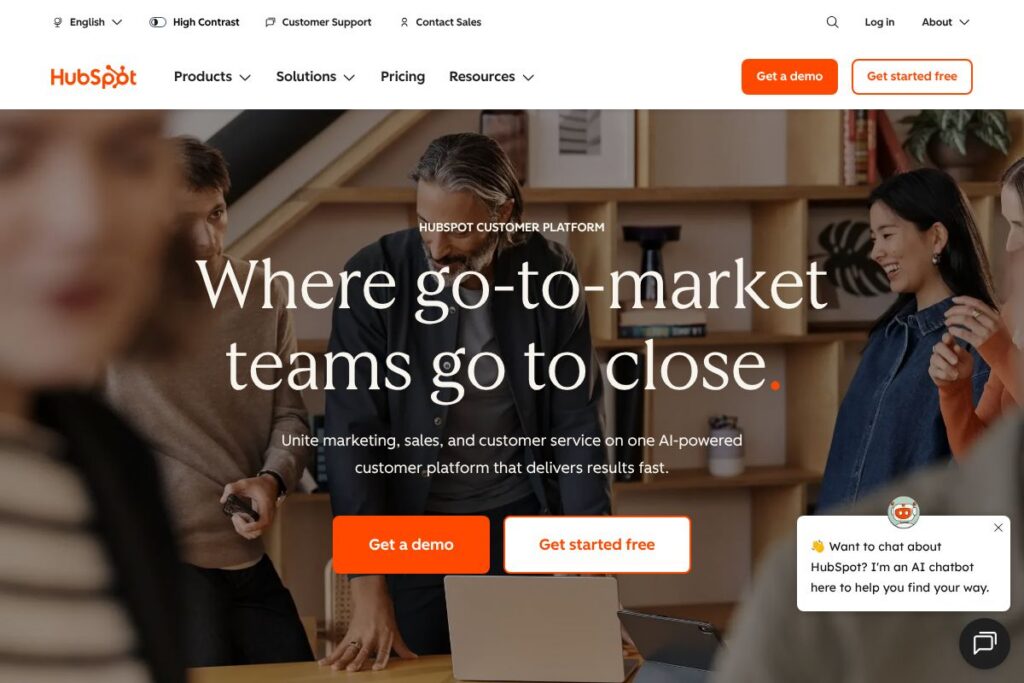
HubSpot excels at connecting marketing, sales, and service workflows into a single record and is best for organizations that want one vendor for CRM-driven marketing, sales automation, and support operations. It is particularly suited to small and mid-size companies that need fast time to value and centralized customer data for cross-team collaboration. Explore the HubSpot home page for product overviews and examples of typical workflows.
How HubSpot Works
HubSpot stores contacts, companies, deals, and tickets in a unified CRM, then exposes that data to marketing automation, sales pipelines, and service workflows. Marketers build email campaigns, landing pages, and workflows that use CRM fields and behavior triggers to segment audiences and automate follow-up.
Sales teams use the same CRM records to track deals, log activities, and sequence outreach, while support teams create tickets, run knowledge base articles, and automate customer handoffs. Common implementation patterns include connecting web forms to contact records, syncing email interactions, and using automation to move deals through pipeline stages.
HubSpot can be used via its web app, a desktop interface, and mobile apps, with integrations to external systems for data enrichment and two-way sync. Teams typically start with the CRM, add a Hub such as Marketing or Sales, and then expand automations, reports, and integrations as needs grow.
HubSpot features
HubSpot is organized around a central CRM and modular Hubs for Marketing, Sales, Service, CMS, and Operations. Core capabilities include contact and pipeline management, marketing automation, email and ad tools, customer service ticketing, and analytics. The product adds AI-assisted features, templates, and prebuilt workflows to speed setup and standardize processes.
Let’s talk HubSpot’s Features
CRM and Contact Management
The CRM centralizes contact, company, deal, and ticket records with activity timelines, contact scoring, and custom properties. This single source of truth enables consistent segmentation, personalization, and reporting across marketing, sales, and service teams.
Marketing Automation and Campaigns
Built-in automation lets teams design multi-step workflows for lead nurturing, event-based triggers, and contact lifecycle management. It integrates with email, landing pages, forms, and ad accounts so campaigns can update CRM records and assign follow-up tasks automatically.
Sales Hub and Pipeline Tools
Sales features include deal pipelines, sequences for automated outreach, meeting scheduling, and email tracking. These tools help sales reps reduce manual tasks, prioritize opportunities, and move deals forward with standardized playbooks.
Service Hub and Support Tools
Service capabilities provide ticketing, a shared inbox, knowledge base pages, and customer feedback surveys. Automations route tickets, escalate issues, and surface context from the CRM so support agents have customer history at hand.
CMS and Website Tools
HubSpot’s CMS offers page templates, drag-and-drop editing, and integrated forms that directly populate the CRM. It is useful for teams that want content personalization driven by contact data without a separate CMS integration.
Reporting and Analytics
Built-in dashboards and custom reports pull data from CRM objects, campaign metrics, and engagement signals. Reporting supports cross-hub visibility so teams can measure pipeline influence, campaign attribution, and customer lifecycle metrics.
With HubSpot you get a comprehensive platform that reduces data fragmentation and accelerates cross-team workflows. The biggest benefit is the tight integration between CRM data and operational tools, which lowers the cost of coordinating marketing, sales, and support activities.
HubSpot pricing
HubSpot uses a freemium SaaS model with a free CRM and paid modular Hubs offered at tiered levels. Pricing varies by Hub, feature set, contact or seat counts, and optional add-ons; larger organizations typically move to higher tiers or custom enterprise agreements.
Hubs and Editions
Free: HubSpot’s Free CRM provides contact and company records, basic forms, contact activity timeline, and simple dashboards for no cost. This tier is useful for companies getting started with a centralized contact database.
Paid Tiers: HubSpot’s paid editions are typically named Starter, Professional, and Enterprise, and they scale feature sets and limits. Costs depend on which Hub you choose, number of seats, and quantities such as marketing contacts; enterprise deployments are often priced via custom quotes.
Enterprise and Custom Pricing
Enterprise customers receive advanced features such as single sign-on, custom objects, advanced reporting, and higher API limits that are generally provided under a custom pricing agreement. For detailed rate cards and packages tailored to your business, review the HubSpot home page or contact HubSpot sales to request a quote.
What is HubSpot Used For?
HubSpot is used to centralize customer data and automate marketing, sales, and support processes that depend on that data. Common uses include lead capture and nurturing, sales pipeline management, automated customer onboarding, and self-service support via knowledge bases.
Teams also use HubSpot for campaign analytics and attribution so they can quantify the impact of marketing on pipeline and revenue. It is suitable for small and mid-market companies that prefer a single platform to reduce integration overhead and for enterprise teams that want modular hubs with shared CRM data.
Pros and Cons of HubSpot
Pros
- Unified CRM and toolset: The CRM and Hubs reduce data silos so marketing, sales, and service teams share the same contact records and activity history.
- Ease of use and setup: HubSpot provides templates, prebuilt workflows, and a guided interface that help teams deploy common use cases quickly.
- Extensive integrations: Native integrations and an app marketplace make it easier to connect email platforms, e-commerce systems, and analytics tools to the CRM.
- Free entry-level CRM: The Free tier allows smaller teams to centralize contacts and test the platform before committing to paid Hubs.
Cons
- Cost at scale: Feature gates and contact-based pricing can make advanced marketing and enterprise features expensive as contact or usage volumes grow.
- Customization limits for complex deployments: Very large or highly specialized enterprises may require more customization and flexibility than standard Hub tiers provide, often necessitating professional services.
- Learning curve for advanced features: While basic setup is straightforward, unlocking the full potential of automation and reporting can require training or consultancy.
Does HubSpot Offer a Free Trial?
HubSpot offers a Free plan and trial options for paid Hubs. The CRM is available at no cost; many paid Hubs provide free trials or demo periods to evaluate Professional and Enterprise features before purchase, with trial availability varying by Hub and region.
HubSpot API and Integrations
HubSpot provides a developer-focused REST API and SDKs for common languages; the HubSpot API documentation outlines endpoints for contacts, deals, tickets, CMS, and more. The API supports webhooks, custom objects, and bulk data operations for integrations and automation.
HubSpot also maintains an integrations directory with connectors for common platforms such as email, e-commerce, analytics, and CRM syncs, and it supports native connections to tools like Slack, Microsoft, and Shopify for day-to-day workflows.
10 HubSpot alternatives
Paid alternatives to HubSpot
- Salesforce — Enterprise-grade CRM and platform with deep customization and a vast partner ecosystem suitable for complex, large-scale deployments.
- Marketo — Marketing automation focused on advanced campaign orchestration and account-based marketing, often selected by B2B marketing teams.
- ActiveCampaign — Combines email marketing, automation, and CRM features with affordability for small to mid-size businesses.
- Pipedrive — Sales-first CRM with a simple pipeline interface that is easy to adopt for sales teams focused purely on deal management.
- Zoho CRM — Flexible CRM with a broad suite of business applications and competitive pricing for small and mid-market teams.
- Microsoft Dynamics 365 — Comprehensive enterprise CRM and ERP platform that integrates tightly with Microsoft 365 and Azure services.
- Freshworks (Freshsales) — CRM and customer engagement tools aimed at small and growing businesses with built-in reporting and AI insights.
Open source alternatives to HubSpot
- SuiteCRM — Open source CRM forked from SugarCRM that provides contact management, sales automation, and extensibility for self-hosting.
- ERPNext — An open source ERP with CRM modules that work well for companies that want a broader business system under open source licensing.
- Odoo — Modular open source suite with CRM, ERP, and website building blocks, suitable for teams that want to self-host and customize extensively.
- EspoCRM — Lightweight open source CRM focused on contact and process management with extension capabilities for developers.
Frequently asked questions about HubSpot
What is HubSpot best used for?
HubSpot is best used for centralizing CRM data and running integrated marketing, sales, and service workflows. Teams use it to capture leads, automate outreach, manage pipelines, and deliver customer support from a single platform.
Does HubSpot provide a free CRM?
Yes, HubSpot provides a Free CRM. The free tier includes contact management, basic reporting, forms, and limited marketing and sales tools to get started without a subscription.
Can HubSpot integrate with other CRMs or tools?
Yes, HubSpot integrates with many third-party systems. The platform offers native connectors and API-based integrations for email providers, e-commerce platforms, analytics tools, and enterprise systems.
Is HubSpot suitable for enterprise teams?
Yes, HubSpot can serve enterprise teams through its Enterprise editions and custom agreements. Enterprise plans add advanced security, custom objects, and higher limits that support larger organizations.
How does HubSpot handle data and reporting?
HubSpot provides built-in dashboards and custom reporting that use CRM objects and campaign metrics. Reports can combine engagement, pipeline, and revenue data to help teams measure marketing influence and service outcomes.
Final verdict: HubSpot
HubSpot delivers a broad, well-integrated customer platform that reduces the friction of coordinating marketing, sales, and support around a single CRM. It does especially well at rapid deployment, cross-team data visibility, and providing a path from a free CRM to advanced paid Hubs without swapping vendors.
Compared with Salesforce, HubSpot typically offers faster time to value and an easier user experience for small and mid-market teams, while Salesforce often requires larger implementation investments and deeper customization. For organizations that want an all-in-one platform with modular expansion, HubSpot is a strong choice; for very large enterprises with bespoke needs, Salesforce or a heavily customized stack may provide more flexibility.