Meet Kick
Kick is a live video streaming platform focused on real-time broadcasts across gaming, IRL, art, music, and esports. The service presents channel categories, trending clips, and a chat-first viewing experience that helps audiences discover both established streamers and new creators.
Kick competes with major streaming platforms such as Twitch and YouTube Live, offering a simpler discovery layer and a creator-friendly model aimed at reducing onboarding friction. Compared with Twitch, Kick emphasizes rapid clip discovery and a chat-centric interface; compared with YouTube Live, Kick puts live interaction and community moderation tools front and center.
All of this makes Kick a practical choice for independent creators who want a straightforward platform for live interaction, and for viewers who prefer fast discovery of clips and active chat communities. Its mix of categories and clips-focused browsing is especially useful for audiences who want quick highlights alongside full streams.
How Kick works
Kick uses standard live-streaming protocols so creators broadcast with the same tools they already use, such as OBS Studio and Streamlabs. Streamers set up an RTMP stream key in their encoder, configure overlays and alerts, and go live to appear in category listings such as Games, IRL, Art & Music, and Gambling.
Viewers discover content through category pages and trending clips, join live chat for real-time interaction, and follow channels to receive notifications when a creator goes live. Creators manage broadcasts and audience engagement from a web dashboard, which includes chat moderation controls, clip tools, and performance metrics for each stream.
What does Kick do?
Kick organizes live streaming around discovery, chat interaction, and simple creator workflows. Core capabilities include category-based browsing, clip creation and sharing, live chat with moderation tools, and creator dashboards for stream management. Recent updates have focused on improving clip discovery and making channel navigation faster.
The platform includes several powerful capabilities:
Live broadcasting
Kick accepts standard encoder input so broadcasters can send video using OBS Studio or other RTMP-compatible software. This lets creators use familiar setups, add overlays and alerts, and stream at varying bitrates to match viewer bandwidth.
Real-time chat and moderation
Chat is central to Kick’s viewing experience, offering moderators the tools to mute, ban, and filter messages, plus slow and subscriber-only modes. Effective chat controls help maintain community standards during high-traffic streams and enable safer viewing environments.
Categories and discovery
Streams are organized into categories like Games, IRL, and Art & Music, with trending lists and recommended clips to surface popular moments. This discovery model helps new viewers find short highlights before committing to long broadcasts.
Clip creation and sharing
Viewers and creators can make short clips from live streams to share on social platforms or within Kick. Clip tools accelerate content reuse and help creators grow reach by turning live moments into short-form highlights.
Creator dashboard and analytics
Creators get a dashboard for stream setup, revenue tracking, and basic performance metrics such as concurrent viewers and clip engagement. These analytics enable rapid adjustments to stream length, content, and schedule based on audience response.
Monetization and tips
Kick supports viewer-to-creator financial interactions through tipping and other monetization features, enabling creators to receive direct support during live sessions. The platform is designed to make collecting viewer support accessible while creators build audience loyalty.
With these features, Kick prioritizes fast discovery and audience interaction so viewers can find highlights quickly and creators can manage streams with familiar tools.
Kick pricing
Kick is free to join and use as a viewer, and creator monetization and subscription options are handled through the platform rather than requiring a paid subscription to access basic features. For the latest details on creator revenue programs, subscription tiers, and any developer or enterprise offerings, review the information on the official Kick site.
What is Kick Used For?
Kick is used primarily for watching and producing live broadcasts across genres such as gaming, IRL, music, and creative arts. Viewers use it to discover trending streams and clips, follow favorite creators, and participate in live chat communities.
Creators use Kick to host live shows, capture short-form clips for social sharing, interact with audiences via chat and tipping, and track stream performance through the dashboard. The platform works well for solo streamers, small teams, and niche content creators who prioritize real-time engagement.
Pros and Cons of Kick
Pros
- Simple discovery of clips: Kick surfaces trending clips and highlights, making it quick for new viewers to find engaging moments without watching full streams.
- Familiar streaming setup: Support for RTMP and common encoders like OBS Studio and Streamlabs lets creators start broadcasting with existing tools and workflows.
- Live chat focus: Active, low-latency chat and practical moderation controls help communities form around streams and maintain order during high-traffic events.
- Accessible creator dashboard: The dashboard provides the basic tools creators need to manage streams, view metrics, and handle monetization interactions.
Cons
- Smaller audience than legacy platforms: Kick has a smaller overall viewer base compared with larger services, which can limit discoverability for some creators.
- Evolving feature set: Some advanced features and integrations common on more established platforms may be limited or in development, requiring creators to adopt workarounds.
- Fewer third-party integrations listed publicly: Compared with larger ecosystems, there may be fewer pre-built integrations for bots, overlays, and team workflows.
Does Kick Offer a Free Trial?
Kick offers a free account for viewers and creators. Anyone can create an account, watch streams, and start broadcasting using standard streaming software without a paid subscription; creator monetization and premium programs are managed through Kick’s platform policies and creator tools.
Kick API and Integrations
Kick works with standard streaming software and services such as OBS Studio and Streamlabs, allowing creators to use well-known encoders and alert overlays. For encoder setup and third-party tool compatibility, refer to resources on the OBS Studio website and Streamlabs.
Developer-facing API details and advanced integration options are covered in Kick’s creator resources and documentation on the official Kick site. Those pages outline available endpoints and integration patterns for bots, analytics, and platform extensions if offered.
10 Kick alternatives
Paid alternatives to Kick
- Twitch — A mature streaming platform with broad discoverability, integrated subscriptions, and a large creator ecosystem. Visit the Twitch homepage for more details.
- YouTube Live — Live streaming integrated with YouTube’s large audience and on-demand video features, useful for creators who want both live and recorded content. See YouTube Live.
- Facebook Gaming — Built-in social distribution through Facebook, offering easy connection to existing social audiences and moderation tools. Learn more at Facebook Gaming.
- Trovo — A streaming platform that emphasizes community features and channel discovery, appealing to gaming creators looking for alternatives. Explore Trovo.
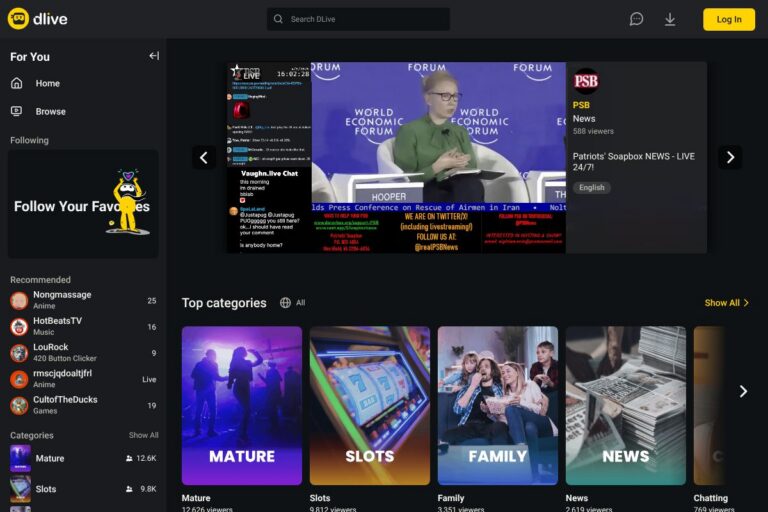
- DLive — A decentralized-friendly streaming service with a focus on community rewards and creator incentives. Details are on the DLive site.
- Vimeo Livestream — A professional streaming solution aimed at events and paid broadcasts, with tools for ticketing and white-label streaming. See Vimeo Livestream.
Open source alternatives to Kick
- Owncast — A self-hosted live video streaming platform you can run on your own server to control hosting and community features.
- OBS Studio — While primarily a streaming encoder rather than a hosting platform, OBS is open source and essential for broadcasting to any live service. Visit OBS Studio.
- Nginx with RTMP module — A widely used open-source server configuration for self-hosted streaming workflows, enabling custom pipelines and distribution.
- MistServer — An open-source media server for live and on-demand streaming, useful for teams wanting full control over streaming infrastructure.
Frequently asked questions about Kick
What is Kick used for?
Kick is used for watching and broadcasting live video content. It handles real-time streams across categories such as gaming, IRL, and creative arts while enabling chat interaction and clip sharing.
Does Kick allow creators to monetize streams?
Yes, Kick provides creator monetization features. Creators can receive viewer support through tipping and platform-managed monetization options, with details available via Kick’s creator resources on the official site.
Can I stream to Kick using OBS Studio?
Yes, OBS Studio is compatible with Kick. Kick accepts standard RTMP input, so you can configure a stream key in OBS and go live using your existing encoder setup.
Does Kick offer APIs or developer documentation?
Kick provides creator documentation and integration guidance. For developer APIs and bot integration details, check the creator resources available on the official Kick site.
Is Kick free to use for viewers?
Yes, Kick is free for viewers to join and watch streams. Creating an account and viewing live broadcasts does not require payment, though creators may offer paid subscriptions or accept tips.
Final verdict: Kick
Kick is a straightforward live streaming platform that emphasizes chat interaction, clip discovery, and compatibility with standard encoders. It works well for creators who want to start broadcasting quickly with familiar tools like OBS Studio and for viewers who prefer fast access to highlights and active chat communities.
Compared with Twitch, Kick typically presents a simpler onboarding experience and a focus on clip-based discovery, while Twitch offers a larger audience and a broader set of built-in creator features. For creators weighing options, Kick is worth testing for its ease of use and chat-driven interaction, while platforms like Twitch remain strong choices for scale and integrated partner programs.
For more about streaming, setup, and creator tools, consult the official Kick site and the resources linked above for encoder configuration and third-party integrations.