What is Landbot
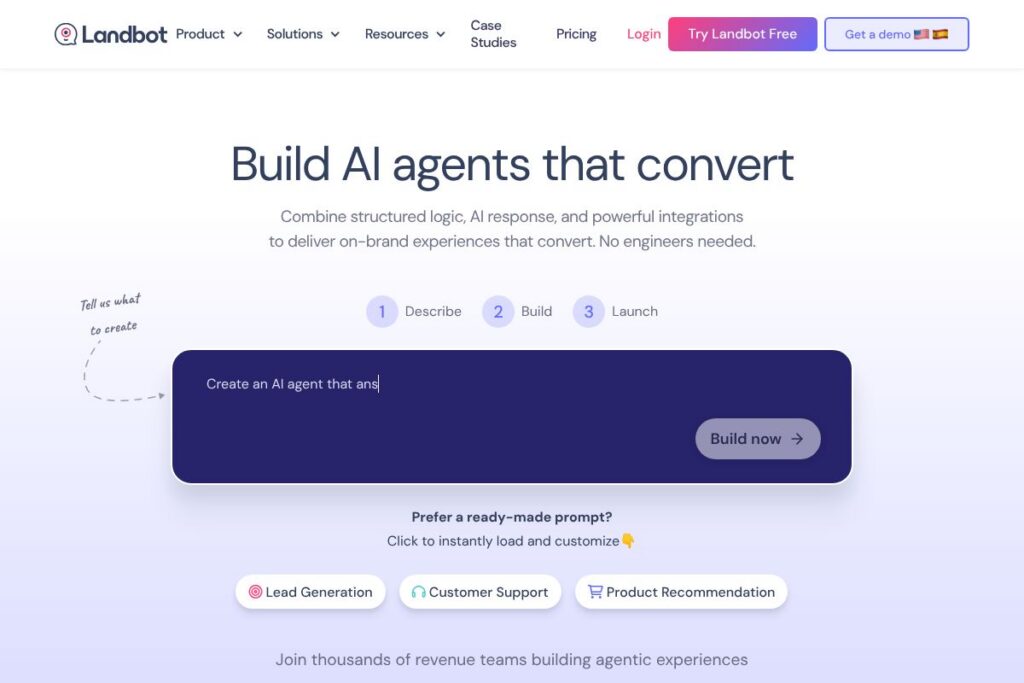
Landbot is a no-code platform for building conversational AI agents that run on WhatsApp and websites. It combines visual flow building with AI-powered responses so teams can create lead-qualification, support, and routing experiences without developer involvement. The builder emphasizes branded UIs, multi-channel deployment, and direct connections to CRMs and automation platforms.
Landbot sits between simple rule-based chat widgets and full chatbot development frameworks. Compared with Intercom, which focuses on inbox-centered support and customer messaging, Landbot emphasizes visual flow design and channel-specific UIs for WhatsApp and web. Against providers like Drift and ManyChat, Landbot targets teams that need structured workflows plus AI flexibility and tighter integration with third-party services.
All of this makes Landbot well suited for revenue, support, and product teams that need fast time to production and easy iteration. Its strengths are rapid workflow creation, multi-channel delivery, and built-in integrations that keep conversations synchronized with your stack. For teams that need deep customization and enterprise-grade SLAs, Landbot can be extended via APIs and partners to match larger deployments.
How Landbot Works
Using Landbot starts with a visual workflow where you combine blocks for questions, logic branches, API calls, and AI response steps. You can generate a flow automatically with Landbot’s AI assistant, tweak logic manually in the canvas, and add UI elements like quick replies or buttons to guide users toward conversion.
After building a flow you pick a channel configuration to adapt UI patterns, message routing, and delivery settings for WhatsApp, a web widget, or other channels. Integrations then link conversations to external systems, so captured leads, quotes, or support tickets are sent to CRMs, automation tools, or custom endpoints in real time.
A typical workflow example: a marketing landing page widget captures initial qualification answers, the bot uses AI to summarize intent, the flow routes qualified prospects to sales with a scheduled call link, and all user data is pushed to your CRM through an integration. Teams iterate by monitoring analytics, adjusting prompts, and using Landbot’s in-context Copilot to speed up configuration and testing.
Landbot features
Landbot focuses on combining no-code flow design, AI-assisted responses, multi-channel deployment, and prebuilt integrations so non-technical teams can deliver consistent, branded conversational experiences quickly.
Let’s talk Landbot’s Features
Visual flow builder
The drag-and-drop builder maps conversations as blocks and branches so designers and marketers can create deterministic paths for lead qualification, support triage, and transactional flows. It reduces reliance on developers by making conditional logic, variable handling, and API calls accessible from a visual canvas.
AI-driven response and Copilot
AI components let you craft dynamic replies, summarize user inputs, and generate question flows; the in-product Copilot provides contextual suggestions to speed setup and reduce configuration errors. This hybrid approach preserves predictable outcomes where needed while letting AI handle open-ended user messages.
WhatsApp and web channel support
Landbot adapts UI components and delivery mechanics to the selected channel, ensuring the same workflow behaves appropriately on WhatsApp and on-site chat widgets. Channel-aware routing helps maintain compliance and user experience standards across platforms.
Integrations and connectors
Out-of-the-box connectors include OpenAI, Google Gemini, CRMs, Zapier, and automation tools like n8n, plus the ability to call custom APIs for bespoke workflows. These integrations let you enrich conversations with CRM data, trigger backend processes, and keep records synchronized across systems. Explore the integration options to map flows to your stack.
Templates and prebuilt workflows
Landbot ships with templates for lead capture, support automation, and user onboarding so teams can start from proven layouts and adapt them to their brand and processes. Templates shorten time to production and give practical examples of combining rules and AI.
Analytics and conversation monitoring
Built-in reporting tracks metrics such as completion rates, cost per response, and message volumes so teams can measure conversion and identify points for improvement. Real-time insights help prioritize flow changes and manage operational costs.
Branded UI and customization
The platform supports branded chat interfaces, quick replies, and custom styling so chat experiences match company design systems and feel native on web or WhatsApp. UI controls also reduce friction for users during form completion and transactions.
With these capabilities, Landbot is strongest at turning marketing and support touchpoints into measurable, repeatable processes. Teams get a fast development loop for experiments, and the combination of rules and AI covers both predictable flows and open-text handling.
Landbot pricing
Landbot uses a SaaS freemium model with a free entry tier and paid plans that scale by features, channels, and usage. The platform advertises a free plan that allows teams to build and test workflows without providing a credit card, with paid tiers and enterprise options available for production usage.
Plan structure
Free plan: Core builder access, basic templates, limited monthly interactions, community support. For up-to-date limits and included features see Landbot’s current pricing options.
Teams and Business tiers: Mid-level plans typically add WhatsApp channel support, expanded message quotas, advanced integrations, and analytics. Pricing varies by monthly volume and chosen channels; contact Landbot or view the current pricing options for details.
Enterprise: Custom pricing for higher message volumes, SSO, dedicated SLAs, and onboarding services. Enterprise engagements include bespoke integration work and account support; request tailored terms through Landbot’s enterprise contact pathways on the Landbot site.
What is Landbot Used For?
Landbot is commonly used for lead capture and qualification on landing pages and ad traffic, turning anonymous visitors into actionable leads with guided flows and automated routing. Marketing teams build qualification funnels that push high-intent leads directly to sales systems, reducing time to contact.
Support teams use Landbot to provide 24/7 AI-assisted triage and resolution for common issues, escalate complex cases to human agents, and reduce backlog by automating routine inquiries. Product teams also use Landbot to guide users through onboarding flows and collect contextual feedback inside the app or on the website.
Pros and Cons of Landbot
Pros
- No-code visual builder: The drag-and-drop canvas lets non-technical users create multi-step workflows and conditional logic without developer resources, accelerating experimentation and deployment.
- Multi-channel focus: Native support for WhatsApp plus web widgets makes it easy to reuse workflows across channels while adapting UI and routing for each medium.
- Integration ecosystem: Direct connectors to AI models, CRMs, Zapier, and automation platforms keep conversations synchronized with backend systems and enable end-to-end automation.
- Templates and Copilot: Prebuilt templates and an AI Copilot speed setup and help teams adopt best practices for conversation design and prompt structure.
- Analytics and cost visibility: Built-in metrics surface completion and message cost information so teams can iterate on flows and control operational spend.
Cons
- WhatsApp setup complexity: Connecting WhatsApp often requires additional configuration and approval through the WhatsApp Business API which can slow initial deployment for some teams.
- Limits on advanced customization: Teams requiring fully bespoke NLP models or complex orchestration may find platform constraints compared to developer-first frameworks like Rasa or custom codebases.
- Scaling costs: Message volume and multi-channel usage can increase costs quickly as interactions scale, so careful quota planning is necessary for high-volume deployments.
- Enterprise procurement: Organizations with strict procurement or compliance needs may need to negotiate custom terms and SLAs for enterprise-grade deployments.
Does Landbot Offer a Free Trial?
Landbot offers a free plan that lets you build and test chatflows without a credit card; it includes core builder features and templates. For full production capabilities and trial details of paid tiers, check Landbot’s current pricing options.
Landbot API and Integrations
Landbot provides API access and webhooks for sending and receiving conversation data, calling external services from flows, and syncing records with CRMs. Developers can use the platform API to trigger flows, export transcripts, and orchestrate actions; see the API documentation for endpoints and examples.
Key integrations include major AI providers such as OpenAI and Google Gemini, automation tools like Zapier and n8n, and common CRMs so you can push leads and update records automatically. These integrations let teams connect Landbot to existing sales and support workflows without custom middleware.
10 Landbot alternatives
Paid alternatives to Landbot
- Intercom — Customer messaging platform with a focus on shared inboxes, product messaging, and support workflows for midmarket and enterprise teams.
- Drift — Conversational marketing and sales platform that emphasizes real-time chat, account-based routing, and calendar-based meeting scheduling.
- ManyChat — Messenger and SMS-focused chatbot builder that targets marketing automation and e-commerce use cases with a visual flow editor.
- Tidio — Chat and chatbot platform combining live chat, chatbots, and email automation for small and growing businesses.
- Zendesk — Customer service platform with messaging capabilities, macros, and routing that integrates with Zendesk Support for ticket-driven workflows.
- Ada — Enterprise-focused AI chatbot platform that emphasizes automated customer service and self-service deflection at scale.
Open source alternatives to Landbot
- Botpress — An open source conversational AI platform with a visual flow editor and developer extensibility for self-hosted deployments.
- Rasa — Developer-focused framework for building contextual assistants with custom NLU, dialogue management, and complete control over data and models.
- ChatterBot — A Python library for training conversational models and building simple rule-based or learning chatbots for custom projects.
- Rocket.Chat — While primarily a messaging platform, Rocket.Chat supports custom bots and integrations for teams wanting an open source chat stack.
Frequently asked questions about Landbot
What is Landbot used for?
Landbot is used for building lead capture, support automation, and onboarding chatflows on web and WhatsApp channels. Teams deploy flows to qualify leads, automate answers to common support questions, and guide users through product setups.
Does Landbot integrate with WhatsApp?
Yes, Landbot supports WhatsApp channel deployment. Workflows can be adapted for WhatsApp message formats, and conversations can be routed and synchronized with backend systems via connectors and APIs.
Can Landbot connect to OpenAI or other LLMs?
Yes, Landbot connects to AI providers including OpenAI and Google Gemini. You can use those integrations to generate dynamic replies, summarize inputs, and power Copilot features inside the builder.
How much does Landbot cost?
Landbot uses a freemium SaaS model with a free plan and paid tiers that scale by features and message volume. For specifics about included quotas, channel pricing, and enterprise options see Landbot’s current pricing options.
Is Landbot suitable for small businesses?
Yes, Landbot is well suited for small businesses that need no-code tools to capture leads and automate common support tasks. The free tier and templates allow small teams to prototype workflows quickly before upgrading to paid plans for production needs.
Final Verdict: Landbot
Landbot is a practical choice for teams that need to build multi-channel conversational agents quickly without engineering resources. Its visual flow builder, templates, and integration ecosystem let marketing, sales, and support teams move from idea to production in a few iterations, and the free plan lowers the barrier to initial experimentation.
Compared with a competitor like Intercom, Landbot is more focused on no-code flow design and channel-adapted experiences for WhatsApp and web, while Intercom centers on in-app messaging and shared support inboxes. For organizations prioritizing rapid experimentation and automated lead qualification, Landbot often delivers lower initial setup cost and faster deployments, though larger enterprises with heavy messaging volumes should evaluate message quotas and enterprise terms to estimate long-term costs.