Lawmatics: An Overview
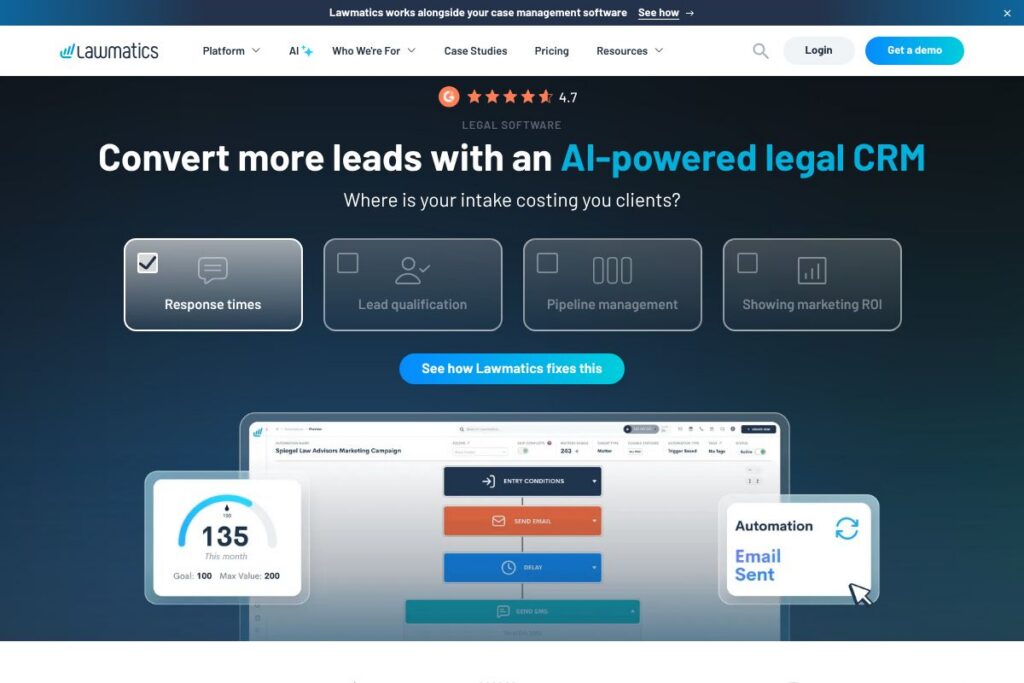
Lawmatics is legal-focused software that combines client intake, CRM, marketing automation, scheduling, and document signing into a single platform. It is designed to convert inquiries into booked consultations and signed agreements while reducing manual steps that commonly slow down law firm intake and onboarding.
Compared with competitors, Lawmatics emphasizes intake automation and lead conversion more than some general-purpose practice management systems. For example, Clio focuses broadly on case management, billing, and trust accounting, while MyCase centers on client portals and billing. PracticePanther provides a comparable mix of case management and automation, but Lawmatics stands out for intake templates, automated follow-ups, and built-in marketing workflows tailored to acquisition and conversion.
Lawmatics works especially well for small to mid-sized firms that generate significant inbound leads and want to move prospects through a repeatable, measurable intake funnel. Its strengths are intake conversion, automated client communication, and CRM-driven marketing analytics for firms that treat lead flow as a core growth channel. For demos and platform details, visit the Lawmatics homepage.
How Lawmatics Works
New inquiries are captured through customizable intake forms which can be embedded on a website or sent by link. As soon as a lead submits an intake form, Lawmatics can send a personalized email or text, tag the contact, and add them to an automated pipeline that tracks progress toward a paid engagement.
Scheduling is handled with built-in calendar booking that integrates with common calendar providers, letting prospects pick an available time and receive confirmation and reminder messages automatically. When a lead is ready to sign, Lawmatics generates branded engagement agreements that can be sent for electronic signature.
Behind the scenes, Lawmatics uses workflow automation to assign tasks, run conflict checks, and trigger nurture campaigns based on behavior or case type. Teams typically implement the platform by mapping existing intake stages into a kanban-style pipeline, creating a few core automations for follow-up and scheduling, and rolling out templates for common agreements and drip emails.
Lawmatics features
Lawmatics groups features around intake conversion, CRM, automation, and reporting, with core capabilities designed to reduce manual follow-up and improve lead-to-client conversion. The platform also provides tools for segmentation, marketing analytics, and custom dashboards to monitor intake performance.
Let’s talk Lawmatics’s Features
Client intake forms
Customizable intake forms capture lead information, route responses, and trigger immediate automated follow-ups by email or SMS. Templates save time for common practice areas and can be embedded on websites or routed from paid ads to reduce friction during first contact.
AI-powered CRM and lead scoring
Contacts live in a single timeline that records forms, calls, emails, and tasks, allowing teams to see every interaction. Lead scoring and tags let firms prioritize high-value prospects and automatically move them through the appropriate workflow.
Automated workflows and task automation
Automation rules let you assign tasks, send reminders, and advance pipeline stages without manual steps. Workflows reduce administrative overhead by linking intake events to concrete actions, such as creating follow-up tasks or sending document requests.
Scheduling and appointment reminders
Built-in scheduling removes back-and-forth by letting prospects pick times from configured availability, while automated confirmations and reminders reduce no-shows. Calendar syncing ensures appointments appear in staff calendars and triggers downstream actions as needed.
E-signature and document generation
Generate branded engagement agreements and collect e-signatures to finalize retainers quickly. Automated document workflows can prefill client data from intake forms to reduce duplicate entry and speed turnaround.
Conflict checking and compliance aids
Automatic conflict checks scan your existing contact database when a new lead is added, flagging potential matches early in intake. This keeps compliance steps within the intake flow rather than as a separate manual task.
Reporting, dashboards, and marketing analytics
Custom dashboards and productivity reports let managers track conversion rates, intake drop-offs, and which campaigns drive revenue. Reporting helps teams refine forms and follow-ups based on real conversion data.
Integrations and extensibility
Lawmatics connects to calendars, email systems, e-signature providers, and integration platforms to move data between tools. Integrations minimize duplicate entry and support common firm workflows around billing, intake, and client communication.
With these capabilities, Lawmatics centralizes early-stage client work so firms can respond faster, reduce manual errors, and measure which outreach actually generates retained clients. The biggest benefit is converting more inbound interest into paying engagements with less manual effort.
Lawmatics pricing
Lawmatics uses a subscription SaaS model with pricing tailored to firm size, feature needs, and onboarding requirements. Because public per-seat pricing is not published directly, firms typically request a custom quote or schedule a demo to see plans and seat-based or bundled options.
For specific plan details, feature comparisons, and the latest offers, view the current pricing options on Lawmatics or contact sales through their demo request page at request a demo.
Lawmatics Use Cases
Lawmatics is commonly used for client intake, marketing automation, and CRM tasks that sit upstream of traditional practice management. Teams use it to automate intake responses, schedule consultations, and send engagement agreements so the administrative burden on intake staff is reduced.
Firms that benefit most include personal injury, family law, immigration, bankruptcy, and other practices with high inbound lead volumes. Marketing teams within larger firms use Lawmatics to segment audiences, run drip campaigns, and track marketing ROI tied directly to converted matters.
Pros and Cons of Lawmatics
Pros
- Strong intake conversion tools: Lawmatics streamlines the full intake funnel from form capture to signed agreement, reducing drop-offs and manual follow-up.
- Integrated CRM timeline: Every client interaction is recorded in a single timeline, helping teams see the full history of a lead or client without toggling between tools.
- Automation and task management: Workflow automation reduces repetitive tasks by creating assignments and sending messages based on pipeline events, which speeds response time and consistency.
- Built for marketing and attribution: Built-in reporting and campaign tracking help firms identify which channels produce paying clients, improving budget allocation.
Cons
- Focused on intake and CRM: Firms seeking a complete practice management suite with advanced billing or trust accounting may still need a separate system for full matter lifecycle management.
- Customization learning curve: Powerful automation and template engines require initial setup and governance, which can take time for teams without a dedicated admin.
- Potential integration work: Larger firms with complex existing stacks may need integration work to sync with billing systems or specialty software providers.
Is Lawmatics Free to Try?
Lawmatics offers a free demo and time-limited trial options for new users. Prospective customers can schedule a guided demo and often access a trial to test intake forms, automations, and the CRM environment; contact sales through the demo request page for exact trial terms.
Lawmatics API and Integrations
Lawmatics provides integration options and connects with common calendar and communication services as well as third-party automation platforms. See the Lawmatics integrations page for an overview of supported connections and recommended workflows.
For developer-focused automation, firms can extend workflows via integration platforms like Zapier or direct APIs where available; consult the Lawmatics integrations documentation or contact support for API access and developer guidance.
10 Lawmatics alternatives
Paid alternatives to Lawmatics
- Clio — Comprehensive practice management with case management, billing, and trust accounting aimed at firms that need an all-in-one back-office solution.
- PracticePanther — Combines case management, time tracking, billing, and automation with a focus on simplifying daily legal operations.
- MyCase — Client-facing portals and billing features that emphasize client communication and matter management for small firms.
- CosmoLex — Integrates practice management with trust accounting and legal billing to reduce the need for separate accounting software.
- Rocket Matter — Practice management with built-in timekeeping and billing, plus reporting for firm operations.
- Filevine — Scalable matter management and collaboration tools suited for firms that need advanced case customizations and document workflows.
- Zola Suite — A workflow-oriented platform with integrated email, billing, and matter management for firms that want a unified workspace.
Open source alternatives to Lawmatics
- Casebox — Open source document and case management that can be adapted for legal intake and matter organization with custom development.
- CiviCRM — Open source CRM commonly used by nonprofits that can be configured for client intake and relationship tracking with developer support.
- SuiteCRM — Open source CRM that provides sales and customer management features which firms can customize for legal intake and CRM workflows.
- OpenLaw — Open source legal tooling focused on document automation and smart contracts, suitable for teams that want developer-driven solutions.
Frequently asked questions about Lawmatics
What is Lawmatics used for?
Lawmatics is used for client intake, CRM, and marketing automation tailored to law firms. It captures leads, automates follow-up and scheduling, and helps convert inquiries into paid matters.
Does Lawmatics integrate with calendar and email systems?
Yes, Lawmatics integrates with calendar and email providers and with integration platforms. These connections enable automated scheduling, confirmations, and two-way calendar syncing to reduce double bookings.
Can Lawmatics run conflict checks automatically?
Yes, Lawmatics can run conflict checks as part of the intake flow. The system scans existing contacts to flag potential conflicts early so intake staff can resolve issues before proceeding.
How does Lawmatics help with marketing ROI tracking?
Lawmatics tracks lead sources, campaigns, and conversion data to link marketing activity to revenue. Custom dashboards and reports let teams see which campaigns generate signed agreements and refine spend accordingly.
Is Lawmatics suitable for small law firms?
Yes, Lawmatics is well suited to small and mid-sized firms with inbound lead volumes. It reduces administrative time on intake and helps smaller teams appear responsive and professional during early client interactions.
Final Verdict: Lawmatics
Lawmatics excels at converting inbound interest into consultations and signed retainers by centralizing intake, automating follow-ups, and providing a CRM designed for legal workflows. Its intake templates, automated scheduling, and e-signature capabilities make it a practical choice for firms that prioritize lead conversion and consistent client communication.
Compared with Clio, which focuses on end-to-end practice management and billing, Lawmatics places a stronger emphasis on intake automation and marketing attribution. For firms that need deep billing and trust accounting, Clio may be the more complete solution; for firms focused on growing through improved intake and CRM-driven marketing, Lawmatics delivers specialized tools that reduce friction and improve conversion without replacing a full practice management system.
Overall, Lawmatics is a good fit for firms that treat lead flow as a strategic channel and want intake, CRM, and automation in one place. Schedule a demo or examine platform capabilities on the Lawmatics homepage to determine how it fits into your firm’s tech stack.