LawPay Explained
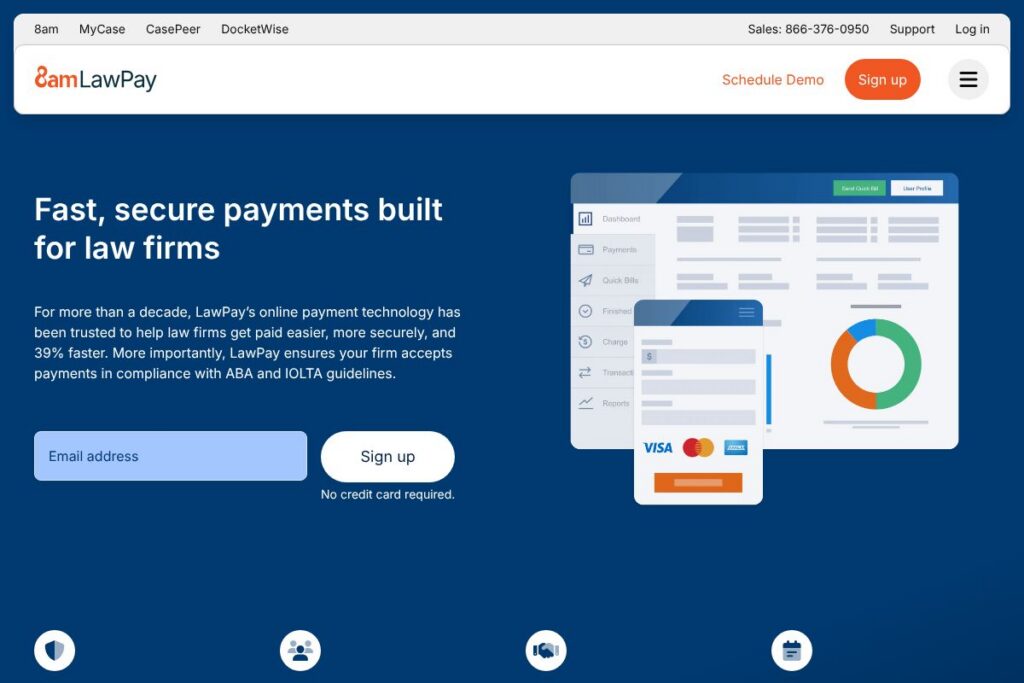
LawPay is a payment management platform purpose-built for law firms, designed to simplify client payments while keeping transactions compliant with ABA and IOLTA rules. It combines card and eCheck acceptance, invoicing, trust-account safeguards, and integrations with practice management systems so firms can accept payments from anywhere while protecting client funds.
Compared with general payment processors, LawPay focuses on legal-industry compliance and workflows. Unlike broad services such as PayPal or Square, LawPay includes trust accounting controls and has formal bar program endorsements. Versus practice-management vendors that offer payments as an add-on, such as Clio or Rocket Matter, LawPay concentrates primarily on payments and works to integrate with multiple practice platforms rather than tying payments to a single practice-management suite.
All of this makes LawPay a good fit for small and mid-size firms, solo practitioners, and specialty practices that need secure, compliance-aware payment handling and tight integration with case and billing systems. Firms that prioritize trust-account segregation, faster deposits, and partner integrations will find LawPay especially useful.
How LawPay Works
LawPay processes client payments through a secure gateway that supports credit and debit cards as well as ACH/eCheck. Payments can be captured via emailed invoices, client portals, or in-office card readers, and the system tags transactions to operating or trust accounts based on firm rules to help maintain compliance.
In typical workflows, a firm issues an invoice from its billing or practice-management system, the client clicks a secure payment link or logs into a client portal, and LawPay routes the funds and posts transaction records back to the firm. Built-in reporting and reconciliation tools let accounting staff balance trust ledgers and track collections without manual spreadsheets.
What does LawPay do?
LawPay centers on secure payment acceptance, trust-account protection, and integration with legal billing workflows. Core capabilities include hosted payment pages, client portals, payment links, eCheck processing, reconciliation tools, and partner integrations that attach payments to matters.
Let’s talk LawPay’s Features
Secure payment processing
LawPay encrypts payment data and uses PCI-compliant infrastructure to reduce cardholder data exposure for firms. For legal teams, this means collecting payments online or in-person while maintaining a consistent security posture and lowering payment-related risk.
Trust-account controls and compliance
LawPay provides controls to route funds to trust accounts or operating accounts according to ABA and IOLTA guidelines, and it includes features to support record-keeping and reconciliation required for ethical bookkeeping. These safeguards help firms reduce errors when handling client funds.
Invoicing and payment links
Firms can create and send invoices with embedded payment links, and clients can pay directly from email or the firm’s client portal. This reduces friction in collections and shortens the time between invoice and payment.
eCheck and ACH support
LawPay supports electronic check processing, enabling firms to accept ACH payments in addition to card payments. ACH acceptance can lower transaction costs for larger payments and gives clients a broader set of payment choices.
Integrations with practice management systems
LawPay integrates with many legal practice-management and accounting solutions so payments, matter numbers, and client records stay in sync. These integrations reduce duplicate data entry and make reconciliation faster for billing teams.
Reporting and reconciliation
The platform provides reports on transactions, deposits, and trust balances to make reconciliation and bookkeeping more straightforward. Firms can export transaction reports for accounting or review dispute and refund activity when needed.
With these capabilities, LawPay helps firms accept payments securely, keep trust accounts balanced, and shorten collection cycles so billing teams spend less time on manual follow-up.
LawPay pricing
LawPay uses a fee-based pricing approach tailored to legal practices, with per-transaction processing fees and optional account or feature charges depending on the firm’s processing volume and needs. For the most accurate and up-to-date pricing details, check the LawPay homepage or contact their sales team for a quote based on your firm’s account and transaction requirements.
What is LawPay Used For?
LawPay is used to accept client payments, manage trust-account activity, and streamline invoicing for law firms of all sizes. Firms deploy it to reduce time spent on collections, improve cash flow, and ensure that client funds are handled in accordance with legal-ethics requirements.
It is also used to centralize payment activity across offices and practice areas, connect payments to matter records in practice-management systems, and provide clients with modern payment options such as online portals and payment links.
Pros and Cons of LawPay
Pros
- Trust-account compliance: The platform includes controls and workflows built specifically to help firms meet ABA and IOLTA trust-account requirements, reducing the risk of misapplied funds.
- Legal-industry endorsements: LawPay is recommended by many state and local bar associations, which helps firms adopt a payments solution that aligns with industry expectations.
- Practice-management integrations: Integrations with major practice-management systems reduce manual entry and streamline billing-to-payment workflows.
- Flexible payment options: Accepting cards and eChecks provides clients multiple payment methods and can speed collections.
Cons
- Fee-based costs: Processing fees apply per transaction, which can add up for high-volume firms or firms handling many small payments.
- Feature overlap with PM vendors: Firms that already use a practice-management vendor with built-in payments may face duplicate features or need to choose how tightly to integrate systems.
- Enterprise customization: Very large firms or those with unusual trust-account setups may need custom configuration or account-level support to match internal workflows.
Does LawPay Offer a Free Trial?
LawPay is a paid service; firms can request demos and onboarding support to evaluate the platform and its compliance features before committing. Prospective customers can arrange a guided demo and discuss onboarding, integration, and account setup with LawPay’s team.
LawPay API and Integrations
LawPay provides integrations with a range of legal practice-management systems and billing platforms to sync payments with matter records, including connectors to well-known platforms. Common integration partners include Clio, MyCase, PracticePanther, and Zola Suite, which helps payments flow directly into existing billing and matter workflows; view LawPay’s partner integrations for more detail.
For developers, LawPay offers API access and documentation to automate payment flows and connect custom systems; consult the LawPay developer resources for endpoints, authentication, and integration guides.
10 LawPay alternatives
Paid alternatives to LawPay
- Clio Payments — Native payments built into Clio’s practice-management suite for firms that want a single vendor for billing and payments.
- Rocket Matter Payments — Payment acceptance integrated with Rocket Matter for firms that use that practice-management platform.
- Zola Suite Payments — Payments tied into Zola Suite’s accounting and case-management features.
- Timeslips — Billing and time-tracking with payment options suitable for firms focused on time-based billing.
- PayPal for Law Firms — General payment acceptance with wide consumer familiarity and invoicing features.
- Square — Broad payment acceptance with simple hardware and online invoicing, useful for firms that accept in-person payments.
- LawToolBox Payments — Payments integrated with calendaring and court-deadline tools for practices that use those workflows.
Open source alternatives to LawPay
- Invoice Ninja — Open-source invoicing and payment platform that can be self-hosted and extended to accept payments through gateways.
- Kill Bill — Open-source billing and payment orchestration platform for teams that want to build custom payment flows.
- Odoo — Open-source ERP with accounting and invoicing modules that can be extended for legal billing and payments.
- Dolibarr — Open-source ERP and CRM with invoicing features suitable for self-hosted payment solutions.
Frequently asked questions about LawPay
What is LawPay used for?
LawPay is used to accept client payments and manage trust-account compliance for law firms. It centralizes payment acceptance, routes funds to appropriate accounts, and integrates with billing systems to simplify collections.
Does LawPay integrate with Clio and other practice-management systems?
Yes, LawPay integrates with major practice-management platforms. Integrations help associate payments with matters and simplify reconciliation between billing and payments.
How does LawPay handle trust-account compliance?
LawPay provides account controls and transaction tagging to separate trust and operating funds. These controls support record-keeping and reconciliation that align with ABA and IOLTA guidelines.
Can LawPay process eChecks and ACH payments?
Yes, LawPay supports eCheck and ACH processing in addition to card payments. This gives firms a lower-cost option for larger client payments and more flexibility in how clients pay.
Is LawPay available through bar association programs?
Yes, LawPay is offered through many state and local bar programs and is recommended by the ABA and multiple bar associations. Bar programs often provide vetted access and preferred onboarding for member firms.
Final verdict: LawPay
LawPay is a specialist payment platform for law firms that prioritizes trust-account safeguards, compliance with ABA and IOLTA guidance, and seamless connections to practice-management systems. It reduces the manual work around reconciliation and collections, and its bar-program endorsements are a practical advantage for firms that must meet ethical bookkeeping standards.
Compared with Clio Payments, which bundles payments within a broader practice-management subscription, LawPay focuses on payments and cross-platform integrations; firms that already use Clio may prefer Clio Payments for a single-vendor workflow, while firms using a mix of practice-management tools or needing strong trust-account controls may prefer LawPay. For current account options and to discuss transaction fees and onboarding, visit the LawPay homepage or contact their sales team to get a tailored quote based on your firm’s processing volume.