What is MyCase
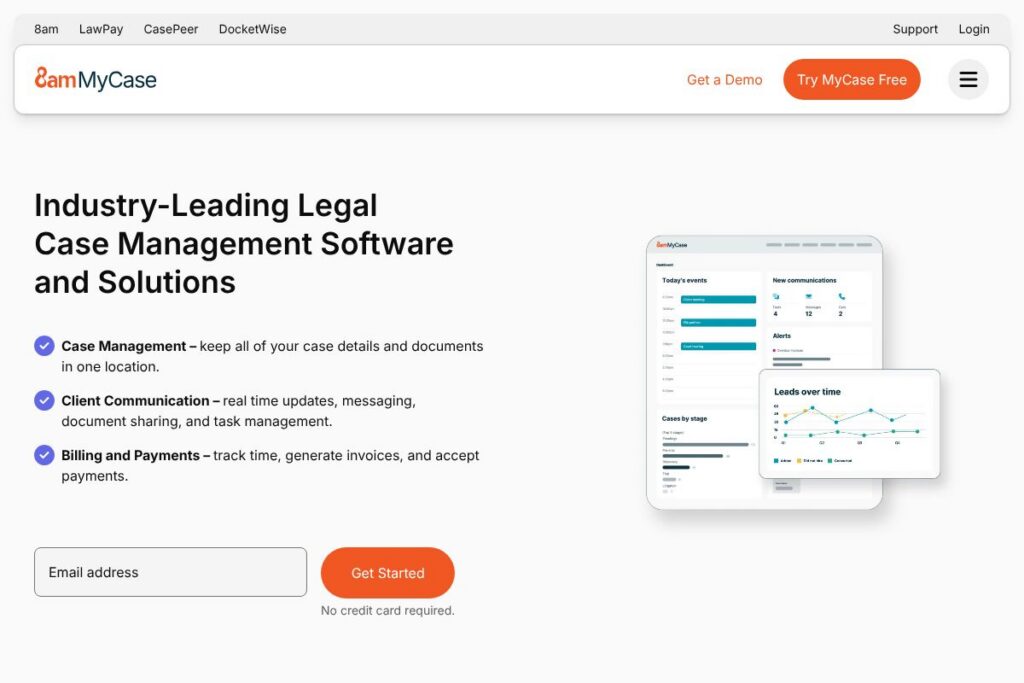
MyCase is a cloud-based legal practice and case management platform designed to keep case files, client communication, billing, and document workflows in one place. It provides a unified workspace for attorneys and staff to manage matters, track time and expenses, automate intake, and accept online payments through an integrated billing system.
Compared with competitors, MyCase positions itself as a full-practice solution that balances ease of use with depth. Compared to Clio, which emphasizes a broad ecosystem of integrations and app marketplace depth, MyCase focuses more on built-in client communication and an integrated client portal. Against PracticePanther, MyCase highlights streamlined intake and billing workflows that suit small to mid-size firms, while Rocket Matter competitors often emphasize advanced time and billing reports for firms that prioritize complex billing needs.
All of this makes MyCase a practical choice for solo practitioners and small to mid-size law firms that want a single system to manage cases, client contact, and firm finances without heavy customization. The platform is especially useful for practices that rely on client portal communication and online payments and want a straightforward onboarding path.
How MyCase Works
MyCase organizes a law firm around matters. Each matter serves as a single source of truth containing contact details, documents, tasks, time entries, invoices, and communication history so teams can find everything related to a case without switching tools.
Intake and lead tracking feed directly into matters. Firms can capture leads via customizable web intake forms, convert a lead to a client matter, and automatically generate retainer documents and task lists to accelerate the onboarding process.
Daily workflows center on the calendar, task lists, and time capture. Attorneys track time and expenses against matters, generate invoices from billable entries, and accept client payments through integrated payment processing while reporting tools surface firm financials and overdue balances.
MyCase features
MyCase combines case management, client communication, billing, and document management into a single interface, with recent emphasis on intake automation and enhanced client portal capabilities. The platform includes tools for timekeeping, secure messaging, e-signatures, calendaring, and financial reporting.
Let’s talk MyCase’s Features
Case Management
Each matter stores contacts, notes, document versions, and a timeline of activity so teams can see case history at a glance. Matter-level organization reduces duplicate records and helps small firms maintain consistent file structure across the practice.
Client Portal and Communication
The secure client portal centralizes messaging, document sharing, and invoice delivery so clients can view updates, sign documents, and pay online. Integrated text notifications and email updates help reduce missed deadlines and client follow-up tasks.
Time Entry and Expense Tracking
Time capture supports manual entries, timers, and mobile time entry so attorneys can record billable minutes wherever they work. Expense tracking ties directly to matters and feeds into invoicing to present a complete financial picture on each bill.
Billing and Payments
Invoicing tools let firms generate detailed bills, apply trust accounting rules, and accept online payments to shorten collection cycles. Built-in reporting shows outstanding receivables and supports routine financial reconciliation.
Document Management and E-signatures
MyCase stores documents by matter with version control and full-text search to find files quickly. Integrated e-signature capability simplifies client agreement execution without sending documents through unsecured channels.
Calendaring and Task Management
Centralized calendaring, task lists, and automated reminders keep everyone aligned on deadlines and court dates. Shared task templates and recurring events help standardize workflows for repeatable processes.
Lead Management and Intake Automation
Customizable web intake forms and lead pipelines provide a 360-degree view of prospective clients, enabling staff to track conversions and follow-ups from first contact to signed retainers. Automated creation of retainer agreements reduces manual setup time.
Security and Onboarding
The platform uses industry-standard encryption, role-based access controls, and admin tools to meet law firm security needs while onboarding services and migration support reduce the time to production. Firms can review security features and onboarding options on the MyCase security and support pages.
MyCase’s biggest benefit is consolidating client-facing communication, document workflows, and billing into one system, which reduces context switching and gives small firms a clearer view of case and financial status.
MyCase pricing
MyCase uses a subscription pricing model with tiered plans tailored to firm size and required features; billing is typically available monthly or annually and often varies by seat count and optional services. For current plan options, promotional offers, and enterprise arrangements, check the MyCase pricing details on the MyCase website.
What is MyCase used for
MyCase is used to manage legal matters from intake through resolution, combining case files, client communications, billing, and calendaring in one platform. It is common for solo practitioners and small to mid-size firms to rely on MyCase to reduce administrative overhead and centralize client interactions.
Firms use MyCase for tasks such as automated client intake, timekeeping and invoicing, secure document delivery and signing, and basic reporting on firm financials and caseload health. The client portal and payment features make it a practical option for firms that want to modernize client-facing workflows.
Pros and cons of MyCase
Pros
- Centralized case files: Matter-centric organization keeps documents, emails, time entries, and notes together so teams can access a complete case history without stitching systems together.
- Client portal and payments: The integrated portal, messaging, and online payment tools reduce reliance on email and speed collections by offering clients a single place to sign documents and pay invoices.
- Easy onboarding and customer support: Firms often report fast implementation and responsive support which helps small firms adopt the system quickly and start tracking billable time sooner.
Cons
- Limited advanced customization: Firms with highly specialized or complex workflow requirements may find the out-of-the-box automation options less flexible than platforms that expose deeper customization or marketplace apps.
- Reporting depth for large firms: While reporting covers core financials and caseload metrics, firms that need very granular BI may need to export data or connect to external analytics tools.
Does MyCase Offer a Free Trial?
MyCase offers a free trial for new users that provides hands-on access to core case management, client portal, timekeeping, and billing features so firms can evaluate fit before subscribing. There is no public permanent free tier; firms that want to test integrations or onboarding options should request a trial or demo through the MyCase contact channels.
MyCase API and Integrations
MyCase provides integration links and partner connections to common law firm tools; you can review available connections on the MyCase integrations page. Key integrations include QuickBooks, LawPay, Google Workspace, Dropbox, Microsoft Office 365, and Zapier for automation and cross-application workflows.
For firms that need programmatic access, MyCase offers developer-facing options and partner APIs to connect billing, document storage, and calendar events; consult the MyCase integrations resources for documentation and partner programs.
10 MyCase alternatives
Paid alternatives to MyCase
- Clio — Cloud practice management with a large app marketplace and an emphasis on extensibility and third-party integrations.
- PracticePanther — Feature-rich matter management that focuses on automation, billing flexibility, and client communication tools.
- Rocket Matter — Time and billing focused practice management with detailed reporting and productivity tools for firms with complex billing needs.
- CosmoLex — Combines practice management with built-in trust accounting and legal-specific financial controls.
- Actionstep — Highly configurable workflow and case automation platform aimed at firms that require process-driven systems.
- Zola Suite — End-to-end practice management with robust email and document handling integrated into the platform.
- Litify — Salesforce-based solution aimed at larger firms and law departments that need enterprise CRM-style case management.
Open source alternatives to MyCase
- Casebox — Open source case management and document management platform that can be self-hosted and customized for specific legal workflows.
- OpenLaw — Open-source tooling and smart contract frameworks for legal documents and automated agreement workflows, suited to teams that want to experiment with automation.
- CiviCRM — Open-source CRM commonly adapted by nonprofits and small practices for contact and case tracking, with customization required for full law-firm workflows.
Frequently asked questions about MyCase
What is MyCase used for?
MyCase is used for managing legal matters and firm operations. It centralizes case records, client communication, timekeeping, billing, and document workflows to support everyday law firm work.
Does MyCase integrate with QuickBooks?
Yes, MyCase integrates with QuickBooks. Integration allows firms to synchronize invoices and payments for accounting reconciliation and financial reporting.
How much does MyCase cost?
MyCase uses subscription pricing tailored to firm size and feature needs. For the latest plan options, billing cadence, and enterprise arrangements, review the MyCase pricing details on the MyCase website.
Can MyCase handle client intake forms?
Yes, MyCase supports customizable web intake forms. Firms can capture leads, automate matter creation, and generate retainer agreements from intake responses.
Does MyCase offer a secure client portal?
Yes, MyCase includes a secure client portal. The portal provides messaging, document delivery, e-signature, and online payment capabilities to reduce unsecured email exchange.
Final verdict: MyCase
MyCase is a practical, all-in-one case management system that focuses on making intake, client communication, billing, and document workflows accessible to small and mid-size law firms. Its strengths are the integrated client portal, straightforward billing tools, and ease of onboarding which reduce administrative friction for practices without a large IT team.
Compared to Clio, MyCase tends to emphasize built-in communication and client-facing features while Clio invests heavily in an expansive app ecosystem and published per-user pricing. Firms that prioritize an integrated client experience and a single vendor for core workflows will find MyCase compelling, while firms that need extensive third-party integrations or enterprise-level customization may evaluate competitor pricing and marketplace options before deciding.
Overall, MyCase is a solid choice for firms that want a single platform to manage day-to-day case work and client interactions with minimal configuration and reliable support. For subscription details and to arrange a trial, visit the MyCase website to request a demo or free trial.