Slack: An Overview
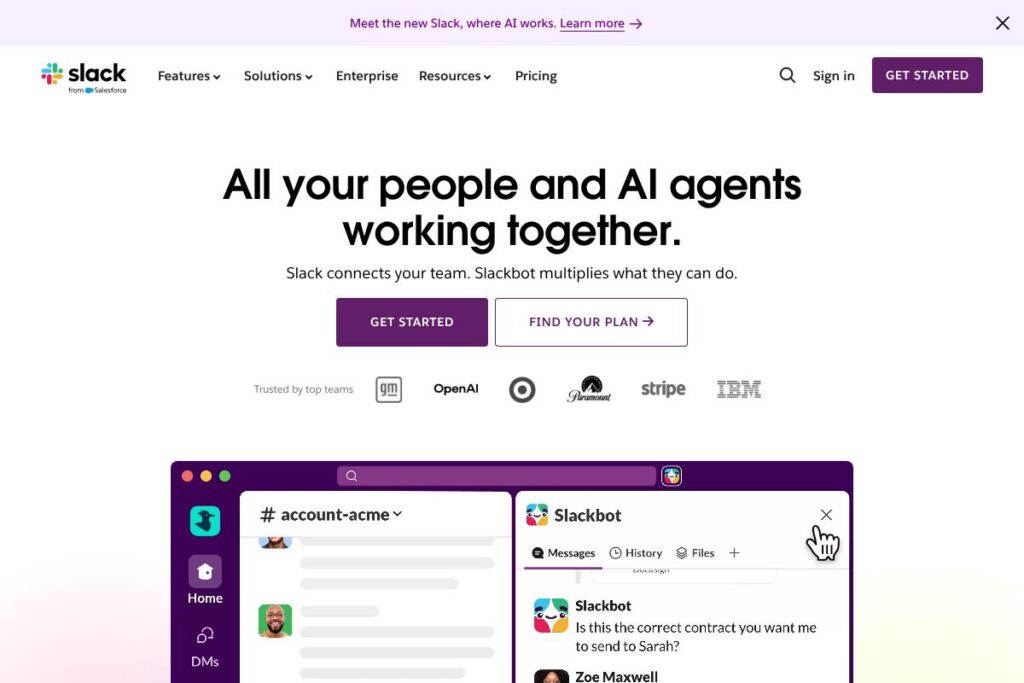
Slack is a cloud-based collaboration platform built around persistent channels for teams, direct messages, and threaded conversations. It combines real-time chat, file sharing, voice and video huddles, and a developer platform for apps and bots so teams can keep work organized and searchable across contexts.
Compared with Microsoft Teams, Slack focuses more on lightweight, channel-centric communication and a large ecosystem of third-party integrations, while Teams is tightly integrated with Microsoft 365 apps and often favored by organizations standardized on Microsoft tooling. Compared with Google Chat, Slack offers more mature workflow automation, a larger app directory, and a richer set of developer hooks for custom agents and bots.
Slack excels at conversation-first coordination, lightweight process automation, and keeping contextual knowledge discoverable. That combination makes it well suited for product teams, customer-facing groups, and cross-functional organizations that need flexible integrations and faster, more visible collaboration.
How Slack Helps Teams
Teams use Slack to replace scattered email threads with focused channels that represent projects, teams, or topics. Channels keep conversations visible to the right people, allow threaded replies for focused sub-discussions, and make it simple to attach files, reference tickets, or surface CRM records alongside chat.
Slack integrates apps, bots, and automated workflows so messages can trigger actions without leaving the conversation. For example, a channel discussion can surface a customer record, create a task in a project list, or run a workflow that routes approvals and posts status updates back into the channel.
Huddles provide quick voice or video check-ins, and AI features can capture meeting notes, summarize long threads, or surface relevant past conversations so team members stay aligned without extensive manual handoffs.
What does Slack do?
Slack organizes work around conversations and extends those conversations with AI, integrations, and automation. Core capabilities include channels and threads, Slackbot and AI assistants, huddles with automated notes, workflow automation for common processes, and an extensive app directory for third-party integrations.
The platform includes several powerful capabilities worth highlighting:
Slackbot and AI assistants
Slack provides built-in assistants that can answer questions, run simple automations, and act as a personal helper inside workspaces. AI features can summarize missed conversations, generate draft messages, and surface quick answers from your workspace history, reducing the time spent hunting for context.
Channels and threaded conversations
Channels give teams a shared, topic-focused space for coordination, with threading to keep side discussions organized. Channels can be public, private, or shared externally via Slack Connect so cross-company work stays in one place.
Huddles and AI note-taking
Huddles are lightweight audio and video sessions for quick syncs; toggling AI note-taking captures action items and highlights so participants can focus on the discussion rather than taking notes. This makes short meetings more effective and reduces manual follow-up.
Workflows and automation
Slack’s workflows let non-developers create simple automations by click, and developers can build more advanced automations with code. Workflows can collect form responses, route approvals, create tasks, and post consistent updates back into channels to standardize repetitive processes.
Integrations and app ecosystem
Slack connects to a broad set of business apps including Google Drive, Zoom, GitHub, Salesforce, and many more through its app directory. Integrations bring external data into conversations, trigger notifications, and enable in-channel actions that keep work moving forward.
Search and knowledge
AI-powered search surfaces relevant messages, files, and context across channels so teams can find prior decisions and customer details quickly. Search acts as a centralized memory for the organization, making onboarding and handoffs smoother.
Security and compliance
Slack provides enterprise-grade security controls and administrative features to protect shared information, including SSO support, data loss prevention, and audit logs. These controls help organizations meet internal policies and compliance requirements.
With these capabilities combined, Slack focuses on keeping work visible, searchable, and connected to the apps and systems teams already use.
Slack pricing
Slack uses a tiered subscription model with options for free users, paid team plans, and enterprise-level deployments with custom pricing, allowing organizations to choose based on feature needs and scale. Pricing depends on plan features, seat counts, and the level of administrative or security controls required.
For the most accurate and up-to-date plan details and billing options, review Slack’s current pricing options which outline the free tier, standard paid tiers, and enterprise agreements.
What is Slack Used For?
Slack is commonly used for internal team communication, project coordination, incident response, and cross-functional collaboration where fast, visible conversation matters. Teams use channels to separate topics, run standups, and store decisions so information stays accessible over time.
It is also used to connect external partners and clients through Slack Connect, to orchestrate lightweight automation with Workflows, and to surface CRM or ticketing data directly in conversations so updates happen in context rather than across multiple tools.
Pros and Cons of Slack
Pros
- Conversation-first collaboration: Channels and threads keep team discussion organized and reduce noisy inbox traffic, improving visibility across projects and teams.
- Rich app ecosystem: A large directory of integrations and developer APIs allows teams to bring external tools and custom agents directly into conversations, speeding up workflows and reducing context switching.
- Built-in automation and AI: Click-to-build workflows, Slackbot, and AI features like summaries and search reduce repetitive work and help teams find answers faster.
- Flexible external collaboration: Slack Connect enables real-time collaboration with clients and vendors without relying on email.
Cons
- Information overload risk: Active channels and notifications can become noisy without governance or disciplined channel practices, making it easy to miss important messages.
- Advanced features require paid plans: Enterprise security controls, some administrative features, and larger integration capabilities are gated behind higher tiers or custom contracts.
- Scaling governance required: Large organizations need clear naming, retention, and access policies to keep channels organized and compliant.
Does Slack Offer a Free Trial?
Slack offers a free plan and paid plans with varying feature sets, and paid plans typically provide trial or upgrade pathways for new customers. The free tier supports basic channels, message history limits, and a subset of integrations, while paid plans add expanded history, enhanced security controls, and advanced administrative features. For exact trial availability and what each plan includes, check Slack’s current pricing options.
Slack API and Integrations
Slack provides a comprehensive developer platform and a public API that supports building apps, bots, and custom integrations. The API documentation describes available endpoints for messaging, events, workflows, and administrative tasks so developers can extend Slack to fit business needs.
Key native integrations include Google Drive, Zoom, GitHub, Asana, Salesforce, and many enterprise systems; these integrations let teams surface data and take actions inside conversations. See the app directory for the full catalog of connectors.
10 Slack alternatives
Paid alternatives to Slack
- Microsoft Teams — Integrates tightly with Microsoft 365 apps, offering chat, meetings, and file collaboration that appeals to organizations standardized on Microsoft tooling.
- Google Chat — Part of Google Workspace, suitable for teams that rely on Gmail and Google Drive for collaboration and prefer lightweight messaging with integrated docs access.
- Zoom Team Chat — Extends Zoom meetings with persistent messaging and channels, useful when meetings are already centralized on Zoom.
- Discord — Popular with communities and some development teams, offering persistent voice channels, low-latency audio, and a large set of bot integrations.
- Workplace from Meta — Provides social-style collaboration with familiar interfaces for organizations that want enterprise social networking plus messaging.
- Flock — A collaboration app with chat, shared to-dos, and built-in productivity tools aimed at small and medium teams.
- Chanty — A team chat tool with built-in task management and a focus on simplicity for small teams.
Open source alternatives to Slack
- Mattermost — Open source messaging platform designed for self-hosting, with strong support for developer workflows and enterprise security controls.
- Rocket.Chat — Self-hostable chat platform that supports real-time messaging, voice, video, and federation for organizations that require on-premise control.
- Zulip — Threaded messaging with a focus on structured conversations, useful for engineering teams that want persistent, topic-based organization.
- Matrix / Element — An interoperable open standard and client that supports decentralized communication and self-hosted deployments.
- Nextcloud Talk — Part of the Nextcloud ecosystem, combining messaging and video calls with file storage for teams that want an integrated self-hosted stack.
Frequently asked questions about Slack
What is Slack used for?
Slack is used for team communication, project coordination, and bringing third-party tools into a single conversational workspace. Teams use channels, huddles, and integrations to replace fragmented email threads and keep work visible.
Does Slack offer AI features like summarization?
Yes, Slack includes AI features such as conversation summaries, AI-powered search, and assistants that can draft messages and surface context. These features help reduce time spent searching and catching up on missed discussions.
Can Slack integrate with Salesforce?
Yes, Slack supports bringing CRM data into conversations and has integrations that surface Salesforce records and updates directly in channels. That integration helps sales teams keep deals moving without switching tools.
Does Slack have an API for developers?
Yes, Slack provides a public API and developer platform for building apps, bots, and custom workflows. The API documentation explains available endpoints and developer tools.
Is Slack secure enough for enterprise use?
Slack includes enterprise-grade security and administrative controls such as SSO, data loss prevention, and audit logs. Organizations can apply policies, retention settings, and compliance features to meet regulatory requirements.
Final verdict: Slack
Slack is strongest as a conversation-first collaboration platform that pairs channels and threaded discussions with a broad integration ecosystem and growing AI features. It reduces context switching by letting teams surface CRM data, automate routine tasks, and summarize conversations without leaving the workspace.
Compared with Microsoft Teams, Slack typically offers a larger third-party app ecosystem and a more flexible developer surface, while Teams often bundles collaboration tightly with Microsoft 365 at a competitive price point for organizations already invested in that stack. For teams that prioritize open integrations, lightweight channel workflows, and searchable conversational history, Slack remains one of the most capable choices.