Status: An Overview
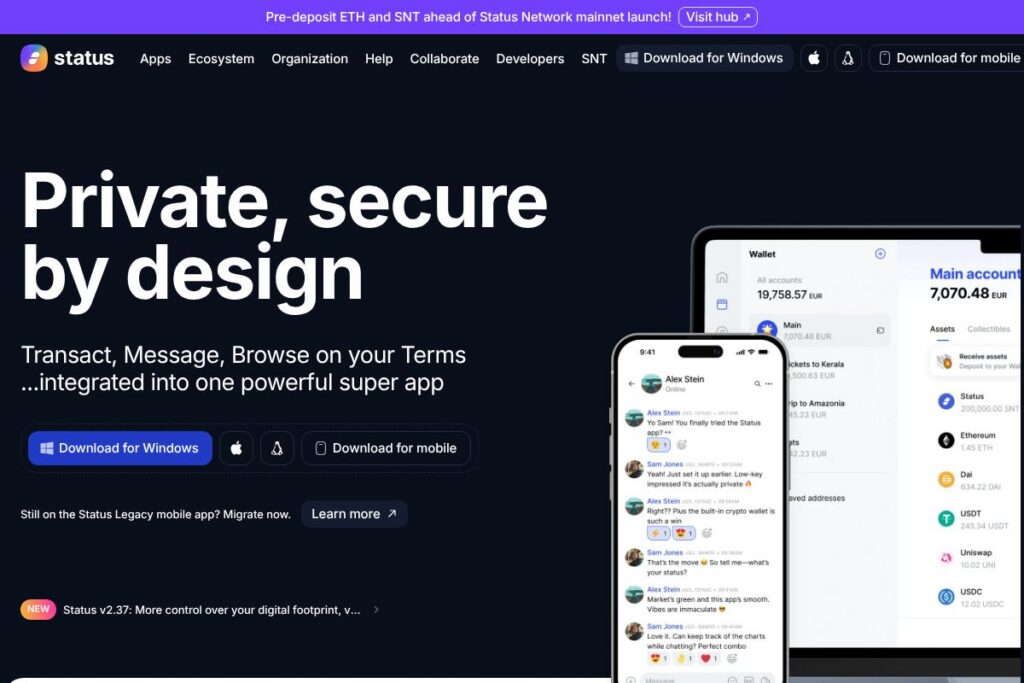
Status is an open-source, decentralised wallet and messenger that combines private peer-to-peer messaging with a self-custodial crypto wallet. It runs on a peer-to-peer network so communities and conversations are not hosted by a single company, and private keys are stored locally to give users control of funds and identity. The app emphasizes metadata privacy so participants can communicate without revealing contact lists to a central provider.
Compared with other privacy or wallet tools, Status occupies a hybrid position. Unlike MetaMask, which focuses on wallet connectivity and browser extension workflows, Status integrates messaging and wallet functionality in a single mobile and desktop client. Compared with privacy-first messaging apps such as Signal, Status adds built-in support for crypto, NFTs, and on-chain interactions. Compared with federated or decentralised messaging frameworks like Element (Matrix), Status focuses on a permissionless mobile-first peer-to-peer network with a stronger out-of-the-box crypto experience.
All of this makes Status particularly useful for users who want an integrated private chat and wallet experience without depending on centralized servers. It is well suited to crypto-native communities, builders who want an open platform to extend, and anyone who prefers self-custody and metadata privacy when communicating and transacting.
How Status Works
Status runs as a client on mobile and desktop that connects to a peer-to-peer messaging layer and to blockchain networks through integrated wallet functionality. Messages travel across a decentralised network protocol, nodes are run by community members, and clients exchange encrypted content directly without relying on a central server.
Wallet functionality in Status is self-custodial: keys are generated and stored on-device, and elliptic curve cryptography is used to sign transactions. The wallet supports multiple chains and keeps a live token list synced from major decentralized exchanges to present up-to-date token data. Status can also surface NFTs and collectibles listed on platforms such as OpenSea.
Users can pair hardware like the Status Keycard for contactless key management, join and participate in community groups where members run desktop nodes, and interact with Web3 dapps through the client and standard wallet connection protocols. Developers and community members can run a node, inspect the source code, and extend the client using the open-source codebase.
Status features
Status bundles secure messaging, a multi-chain wallet, and developer-friendly open source tooling into one client. Core capabilities include end-to-end encrypted p2p messaging, self-custodial wallet support, multi-chain token listings and NFT discovery, hardware wallet pairing with the Status Keycard, and community governance mechanisms tied to SNT token holders. The project continues to prioritize on-device privacy and seamless access to on-chain assets.
The platform includes several powerful capabilities:
Private peer-to-peer messaging
Messages are end-to-end encrypted and routed over a peer-to-peer protocol so there is no central inbox to harvest metadata. The client aims to protect who you talk to by minimizing the metadata that is exposed, and group chats are managed across the decentralised network to avoid a single point of control.
Self-custodial wallet
Users create and control private keys locally, which prevents third parties from freezing or revoking access to funds. The wallet supports sending, receiving, and signing transactions across multiple blockchains, and acts as a Web3 provider for dapps when needed.
Multi-chain token support and token lists
Status syncs token lists from major decentralized exchanges to provide live token data across supported chains. This makes it easier to add and manage tokens without manual contract entry and helps keep balances and token metadata current within the wallet interface.
NFTs and collectibles discovery
The client shows NFTs and collectibles from marketplaces such as OpenSea, allowing users to collect and display digital assets from within the app. NFT views include metadata and ownership details so users can browse holdings and token data without leaving the client.
Hardware wallet integration (Keycard)
Status supports pairing with the Status Keycard, a contactless hardware wallet that stores keys offline and signs transactions securely. Hardware pairing separates signing operations from the app to reduce exposure to device-level compromise.
Open-source governance and community participation
The codebase is public and contributions are community-driven, and SNT token holders influence governance and development priorities. Anyone can fork or build on the project, run a node, and propose or vote on protocol-level changes.
With these capabilities, Status aims to give users a single app for private conversations and direct control over crypto assets while remaining extensible and auditable through its open-source ecosystem.
Status pricing
Status is open-source and distributed free of charge to users. There is no paid tier or advertising; the client is provided as a community project with contributions from developers and token-holding participants.
You can download the client and review source code on the Status homepage and the Status GitHub repository to inspect builds, installation instructions, and development resources.
What is Status Used For?
Status is commonly used for private, encrypted conversations between individuals and groups that want to avoid centralised messaging platforms while also managing crypto assets in the same client. It is useful for communities that operate permissionless networks where members run nodes to keep the mesh alive.
Beyond chat, Status is used to hold and transact tokens, display and manage NFTs, and interact with Web3 dapps as a self-custodial wallet. Developers and community organizers use Status to prototype decentralised workflows, coordinate governance, and onboard users into tokenized communities.
Pros and cons of Status
Pros
- Open-source and auditable: The codebase is public, enabling inspection, contribution, and independent builds which increases transparency and security assurance.
- Self-custodial keys: Users control private keys locally, which prevents third-party lockouts and supports true ownership of assets and identity.
- Integrated messaging and wallet: Combining private p2p messaging with wallet functionality reduces the need to switch apps for chat and on-chain interactions.
- Metadata privacy: The design reduces exposure of contact lists and communication metadata, which is important for privacy-conscious users.
Cons
- Usability trade-offs: Self-custody and decentralised networking introduce more user responsibility for backups and recovery, which can be challenging for non-technical users.
- Network dependence on peers: Decentralised messaging depends on peers and nodes; message delivery and performance can vary compared to centralised services.
- Smaller mainstream ecosystem: Compared with more widely adopted wallets or messengers, some dapps and services may optimize for other wallets like MetaMask first, requiring additional configuration.
Is Status Free to Try?
Status offers a free and open-source client with no paid tiers or ads. You can install the mobile and desktop apps, run a node, and use wallet and messaging features without subscription fees. For developers, the source code and installation guides are available from the Status GitHub repository and the official docs.
Status API and Integrations
Status provides developer documentation and integration points for running nodes, connecting as a Web3 provider, and working with the messaging protocol. See the Status documentation for API references, protocol details, and deployment guides.
Key integrations include hardware wallet support via the Status Keycard, NFT discovery through marketplaces like OpenSea, and wallet connectivity patterns compatible with common dapp workflows such as WalletConnect. Developers can extend the client, contribute modules, or integrate services by following the docs and community repositories.
10 Status alternatives
Paid alternatives to Status
- MetaMask — A widely used browser extension and mobile wallet that focuses on wallet connectivity for dapps and DeFi, with broad ecosystem support.
- Coinbase Wallet — A consumer-friendly wallet and dapp browser connected to Coinbase services, offering custodial and non-custodial options depending on configuration.
- Trust Wallet — A mobile-first wallet with multi-chain support and dapp browser functionality that targets ease of use for mobile users.
- Argent — A smart-contract wallet with UX-focused features like social recovery and built-in DeFi integrations, aimed at simplifying self-custody.
- Brave Wallet — A wallet integrated into the Brave browser for seamless dapp and on-chain interactions alongside privacy-focused browsing.
Open source alternatives to Status
- Element — A client for the Matrix protocol that offers decentralised, end-to-end encrypted messaging with bridges to other networks and a strong open-source community.
- Matrix — The underlying open standard and protocol for decentralised communication; projects built on Matrix provide federated chat and E2E encryption.
- Briar — An open-source messaging app focused on direct, peer-to-peer and mesh communication for privacy and resilience in censorship-prone environments.
- MetaMask (open-source components) — While known as a commercial project, much of MetaMask is open-source and can be self-hosted or forked for custom wallet workflows.
- Gnosis Safe — An open-source multisignature wallet for more secure custody of shared assets and treasury management in decentralised organizations.
Frequently asked questions about Status
What is Status used for?
Status is used for private messaging and self-custodial crypto management. Users rely on it to chat over a decentralised protocol, hold and transact tokens, and browse NFTs in a privacy-oriented client.
Does Status support NFTs and marketplaces like OpenSea?
Yes, Status surfaces NFTs and collectibles and connects to marketplaces. The client can display NFTs listed on platforms such as OpenSea and show associated metadata for collectibles.
Can I use Status as a wallet for multiple blockchains?
Yes, Status supports multi-chain token management. The wallet syncs token lists from major decentralized exchanges to present live token data across supported chains.
Is Status open-source and can I run my own node?
Yes, Status is open-source and community driven. Developers and community members can run nodes, examine the code on the Status GitHub repository, and contribute to the project.
Does Status integrate with hardware wallets like Keycard?
Yes, Status supports the Status Keycard for contactless hardware signing. Pairing a Keycard moves private keys off-device for signing operations to improve key protection.
Final verdict: Status
Status excels at combining private peer-to-peer messaging and a self-custodial wallet into a single, open-source client. Its emphasis on metadata privacy, community-run nodes, and developer transparency makes it a strong choice for crypto-native users and communities that prioritize control over their keys and conversations.
Compared with MetaMask, which is primarily a wallet and Web3 connector, Status adds integrated messaging and a decentralised communication layer without charging for basic functionality. Both are free to use, but Status provides a more integrated private chat experience while MetaMask benefits from wider dapp compatibility and ecosystem adoption. For users who want a single app for private chat and on-chain activity and who are comfortable with self-custody responsibilities, Status is a compelling option.