What is Twitch
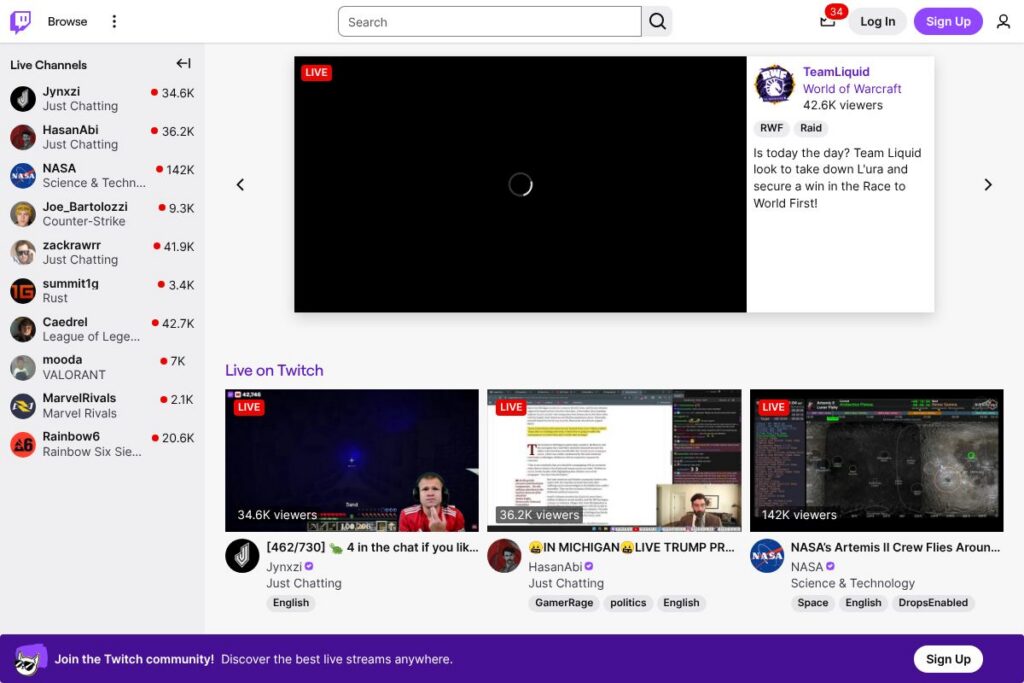
Twitch is a live video streaming platform focused on real-time interaction between creators and their audiences. The service centers on individual channels where streamers broadcast content live, with integrated chat, moderation tools, and mechanisms for monetization such as subscriptions, digital currency, and ads.
Compared with YouTube Live, Twitch emphasizes live community and chat-driven formats rather than on-demand discovery and long-form uploads. Against Facebook Gaming, Twitch maintains a broader creator ecosystem and richer third-party tooling for streamers. Compared with newer entrants like Kick, Twitch has deeper integrations with streaming tools and an established audience for gaming and creative content.
All of this makes Twitch particularly well suited for creators who rely on audience interaction and real-time community building, esports organizers who need live event infrastructure, and brands seeking live content placements with measurable engagement.
How Twitch works
Streamers use broadcasting software to send a live video feed to their Twitch channel, where viewers join the channel page to watch and participate via chat. The platform exposes a Creator Dashboard that centralizes stream setup, overlays, alerts, and performance metrics while viewers use chat, emotes, and channel features to interact and support creators.
Monetization flows through channel subscriptions, one-time digital tips called Bits, and ad revenue; creators can also use extensions and sponsored content. Moderation, community rules, and automated moderation tools help manage chat during large streams, and streamers often connect tools such as OBS Studio or Streamlabs for production workflows.
Twitch features
Twitch’s core features revolve around live broadcasting, real-time chat, creator monetization, and discovery. The platform has evolved to include clips, highlights, extensions for interactive overlays, and a Creator Dashboard for stream management and analytics. Recent additions have focused on improving moderation tools and expanding creator revenue options.
Key functionality includes:
Live channels and categories
Channels are organized by creator and by categories such as game titles or content themes; viewers browse categories or follow channels to receive notifications when a streamer goes live. This structure helps viewers find relevant live content quickly and allows creators to build persistent channel communities.
Real-time chat and moderation
Chat is a core interaction layer, offering emotes, moderation roles, timed-out messages, and automated moderation settings. The chat system supports community moderators, third-party moderation bots, and Twitch’s built-in safety controls to keep conversations on-topic and reduce abuse.
Subscriptions and payments
Viewers support creators with recurring channel subscriptions and one-time purchases like Bits; these mechanisms give creators predictable revenue and ways to reward subscribers with ad-free viewing, custom emotes, and other perks. Twitch provides tools to manage subscriber benefits and view revenue reports in the Creator Dashboard.
Clips, highlights, and VODs
Viewers and creators can create short Clips from live streams, and creators can save broadcasts as VODs or Highlights for on-demand playback. These features extend content lifespan beyond live sessions and enable creators to repurpose moments across social channels.
Extensions and interactive overlays
Extensions let creators add polls, leaderboards, mini-games, and other interactive elements layered on the stream page. These tools increase viewer engagement and can be configured without altering the streaming software, supported by the Twitch Developer documentation.
Creator Dashboard and analytics
The Creator Dashboard centralizes stream controls, scene management, chat moderation, and analytics on concurrent viewers and revenue. Analytics help creators understand retention, growth patterns, and which content performs best to iterate on programming choices.
Discoverability and community features
Twitch supports follower notifications, curated front-page features, and directory pages for categories and events to improve discoverability. Community features such as raids and hosting allow creators to direct viewers to other channels and grow collaboration.
With these capabilities Twitch provides a full live production and community platform that supports real-time interaction, recurring revenue, and content discovery for creators at every scale.
Twitch pricing
Twitch operates as a freemium platform for viewers, while creator monetization features and some add-ons follow fee-based or revenue-share models. There is no single public SaaS pricing page listed for the platform; costs that affect users include channel subscription tiers set by creators, purchases of virtual currency, and optional paid services.
For specifics on channel subscription mechanics, Bits, and other paid options consult Twitch’s help resources such as the Twitch subscriptions and payments documentation and the advertising choices and preferences.
What is Twitch used for
Twitch is primarily used for live entertainment and interactive broadcasts where audience participation is central. Typical uses include gameplay streams, creative art broadcasts, live music performances, talk shows, and live sports commentary.
Organizations and brands use Twitch for live product reveals, esports events, influencer campaigns, and community-building around shared interests. Educators and hobbyists also host workshops and tutorials that benefit from live Q&A and immediate feedback.
Pros and cons of Twitch
Pros
- Large live audience and discoverability: Twitch provides a sizable built-in audience for gaming and live creative content, making it easier to reach viewers who are actively browsing live streams.
- Robust creator monetization: Multiple monetization paths such as subscriptions, Bits, ads, and channel perks let creators diversify income sources and build recurring revenue.
- Extensive third-party tooling: Broad compatibility with tools like OBS Studio and Streamlabs, plus a rich extension ecosystem, helps creators improve production value and viewer engagement.
- Real-time community features: Chat, raids, emotes, and channel points create strong community dynamics and immediate feedback loops between creators and viewers.
Cons
- High competition for attention: The large number of channels can make discovery and audience growth challenging for new or niche creators.
- Revenue split complexity: Monetization often involves revenue-sharing and regional restrictions that can complicate earnings for smaller creators.
- Moderation overhead at scale: Managing chat and community safety during large streams requires active moderation and can demand extra staffing or tooling.
- Ad experience variability: Viewers can encounter ad interruptions depending on the streamer and ad settings, which may affect retention.
Does Twitch Offer a Free Trial?
Twitch is free to use for viewers and basic streaming features, with optional paid features for creators and viewers. Anyone can watch streams and create an account at no cost; optional paid elements such as channel subscriptions, Bits, and paid services are available for viewers who want to support creators or access extra perks.
Twitch API and Integrations
Twitch provides a developer platform with APIs and webhooks for authentication, chat bots, extensions, and stream metadata. The Twitch Developer documentation details endpoints for building chat integrations, overlay widgets, and extension back ends.
Common integrations include broadcasting software like OBS Studio and production services such as Streamlabs, as well as community tools like Discord for off-platform community building.
10 Twitch alternatives
Paid alternatives to Twitch
- YouTube Live – A live streaming option integrated with YouTube’s on-demand discovery, channel memberships, and Super Chat for monetization.
- Facebook Gaming – Live streaming tied to Facebook’s social graph, good for creators with established Facebook audiences and cross-posting to Pages.
- Kick – A newer live-streaming platform focused on creator revenue and simplified monetization models.
- Trovo – A platform with features reminiscent of Twitch that targets gaming streamers and includes community reward systems.
- Caffeine – A live broadcasting platform focusing on social interaction and simplified production workflows.
Open source alternatives to Twitch
- Owncast – A self-hosted, open-source live video streaming server that lets organizations run their own live platform and control branding and data; see the Owncast project.
- PeerTube – A decentralized, federated video platform that supports live streaming through peer-to-peer and WebRTC technologies; learn more at PeerTube.
- Nginx RTMP module – An open-source streaming module that developers use to build custom live streaming infrastructure and server workflows; reference on the nginx-rtmp repository.
- Ant Media Server (Community Edition) – An open-source media server that supports low-latency WebRTC streaming for live interactive applications; explore Ant Media.
Frequently asked questions about Twitch
What is Twitch used for?
Twitch is used for live streaming content across gaming, creative arts, music, sports, and live events. Creators broadcast live while viewers interact via chat and support creators through subscriptions and donations.
Does Twitch cost money to use?
Twitch is free to watch and to start streaming. Optional paid features include channel subscriptions, Bits, and instrumented advertising or third-party tools for production.
Can Twitch integrate with external streaming software?
Yes, Twitch integrates with popular broadcasting tools like OBS Studio and Streamlabs. These integrations enable scene composition, overlays, alerts, and direct streaming to a channel.
Does Twitch provide an API for developers?
Yes, Twitch offers a comprehensive developer platform and REST APIs. The Twitch Developer documentation covers authentication, chat, event subscriptions, and extension development.
Can creators earn money on Twitch?
Yes, creators monetize via subscriptions, Bits, ads, sponsorships, and tips. Twitch provides built-in tools for subscriptions and Bits, and creators can add external sponsorships and merchandise integrations.
Final verdict: Twitch
Twitch excels as a live-first platform with deep community features, strong third-party tooling, and multiple monetization paths for creators. Its real-time chat, extensions, Clips, and Creator Dashboard make it a comprehensive choice for streamers who prioritize audience interaction and live production quality.
Compared to YouTube Live, Twitch focuses more on live community and dedicated streaming workflows, while YouTube offers stronger on-demand discovery and broader search-driven audience reach. In terms of pricing, both platforms are free to use, but they implement different monetization mechanics such as channel subscriptions and Bits on Twitch, versus channel memberships and Super Chat on YouTube, which affects how creators earn and how viewers support them.
Overall, Twitch is a mature platform for creators and organizations that need reliable live-streaming infrastructure and a large, active live audience. For creators who want on-demand discoverability paired with live features, exploring YouTube Live alongside Twitch is a practical comparison before deciding where to focus streaming efforts.