VSee: An Overview
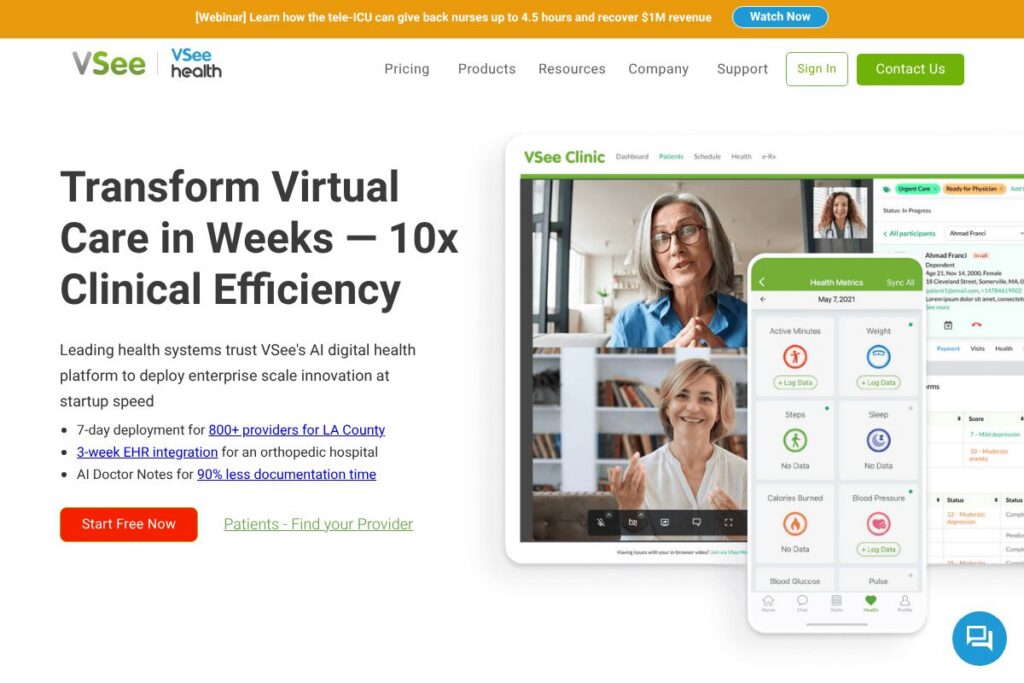
VSee is a HIPAA-compliant telemedicine solution that combines secure video, messaging, and clinical workflow tools for health systems, clinics, and enterprise customers. The platform is notable for being used by NASA aboard the International Space Station, and it serves organizations including Walmart, Walgreens, MDLIVE, McKesson, and DaVita. VSee targets clinical use cases where security, reliability, and customizable workflows are required.
Compared with other telehealth vendors, VSee is positioned for embedded clinical workflows rather than pure consumer-facing visits. Amwell emphasizes large health system integrations and payer relationships, Teladoc focuses on networked provider access and scale, while Doxy.me offers a lightweight, browser-based option for smaller clinics. VSee sits between those models by offering secure video with configurable intake, routing, and clinical forms that support enterprise requirements.
VSee does well where clinical customization and compliance matter. Its strengths include low-latency video for clinical examinations, a flexible form and document builder for intake and consent, and workflow triggers for routing patients to the right provider. The platform is suitable for hospitals, large telemedicine programs, specialty clinics, and organizations that need controlled, auditable telehealth workflows.
How VSee Works
VSee connects patients and clinicians through secure, HIPAA-compliant video sessions hosted in the cloud or via private deployments. Clinicians create encounters, invite patients by link or portal, and run visits with integrated video, chat, file sharing, and screen capture tools to document clinical findings.
The flexible form builder is embedded into the visit flow so teams can collect intake, medical history, consents, and visit surveys before, during, or after an encounter. Forms can include branching logic and trigger workflows that route patients to specific waiting rooms or providers based on specialty, state licensure, or triage answers.
VSee integrates with clinical workflows by allowing automated routing, scheduling handoffs, and linking form responses to patient records. For organizations that require it, VSee can be configured to match state licensure rules, manage waiting room flow, and escalate patients to higher-acuity providers according to predefined rules.
VSee features
VSee’s core capabilities center on secure clinical video, configurable intake and assessment forms, and workflow automation for telemedicine programs. Recent enhancements emphasize flexible form templates, branching logic, and routing triggers that map to provider specialties and state-based rules. Below are the standout features to consider.
Flexible Form Builder
The form builder lets teams create intake forms, medical histories, consent documents, assessments, and satisfaction surveys with a drag-and-drop interface. You can add branching logic to show or hide questions based on prior answers, and save reusable templates for common specialties like telepsychiatry or follow-up visits.
Pre-built Templates
VSee includes templates for common clinical workflows to accelerate deployment and reduce setup time for new specialty programs. Templates are designed to be editable so teams can adapt wording, required fields, and branching behavior to their clinical protocols.
Form Timing Controls
Administrators choose whether to send forms before a visit, present them during the visit, or collect them afterward for post-visit surveys and paperwork. This flexibility helps teams capture critical information at the right time without disrupting clinical flow.
Workflow Triggers and Routing
Form answers can trigger routing logic to place patients into specific waiting rooms or to match them with providers by specialty, language, or state licensure. Routing rules reduce manual triage and help ensure patients see the most appropriate clinician.
Secure Video and Messaging
Low-latency, encrypted video and text messaging are built for clinical use and include clinical tools like screen sharing, file exchange, and session recording where allowed. The platform is configured to meet HIPAA requirements, audit logging, and access controls for clinical teams.
Integration and Embedding Options
VSee supports embedding telehealth into existing portals and can be configured to exchange data with EHRs and scheduling systems. This helps reduce duplicate data entry and places telehealth inside established clinician workflows.
With VSee you get a telemedicine platform focused on clinical workflows: secure video, configurable forms, and routing that together streamline specialty-specific remote care.
VSee pricing
VSee offers enterprise and clinical telemedicine deployments with pricing tailored to organization size, deployment model, feature set, and support requirements. Pricing is typically provided through sales and custom proposals rather than public list plans.
For detailed pricing and deployment options, see VSee’s contact and purchasing information to request a quote or schedule a demo. Enterprise factors that commonly affect cost include hosted versus private cloud deployments, number of clinician seats, integration scope, and required SLAs.
What is VSee Used For?
VSee is used to deliver remote clinical care across primary care, mental health, chronic care management, dialysis support, and specialty consults. Teams use the platform to run scheduled telemedicine visits, urgent virtual triage, and follow-up assessments tied to clinical protocols.
It is also used for remote monitoring and support in settings where connectivity or privacy concerns require controlled deployments, such as corporate clinics, dialysis centers, and government or aerospace programs. Organizations that need customizable intake, consent workflows, and provider routing find VSee useful for scaling telehealth programs.
Pros and Cons of VSee
Pros
- Clinical workflow focus: The platform is designed to integrate forms, routing, and video into clinical workflows, which reduces manual triage and paperwork.
- Flexible form builder: The drag-and-drop builder, branching logic, and reusable templates make it straightforward to create intake, consent, and assessment forms for multiple specialties.
- Enterprise-ready security: VSee targets HIPAA compliance with encrypted video and audit logging suitable for health systems and regulated environments.
- Trusted by high-profile customers: Adoption by organizations including NASA, large retailers, and healthcare vendors demonstrates reliability for mission-critical deployments.
Cons
- Enterprise sales model: Pricing and deployment options are customized, which can slow initial evaluation compared with self-serve freemium platforms.
- Integration effort: Deep EHR or billing integrations typically require implementation work and coordination with IT teams.
- Less consumer-focused UI: Compared with consumer telehealth apps, the interface emphasizes clinical controls and may feel more complex for simple direct-to-consumer visits.
Does VSee Offer a Free Trial?
VSee offers demo and trial options for evaluation. Prospective customers can request a demo or evaluation through VSee’s sales and support channels to test video quality, forms, and routing before committing to a production deployment. See VSee’s contact and purchasing information to request a trial or demo.
VSee API and Integrations
VSee provides APIs and integration pathways to connect telehealth sessions, form data, and patient workflows with other systems. Organizations can integrate scheduling, EHRs, and single sign-on to place telehealth inside existing clinical processes; contact VSee for documentation and developer access.
Key integrations commonly available from telehealth platforms include EHR connectors, calendar and scheduling systems, and identity management tools. For specifics about developer resources and supported integrations, visit VSee’s platform information.
10 VSee alternatives
Paid alternatives to VSee
- Amwell — Enterprise telehealth designed for health systems and payers with networked provider access and clinical program support.
- Teladoc — Large-scale telehealth provider network focused on on-demand care, virtual primary care, and specialty consults.
- Doxy.me — Simple, browser-based telemedicine platform aimed at small practices and clinicians who want minimal setup.
- Zoom for Healthcare — Secure video platform with a healthcare offering that includes HIPAA-compliant video and integrations for clinical teams.
- MDLive — Telehealth service provider that combines a clinician network with platform services for employers and health plans.
- Cisco Webex for Healthcare — Enterprise video conferencing with security controls and integrations suitable for health systems.
- Updox — Communication and telehealth tools focused on patient engagement, intake, and messaging for small to mid-size practices.
Open source alternatives to VSee
- Jitsi Meet — Open source video conferencing that can be deployed on-premises and customized for telehealth use cases.
- OpenEMR — Open source electronic medical record with modules that can be extended for scheduling and telehealth integrations.
- OpenMRS — Clinical record system suitable for global health projects that can be combined with video tools for remote consultations.
- BigBlueButton — Open source real-time conferencing system that can be adapted for low-latency clinical interactions.
Frequently asked questions about VSee
What is VSee used for?
VSee is used for secure telemedicine visits, clinical intake, and workflow automation. Health systems and clinics use it for scheduled visits, triage, and specialty consults that require HIPAA-compliant video and configurable forms.
Does VSee integrate with electronic health records?
Yes, VSee supports integrations with clinical systems through APIs and implementation services. Integration options typically include scheduling, data exchange, and single sign-on when configured during deployment.
How much does VSee cost?
VSee uses customized pricing for enterprise and clinical deployments. Costs depend on deployment model, number of clinician seats, integrations, and support levels; contact VSee via their website for a tailored quote.
Can VSee be used for telepsychiatry?
Yes, VSee is commonly used for telepsychiatry and behavioral health. The platform’s flexible form templates and secure video are suited to psychiatric intake, consent, and follow-up assessments.
Does VSee provide developer APIs?
Yes, VSee offers APIs and developer resources for embedding telehealth and exchanging data. Organizations should contact VSee for access to API documentation and developer support.
Final Verdict: VSee
VSee is a strong choice when secure, customizable telemedicine workflows are the priority. It excels at combining low-latency clinical video with a flexible form builder, routing logic, and enterprise security, which makes it suitable for hospitals, specialty programs, and regulated environments.
Compared with Teladoc, which emphasizes large national provider networks and packaged consumer services, VSee focuses on embedding telehealth into clinical workflows and customizing intake and routing. Pricing for VSee is delivered via custom quotes based on deployment needs, while Teladoc publishes consumer-facing service pricing for its networked care offerings. For organizations that need clinical customization, configurable forms, and enterprise controls, VSee offers the capabilities to implement and scale telemedicine programs.