Zendesk: An Overview
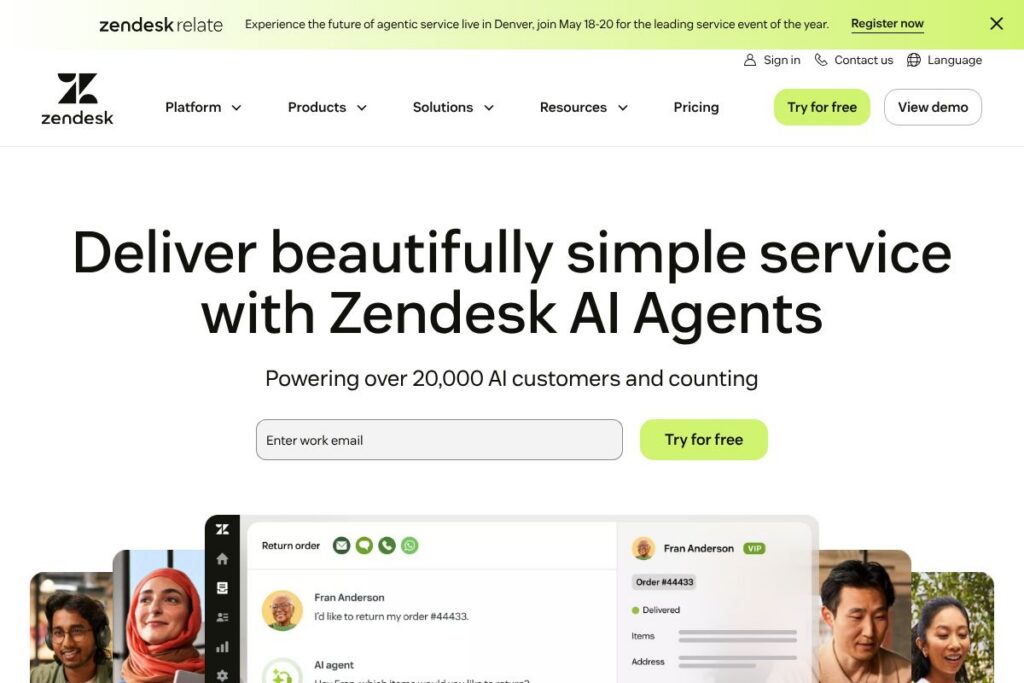
Zendesk is a customer service platform that combines a unified ticketing system, multichannel messaging, and AI agents to help teams handle customer and employee requests. The product bundles conversational channels, knowledge management, automation, and analytics so support teams can resolve requests faster and keep contextual history across channels.
Compared with Salesforce Service Cloud, Zendesk is often chosen for faster time to value and a simpler admin experience for standard support use cases, while Salesforce excels at deep CRM and customization for large enterprise processes. Compared with Freshdesk, Zendesk typically provides broader enterprise features and a larger app ecosystem, while Freshdesk can be more budget friendly for smaller teams. Compared with Intercom, Zendesk leans more toward full ticketing and enterprise support operations, whereas Intercom focuses on conversational marketing and product-led support.
Zendesk performs well when organizations need reliable multichannel support, AI-assisted automation, and an extensible platform for integrations. It is suitable for customer support teams and internal service desks that require a scalable solution with strong reporting and an ecosystem of third-party apps.
How Zendesk Works
Zendesk centralizes incoming requests from chat, email, voice, social, and messaging into a single ticketing system where agents manage conversations with full context. Automated routing and business rules assign tickets to appropriate teams, and AI features surface suggested replies, ticket triage, and knowledge articles to accelerate resolution.
Teams can layer Zendesk AI Agents on top of existing channels to automate routine interactions, while human agents handle exceptions and complex issues. The platform captures outcomes to feed back into the system so automation suggestions improve over time, and managers can use dashboards to track SLA performance, volume trends, and agent productivity.
Zendesk features
Zendesk centers on conversation handling, automation, and analytics. Core capabilities include AI-assisted agents, a unified ticketing system, knowledge base and self-service, voice and messaging channels, and an apps marketplace for integrations. Recent focus has been on AI agents and continuous learning to increase automation rates over time.
AI Agents and Automation
AI Agents automate routine inquiries across chat, email, and voice by suggesting responses, resolving standard issues, and handing off to agents when needed. This reduces repetitive work for agents and shortens response times while keeping a clear audit trail for supervised handoffs.
Resolution Learning Loop
The Resolution Learning Loop applies AI to historical interactions and outcome data so automated responses get more accurate with each resolution. That continuous learning model helps raise automation coverage and reduces remediation required by human agents.
Multichannel Support
The platform ingests conversations from web chat, email, phone, messaging apps, and social channels into the same workflow so agents keep context across channels. Consistent routing and unified history reduce duplicate work and improve first contact resolution rates.
Knowledge Management and Self-Service
Zendesk includes a knowledge base and help center tools for creating articles, community forums, and searchable content that powers self-service and AI suggestions. Self-service content reduces ticket volume and provides customers with immediate answers outside business hours.
Reporting and Analytics
Built-in dashboards provide ticket volume, SLA compliance, agent performance, and customer satisfaction metrics, with options to build custom reports or export data for deeper analysis. Analytics help operations teams prioritize improvements and measure automation impact.
Voice and Contact Center
Zendesk integrates voice channels with call routing, IVR, and call recording so contact centers operate within the same ticketing framework as digital channels. Combining voice and digital history helps agents handle omni-channel cases with full context.
Integrations and API
A developer-friendly API and a large app marketplace connect Zendesk to CRMs, ecommerce platforms, messaging services, and productivity tools. These integrations allow organizations to enrich tickets with CRM data, trigger workflows, and sync customer records across systems.
With this set of capabilities, Zendesk helps organizations reduce manual work and centralize support operations while giving teams the tools to measure and improve service quality over time.
Zendesk pricing
Zendesk uses a subscription pricing model with plans and enterprise options tailored to team size, channel usage, and feature needs; many organizations will evaluate bundled suites or custom enterprise agreements. For detailed plan breakdowns, available add-ons, and volume discounts, view Zendesk’s current pricing options.
What is Zendesk Used For?
Zendesk is used to manage customer support and internal service requests, bringing together conversations from chat, email, phone, and social into a single queue for triage and resolution. Support teams use it to automate routine responses, track SLAs, and surface contextual customer history so agents can resolve cases faster.
Organizations also use Zendesk for employee service desks, IT help, and HR inquiries where a centralized ticketing system and knowledge base improve response times and standardize processes. Self-service portals and community forums reduce incoming ticket volume and let teams scale support without linear headcount growth.
Pros and Cons of Zendesk
Pros
- Multichannel coverage: Zendesk consolidates chat, email, voice, messaging, and social into one system so agents manage a single workflow with full context.
- AI-assisted automation: AI Agents and the Resolution Learning Loop reduce repetitive tasks by suggesting responses and automating common resolutions, which can lower manual effort per ticket.
- Extensive integrations: A large app marketplace and public APIs let teams connect Zendesk with CRMs, ecommerce platforms, and analytics tools to enrich workflows.
- Scalable reporting: Built-in dashboards and reporting help operations teams monitor SLAs, agent productivity, and the impact of automation across the organization.
Cons
- Enterprise complexity: Customization and advanced enterprise features can require professional services or internal admin resources to implement at scale.
- Cost for advanced features: Advanced AI, contact center capabilities, and add-on services may push total cost higher for large deployments compared with simpler helpdesk solutions.
- Learning curve for admins: Powerful configuration options mean admins must learn the product to fully leverage triggers, automation, and advanced routing effectively.
Does Zendesk Offer a Free Trial?
Zendesk offers a free trial for most plans. Trial lengths and included features vary by edition; trials typically allow you to test core support features, messaging channels, and AI capabilities. For exact trial terms and to start a trial, see Zendesk’s signup and plan options.
Zendesk API and Integrations
Zendesk provides a developer API with endpoints for tickets, users, organizations, and messaging, plus SDKs for building custom apps. The Zendesk developer documentation provides details on REST APIs, webhooks, and SDKs.
Key native integrations include Slack, Salesforce, Shopify, Microsoft Teams, and Google Workspace, and many more are available through the Zendesk Marketplace. These integrations enable data enrichment, workflow automation, and cross-platform notifications.
10 Zendesk alternatives
Paid alternatives to Zendesk
- Salesforce Service Cloud – Enterprise-grade CRM and service platform with deep customization and CRM integration for organizations that need tight sales and service alignment.
- Freshdesk – A helpdesk focused on ease of use and value for small to mid-market teams with multichannel support and automation features.
- Intercom – Conversational support and customer messaging platform that emphasizes live chat, product-led support, and in-app messaging.
- Help Scout – Email-first helpdesk designed for small to mid-size teams with simple workflows and an emphasis on shared inboxes and human-centric service.
- Front – Shared inbox and collaborative workflow tool that treats email and messaging as shared channels with integrated automation.
- ServiceNow Customer Service Management – A robust enterprise solution focused on complex workflows, case management, and enterprise IT service integration.
- HubSpot Service Hub – Service ticketing and customer success tools that integrate tightly with HubSpot CRM and marketing tooling.
Open source alternatives to Zendesk
- Zammad – Open source helpdesk with ticketing, multichannel support, and user management that can be self-hosted for full control.
- osTicket – A lightweight open source ticketing system for teams that want a simple, self-hosted helpdesk with basic automation.
- UVdesk – Open source ecommerce-focused helpdesk offering self-hosting and extensions for online stores.
Frequently asked questions about Zendesk
What is Zendesk used for?
Zendesk is used to manage customer and employee support requests across multiple channels. Teams use it for ticketing, automation, knowledge bases, and reporting to improve response times and service quality.
Does Zendesk include AI features?
Yes, Zendesk includes AI Agents and automation features. Those AI capabilities help with suggested replies, ticket triage, and self-service automation and improve over time using learning loops.
Can Zendesk integrate with Salesforce?
Yes, Zendesk integrates with Salesforce. Integration options allow syncing customer records, creating tickets from CRM data, and enriching support workflows with sales context.
Is Zendesk suitable for internal employee service desks?
Yes, Zendesk supports employee service use cases. Teams use it to run HR, IT, and facilities help desks with self-service portals and automated routing.
How can I access Zendesk developer resources?
Zendesk provides public developer documentation and APIs. Visit the Zendesk developer documentation to explore API endpoints, SDKs, and integration examples.
Final Verdict: Zendesk
Zendesk is a mature, extensible platform for multichannel customer and employee service that combines ticketing, knowledge management, and AI-driven automation. It stands out for strong multichannel handling, a large integrations ecosystem, and AI capabilities designed to increase automation rates while keeping agents in the loop.
Compared with Salesforce Service Cloud, Zendesk typically offers a faster path to deployment for standard support operations and a simpler administration experience, while Salesforce provides deeper CRM integration and extensive customization for complex enterprise use cases. For organizations that prioritize rapid rollout, multichannel coverage, and built-in AI for support, Zendesk is a practical, scalable choice.