Zoho: An Overview
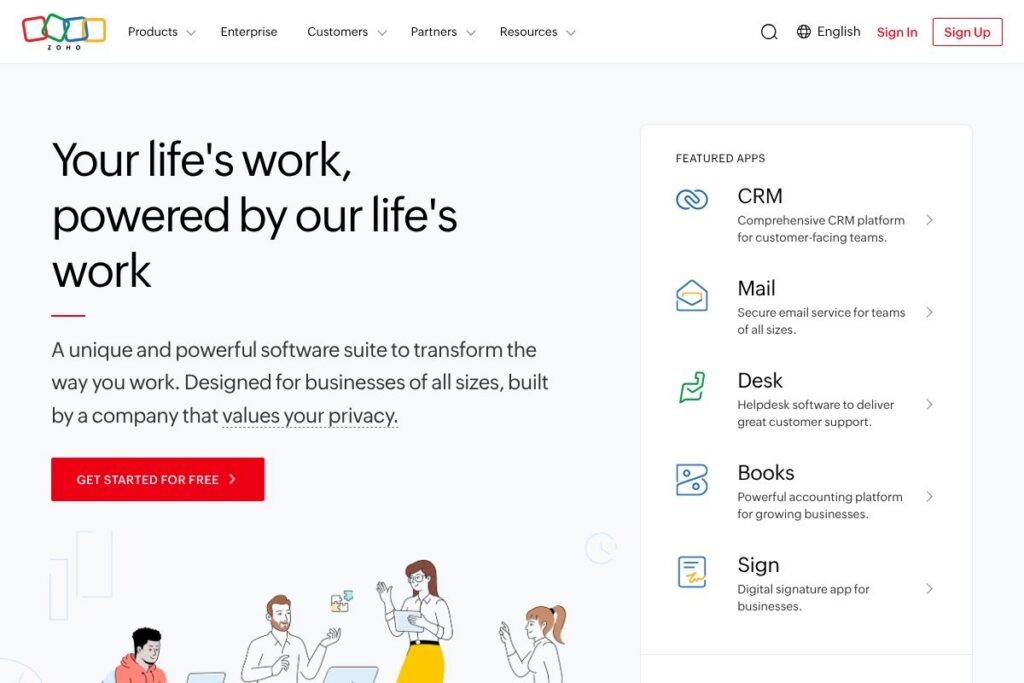
Zoho is a comprehensive cloud software suite that groups more than 55 business applications into a single ecosystem. The platform covers customer relationship management, finance and accounting, HR, collaboration, analytics, IT operations, and low-code application development so teams can use one vendor across the stack.
Compared with Salesforce and Microsoft Dynamics 365, Zoho places more emphasis on breadth and integrated administration across apps rather than on a single flagship CRM or ERP product. Compared with niche tools like QuickBooks for accounting or Workday for HR, Zoho combines many of those capabilities into a single subscription and a unified admin console. All of this makes Zoho particularly well suited for organizations that prefer an all-in-one approach and centralized governance across sales, finance, and operations.
Zoho does especially well at reducing integration overhead between apps, providing consistent user accounts, and offering an extensible platform for internal app development and automation. That combination makes it a practical option for small and mid-market companies, and for enterprises that want a single vendor to cover most operational software needs.
How Zoho Works
Zoho organizes functionality into discrete apps that share a common identity and administration layer so users get single sign-on, shared data models, and centralized user provisioning. An administrator can enable or disable apps for users, enforce policies, and apply cross-application automation from a central console, which simplifies governance for multi-department deployments.
Teams use Zoho by picking the apps they need, such as Zoho CRM for sales, Zoho Books for accounting, Zoho People for HR, and Zoho Projects for work management, then connecting them through built-in integrations and automation rules. Workflows can surface data across apps, Zia (Zoho’s AI) can generate insights or suggestions, and the Zoho platform supports custom apps and integrations for specific business processes.
What does Zoho do?
Zoho covers a wide set of business functions with modular apps that work together under a single account and admin experience. Core capabilities include CRM, finance, HR, help desk, collaboration, analytics, and a low-code platform for building custom workflows and internal applications.
Let’s talk Zoho’s Features
Unified App Suite
Zoho bundles 55+ business applications under a single ecosystem so teams can adopt only the tools they need while maintaining a consistent user directory and centralized administration. This reduces duplicate data, simplifies user management, and shortens the time required to connect apps compared with assembling point solutions from multiple vendors.
CRM and Sales Automation
Zoho CRM provides lead and opportunity management, sales forecasting, pipeline analytics, and workflow automation designed for B2B and B2C sales teams. It integrates with email, telephony, and marketing tools so sales activity, customer interactions, and revenue data stay in sync.
Finance and Accounting
Zoho Books and related finance apps handle invoicing, expense tracking, bank reconciliation, and basic financial reporting suitable for small to mid-sized businesses. The finance apps support tax-compliant invoicing, multi-currency transactions, and integrations with payment gateways for receivables.
HR and People Management
Zoho People covers employee records, time and attendance, performance reviews, and onboarding workflows to centralize HR processes. Managers can automate approvals and approvals routing, and employees can access self-service tools for leave requests and payroll inputs.
Collaboration and Productivity
Zoho offers collaboration tools such as mail, chat, meeting, and document management that integrate with core business apps to keep communication and work context together. Shared calendars, file collaboration, and team workspaces help teams coordinate without switching accounts across unrelated apps.
Zia, Zoho’s AI Assistant
Zia surfaces insights, suggests automation, and can draft or classify content across supported apps using context from your data. Zia is embedded into CRM, analytics, and productivity apps to help with forecasting, anomaly detection, and natural language queries; explore Zia on the Zia AI assistant page.
Low-code Platform and Extensibility
Zoho Creator and the platform tools let teams build custom internal applications, automate processes, and extend standard apps without heavy engineering effort. Developers can also use RESTful APIs and SDKs to integrate Zoho with external systems; see the Zoho developer documentation for details.
With Zoho you get a single-vendor set of business apps that reduce integration work and centralize administration, which is especially valuable for organizations aiming to standardize processes across departments.
Zoho pricing
Zoho uses a subscription pricing model that covers individual apps and an all-in-one option called Zoho One. Pricing is typically offered per user, with discounts for annual billing and additional enterprise-level packages for large organizations. For full details and the latest rates, view the Zoho One pricing overview.
Monthly Billing:
Zoho One (All apps): $37/user/month (access to 55+ apps, centralized admin, Zia AI, mobile apps)
Annual Billing:
Zoho One (All apps): $30/user/month billed annually ($360/year) (same features as monthly, lower effective rate)
Enterprise
Enterprise – Custom pricing (Advanced security, dedicated support, professional services, and deployment options for very large organizations). For enterprise-level contracts and deployment details consult the enterprise solutions information.
What is Zoho Used For?
Zoho is used to run core business operations across sales, marketing, finance, HR, and IT without stitching together multiple vendors. Companies adopt Zoho to unify customer data, automate recurring processes, and reduce the administrative overhead of managing separate user accounts and integrations.
Typical users include small and mid-sized businesses that want an all-in-one stack, regional enterprises seeking centralized administration, and teams that need rapid custom app development using low-code tools. Zoho is also common where IT wants to limit vendor sprawl while still offering specialized apps to departments.
Pros and Cons of Zoho
Pros
- Unified app ecosystem: Reduces integration overhead and keeps user and permission management centralized across 55+ apps.
- Broad feature coverage: From CRM to finance to HR, Zoho provides a wide set of capabilities that can replace multiple point solutions.
- Cost-effective for multi-app deployments: Bundled options like Zoho One often yield a lower total cost compared with buying separate best-of-breed products.
- Extensible platform: Low-code tools and APIs let teams build custom applications and automate processes without a full engineering effort.
- Privacy and data practices: Zoho emphasizes customer data ownership and does not rely on advertising-based revenue models, with written policies on data handling and security.
Cons
- Learning curve across apps: The sheer number of apps and configuration options can require dedicated admin time to deploy and govern effectively.
- Variation in depth per app: Some Zoho apps are broad but not as feature-rich as specialized competitors in niche categories, which may require trade-offs for advanced use cases.
- Customization complexity for large deployments: Deep customizations at enterprise scale can require professional services or experienced developers, adding to implementation cost.
Does Zoho Offer a Free Trial?
Zoho offers both free plans for many individual apps and free trial options for Zoho One. Individual apps commonly have free tiers or trial periods, while Zoho One is available on a trial basis so organizations can evaluate the full suite before committing to an annual subscription; start a trial from the Zoho One sign-up page.
Zoho API and Integrations
Zoho provides RESTful APIs and SDKs across many of its products so developers can integrate CRM, finance, and custom apps with external systems; consult the Zoho developer documentation for endpoint details and authentication patterns. The platform also supports webhooks, custom functions, and developer toolkits to automate cross-app workflows.
Key built-in integrations include Google Workspace, Microsoft 365, Slack, QuickBooks, and connectors via Zapier and other middleware platforms to extend integrations further; see the Zoho integrations directory for a full list.
10 Zoho alternatives
Paid alternatives to Zoho
- Salesforce — Enterprise-grade CRM with a vast partner ecosystem and deep sales automation capabilities, suited for large sales organizations.
- Microsoft Dynamics 365 — Integrated CRM and ERP capabilities tightly integrated with Microsoft 365 and Azure for enterprises invested in the Microsoft ecosystem.
- HubSpot — CRM and marketing platform focused on inbound marketing, sales enablement, and a freemium model that scales into paid tiers.
- Oracle NetSuite — Cloud ERP focused on finance and back-office operations for mid-market and enterprise customers.
- SAP Business One — ERP and financial management for growing businesses with complex manufacturing or supply chain needs.
- Freshworks — Offers CRM, service desk, and support tools with a simpler interface aimed at SMBs.
Open source alternatives to Zoho
- Odoo — Modular open source ERP and business apps platform that can be self-hosted or used with paid hosting and support.
- ERPNext — Full-featured open source ERP with accounting, HR, and manufacturing modules for small and medium businesses.
- SuiteCRM — Open source CRM that offers many of the core sales and marketing functions found in commercial CRM products.
- Dolibarr — Lightweight open source ERP and CRM geared toward small businesses that need modular features and self-hosting.
Frequently asked questions about Zoho
What is Zoho used for?
Zoho is used for managing core business functions such as sales, finance, HR, and customer support. Organizations use Zoho to consolidate applications, automate workflows, and centralize customer and operational data.
Does Zoho include AI features?
Yes, Zoho includes AI features through Zia, the built-in AI assistant. Zia can surface analytics, suggest automations, and assist with natural language queries across supported apps.
How much does Zoho cost?
Zoho pricing is subscription-based and varies by product and billing cadence. The all-in-one Zoho One plan is offered per user with both monthly and annual billing; view the Zoho One pricing overview for current rates and plan details.
Can Zoho integrate with other business systems?
Yes, Zoho provides APIs and prebuilt integrations for common business systems. Developers can use REST APIs and SDKs, and the platform offers native connectors for Google Workspace, Microsoft 365, Slack, and many third-party services.
Is Zoho suitable for large enterprises?
Yes, Zoho provides enterprise-grade deployments with professional services, advanced security options, and SLAs. Large organizations can opt for enterprise packages and consult with Zoho for custom onboarding, dedicated support, and compliance needs.
Final Verdict: Zoho
Zoho stands out as a practical choice for businesses that want a broad, integrated application ecosystem under a single vendor. Its combination of CRM, finance, HR, collaboration, and a low-code platform reduces the effort needed to connect tools and manage users, and Zia adds contextual AI assistance across apps.
Compared with Salesforce, which begins at $25/user/month for entry-level CRM plans, Zoho One’s bundled approach at $37/user/month monthly or $30/user/month billed annually can deliver better value when multiple apps are required across the organization. If your primary need is an ultra-deep CRM with an extensive partner marketplace, Salesforce may be preferable; if you need broad operational coverage with centralized administration and lower total cost for multiple apps, Zoho is often the more economical and administratively simple option.