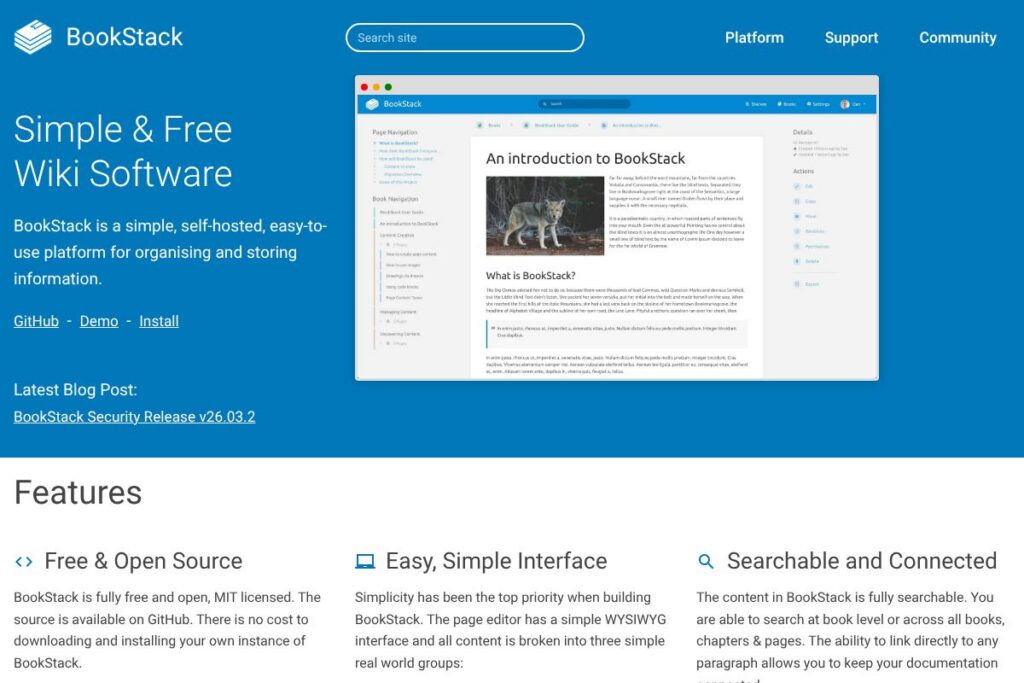
What is BookStack
BookStack is a self-hosted documentation platform that organises content into Books, Chapters, and Pages. It is designed to be simple to install and use, with a WYSIWYG editor, optional Markdown editing, and built-in diagram drawing to support technical and non-technical contributors.
Compared with Confluence and Notion, BookStack is intentionally lightweight and focused on on-premises control and data ownership. Confluence is a full-featured enterprise wiki with deep integration across the Atlassian ecosystem and starts at $5.75/user/month for small teams; Notion provides flexible blocks and databases but is primarily a hosted SaaS service. BookStack trades the extended app ecosystem and advanced workflow automation of those services for simpler administration and zero licensing cost for the core platform.
All of this makes BookStack particularly well suited for teams that need a straightforward, searchable documentation system they can host themselves, and for organizations that require integration with on-premises authentication. Its simplicity and modular structure mean it fits well in environments where read/write access needs to be tightly controlled and content needs to be portable.
How BookStack Works
BookStack stores content in a straightforward hierarchy: create a Book, add Chapters inside a Book, and write Pages inside Chapters. The editor offers a WYSIWYG experience for most users while also providing an optional Markdown editor and live preview for contributors who prefer plain text workflows.
Installation is standard PHP/Laravel deployment backed by MySQL, which allows it to run on small VPS instances or larger servers. Administrators configure global settings, registration options, and visibility rules through the admin UI, while permission and role controls manage who can read, create, edit, and delete content.
Search runs across books, chapters, and pages and links can point directly to specific paragraphs to support deep linking inside documentation. For teams, common workflows include drafting content in a personal space, publishing into a shared Book, and using page revisions to track changes and roll back when needed.
BookStack features
BookStack focuses on content structure, access control, and simple authoring tools. Core capabilities include a WYSIWYG editor with optional Markdown, full-text search, role-based permissions, built-in diagram support via diagrams.net, and multi-language UI options. The project is licensed under MIT and the source is available on GitHub for self-hosting and customization; view the BookStack source code on GitHub.
The platform includes several powerful capabilities worth highlighting:
Free & Open Source
BookStack is released under the MIT license, which means you can download, modify, and host it without licensing fees. The open-source model also allows for community contributions and forks; you can inspect or contribute to the code via the BookStack repository on GitHub.
Simple WYSIWYG Editor
The default editor is WYSIWYG and designed for clarity, making it easy for non-technical staff to create well-formatted pages. This reduces onboarding time and keeps documentation consistent across teams.
Optional Markdown Editor
A Markdown editor with live preview is available for users who prefer plain-text authoring or want faster formatting using a familiar syntax. This supports developer workflows and version-controlled content authoring.
Searchable and Connected Content
Full-text search covers books, chapters, and pages, and paragraph-level linking lets you point directly to sections of a page. This improves discoverability and eases cross-referencing across large documentation sets.
Built-in diagrams.net Integration
The page editor includes embedded diagrams.net drawing capability so you can create and embed diagrams without leaving the interface. This simplifies technical documentation and architectural diagrams creation; see diagrams.net for the drawing tool used.
Configurable Visibility and Branding
Administrators can change site name, logo, and registration options, and make the instance public or private depending on requirements. Basic theming and user-level dark or light mode help tailor the reading experience.
Integrated Authentication Options
BookStack supports email/password logins out of the box and includes enterprise options such as OIDC, SAML2, and LDAP. This enables single sign-on and centralized user management for self-hosted deployments.
Role and Permission System
A granular role and permission model lets you lock down actions such as creating, editing, deleting, and exporting content. This is useful for compliance and for controlling editorial workflows in larger teams.
Page Revisions and Image Management
BookStack keeps page revisions so you can review history and restore earlier versions, and it provides simple image and attachment management for organizing media used in documentation. This supports auditability and content recovery.
Multi-Lingual UI
The interface supports multiple languages contributed by the community, letting users set their preferred language and improving accessibility for international teams.
Multi-Factor Authentication
Built-in multi-factor authentication supports TOTP apps like Google Authenticator and Authy, and administrators can enforce MFA at the role level for stronger account protection.
With these features, BookStack delivers a focused documentation experience that emphasizes structure, portability, and secure self-hosting while keeping authoring simple.
BookStack pricing
BookStack follows an open-source distribution model rather than a paid SaaS plan, so there are no licensing fees for the core software. You can run your own instance at no cost and modify the source under the MIT license.
If you prefer managed hosting or enterprise support, third-party vendors provide paid hosting and services; check the BookStack homepage for links to community hosting options and commercial support partners. For installation instructions and self-hosting requirements see the BookStack installation guide.
What is BookStack Used For?
BookStack is commonly used for internal documentation, technical knowledge bases, runbooks, onboarding manuals, and policy handbooks. Its Books/Chapters/Pages model maps easily to product docs, departmental SOPs, and learning materials.
Organizations use BookStack when they need full control of their documentation infrastructure, such as in regulated environments, private intranets, or when data residency rules require on-premises hosting. Small teams also use it as a lightweight alternative to more complex enterprise wikis.
Pros and Cons of BookStack
Pros
- Open-source license: The MIT license lets you run and modify BookStack without licensing fees, and the codebase is available on GitHub for customization and audits.
- Simple content model: The Books, Chapters, and Pages structure reduces complexity and makes it fast to organise information with minimal training.
- Flexible authentication: Built-in support for OIDC, SAML2, and LDAP allows integration with corporate identity providers for single sign-on.
- Built-in diagramming: diagrams.net integration removes the need for separate diagram hosting and streamlines technical documentation workflows.
Cons
- Fewer advanced workflows: Compared with enterprise platforms like Confluence, BookStack lacks some advanced automation, plugin ecosystems, and deep integrations out of the box. This can require custom development for complex workflows.
- Self-hosting overhead: Running BookStack requires server management, backups, and updates which may be a drawback for teams without ops resources.
- Limited native analytics: Built-in reporting and analytics are minimal, so teams needing detailed usage metrics may need external tools or custom instrumentation.
Does BookStack Offer a Free Trial?
BookStack offers a free, open-source version you can self-host. You can download and install BookStack at no charge from the BookStack repository on GitHub or follow the official installation documentation to run it on your own infrastructure.
BookStack API and Integrations
BookStack provides a REST API for automating content creation, retrieving pages, and integrating with other systems; see the BookStack API documentation for available endpoints and examples. The API supports programmatic exports and content management for CI/CD or backup workflows.
Key integrations include built-in diagrams.net support for diagrams, and authentication connectors like OIDC, SAML2, and LDAP for identity management. Export options such as PDF and HTML help integrate BookStack content with publishing pipelines and external documentation sites.
10 BookStack alternatives
Paid alternatives to BookStack
- Confluence — A full-featured enterprise wiki from Atlassian with advanced collaboration, templates, and deep integration into the Atlassian ecosystem. See Confluence pricing for subscription details.
- Notion — A flexible, hosted workspace with page blocks, databases, and collaboration features aimed at product and marketing teams.
- Document360 — A SaaS knowledge base solution focused on product documentation and customer self-service with versioning and analytics.
- Guru — Knowledge management with browser extensions and verification workflows geared toward customer-facing teams.
- Slab — A documentation platform with search-focused UX and integrations targeting engineering and product teams.
- Helpjuice — A hosted knowledge base product with advanced analytics, customizable UI, and team collaboration features.
- GitBook — A documentation platform that combines editable docs with a hosted experience, supporting teams that want a managed service.
Open source alternatives to BookStack
- Wiki.js — Modern, Node.js-based wiki with a strong editor, built-in authentication connectors, and modular architecture for self-hosting.
- MediaWiki — The wiki engine behind Wikipedia, suited for large-scale public wikis and extensive customization, but with a steeper learning curve.
- DokuWiki — File-based wiki focused on simplicity and low maintenance, popular for internal documentation on lightweight servers.
- MkDocs — A static site generator for project documentation written in Markdown, often used with continuous deployment to host docs sites.
- Read the Docs — Documentation hosting for projects, commonly used with Sphinx and static documentation generators for open-source projects.
Frequently asked questions about BookStack
What is BookStack used for?
BookStack is used as a self-hosted documentation and knowledge base platform. Teams use it to store manuals, runbooks, onboarding guides, and structured documentation in a simple book/chapter/page layout.
Does BookStack have an API?
Yes, BookStack provides a REST API. The API lets you create, update, and export content programmatically; refer to the BookStack API documentation for endpoint details.
Is BookStack free to use?
Yes, BookStack is free and open-source under the MIT license. You can download the source code from the BookStack GitHub repository and host it without licensing fees.
Can BookStack integrate with corporate single sign-on systems?
Yes, BookStack supports OIDC, SAML2, and LDAP authentication. These options allow integration with enterprise identity providers for SSO and centralized user management.
Does BookStack support Markdown editing?
Yes, BookStack includes an optional Markdown editor with live preview. Users can choose the editor that fits their workflow while the platform also supports WYSIWYG authoring for non-technical contributors.
Final verdict: BookStack
BookStack is an effective choice when you need a straightforward, self-hosted documentation system that emphasises structure, access control, and ease of use. It excels at providing a predictable content model, simple editing, and enterprise authentication options without licensing costs for the core software.
Compared with a hosted product like Confluence, BookStack offers the advantage of no core licensing fees and full control over your data, while Confluence provides broader integrations, marketplace add-ons, and built-in enterprise features at a recurring cost such as $5.75/user/month for small teams. For organizations that prioritize on-premises hosting, low operational cost, and a clean authoring experience, BookStack is a strong, pragmatic choice.