Dendron: An Overview
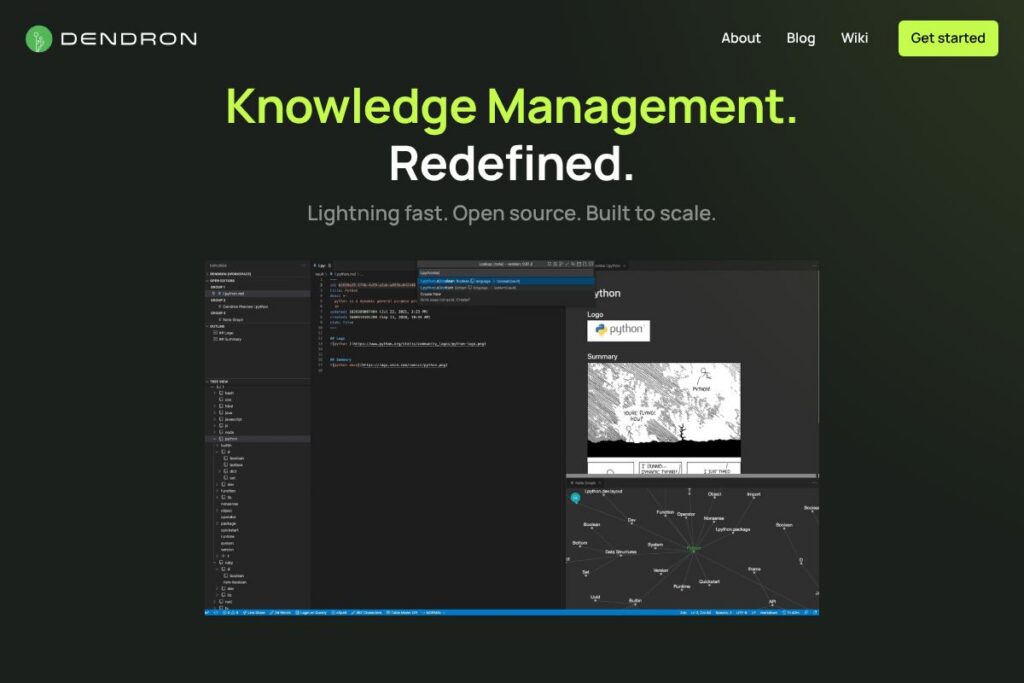
Dendron is a local-first knowledge management system that lives inside Visual Studio Code. It organizes notes in a hierarchical namespace so users can break topics into nested, searchable notes while keeping content in plain Markdown files that are easy to sync with Git and third-party storage.
Compared with Notion, which is a hosted block-based workspace, Dendron favors local control, filesystem-backed notes, and deep hierarchical organization for technical documentation. Compared with Obsidian, Dendron emphasizes explicit namespace hierarchies rather than a flat vault with bidirectional links. Compared with Roam Research, Dendron targets developers who want an editor-native workflow and strong Git integration for team collaboration.
All of this makes Dendron particularly well suited for engineers, technical writers, and teams that need a single source of truth inside their development environment. It excels at long-running technical documentation, project notes, onboarding materials, and structured personal knowledge bases where hierarchy and version control matter.
How Dendron Works
Dendron installs as a Visual Studio Code extension and operates directly on Markdown files in a workspace. Notes are created using a namespace syntax, for example vault.topic.subtopic, and Dendron expands that namespace into a nested folder structure so that organization remains visible on disk and searchable within VS Code.
Notes are linked using Markdown links and cross-reference features built into the extension. The extension provides commands to create, move, and refactor notes, making restructuring hierarchies straightforward. Users can search across vaults, jump between references, and use templates to standardize note formats.
For collaboration and publishing, Dendron works with standard Git workflows and includes publishing helpers to generate static sites or sync with remote repositories. Workflows typically combine the VS Code UI, Git for versioning, and Dendron commands for creating and maintaining the knowledge base.
What does Dendron do?
Dendron focuses on hierarchical note organization, referenceable Markdown content, and developer-friendly workflows inside Visual Studio Code. Core functionality includes namespace-driven notes, fast lookup and indexing, templating, and export/publish tools that integrate with Git. Recent development has strengthened search, publish hooks, and workspace management to support growing knowledge bases.
Let’s talk Dendron’s Features
Hierarchical namespaces
Dendron uses explicit namespaces to create a tree of notes that mirrors how teams think about topics and projects. Hierarchies make it easy to find related content, move entire branches of notes, and apply consistent structure across projects, which benefits documentation and multi-project workflows.
Note linking and backlinks
Notes can reference each other with Markdown links and Dendron surfaces backlinks so you can see connections between topics. This bi-directional reference system helps build a web of related notes while preserving the parent-child relationships defined by namespaces.
Search and indexing
Dendron builds an index of notes for fast search inside VS Code, supporting quick lookups by title, tags, or content. The search integrates with the editor so finding meeting notes, TODOs, or API documentation becomes a matter of a few keystrokes.
Templates and snippets
Dendron provides templating features to scaffold new notes with predefined sections like metadata, tasks, and headers. Templates reduce friction when creating consistent meeting notes, RFCs, or incident reports and speed onboarding for new contributors.
Git-friendly storage and publishing
Content is stored as plain Markdown files, which makes it possible to use standard Git workflows for versioning and collaboration. Dendron also includes publishing helpers to convert structured notes into static sites or shareable documentation, and it works well with CI pipelines.
Workspace and multi-vault support
Dendron supports multiple vaults and workspace configurations so you can isolate personal notes from team docs or split content by project. Workspace-level commands let you manage vaults, search across them, and configure publishing targets.
With these capabilities, Dendron helps teams keep large knowledge bases organized, easy to navigate, and simple to maintain over time. The biggest benefit is a predictable, filesystem-backed structure that integrates with developer tools and source control.
Dendron Pricing
Dendron is distributed as an open-source Visual Studio Code extension with a local-first model and no required subscription. The project is hosted publicly and the core tooling is available without licensing fees, which makes it suitable for individual users, hobbyists, and teams who prefer to manage notes on their own infrastructure.
For downloads, contributions, and repository access see the Dendron on GitHub project page. To install the extension inside Visual Studio Code, visit the Dendron extension on the VS Code Marketplace. For usage and publishing instructions consult the Dendron documentation.
What is Dendron Used For?
Dendron is commonly used to build technical knowledge bases, API documentation, runbooks, and project notes that need to scale with a codebase. Its hierarchical model is helpful when topics naturally nest, such as platform -> service -> endpoint, or company -> team -> project.
Individuals use Dendron as a daily notebook, developer journal, or research archive because notes are plain Markdown and easy to search. Teams use it for onboarding material, standard operating procedures, and shared runbooks that integrate with Git and CI workflows.
Pros and Cons of Dendron
Pros
- Hierarchy-first organization: The namespace system enforces a tree structure that makes it easy to group related content and move branches without breaking links.
- Editor-native workflow: Because it runs inside Visual Studio Code, Dendron fits naturally into developer workflows and supports familiar editor features like keyboard navigation and extensions.
- Plain Markdown on disk: Notes are stored as standard Markdown files which simplifies backups, diffing in Git, and integration with other tools.
- Strong publishing and Git integration: Built-in helpers for publishing and full compatibility with Git make collaboration and automation straightforward.
Cons
- VS Code dependency: Dendron is designed around Visual Studio Code, so users who prefer other editors may face a steeper setup or less feature parity.
- Learning curve for namespaces: The namespace syntax and hierarchical mindset take some time to learn compared with flat note apps; initial setup and migration require planning.
- Not a hosted SaaS by default: For teams that want a turnkey, cloud-hosted workspace with user management out of the box, additional tooling or hosting is required.
- UI focused on developers: The interface and workflows are tailored to technical users, so non-technical teams may need training to adopt it effectively.
Is Dendron Free to Try?
Dendron is free and open-source. The core extension is available at no cost and can be installed immediately in Visual Studio Code; users can run it locally and integrate with Git without payment.
Dendron API and Integrations
Dendron does not expose a separate hosted API; instead it is extensible through the Visual Studio Code extension model and command-line tools. The Dendron documentation describes available commands and hooks for publishing and automation.
Integration points include Git repositories for sync and collaboration, VS Code extensions for editor functionality, and static site publishing workflows. For development and contributions see Dendron on GitHub.
10 Dendron alternatives
Paid alternatives to Dendron
- Notion — An all-in-one, hosted workspace that combines databases, documents, and team collaboration tools with a visual editor and templates.
- Roam Research — A graph-focused note app that emphasizes bidirectional links and daily notes, popular for networked thought workflows.
- Obsidian — A local-first note app with powerful graph views and a plugin ecosystem; core app is free for personal use with paid services available.
- Evernote — A long-standing note-taking app with web clipping, search, and multi-device sync aimed at general-purpose note capture.
- Microsoft OneNote — A free-form note app integrated with Microsoft 365, useful for mixed-media notes and organization across devices.
Open source alternatives to Dendron
- Joplin — An open-source note app that supports Markdown, notebooks, end-to-end encryption, and sync via multiple backends.
- Logseq — A local-first, open-source outliner and knowledge graph with daily notes, backlinks, and Markdown/Org compatibility.
- Trilium Notes — An open-source hierarchical note-taking application with scripting, attributes, and built-in sync options.
- Emacs Org-mode — A text-centric, open-source system for notes, task management, and literate programming favored by power users.
Frequently asked questions about Dendron
What is Dendron used for?
Dendron is used to build hierarchical knowledge bases and developer-centric documentation. Teams use it for runbooks, project notes, and technical documentation that benefits from namespace organization and Git-based workflows.
Does Dendron work inside Visual Studio Code?
Yes, Dendron runs as a Visual Studio Code extension. Installation through the VS Code Marketplace provides editor commands, note creation, and search features integrated with the editor.
Can Dendron be used for team collaboration?
Yes, Dendron supports team workflows via Git and shared repositories. Teams typically pair the extension with Git hosting and CI for publishing documentation and coordinating changes.
Is Dendron open-source?
Yes, Dendron is open-source and hosted on GitHub. The core repository contains the extension source, contribution guidelines, and issue tracking for community development.
How do I publish notes from Dendron?
Dendron includes publishing helpers and CLI commands for generating documentation sites. The Dendron documentation covers publishing workflows, static site generation, and integration with CI pipelines.
Final verdict: Dendron
Dendron is a strong choice for developers and technical teams who want a local-first, hierarchical approach to knowledge management inside Visual Studio Code. It excels at organizing large, evolving documentation collections, integrates well with Git, and keeps content portable as plain Markdown files.
Compared with Notion, Dendron favors filesystem-backed control and developer workflows while Notion provides a hosted, visual workspace with built-in collaboration features; for details on Notion’s paid tiers and hosted options see Notion’s pricing. If your team values editor integration, explicit hierarchies, and version control, Dendron is a practical and cost-effective choice. If you need a turnkey hosted workspace with user management and a visual interface, a hosted alternative may be a better fit.