What is Flock
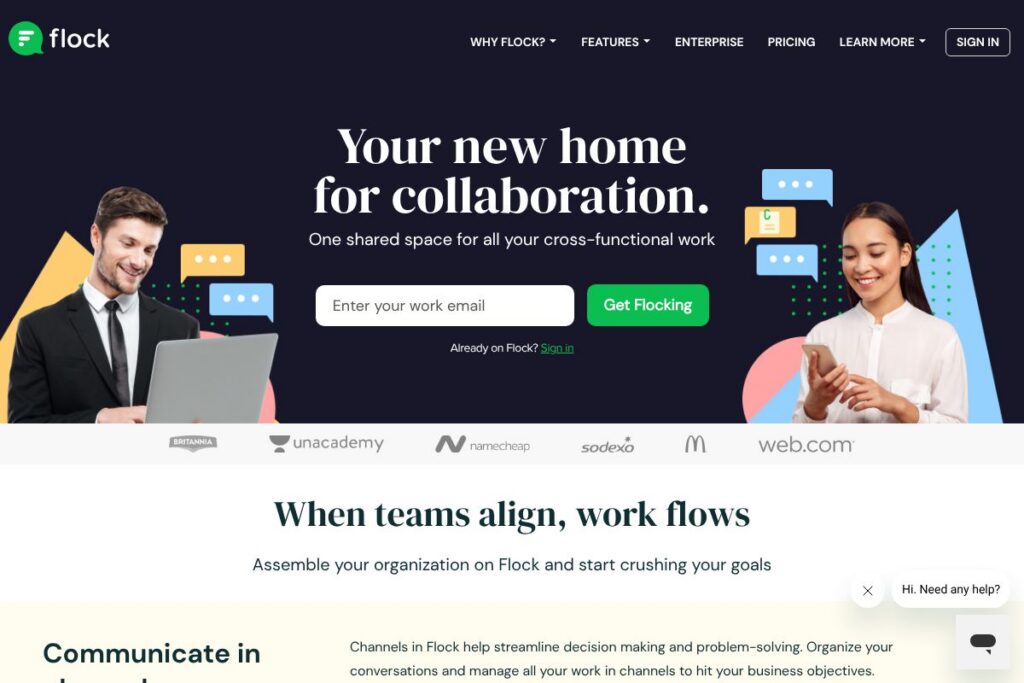
Flock is a team messaging and online collaboration platform that combines persistent channel-based chat with built-in voice and video calling, file sharing, and simple task management. It targets teams that want a single place for daily communication and lightweight project work, where channels replace long email threads and meetings are supported by quick calls and screen sharing.
Flock compares directly with Slack and Microsoft Teams in the team-chat category, and with lightweight task tools such as Asana for basic project coordination. Compared with Slack, Flock focuses on integrated productivity features like reminders and notes inside the app and a more compact app store; compared with Microsoft Teams, Flock is generally positioned for smaller, cross-functional teams that prefer a simpler interface. All of this makes Flock particularly well suited to teams that want channel-first communication plus accessible task and meeting tools without the complexity of a full unified communications suite.
How Flock Works
Channels are the default workspace in Flock; teams create channels for projects, departments, or topics, and use threaded conversations to keep decisions and context together. Channels can be public to the organization or private for select members, and messages support file attachments, reactions, and message pins for easy retrieval.
Calls and screen sharing are available inside channels or one-to-one conversations, so teams can move from text discussion to live conversation without switching apps. Integrations and bots surface notifications from external services in channels, while built-in to-dos, reminders, and shared notes let teams track work items alongside conversation.
Flock features
Flock organizes work around conversation, meetings, and lightweight project tools. Core capabilities include channel-based messaging, voice and video calls with screen sharing, integrated task lists and shared notes, real-time file sharing, and an app store for third-party integrations. The platform also emphasizes admin controls, onboarding support, and 24/7 customer service.
Channels and threaded conversations
Channels let teams group conversations by project, function, or topic so messages and decisions remain discoverable. Threads and message pins reduce noise while keeping related discussion together, which speeds decision making and lowers the need for repetitive status updates.
Voice, video, and screen sharing
Flock includes built-in voice and video calling with screen sharing from desktop and mobile devices to clarify context and reduce email back-and-forth. Calls can be started from channels or DMs, making it easy to move from text to live discussion when tone or detail matters.
File sharing and search
Users can upload and share files directly in conversations with version visibility and quick download options, while full-text search across messages and files helps teams find past decisions and documents. Real-time file exchange keeps information flowing without requiring external FTP or separate file-transfer tools.
Tasks, reminders, and shared notes
Lightweight project management is available through to-dos, reminders, and shared notes that live inside channels; these features help teams track action items without adopting a separate tasking app. Assignments, due dates, and simple checklists provide enough structure for many cross-functional workflows.
App integrations and bots
Flock connects to third-party services via its app store to surface alerts and automate routine tasks inside channels. Popular integrations include task tools such as Asana, Trello, and Jira, plus productivity services for calendars and file storage to reduce context switching.
Admin controls, onboarding, and support
The platform includes organization-level admin controls for user provisioning and security, plus options for personalized onboarding and 24/7 customer support to accelerate rollouts. These capabilities help IT and ops teams manage access and compliance while reducing the time to value for new users.
With these features, Flock aims to centralize team communication and simple project coordination so teams can move faster without adding more separate tools.
Flock pricing
Flock offers flexible subscription tiers tailored to different organization sizes and needs; plan details and current rates are published on Flock’s site. For the latest plan breakdowns, team seat costs, and enterprise options, check Flock’s homepage for current pricing options.
What is Flock used for
Flock is used for real-time team communication, asynchronous coordination, and lightweight project tracking across departments. Teams rely on channels to centralize decisions, reduce email, and keep daily updates visible to stakeholders without repeated meetings.
Flock is also used to run quick standups, share files and design feedback, and host ad-hoc video calls for clarifying complex topics. Cross-functional teams such as product and engineering, sales and marketing, or HR and finance can all keep their workflows in one shared workspace with integrations that bring external alerts into conversation.
Pros and cons of Flock
Pros
- Centralized channels and threads: Flock consolidates conversations into searchable channels, making historical context easy to locate and reducing email overload.
- Built-in voice and video: Native call and screen-share features let teams move from chat to live discussion without extra apps, useful for quick clarifications.
- Integrated lightweight project tools: Reminders, shared notes, and to-dos inside channels make it practical to track action items without a separate project management platform.
- App integrations and bots: The app store supports integrations with Asana, Trello, Jira, and common productivity tools, which reduces context switching for teams.
Cons
- Smaller ecosystem than larger competitors: Flock’s app marketplace is more limited compared with platforms like Slack, which can reduce available third-party workflow extensions.
- Less advanced project management: For teams that need rich portfolio planning, Gantt charts, or advanced reporting, purpose-built PM tools such as Asana or Jira remain more capable.
- Pricing transparency for enterprises: Organization-level enterprise pricing and feature bundles often require sales engagement, which can slow procurement for some buyers.
Does Flock Offer a Free Trial?
Flock offers a 30-day free trial for new users. The trial provides access to core collaboration features including channel messaging, voice and video calling, file sharing, and the app store. Desktop and mobile clients are available for Windows, Mac, Linux, and Chrome, making it easy to test the platform across devices.
Flock API and Integrations
Flock provides developer APIs and a public app ecosystem so teams can automate notifications and extend the platform with custom bots. The Flock API documentation explains available endpoints for messaging, bots, and integration workflows; see the Flock API documentation for developer details.
Key built-in integrations include Asana, Trello, and Jira, as well as common productivity services for calendars and file storage that deliver alerts directly into channels. Explore the Flock app store to see available connectors and automation options.
10 Flock alternatives
Paid alternatives to Flock
- Slack — Channel-based team chat with a large app ecosystem, advanced message search, and enterprise-grade controls.
- Microsoft Teams — Integrated with Microsoft 365 apps, provides chat, meetings, and file collaboration for organizations using Microsoft services.
- Google Workspace — Google Chat and Spaces combined with Drive and Meet for teams invested in Google apps.
- Zoom — Primarily a meeting platform, Zoom also offers chat, channels, and integrations for hybrid collaboration.
- Asana — Focused on project and work management with richer task, timeline, and reporting features than Flock.
- Twist — Async-first team communication designed to reduce real-time noise and prioritize threaded discussions.
Open source alternatives to Flock
- Mattermost — Self-hosted team messaging with strong customization and security controls for enterprises that want to manage their own infrastructure.
- Rocket.Chat — An open source communication platform that supports on-premises deployment, flexible integrations, and customization.
- Zulip — Topic-threaded chat that combines real-time and asynchronous workflows with a developer-friendly API.
- Element (Matrix) — A client for the Matrix protocol that provides decentralized, secure messaging and integrations.
Frequently asked questions about Flock
What is Flock used for?
Flock is used for team messaging, lightweight project coordination, and real-time collaboration. Teams use channels to centralize communication, run ad-hoc calls, and track simple tasks without switching between multiple apps.
Does Flock offer a free trial?
Yes, Flock offers a 30-day free trial for new users. The trial includes core messaging, calls, file sharing, and access to the app store so teams can evaluate the platform across devices.
Does Flock have an API?
Yes, Flock provides developer APIs and documentation. The Flock API lets teams build bots, send messages programmatically, and integrate external services into channel workflows; consult the Flock API documentation for endpoints and examples.
Can Flock replace email for team communication?
Yes, Flock can replace much email traffic for internal communication. Channel-based messaging and threaded conversations keep discussions visible and reduce the need for long email chains and status emails.
Is Flock secure for business use?
Flock includes organization-level admin controls and security features suited to business use. Admin capabilities, user provisioning, and privacy controls help IT teams manage access and compliance across the organization.
Final verdict: Flock
Flock is a practical choice for teams seeking a compact collaboration workspace that combines channel-based chat, built-in calls, file sharing, and lightweight task tools. It performs best for small to mid-size organizations and cross-functional teams that want a single app to handle day-to-day communication and simple project tracking.
Compared with Slack, which offers a larger app ecosystem and widely published per-user pricing tiers, Flock emphasizes simpler onboarding, integrated productivity features, and a focused app store. For teams that value a straightforward interface and built-in task and call features, Flock is worth evaluating; for organizations that need the deepest integration marketplace or advanced project management, platforms like Slack or dedicated PM tools may better match those needs.