What is GetResponse?
GetResponse is an all-in-one marketing platform focused on email marketing, marketing automation, landing pages, and transactional SMS. It combines campaign creation, customer journeys, and web conversion tools into a single interface so teams can run lead generation, ecommerce recovery, and lifecycle campaigns from one place.
Compared with Mailchimp, GetResponse places more emphasis on built-in automation workflows and landing page creation rather than just list-based campaigns. Against ActiveCampaign, GetResponse competes on price and an easier landing page and webinar toolset, while ActiveCampaign leans heavier into CRM-style automation and sales pipelines. Compared to Constant Contact, GetResponse offers more advanced automation and AI features for send-time optimization and copy generation, which makes it better suited for marketers who want automated conversion workflows.
All of this makes GetResponse especially useful for small and mid-market ecommerce merchants, marketing teams that need integrated landing pages plus email automation, and entrepreneurs who want a single platform to manage lead capture through repeat revenue generation.
How GetResponse Works
The platform centers on three linked components: lists and campaigns for email, a visual automation builder for customer journeys, and a landing page builder for conversion. You create audiences and segments, design messages using templates or AI-generated copy, then attach those messages to automation workflows that trigger on events like signups, purchases, or cart abandonment.
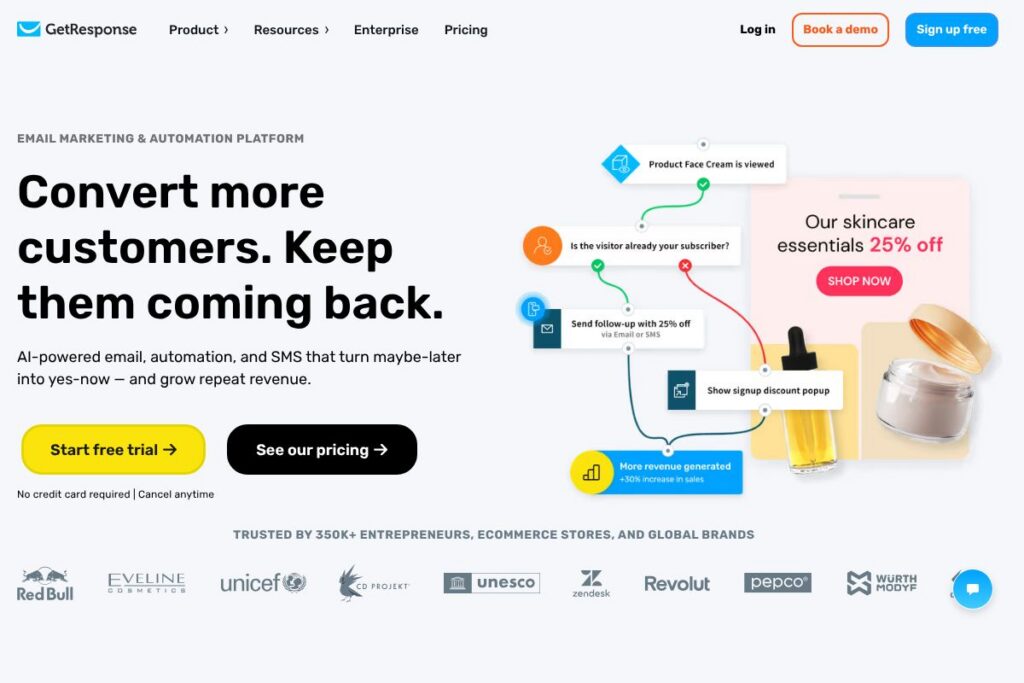
Workflows are built in a drag-and-drop canvas where you add triggers, conditions, and actions such as sending an email, waiting a set time, or sending an SMS. Landing pages publish directly from the platform and can feed leads into an automation flow, which then nurtures or converts those leads according to rules you define.
Typical workflows include welcome sequences that onboard new subscribers, cart recovery funnels that send timed reminders and discount offers, and reactivation campaigns that target dormant customers. The platform also provides delivery metrics and conversion tracking so you can tie email and landing page activity back to revenue.
GetResponse features
GetResponse combines core email campaign tools, a visual automation builder, landing page publishing, and AI-assisted content and timing features. The product emphasizes unlimited sends, unlimited automations, and unlimited landing pages for many paid plans, plus 24/7 support and multi-channel outreach including SMS.
What GetResponse Brings to the Table
Email Marketing
Send broadcast and lifecycle emails using templates, a drag-and-drop editor, and A/B testing tools. The platform includes deliverability controls, segmentation, and analytics so teams can optimize campaigns for opens, clicks, and conversions.
Marketing Automation
A visual workflow builder lets you create multi-step journeys with triggers, conditions, and actions to automate onboarding, cart recovery, and post-purchase follow-ups. Automation supports complex branching logic and integrates with CRM data to personalize messages.
Landing Pages
Publish conversion-focused landing pages using templates and a WYSIWYG editor that includes forms, countdown timers, and conversion widgets. Pages connect directly to email lists and automations to accelerate lead capture and reduce setup time for campaigns.
AI-Assisted Content and Send-Time Optimization
AI tools help generate email copy, subject lines, and landing page text, and the platform recommends optimal send times for each recipient to improve engagement. These features are designed to reduce manual testing and accelerate campaign creation while improving open and click performance.
SMS and Web Push Notifications
Support for SMS and push notifications extends campaigns beyond email so you can reach customers on mobile devices for time-sensitive offers and cart recovery. SMS workflows can be integrated into automation sequences alongside emails to increase conversion rates.
Integrations and API Access
GetResponse connects to ecommerce platforms, CRMs, payment processors, and other marketing tools through built-in integrations and Zapier. A developer API is available for custom integrations and automation, with documentation for common endpoints and webhooks.
With this set of capabilities, the biggest benefit is the platform’s ability to combine lead capture, automated nurturing, multi-channel outreach, and conversion tracking in one place so teams can manage end-to-end campaigns without stitching multiple vendors together. For teams that rely on continuous email, landing page creation, and automated journeys, GetResponse streamlines those workflows into a single product experience.
GetResponse pricing
GetResponse offers subscription-based plans tailored to different business sizes and use cases, with a free trial available to test platform features. Public detailed tiered pricing was not present in the provided material, so readers should consult the vendor for current plan limits and rates.
Visit the GetResponse homepage to view current pricing options and plan comparisons, or contact their sales team for enterprise requirements and seat-based quotes.
What is GetResponse Used For?
GetResponse is commonly used for lead generation, email campaigns, and conversion-focused web pages. Marketing teams use it to capture prospects via landing pages, enroll them into automated workflows, and send timed promotions or transactional messages that drive purchases and reorders.
Ecommerce stores deploy GetResponse to recover abandoned carts with sequences that combine email and SMS, to run flash sales using dedicated landing pages, and to track revenue from campaigns. Smaller businesses and solo marketers use its templates and AI features to create professional campaigns without a dedicated design or copy team.
Pros and Cons of GetResponse
Pros
- Comprehensive multi-channel tools: The platform bundles email, SMS, landing pages, and automation into a single interface which reduces the need for multiple vendors. This centralization simplifies campaign setup and data synchronization.
- Visual automation builder: The drag-and-drop workflow canvas makes it straightforward to map customer journeys with triggers, delays, and conditional logic, which helps teams scale recurring campaigns and workflows.
- AI-assisted content and timing: Built-in AI speeds up copywriting and recommends send times per recipient, which can increase open and click rates with less manual optimization.
- Scalable sending and pages: Many plans emphasize unlimited emails and landing pages, allowing marketers to grow campaigns without frequent plan changes.
Cons
- Reporting depth varies: Advanced analytics and custom reporting can be less comprehensive than specialized BI or dedicated CRM platforms, which may require exporting data for deeper analysis.
- Learning curve for advanced automation: While basic automations are easy to set up, complex multi-step journeys and ecommerce integrations require familiarity with the visual builder and event mapping.
- Price visibility: Public, detailed pricing tiers were not available in the provided content, so comparing exact costs against competitors requires contacting GetResponse or visiting their site.
Does GetResponse Offer a Free Trial?
GetResponse offers a 14-day free trial with no credit card required. The trial allows new users to explore email campaigns, automation, and landing pages; signups can start a trial from the free trial signup flow on the homepage and cancel at any time.
GetResponse API and Integrations
GetResponse provides an API for developers to manage contacts, campaigns, and automations programmatically; the API documentation outlines endpoints, authentication, and webhook capabilities. For non-developers, the platform lists prebuilt integrations for ecommerce platforms, CRMs, analytics tools, and Zapier on its integrations directory.
10 GetResponse alternatives
Paid alternatives to GetResponse
- Mailchimp — An email marketing platform with strong creative tools and audience management, often chosen for simpler newsletter workflows and brand templates.
- ActiveCampaign — Focused on advanced automation and CRM features, suitable for teams that need deeper sales and marketing alignment.
- Klaviyo — Popular with ecommerce merchants for data-driven segmentation and revenue attribution across stores and email campaigns.
- Constant Contact — A straightforward email and event marketing tool with easy-to-use templates for small businesses.
- ConvertKit — Built for creators and bloggers, offering simple automation and tagging for content-focused email sequences.
- AWeber — Email marketing with a long history of reliability, offering autoresponders and template libraries for small teams.
- Sendinblue — Combines email, SMS, and basic automation with a pay-as-you-go option for high-volume senders.
Open source alternatives to GetResponse
- Mautic — A self-hosted marketing automation platform that provides email campaigns, landing pages, and lead scoring with full control over data.
- OpenEMM — An open source email marketing suite for managing campaigns and transactional mailing with on-premise hosting.
- phpList — A lightweight, self-hosted newsletter manager suited for organizations that want simple list management and broadcast emailing.
Frequently asked questions about GetResponse
What is GetResponse best used for?
GetResponse is best used for integrated email marketing, landing page creation, and automated customer journeys. Teams use it to capture leads, nurture prospects, and run multi-channel campaigns that combine email and SMS.
Does GetResponse include landing pages?
Yes, GetResponse includes a landing page builder. The builder provides templates, forms, and conversion widgets that connect directly to automations and email lists.
Can GetResponse send SMS messages?
Yes, GetResponse supports SMS as part of multi-channel campaigns. SMS can be added to automation workflows alongside email to reach customers on mobile devices for urgent messages or cart recovery.
Does GetResponse have an API for custom integrations?
Yes, GetResponse provides a developer API with endpoints for contacts, campaigns, and webhooks. Developers can use the API to sync data, trigger automations, or build custom integrations documented in the API reference.
Is there a free way to try GetResponse before buying?
GetResponse offers a 14-day free trial with no credit card required. The trial gives access to core features like email campaigns, automations, and landing pages for evaluation.
Final verdict: GetResponse
GetResponse is a practical choice for businesses that want an integrated marketing platform combining email, landing pages, automation, and SMS in one interface. Its visual automation canvas, AI-assisted content and send-time features, and focus on unlimited sends and pages make it attractive for ecommerce merchants and marketing teams that run frequent campaigns.
Compared with ActiveCampaign, GetResponse typically presents a simpler setup for landing pages and webinars while offering competitive automation. For organizations comparing cost and functionality, review the options on the GetResponse homepage and compare them with ActiveCampaign pricing and feature lists to determine which platform matches required automation depth and budget constraints. Overall, GetResponse delivers a broad set of conversion-focused tools that reduce vendor sprawl and help teams manage email, pages, and automated journeys from a single platform.