Grasshopper: An Overview
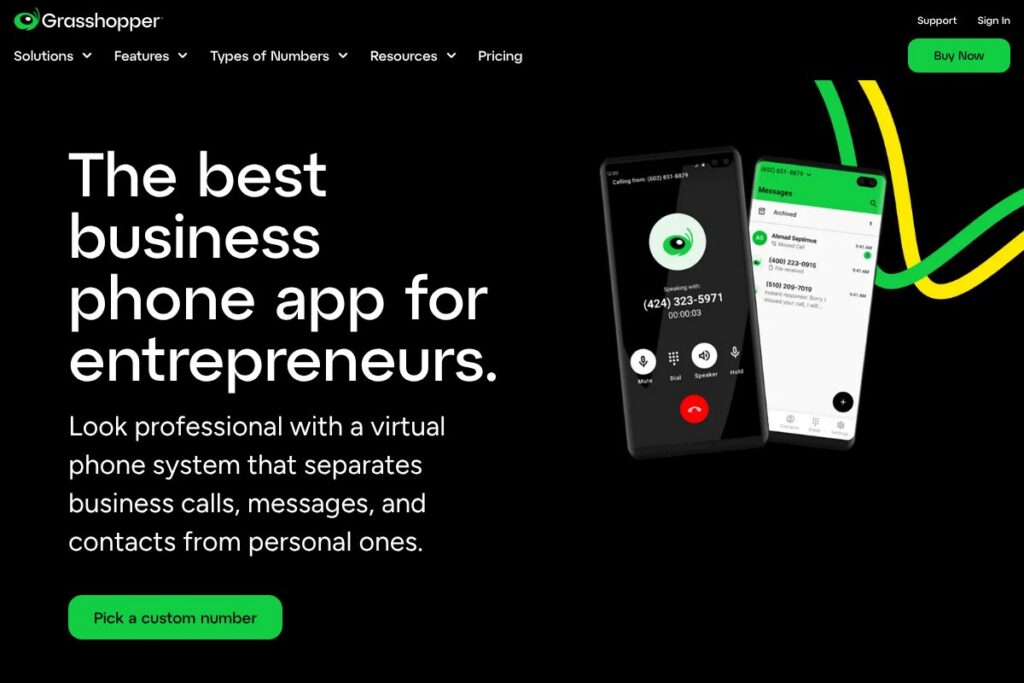
Grasshopper is a virtual phone system built to give small businesses and solo entrepreneurs a professional business phone presence without buying dedicated hardware. It provides local and toll-free numbers, call forwarding and routing, voicemail-to-email, and mobile apps that let business owners handle calls and texts from personal devices.
Compared with larger unified communications platforms like RingCentral and Nextiva, Grasshopper focuses on simplicity and fast setup rather than deep contact center or advanced collaboration features. Compared with Google Voice, Grasshopper emphasizes business-oriented features such as multiple extensions, vanity numbers, and professional greetings that are designed for customer-facing use.
All of this makes Grasshopper well suited for sole proprietors, small teams, and any business that wants a separate business number quickly without managing PBX hardware. It works well when you need simple call handling, basic team extensions, and an easy way to separate business communications from personal lines.
How Grasshopper Works
Sign up, choose a new business number or port an existing number, then configure how incoming calls are handled using extensions, call forwarding, and custom greetings. The system routes calls to the devices you specify so team members can accept business calls on their phones or desktop app.
Voicemail is delivered as audio and text via email, and business texting lets teams send and receive SMS from the shared business number. Administrative controls let owners add users and set hours so calls are routed differently during and outside business hours.
What does Grasshopper do?
Grasshopper provides core telephony features for small businesses, packaged as a virtual phone system you access via mobile and desktop apps. Recent updates have emphasized easier number selection and faster onboarding so teams can be operational in minutes.
The platform includes virtual numbers, call forwarding and routing, voicemail transcription, business SMS, and multiple extensions. It also supports number porting so you can bring an existing business number with you; see Grasshopper’s number options on their business number page.
Here are some key features worth highlighting:
Virtual business numbers
Choose a local, toll-free, or vanity business number and use it without new hardware; numbers can be set up to ring on existing mobile phones and desktops. This makes it easy to separate personal and business communications while keeping a single professional contact point.
Call routing and extensions
Create extensions for team members and route incoming calls based on hours, call groups, or sequential ringing. This enables basic team handling and ensures callers reach the right person without needing a receptionist.
Voicemail and transcription
Voicemails are captured and delivered as audio files and text to email, which speeds message review and follow up. Transcriptions make it easier to scan messages and prioritize callbacks.
Business texting (SMS)
Send and receive SMS and MMS on the business number from mobile and desktop apps, keeping customer text conversations separate from personal messages. Threaded conversations and notifications help teams manage inquiries quickly.
Mobile and desktop apps
Manage calls, texts, and voicemails from iOS, Android, and web apps that mirror your business number on personal devices. Apps include caller ID, call transfer, and quick access to voicemail and contacts.
With these capabilities, Grasshopper provides a compact set of features that cover the needs of most small businesses: a professional phone presence, flexible call handling, and simple team management.
Grasshopper pricing
Grasshopper uses a subscription pricing model with plans organized by the number of numbers and extensions, and with monthly or annual billing options; plan features typically scale from single-user setups to multi-user business packages. For the most accurate and current plan details and rates, view Grasshopper’s current pricing options.
What is Grasshopper Used For?
Small businesses and solo entrepreneurs commonly use Grasshopper to present a professional phone presence while keeping their personal phones private. It is also used by consultants, freelancers, and home-based businesses who need a dedicated business number but do not want to install on-premises phone systems.
Teams with simple call routing needs use Grasshopper to manage incoming customer calls across multiple people, to route calls by time of day, and to centralize voicemails and texts. Marketing teams sometimes use separate numbers for campaigns to track response by phone.
Pros and Cons of Grasshopper
Pros
- Easy setup and onboarding: Setup can be completed in minutes, with options to pick numbers or port existing ones and configure routing without technical staff.
- Separate business presence on personal devices: Lets users keep business calls and texts organized on their existing phones and desktops without additional hardware.
- Voicemail transcription and business SMS: Voicemail-to-email and text messaging on the business line simplify follow up and customer communication.
- Scales for small teams: Supports multiple extensions and team routing which is sufficient for most small-business workflows.
Cons
- Limited advanced collaboration features: Lacks the deep integrations, analytics, and contact-center features you find in larger platforms like RingCentral or Nextiva, which may be necessary for larger teams.
- Integration constraints: Does not offer the same breadth of native third-party integrations as enterprise-focused providers, so you may need workarounds for CRM or helpdesk connectivity.
Does Grasshopper Offer a Free Trial?
Grasshopper offers a free trial so prospective users can test call routing, number selection, and apps before committing; check the signup flow for trial duration and any feature limits on Grasshopper’s trial and signup page.
Grasshopper API and Integrations
Grasshopper does not position itself as a developer platform with a public, full-featured API; its integrations focus on voicemail-to-email, call routing, and mobile/desktop app access. For programmatic integrations or advanced telephony hooks, businesses typically connect through SIP trunks or use third-party middleware.
If you need deeper automation or CRM integration, compare integration notes and support options on Grasshopper’s help center and support resources or evaluate providers that advertise open developer APIs.
10 Grasshopper alternatives
Paid alternatives to Grasshopper
- RingCentral — Full-featured cloud phone system with extensive integrations, team collaboration, and contact center options; suited for growing teams. See RingCentral’s business phone plans at their site.
- Google Voice — Simple, low-cost business numbers with voicemail transcription and basic calling for Google Workspace customers; useful for small teams. Explore Google Voice for business at their product page.
- Nextiva — Business phone system with integrated CRM and analytics aimed at mid-sized businesses; emphasizes reliability and support. Review Nextiva’s business communications offerings on their site.
- Dialpad — AI-powered calling and contact center features with real-time transcription and analytics for sales and support teams. Learn about Dialpad’s voice solutions on their website.
- Vonage Business — Flexible cloud communications with global coverage, APIs, and UCaaS features for international teams. Check Vonage Business for regional plans and features.
- 8×8 — Unified communications platform that combines voice, video, chat, and contact center capabilities across locations. See 8×8’s cloud communications options.
- Ooma Office — Cost-effective business phone service with basic business phone features and easy setup for small offices. Visit Ooma Office for plan details.
Open source alternatives to Grasshopper
- Asterisk — A mature open source PBX platform that can be self-hosted and customized for full telephony control. Learn more at the Asterisk project site.
- FreeSWITCH — Scalable telephony platform designed for building voice and messaging systems with modular components. See FreeSWITCH for deployment options.
- Kamailio — A SIP server for routing and handling large volumes of SIP messages used in carrier and enterprise deployments. Explore Kamailio for SIP routing capabilities.
- OpenSIPS — SIP proxy/server designed for large SIP deployments and flexible call routing and scripting. Review OpenSIPS for scaling telephony services.
- SipXecs — Open source IP PBX solution suitable for on-premise business phone systems with multi-tenant support. Visit SipXecs for configuration details.
Frequently asked questions about Grasshopper
What is Grasshopper used for?
Grasshopper is used to provide businesses with a dedicated phone number and call handling without on-premises hardware. It enables call routing, voicemail transcription, and basic team extensions so small businesses can present a professional phone presence.
Does Grasshopper have a mobile app?
Yes, Grasshopper includes mobile apps for iOS and Android. The apps let users make and receive calls and texts on the business number and access voicemail from personal devices.
Can I port my existing number to Grasshopper?
Yes, Grasshopper supports number porting. You can move an existing business number to the service so customers can reach you at the same number while using Grasshopper’s call routing and features.
Does Grasshopper integrate with CRMs and other business tools?
Grasshopper offers voicemail-to-email and basic integrations but does not provide a broad set of native CRM integrations. For deeper CRM automation you may need third-party connectors or to evaluate providers with explicit API and integration support.
How much does Grasshopper cost?
Grasshopper uses subscription plans tailored to different business sizes. For the most up-to-date plan comparisons and rates, review Grasshopper’s current pricing options.
Final Verdict: Grasshopper
Grasshopper excels at delivering a straightforward virtual phone system that gets small businesses and solo professionals a business number fast, with easy setup, voicemail transcription, and mobile apps that work on existing devices. Its simplicity is an advantage if you want minimal administration and a clear separation between business and personal communications.
Compared with larger platforms like RingCentral, which offer broader integrations and enterprise features at higher price points, Grasshopper is a lighter, more focused option. If your needs are limited to professional call handling, business texting, and simple team routing, Grasshopper is a practical choice; if you require advanced collaboration, analytics, or contact-center capabilities, evaluate more feature-rich providers such as RingCentral or Nextiva.