Inspectlet: An Overview
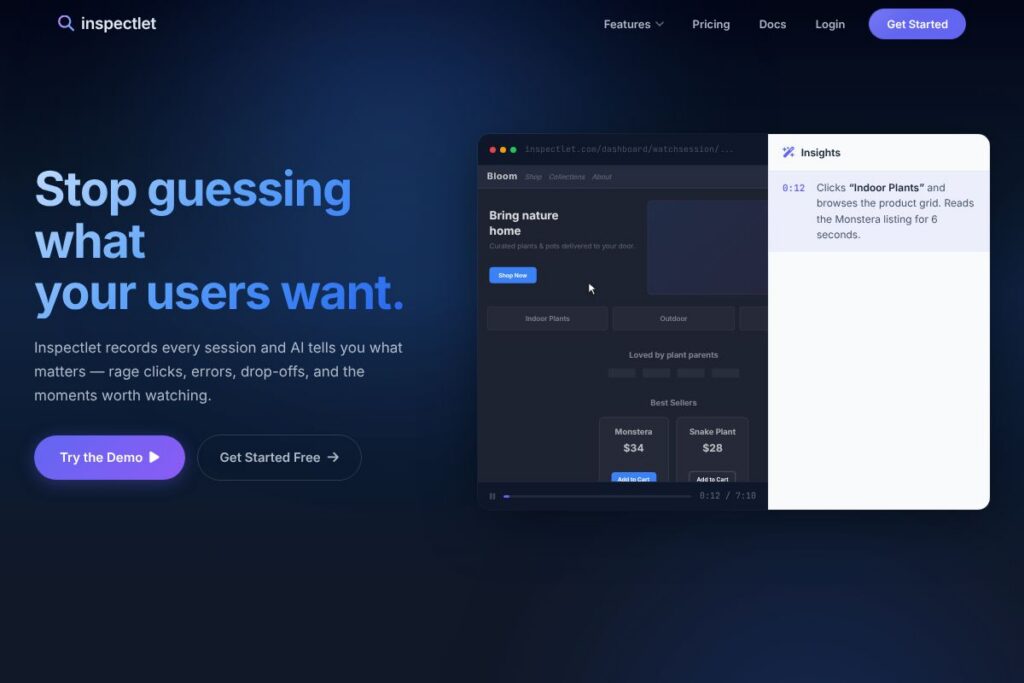
Inspectlet records videos of website visitors and analyzes their interactions to reveal where users hesitate, get frustrated, or convert. Core capabilities include session replay, heatmaps, form analytics, JavaScript error logging, A/B testing hooks, and AI-driven session prioritization that highlights the sessions most likely to contain actionable issues.
Compared with Hotjar, Inspectlet emphasizes deeper session playback and automated session scoring rather than an equal focus on on-page surveys and funnels. Against FullStory, Inspectlet provides a simpler setup and direct session narratives while FullStory concentrates on enterprise scale and advanced event modeling. Compared with LogRocket, Inspectlet matches playback and error logging but leans toward behavioral narrative and AI session highlights rather than heavy client-side performance telemetry.
All of this makes Inspectlet especially useful for product teams and UX researchers who need to watch user behavior, reproduce bugs, and quantify form friction. It suits teams that want fast setup via a small JavaScript snippet and prioritized lists of sessions worth watching.
How Inspectlet Works
Inspectlet starts with a lightweight JavaScript snippet you drop into your pages, which captures mouse movements, clicks, scrolls, and keystrokes while respecting input masking for sensitive fields. Recordings are assembled server-side into session replays you can watch in the dashboard, with timestamps and synchronized console/error logs available alongside the video.
Behind the scenes, Inspectlet’s models analyze every recorded session to detect signals such as rage clicks, JavaScript errors, unusual navigation, and form abandonment. Sessions receive an interest score so the highest-probability problem sessions appear first, and the platform annotates replays with those detected events to speed debugging and UX review.
Teams typically combine filters and funnels to locate sessions of interest, then watch prioritized replays to reproduce bugs or observe conversion blockers. Inspectlet supports event tagging so you can mark critical interactions and build playback lists around campaign sources, devices, or user segments.
What does Inspectlet do?
Let’s talk Inspectlet’s Features. The platform groups core tools around observing and analyzing real user behavior, with recent emphasis on AI session insights that automatically surface frustration signals and conversion drop-offs. Key capabilities cover session replay, heatmaps, form analytics, surveys, error logging, funnels, and JavaScript A/B testing hooks.
Session Replay
Session replay records full user interactions including mouse movement, clicks, scrolls, and typed input with masking for sensitive fields. Watching replays reveals hesitation, mis-clicks, and navigation loops so product teams can reproduce UX issues and confirm fixes faster.
Heatmaps
Heatmaps aggregate click, move, and scroll data to show which areas attract attention and where users stop engaging. They help validate layout changes, identify ignored CTAs, and prioritize UI adjustments based on aggregated behavior.
AI Session Insights
Automated models score and surface sessions that contain rage clicks, errors, or unusual navigation patterns, reducing the time spent hunting through recordings. Each flagged session includes annotations explaining why it was prioritized so reviewers know what to watch first.
Funnels and Filtering
Define funnels to map the steps toward conversion and filter sessions by traffic source, device, event, or conversion status. You can then watch replays of users who dropped off at a specific funnel step to diagnose the exact cause of abandonment.
Form Analytics and Error Logging
Form analytics show which fields cause the most friction and where users abandon input, while integrated JavaScript error logging ties client-side errors to the exact moments they occurred in a session. This combination speeds up root-cause analysis for broken validations and API failures.
Feedback Surveys
On-page surveys let you collect direct user feedback and connect responses to the session replay for context. Combining qualitative responses with recorded behavior provides richer evidence for UX decisions.
JavaScript A/B Testing Hooks
Inspectlet supports client-side experiment hooks so you can replay sessions by variant and compare how different treatments affect behavior. Replays make it easy to observe unintended side effects of experiments on navigation or form completion.
Integration and Data Export
Export session metadata or push events to other analytics tools to combine behavioral replays with existing metrics systems. The setup focuses on a quick JavaScript install and straightforward event tagging to integrate with broader analytics workflows.
With these features, the biggest benefit is the ability to move from hypothesis to evidence quickly: filter a cohort, watch the most relevant recordings first, and act on concrete examples rather than aggregated guesswork.
Inspectlet pricing
Inspectlet follows a subscription-based SaaS model with tiered plans for individual sites and teams, plus custom enterprise options; detailed plan features and seat-based or session-based limits vary by tier. For current plan definitions, limits, and any free tier or trial offers, view Inspectlet’s current pricing options.
What is Inspectlet Used For?
Inspectlet is used to diagnose user experience problems by watching how real visitors interact with a site, capturing the exact sequence of actions that lead to errors, confusion, or successful conversions. Product managers and UX designers use these recordings to validate design changes and reproduce bugs reported by customers.
Teams also use Inspectlet for conversion rate optimization to see why users drop out of funnels, to test variant behavior with A/B experiment hooks, and to pair survey responses with session playback for richer qualitative research. Technical teams rely on the integrated error logging to trace client-side failures tied to specific user sessions.
Pros and Cons of Inspectlet
Pros
- Detailed session playback: Session replays include mouse movements, clicks, scrolls, and typed input with masking for sensitive fields, which helps teams reproduce issues precisely and validate fixes.
- Automated session prioritization: AI Session Insights prioritize the sessions with rage clicks, errors, or drop-offs so reviewers spend time where it matters most rather than watching random recordings.
- Comprehensive form and error analytics: Form analytics and JavaScript error logging are combined with replays so teams can see both the symptom and the exact client-side traceback that caused it.
- Flexible filtering and funnels: Powerful filtering by source, device, events, and funnel step makes it straightforward to find sessions tied to a specific campaign or problem.
Cons
- Limited mobile-native SDKs: Mobile app instrumentation is less prominent compared with some competitors, so mobile-native apps may require additional tooling to achieve parity.
- Enterprise scaling considerations: Larger organizations with heavy session volume may need to evaluate retention limits and ingestion policies carefully to control costs and data flow.
- Feature overlap with other tools: Teams already using advanced analytics suites may find some feature overlap and should plan integration to avoid duplicated instrumentation.
Does Inspectlet Offer a Free Trial?
Inspectlet offers a free interactive demo and typically provides trial or freemium options; for exact availability and plan limits consult the vendor directly. The one-minute online demo records your live session so you can watch a replay without signing up, and full plan trials or free tiers, if offered, are detailed on the vendor site.
Inspectlet API and Integrations
Inspectlet installs via a small JavaScript snippet and supports a client-side API for custom event tagging and identifying users, which lets teams capture business events and tie them to replays. For installation steps and developer guidance consult Inspectlet’s installation and developer guides.
The platform is commonly used alongside analytics and tag management tools such as Google Analytics, Segment, and popular tag managers to combine replay data with metrics and funnel tracking. Teams export session metadata or forward events to other systems to build a complete behavioral dataset.
10 Inspectlet alternatives
Paid alternatives to Inspectlet
- Hotjar — Combines heatmaps, session recordings, and feedback tools with a heavy focus on simple user-friendly reporting and surveys; commonly used by marketing and product teams.
- FullStory — Enterprise-focused session replay with deep event modeling, advanced search, and developer tools for large-scale behavioral analytics and instrumentation.
- LogRocket — Session replay plus network and performance logging designed to help engineering teams reproduce frontend issues and regressions quickly.
- Smartlook — Offers session recordings, events, and funnels with affordable tiers for SMBs and features aimed at conversion optimization.
- Mouseflow — Heatmaps and replay with strong funnel analysis and form analytics, aimed at teams optimizing conversion flows.
- Contentsquare — Enterprise-level behavioral analytics and visualizations for complex user journeys and large-scale digital experience teams.
Open source alternatives to Inspectlet
- OpenReplay — An open source session replay solution that you can self-host to capture replays and privacy-controlled playback for development and QA workflows.
- rrweb — A recording library for session replay that developers embed into projects to build bespoke replay systems or feed replays into self-hosted pipelines.
- PostHog — Open source analytics platform with session recording features and event tracking, allowing self-hosting and product analytics in one stack.
- Matomo — Self-hosted analytics with optional session recording plugins and a privacy-first approach for teams that need full control over data.
Frequently asked questions about Inspectlet
What is Inspectlet used for?
Inspectlet is used to record and analyze real visitor sessions to identify UX issues, form friction, and conversion drop-offs. Teams watch prioritized replays, inspect errors, and use funnel filters to understand why users fail to convert.
Does Inspectlet detect JavaScript errors?
Yes, Inspectlet logs JavaScript errors alongside session replays. Error sessions are flagged so you can jump to the exact moment an error occurred and see the user actions that preceded it.
Can Inspectlet show heatmaps and aggregated behavior?
Inspectlet provides heatmaps for clicks, movement, and scroll depth. Heatmaps help you validate layout changes and locate areas of high or low engagement across pages.
Does Inspectlet integrate with other analytics tools?
Yes, Inspectlet is designed to work with tag managers and analytics platforms. Teams commonly integrate it with tools such as Google Analytics and Segment to combine replay context with quantitative metrics.
How do I get session recordings with Inspectlet?
You install a small JavaScript snippet to start recording sessions. The snippet captures interactions in the browser, after which recordings appear in the Inspectlet dashboard for filtering and playback.
Final verdict: Inspectlet
Inspectlet excels at turning raw user interactions into watchable evidence and prioritized insights, which speeds up bug reproduction and UX fixes. Its strengths lie in clear session replays, integrated form analytics, and AI session scoring that reduces time spent finding the sessions that matter.
Compared with Hotjar, Inspectlet leans more heavily on annotated session narratives and automated session prioritization, while Hotjar balances recordings with built-in feedback and simpler heatmap reporting; for detailed plan limits and pricing comparisons consult Hotjar’s pricing page and Inspectlet’s current pricing options. For teams focused on rapid bug reproduction and prioritized UX review, Inspectlet is a strong fit; organizations prioritizing enterprise-scale event modeling or deeper performance telemetry may also evaluate competitors such as FullStory or LogRocket.