What is MediaWiki
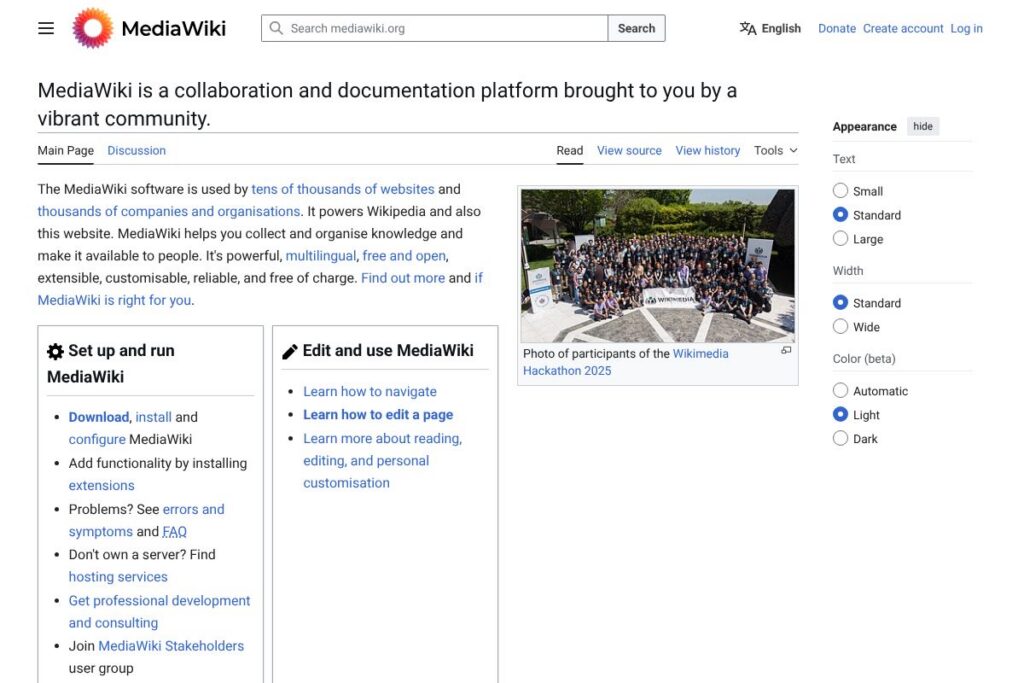
MediaWiki is an open-source wiki platform used to collect, organize, and publish collaboratively edited content at scale. It is the software that powers Wikipedia and thousands of other public and private wikis, and it focuses on reliability, structured content, and internationalisation. Explore the official overview on the MediaWiki project site for release notes and core goals.
Compared with proprietary knowledge platforms, MediaWiki emphasizes openness and extensibility. For example, Confluence targets integrated SaaS teams with built-in task and project integrations and a paid per-user model, while MediaWiki offers self-hosting and deep customization without licensing fees. Notion provides an all-in-one workspace with polished editing and databases, but it is a hosted product with subscription pricing; MediaWiki trades some out-of-the-box polish for greater control and scalability. XWiki is another open-source wiki with built-in application features; MediaWiki generally excels where large public read traffic, multi-language support, and a mature extension ecosystem are primary requirements.
All of this makes MediaWiki particularly well suited to organisations and communities that need a robust, self-hosted knowledge base with extensive customization options. It is a strong fit for public-facing documentation sites, large internal knowledge repositories, and collaborative documentation projects that require fine-grained extension and localization support.
How MediaWiki Works
MediaWiki stores content as wiki pages written in wikitext markup, which can be edited directly in the web interface or via visual editors. Pages are versioned automatically, so every change produces a revision history that administrators and editors can review, compare, and revert as needed.
The platform is modular: a lightweight core provides page rendering, user accounts, and revision tracking, while additional capabilities are added through extensions and skins. Operators typically install MediaWiki on a web server, connect it to a relational database, and then enable extensions for features such as richer editing, search, authentication, or API access.
Common workflows include creating structured documentation using templates and categories, setting up namespaces to separate content types, and using page protection and user rights to manage editing. For integrations and automated workflows, developers use the HTTP-based API and event hooks to connect MediaWiki to external systems.
What does MediaWiki do?
MediaWiki’s core capabilities center on collaborative content creation, revision control, and public or private publishing. The platform includes built-in revision histories, page-level metadata, namespace support, and search, and it can be extended with functionality such as visual editing, structured data, and document import/export features. The project regularly publishes documentation and guides on the MediaWiki documentation portal.
Let’s talk MediaWiki’s Features
Editing and visual editor
The platform supports both wikitext and a visual editor, allowing contributors to work in plain markup or a WYSIWYG-like interface. This dual approach helps technical editors who prefer markup and non-technical contributors who want a simpler editing experience, enabling broader participation across teams.
Extension ecosystem
MediaWiki has a rich extension ecosystem that adds search improvements, authentication methods, content transforms, and UI components. Many communities rely on extensions such as VisualEditor, Parsoid, and Semantic MediaWiki to tailor functionality to their needs, and extension pages are catalogued on the extension directory.
Internationalisation and localisation
The platform includes built-in support for multiple languages, localized user interfaces, and content workflows for translations. Large multilingual projects can manage language variants and make pages available in dozens of languages while keeping a single coherent structure.
User and permission management
MediaWiki provides granular user rights and group-based permissions so administrators can control who reads, edits, or moderates pages. It also supports single sign-on and external authentication through extensions, which is useful for corporate deployments and intranets.
API and automation
A web-based API exposes reading and writing endpoints, search interfaces, and content management functions suitable for automation and integrations. Developers use the API and a rich set of hooks to build bots, importers, and custom publishing pipelines that interact with wiki content programmatically.
Performance and scaling
The software is designed to handle high read traffic through caching layers and CDN-friendly configurations while scaling write workloads with database tuning and job queues. Wikimedia-scale deployments demonstrate that MediaWiki can serve millions of pageviews per day when properly provisioned and tuned.
With these features, the biggest benefit of MediaWiki is its combination of proven scalability and a flexible extension model, which lets organisations tailor the platform to a wide range of documentation and knowledge-sharing scenarios.
MediaWiki pricing
MediaWiki is free and open-source software distributed under the GNU General Public License, which means there are no licensing fees for the software itself. Organisations can download, install, and modify MediaWiki at no cost; see the download and installation guides for setup instructions and recommended system requirements.
Many organisations choose to self-host MediaWiki; in those cases, costs come from infrastructure, backups, and maintenance rather than software licenses. For teams that prefer hosted support, third-party vendors provide managed hosting, enterprise support, and consultancy services with custom pricing; check the official services and support resources to find providers and community help.
What is MediaWiki Used For?
Large public knowledge projects and encyclopedias use MediaWiki to publish collaboratively edited reference content with strong revision tracking and editorial workflows. Its versioning and talk pages make it suitable for communities that need traceable edits and community moderation.
Internal documentation, developer knowledge bases, and product manuals are other common uses; teams use templates, categories, and namespaces to structure content and make it navigable. MediaWiki is often selected where long-form, interlinked documentation and multilingual support are priorities.
Pros and Cons of MediaWiki
Pros
- Open-source and free: The core software can be downloaded and used without licensing costs, enabling full control over customization and hosting. This is useful for organisations that need to avoid per-user subscription fees.
- Extensible ecosystem: A large library of extensions lets teams add features such as visual editing, structured data, and external authentication without modifying core code. Extensions support integration with a wide variety of tools.
- Proven scalability: The software powers high-traffic sites and can be tuned for performance with caching, job queues, and database optimizations. Wikimedia deployments are a real-world example of large-scale use.
Cons
- Steeper setup and maintenance: Self-hosting requires server management, backups, and security patches, which can be a heavier operational burden compared to hosted SaaS alternatives. Organisations without dedicated ops resources may need external support.
- Out-of-the-box polish: The core interface can feel utilitarian compared with modern SaaS collaboration platforms, requiring skins or UX-focused extensions to achieve a more polished editor experience. Customising the UI often requires technical work.
Is MediaWiki Free to Try?
MediaWiki offers a free and open-source platform that can be downloaded and run immediately at no cost; the core software does not require a trial. To evaluate it quickly, set up a local or temporary server following the installation guide and test editing, extensions, and user workflows before committing to a production deployment.
MediaWiki API and Integrations
MediaWiki exposes a REST-like and action-based web API for reading, editing, and content management operations; the API documentation provides endpoints, authentication details, and example calls. The API supports common tasks such as page creation, revision queries, and user management, making automation and bot development straightforward.
Integration options are broad through extensions and community-maintained connectors; common integrations include LDAP/SSO authentication, OAuth, search backends, and publishing pipelines. Browse the integration and extension pages to find modules that connect MediaWiki to CI systems, content management tools, and identity providers.
10 MediaWiki alternatives
Paid alternatives to MediaWiki
- Confluence – A hosted knowledge management and team collaboration platform with built-in page templates, inline comments, and team-level permissions; priced per user and offered as a cloud service. See the Confluence product site for details.
- Notion – An all-in-one workspace combining docs, databases, and kanban boards, with easy-to-use editing and collaboration features under a subscription model. Compare features on the Notion plans page.
- Microsoft SharePoint – Enterprise content management and intranet platform that integrates tightly with Microsoft 365 and Active Directory, typically licensed through Microsoft subscriptions. Learn about SharePoint on the Microsoft SharePoint overview.
- Slab – A knowledge hub focused on team documentation and search, offered as a hosted product with team-focused features and paid plans. Explore Slab’s offerings on the Slab plans page.
- Document360 – A SaaS knowledge base platform aimed at product documentation with versioning, analytics, and portal features under subscription pricing. Review features on the Document360 pricing and features.
- Guru – A knowledge management tool with verification workflows and browser extensions for in-context answers, provided as a paid SaaS product. See the Guru product information.
Open source alternatives to MediaWiki
- DokuWiki – A lightweight, file-based wiki engine that is easy to install and well-suited for small to medium documentation sites. Check the DokuWiki project site.
- XWiki – An open-source wiki and application platform with built-in scripting and structured data support, useful for teams that want both wiki pages and app-like content. Visit the XWiki site.
- BookStack – A simple, user-friendly open-source platform designed specifically for creating book-like documentation and manuals. See the BookStack project.
- Foswiki – A community-driven wiki platform focused on collaboration and enterprise use cases with plugin support. Learn more at the Foswiki site.
- Tiki Wiki CMS Groupware – An all-in-one CMS and wiki with many built-in features for collaboration and publishing, suitable for self-hosted community sites. Explore Tiki Wiki.
Frequently asked questions about MediaWiki
What is MediaWiki used for?
MediaWiki is used for collaborative documentation and knowledge bases. It excels at public encyclopedias, large internal documentation sites, and community-maintained content with full revision histories and discussion pages.
Does MediaWiki have an API for automation?
Yes, MediaWiki provides a comprehensive web API. The API documentation describes endpoints for reading, writing, and managing content, which is suitable for bots and integrations.
Can MediaWiki be hosted in an enterprise environment?
Yes, MediaWiki is designed for self-hosting and enterprise deployments. Organisations typically install it on their infrastructure, integrate with LDAP or SSO, and add enterprise-grade extensions and monitoring.
Is MediaWiki free to use for commercial projects?
Yes, MediaWiki is free and open-source under the GNU GPL. You can use, modify, and distribute it in commercial or non-commercial settings without paying licensing fees.
How do I get help with MediaWiki?
Community and documentation resources provide support and assistance. Use the support desk and community pages to ask questions, report bugs, or find volunteer contributors.
Final verdict: MediaWiki
MediaWiki stands out as a mature, battle-tested platform for collaborative knowledge that prioritises openness, scalability, and internationalisation. It is particularly strong where long-form, interlinked documentation and a community-driven editing model are required, and where organisations want full control over hosting and customization.
Compared with Confluence, which is a hosted SaaS product priced per user such as $5.75/user/month for standard cloud tiers, MediaWiki has no licensing cost and can be hosted on-premises, but it requires more operational effort to install, secure, and maintain. For teams that prefer a managed, integrated experience and are willing to pay per user, Confluence simplifies administration; for organisations that need granular control, offline hosting, or complete customization, MediaWiki is the stronger choice.
Overall, MediaWiki is a powerful option for organisations and communities that need a scalable, extensible platform for collaboratively produced knowledge and that can allocate resources for hosting and maintenance. To get started, follow the installation guide and explore extensions on the MediaWiki extension directory.