What is Ryver
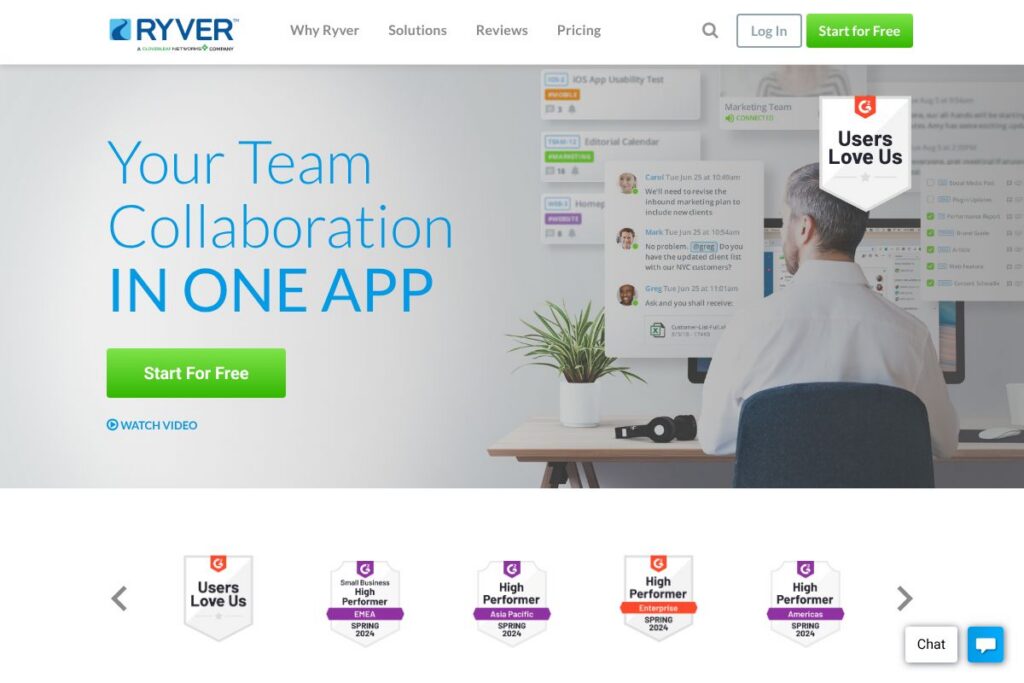
Ryver is a team collaboration platform that brings group chat, topic-based conversations, task management, and voice/video calling into one application. It is designed to reduce app sprawl by combining synchronous and asynchronous communication with built-in task boards and file sharing so teams can keep work and decisions in one place.
Ryver competes directly with collaboration and chat tools such as Slack, Microsoft Teams, and Asana. Compared with Slack, Ryver bundles task management natively rather than relying on third-party task apps. Against Microsoft Teams, Ryver prioritizes lightweight team coordination and simple admin controls rather than deep Office 365 integration. Compared with Asana, Ryver is stronger on live team conversation and real-time calls while Asana focuses more on complex project workflows.
All of this makes Ryver useful for distributed teams and small-to-medium businesses that want integrated chat and task tracking without stitching multiple services together. It works well for teams that want a single place for messages, tasks, and occasional calls, especially when reducing email volume and internal tool costs is a priority.
How Ryver Works
Ryver organizes work around three linked surfaces: team conversations, topic-based forums, and task boards. Conversations are searchable and can contain files and links; messages can be converted into tasks which then appear on team or personal boards for tracking and assignment.
Admins set up the team and manage users, invite links, and SSO options for centralized access control. Day-to-day workflows typically involve posting updates in team chats, creating tasks from decisions made in threads, and using boards to move items from backlog to done, with activity visible in conversation history.
Calls are available as a built-in, one-click option for quick audio or video huddles with up to five participants, with screen sharing for lightweight meetings. Integrations and webhooks let teams surface external files and automate simple flows so Ryver sits at the center of an existing toolchain rather than replacing every system.
Ryver features
Ryver groups core collaboration primitives into chat, tasks, and calling, and adds admin features like single sign-on and premium support. The platform emphasizes unlimited chat and file sharing, native task boards, and integrations with cloud storage and automation services.
Let’s talk Ryver’s Features
Group Messaging
Group messaging supports unlimited conversations and searchable topics to keep discussions organized by project or subject. Threads and topics reduce inbox clutter and make it easier to find decisions later, while unlimited file sharing keeps attachments accessible inside the platform.
Topic-based Forums
Topic-based forums act like persistent channels for ongoing work and knowledge sharing across teams. Forums provide a place to post announcements, share reference material, and hold topic-specific discussions that new team members can review to get context.
Task Management
Tasks can be created from any message and organized on personal or team boards with checklists, tags, and assignments to capture details and ownership. Unlimited tasks and boards let teams track both short-term actions and longer work items without moving to a separate project tool.
Voice & Video Calls (beta)
Built-in calling supports one-click audio and video meetings for small groups, including screen sharing and clear audio quality for quick collaboration. Calls are useful for impromptu demos, decision meetings, or when a conversation needs a real-time touch beyond chat.
Single Sign-On (SSO)
Ryver supports SAML-based SSO with providers like Google Workspace and Okta to simplify login and centralize identity management. SSO helps reduce password resets and supports compliance and access controls for larger organizations, and admins can enforce enterprise-level authentication policies.
Integrations and Automation
Ryver connects to cloud storage services such as Google Drive, Dropbox, and Box for direct file sharing inside conversations, and it links to other apps through Zapier for workflow automation. Teams can also build custom inbound and outbound webhooks or bots to automate notifications and synchronize external systems with Ryver.
With these features Ryver reduces context switching by keeping conversations, tasks, and files in one place, while integrations extend the platform into the rest of your stack.
Ryver pricing
Ryver uses a subscription model with tiered plans for small teams, larger teams, and enterprise customers, including promotional pricing for initial months. Plans are grouped by user capacity and include chat, file sharing, task management, and calling; enterprise plans add SSO and premium support.
Monthly Billing:
Starter – $69/mo (Up to 12 users, Unlimited Chat, Unlimited File Sharing, Task Management, Voice & Video Calls (beta))
Standard – $129/mo (Up to 30 users, Custom Invite Links, Unlimited Chat, Unlimited File Sharing, Task Management, Voice & Video Calls (beta))
Medium Pack – $4/user (30+ users, Custom Invite Links, Unlimited Chat, Unlimited File Sharing, Task Management, Voice & Video Calls (beta))
Enterprise – Starting at $199/mo (Enterprise features including SSO, Premium Support, Advanced Team Management, Testing Sandbox, Custom Invite Links, Unlimited Chat, Unlimited File Sharing, Task Management, Voice & Video Calls (beta))
Annual Billing:
Starter – $828/year ($69/mo equivalent, Up to 12 users, Unlimited Chat, Unlimited File Sharing, Task Management, Voice & Video Calls (beta))
Standard – $1,548/year ($129/mo equivalent, Up to 30 users, Custom Invite Links, Unlimited Chat, Unlimited File Sharing, Task Management, Voice & Video Calls (beta))
Medium Pack – $2/user per month equivalent for annual billing during promotional period (30+ users, Custom Invite Links, Unlimited Chat, Unlimited File Sharing, Task Management)
Enterprise – Starting at $149/mo when discounts apply at checkout, Enterprise features and negotiated terms for larger deployments
Promotional pricing is often offered for the first three months for new accounts. For the latest plan details and any current offers, review Ryver’s current pricing options.
What is Ryver used for
Ryver is used to centralize team communication and to convert conversation into tracked work. Teams that previously used email plus multiple apps can move daily standups, quick decisions, and task follow-ups into a single workspace to reduce lost context and email volume.
Common use cases include internal team chat and announcements, lightweight project coordination with task boards, and small group calls for demos or status checks. It is suited to remote and hybrid teams, support squads, and product groups that want integrated discussion and action tracking without separate subscriptions for chat and task tracking.
Pros and cons of Ryver
Pros
- Unified chat and task management: Combining messaging with native tasks reduces the need for separate task tools and keeps decisions linked to action items.
- Generous unlimited limits: Unlimited chat, file sharing, and searchable history help growing teams avoid storage headaches and retain context over time.
- Enterprise-ready access controls: SSO support and admin features make it practical for organizations that require centralized authentication and compliance controls.
Cons
- Less deep Office integration: Compared with Microsoft Teams the platform does not offer the same level of built-in Office 365 app integration, which could be a drawback for heavy Microsoft users.
- Calling is early-stage: Voice and video calling are listed as beta and may lack advanced meeting features found in dedicated conferencing tools.
- Fewer marketplace apps than larger rivals: While Zapier extends connectivity, the native app ecosystem is smaller than that of some competitors which may require more custom integration work.
Does Ryver Offer a Free Trial?
Ryver offers a free plan and promotional pricing for new accounts. The free tier allows teams to start with unlimited chat and basic task management at no cost, and new customers frequently see limited-time discounts or months free on paid plans for onboarding. For specifics about what is included in the free plan and any current promotions, check Ryver’s signup and pricing details.
Ryver API and Integrations
Ryver provides integration options and an API for developers to automate workflows and connect external systems; see the developer resources and API documentation for endpoint details and authentication methods. The API supports creating and updating messages, tasks, and hooks so teams can push or pull activity between systems.
Key built-in integrations include Google Drive, Dropbox, and Box for file sharing, and Zapier for connecting Ryver to over 2,000 apps. For identity integrations, Ryver supports SAML SSO with providers such as Okta and Google Workspace SSO to centralize user access.
10 Ryver alternatives
Paid alternatives to Ryver
- Slack — Team chat with a large app ecosystem, advanced channel controls, and built-in huddle and call features for larger organizations.
- Microsoft Teams — Deep integration with Microsoft 365 apps, Teams channels, and enterprise telephony and meeting features for Microsoft-centric environments.
- Asana — Focused on project and task management with richer project views and workload planning; less emphasis on real-time chat.
- Trello — Visual kanban boards that are simple for task tracking; pairs well with a separate chat tool for communication.
- ClickUp — All-in-one work platform combining tasks, docs, and chat with many customizable views for project teams.
- Basecamp — Simple project organization with message boards, to-dos, and group chat for small teams and agencies.
- Flock — Team messaging and collaboration features aimed at small and medium businesses with competitive pricing.
Open source alternatives to Ryver
- Mattermost — Self-hosted team messaging platform with extensibility and on-premises deployment for teams that need full control.
- Rocket.Chat — Open source chat platform with audio/video calling, robust integrations, and the option to self-host.
- Zulip — Threaded chat that scales well for large developer teams, available as open source with hosted options.
- Matrix / Element — Decentralized communication protocol and client for secure messaging and federation across servers.
Frequently asked questions about Ryver
What is Ryver used for?
Ryver is used for team communication, task tracking, and lightweight calling in a single app. Teams use it to move conversations into action by turning messages into tasks and tracking progress on boards.
Does Ryver integrate with Google Drive and Dropbox?
Yes, Ryver integrates with Google Drive, Dropbox, and Box for file sharing inside conversations. These integrations let users attach cloud-stored files directly into chats and tasks.
Can Ryver be used with SSO providers like Okta?
Yes, Ryver supports SAML-based single sign-on with providers such as Okta and Google Workspace. This enables centralized access management and reduces password-related support requests.
How much does Ryver cost per month?
Ryver offers tiered subscription plans starting with the Starter plan at $69/mo and enterprise plans starting at $199/mo. Promotional pricing and discounts for annual billing or initial months are often available to new customers.
Does Ryver have an API for automation?
Yes, Ryver publishes API documentation to automate messages, tasks, and webhooks. Developers can use the API and webhooks to connect Ryver to internal systems or to automate notifications through services like Zapier.
Final verdict: Ryver
Ryver is a practical choice for teams that want chat, task management, and small-group calling in a single platform with predictable pricing. It does particularly well at linking conversation to action by letting users convert messages into tracked tasks and by providing unlimited chat and file storage to reduce information loss over time.
Compared with Slack, which commonly starts around $6.67/user/month for paid tiers, Ryver positions itself as a bundled alternative that includes native task boards and built-in calling at set team prices rather than per-user licensing. That makes Ryver appealing to smaller companies and departments that prefer a single subscription covering chat and lightweight project tracking without adding multiple paid apps.
Overall, Ryver fits teams that prioritize a consolidated workspace and straightforward administration over an extensive third-party app marketplace or advanced conferencing features. For organizations that need deeper integrations with enterprise suites or large-scale meeting features, pairing Ryver with dedicated services may still be required.