TiddlyWiki: An Overview
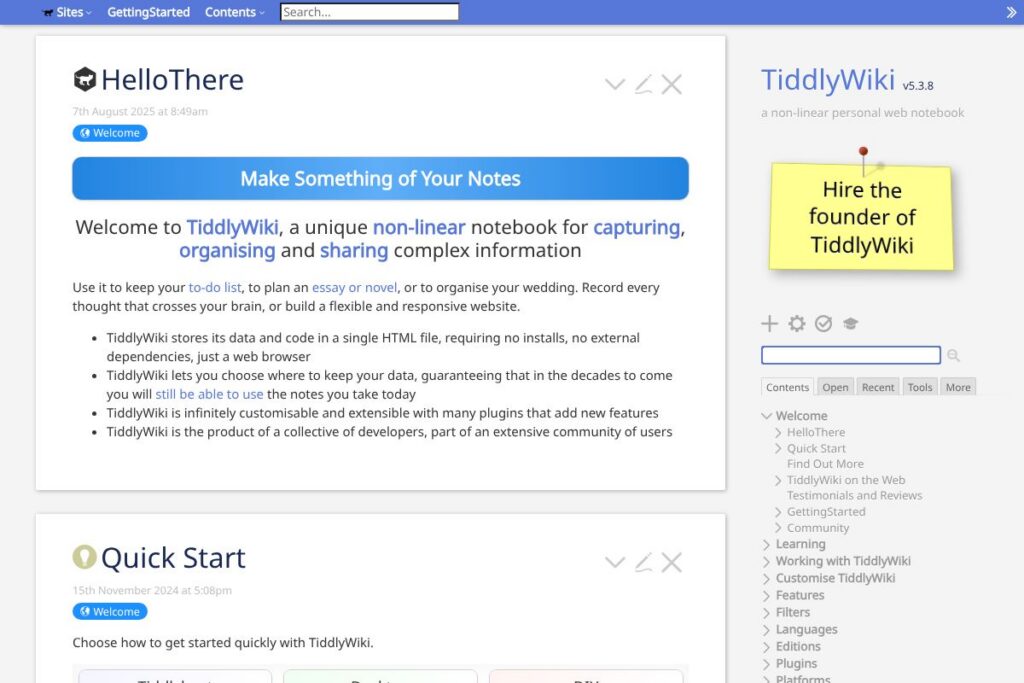
TiddlyWiki is a single-file, client-side wiki that stores content as small, titled units called tiddlers which can be linked, tagged, and composed into larger pages or narratives. Because the entire application and your content live in one HTML file, you can run, carry, and save your notebook locally; this makes it a strong choice for users who prioritize portability, offline access, and full control over their data. Visit the official TiddlyWiki site to download the standalone HTML or view static alternatives such as the static version for non-JavaScript browsing.
TiddlyWiki differs from hosted note platforms by design: it focuses on non-linear organization, content modularity, and extendability through plugins and macros rather than centralized cloud services. Compared with Notion, which is a hosted, block-based workspace with collaborative editing and integrated storage, TiddlyWiki emphasizes local control and customization rather than team-level collaboration out of the box. Compared with Obsidian, which uses linked markdown files and offers paid sync services, TiddlyWiki packages the app and content into a single HTML file and provides a different plugin and macro model. Compared with Microsoft OneNote, which targets structured notebooks and cloud sync, TiddlyWiki gives finer-grained control over linking, templates, and programmatic composition of content.
All of this makes TiddlyWiki especially useful for individuals who want a highly customizable, private knowledge base that runs in a browser or as a Node.js application. Its architecture is well suited to writers, researchers, and developers who want to shape the interface and storage to their workflow rather than adapting to a hosted product’s constraints.
How TiddlyWiki Works
TiddlyWiki stores each idea or piece of content as a tiddler with a title, body, tags, and fields. Tiddlers are connected through wiki-style links, transclusion, and lists so you can build non-linear views, outlines, and documents from small components.
You typically start by opening a single HTML file in a browser, creating tiddlers, and organizing them with tags and links. Saving can be done locally, via browser download, or through adapters that connect to cloud storage and version-control services; the Node.js edition adds programmatic build and sync options for more advanced workflows.
Workflows range from daily note capture and Zettelkasten-style linking to publishing a small website composed from selected tiddlers. The plugin system and macros allow automating repetitive tasks, embedding dynamic content, and adapting the interface to specific use cases.
TiddlyWiki features
TiddlyWiki centers on modular content, flexible linking, and extensibility. Core capabilities include tiddlers as atomic content units, tag and field-based filtering, macros and plugin support, multiple saving adapters, and a themeable interface. The project also maintains documentation and community plugins that extend functionality for publishing, syncing, and formatting.
Let’s talk TiddlyWiki’s Features
Single-file application and content
The entire app and your notes live in one HTML file which you can open in any modern browser, copy to a USB drive, or host on a website. This design guarantees portability and gives you multiple straightforward backup and distribution options.
Tiddlers, linking, and transclusion
Content is organized into tiddlers that can be linked by title, embedded within other tiddlers, and presented as aggregated views. This supports non-linear writing techniques and helps you recombine small pieces of content into larger documents without duplicating text.
Tagging, fields, and filtering
Tags and custom fields let you attach metadata to tiddlers and create dynamic lists or views using queries. Filters and list macros make it easy to build dashboards, task lists, and indexes that update automatically as your content changes.
Plugins and macros
A plugin architecture lets developers extend the editor, add import/export formats, integrate visualizations, or create new saving adapters. Macros provide reusable templating and processing inside tiddlers, enabling automation of repetitive content patterns.
Saving adapters and export options
TiddlyWiki supports multiple save methods including browser downloads, WebDAV, Dropbox, GitHub, and command-line Node.js tools. Export options let you publish selected tiddlers as static HTML pages or export content in common formats for external use.
With these features, the biggest benefit is extreme flexibility: you can use TiddlyWiki as a lightweight note app, a personal CMS, or a publishable site, adapting the tool to your needs rather than the other way around. Explore the plugin directory and documentation for community extensions and examples.
TiddlyWiki Pricing
TiddlyWiki is free and distributed as open-source software intended for local use and self-hosting. There are no subscription fees for the core application; you can download the single-file HTML and use it without paying.
If you prefer hosted or managed options, third-party services and community tools provide paid syncing, hosting, or managed backups, but these are separate from the TiddlyWiki project. See the official download and documentation pages for options to run the app locally or on a server.
What is TiddlyWiki Used For?
TiddlyWiki is commonly used as a personal knowledge base, research notebook, and writable documentation system. People use it to capture notes, outline long-form work, maintain reference material, and connect ideas with links and tags for later retrieval.
It also serves as a portable publishing tool for small websites, handbooks, and personal documentation collections because you can export selected tiddlers as static HTML. TiddlyWiki appeals to users who want an offline-capable, self-contained workspace and those who value customization and data ownership.
Pros and Cons of TiddlyWiki
Pros
- Portable single-file design: The complete application and content are stored in one HTML file, making backups, sharing, and offline use straightforward.
- Highly customizable: Themes, plugins, macros, and field-based queries let you tailor the interface and behavior to many workflows.
- Local data ownership: Content stays under your control by default, reducing reliance on third-party cloud providers and improving privacy.
- Powerful linking and composition: Tiddlers, transclusion, and filters support non-linear writing and reusable content assembly.
Cons
- No built-in multiuser collaboration: Real-time collaborative editing is not a core feature; collaboration requires workarounds or external tools.
- Steeper learning curve: Mastering tiddler conventions, wiki syntax, filters, and plugins can take time for new users.
- Save adapters may require setup: Integrating reliable sync or version control often needs configuration of adapters or a Node.js setup.
- Single-file model can be unfamiliar for large teams: Managing very large notebooks in one file may require additional workflow considerations or splitting into multiple files.
Does TiddlyWiki Offer a Free Trial?
TiddlyWiki is completely free and open-source. You can download the standalone HTML file and use it without time limits or paid tiers; optional third-party services exist for hosted backups or syncing at additional cost.
TiddlyWiki API and Integrations
TiddlyWiki does not rely on a centralized external API for core features, but it provides adapters, a plugin API, and a Node.js edition for automation and integration. The Node.js documentation and plugin resources explain how to run TiddlyWiki as a build tool, automate exports, and connect to version control.
Common integrations are community-built adapters for WebDAV, Dropbox, GitHub, and other storage backends, plus plugins that import data from and export to other formats. Browse the plugins and extensions to see available connectors and sync solutions.
10 TiddlyWiki alternatives
Paid alternatives to TiddlyWiki
- Notion — An all-in-one, cloud-hosted workspace for notes, databases, and collaboration with granular permissions and templates.
- Evernote — A long-standing note app with cross-device sync, powerful search, and web clipping features.
- Microsoft OneNote — Notebook-style app integrated with Microsoft 365, focused on structured sections and cloud sync.
- Roam Research — A linked-thought note app optimized for networked note-taking and daily note workflows.
- Craft — A design-forward writing and note app that emphasizes document layout, templates, and collaboration.
Open source alternatives to TiddlyWiki
- Joplin — A note-taking app that stores notes locally or synced, supports markdown, and offers desktop and mobile clients.
- Zim — A desktop wiki that stores pages as plain text files, with a focus on simple linking and local storage.
- Trilium — A hierarchical note-taking application with tree structure, scripting, and synchronization options.
- DokuWiki — A file-based wiki for documentation and intranets, designed to run on a server without a database.
Frequently asked questions about TiddlyWiki
What is TiddlyWiki used for?
TiddlyWiki is used as a personal wiki and knowledge management tool. People use it for note-taking, drafting, documentation, and composing information from linked micro-notes.
Does TiddlyWiki support syncing across devices?
Yes, syncing is possible through adapters and third-party services. Community plugins and Node.js workflows let you save to WebDAV, GitHub, Dropbox, or other backends to keep copies in sync.
Can I host TiddlyWiki on my own website?
Yes, you can host TiddlyWiki as a static site or serve it from your own server. Exported tiddlers can be published, and the single-file HTML can be served directly from web hosting or attached to a repository for distribution.
Does TiddlyWiki have a plugin system?
Yes, TiddlyWiki supports plugins and macros for extending the editor and storage options. The community maintains plugins for formatting, export, syncing, and UI enhancements which are listed in the project documentation.
Is TiddlyWiki suitable for team collaboration?
TiddlyWiki is optimized for individual use and personal notebooks. Teams can collaborate by sharing exported content or using external version control and hosting, but real-time multiuser editing is not a native feature.
Final Verdict: TiddlyWiki
TiddlyWiki excels at giving individuals complete control over their notes and knowledge in a portable, single-file package. It does core things very well: modular content with tiddlers, flexible linking and filters, and a plugin system that supports deep customization. For users who value privacy, offline access, and the ability to script or extend their notebook, TiddlyWiki is a strong fit.
Compared with a hosted competitor like Notion, which offers built-in collaboration and cloud storage, TiddlyWiki offers a fundamentally different trade-off: no subscription for the core tool and full data ownership versus hosted conveniences and team features. If you need shared, real-time collaboration and integrated team management, a hosted product may be simpler; if you want a self-contained, highly adaptable personal knowledge environment, TiddlyWiki is a compelling option. For downloads, plugins, and detailed usage guides visit the TiddlyWiki homepage and the Node.js integration documentation.