WPForms Explained
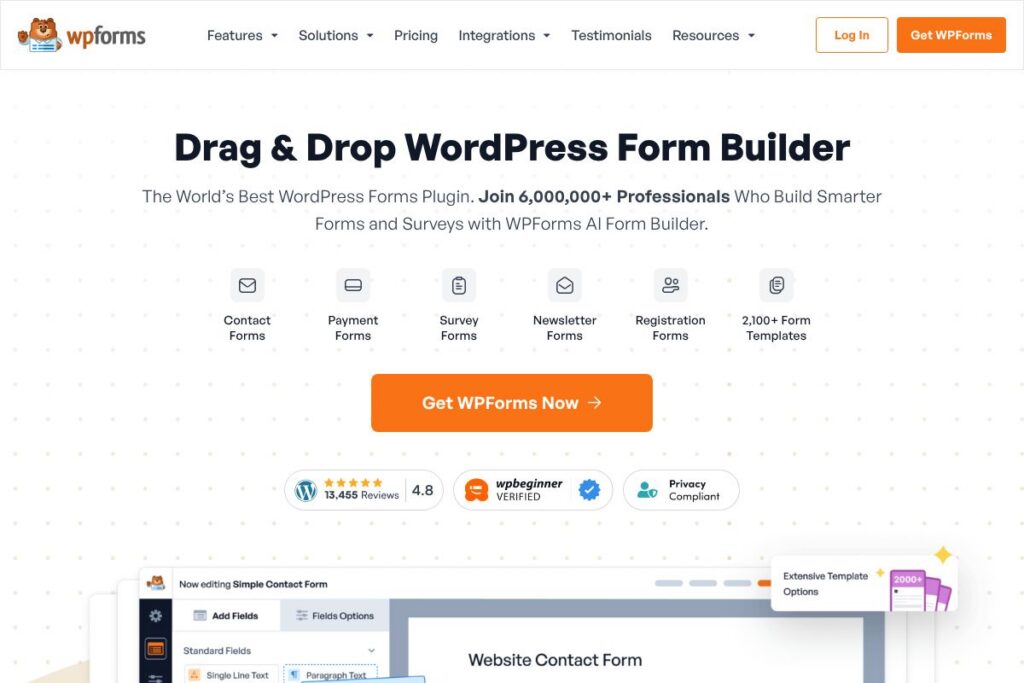
WPForms is a WordPress form plugin that provides a visual drag and drop form builder, ready-made templates, and integrations for payments and marketing tools. It is designed to let nontechnical users create contact forms, surveys, registration forms, and payment forms quickly while offering developer hooks for customization.
Compared to Gravity Forms, WPForms emphasizes ease of use and a free Lite offering for basic sites, while Gravity Forms focuses more on developer-focused features and advanced conditional logic at higher license tiers. Compared to Contact Form 7, WPForms replaces manual shortcodes and custom PHP with a visual builder and built-in form management. Compared to Typeform, which focuses on conversational multi-step forms hosted off-site, WPForms keeps all form functionality inside WordPress and integrates with site hosting and plugins.
WPForms excels at rapid form creation and everyday form needs, including payment collection and lead capture. It is best suited for small businesses, bloggers, agencies, nonprofits, and any WordPress site owner who wants a balance of usability, integrations, and extendability without heavy development work.
How WPForms Works
The WPForms plugin installs into a self-hosted WordPress site and adds a form builder inside the WordPress admin area. Users create forms by dragging fields onto a canvas, configuring labels, validation, and conditional logic, then embedding the form using a block, shortcode, or widget.
Form submissions are stored in WordPress and can trigger notifications, confirmations, and webhooks. For payment-enabled forms, WPForms integrates with Stripe, PayPal, Square, and other gateways to process one-time and recurring payments, while entries can be pushed to CRMs or email platforms via built-in integrations or Zapier.
WPForms features
WPForms centers on form creation, entry management, payments, and integrations. Core capabilities include a drag and drop form builder, WPForms AI-assisted form generation, a library of templates, conditional logic, payment integrations, surveys and polls, entry management, and spam protection. Recent updates have focused on AI-driven form creation and expanded conversion tools.
Drag & Drop Form Builder
The builder provides a visual interface for adding and arranging fields, creating multi-page forms, and tuning validation without writing code. This reduces setup time for typical contact forms, registration flows, and surveys.
WPForms AI
AI-assisted form creation helps generate forms and field suggestions based on a form description, speeding up setup for complex forms like grant applications or multi-step intake forms. This benefits teams that need fast, repeatable form creation with consistent field structures.
Form Templates Library
WPForms includes a large selection of pre-built templates for contact forms, donation forms, surveys, registration forms, and more to jumpstart form design. Templates reduce repetitive setup and provide best-practice field arrangements.
Smart Conditional Logic
Conditional logic allows fields, pages, and notifications to appear based on prior user input, which personalizes the form experience and shortens completion time. This is useful for application forms and order forms where fields change by user selection.
Payments and Gateways
Built-in integrations let you accept credit card payments and donations directly through forms with Stripe, PayPal, Square, and other processors. Payment features include support for one-time and recurring payments, coupons, and a payments dashboard for tracking transactions.
Integrations and Marketing Connections
WPForms connects form data to email marketing platforms, CRMs, and automation tools through native integrations and Zapier, enabling lead routing and marketing workflows. This lowers manual data entry and speeds lead follow-up.
Surveys, Polls, and Conversion Tools
Survey and poll fields, NPS support, and conversational form layouts improve response rates and user experience. Conversion features such as partial submissions, abandonment recovery, and form landing pages are included to boost completion and lead capture.
Entry Management and Notifications
Submissions are stored in WordPress with search and export options, and automated notifications can be sent to multiple recipients or routed based on form input. This centralizes lead, payment, and response data for teams.
Security and Performance
WPForms includes spam protection, access control, and PCI-compliant payment field handling to reduce risk while keeping forms performant on WordPress sites. The plugin is built with performance considerations to minimize page load impact.
With WPForms you get fast form setup, robust payments and integrations, and tools focused on increasing form completion and routing data where it is needed.
WPForms pricing
WPForms uses a tiered subscription model with a free option and paid tiers for additional features, add-ons, and integrations. Premium plans usually unlock advanced fields, payment gateways, survey tools, and priority support.
For specific plan comparisons and to see current billing options, view the WPForms homepage for the latest information on available plans and feature differences. Enterprise and agency requirements are supported through higher-tier plans and custom licensing available via the same site.
What is WPForms Used For?
WPForms is commonly used for contact and lead capture forms, event registrations, donation forms, and customer feedback surveys that need to live inside a WordPress site. Its drag and drop builder and template library make it practical for marketing teams and site owners to deploy forms without developer help.
It is also used for internal workflows such as job applications, grant submissions, and vendor intake where conditional logic and entry routing simplify review processes. Sites that require payments use WPForms to collect donations or sell simple products without a full shopping cart.
Pros and Cons of WPForms
Pros
- Ease of use: The visual drag and drop builder and template library let nontechnical users create forms quickly and consistently. This reduces reliance on developers for standard form needs.
- Comprehensive integrations: Native connections to payment gateways and marketing tools streamline lead capture and revenue collection. Integrations cut down on manual exports and imports.
- Strong entry management: Built-in storage, search, export, and notification features centralize submissions and simplify follow-up for teams. This helps ensure leads and payments are tracked reliably.
- Performance-focused: The plugin is built to minimize impact on page load while providing essential features for production sites.
Cons
- Advanced customization requires extensions: Some complex workflows and advanced integrations are available only through paid add-ons or higher-tier plans. Teams with specialized needs may need developer work or add-on purchases.
- Feature parity across tiers: Not all enterprise-level or developer features are available on lower-cost plans, so larger organizations should evaluate required add-ons before committing.
Does WPForms Offer a Free Trial?
WPForms offers a free plan. The WPForms Lite plugin is available through the WordPress plugin directory and provides core form-building capabilities such as a drag and drop builder, basic fields, and entry storage. Paid plans add payments, premium integrations, advanced fields, and priority support; see the WPForms homepage for current upgrade options.
WPForms API and Integrations
WPForms provides webhook support and developer hooks inside WordPress for extending functionality, and the plugin can be connected to external services via Zapier and native integrations. The WPForms integrations page outlines available connectors such as Stripe, PayPal, Mailchimp, HubSpot, and CRMs.
For developer-level access and examples, consult the WPForms developer documentation which explains filters, actions, and API endpoints for customizing form behavior and data handling.
10 WPForms alternatives
Paid alternatives to WPForms
- Gravity Forms — A developer-friendly WordPress form plugin with extensive add-ons and advanced developer hooks, popular for complex workflows and integrations.
- Formidable Forms — Focuses on advanced form-building, calculations, and display of form data, suited for directory, listing, and application-style sites.
- Ninja Forms — A modular WordPress form builder with paid add-ons for payments, CRM integrations, and conditional logic.
- Typeform — A hosted form platform known for conversational, multi-step surveys and lead capture with a polished UI and analytics.
- JotForm — A hosted form builder with a large template library, payment integrations, and enterprise features for data collection outside WordPress.
- WP Fluent Forms — A WordPress-focused form plugin with a visual builder and performance-minded design, available with premium add-ons.
Open source alternatives to WPForms
- Contact Form 7 — A free, lightweight WordPress plugin for simple contact forms that relies on shortcodes and custom code for extended features.
- Forminator — A freemium plugin from WPMU DEV offering forms, quizzes, and polls with a user-friendly builder and integrations in the free tier.
- CMB2 — A developer toolkit for creating custom metaboxes and forms in WordPress, suited for devs who prefer code-driven form creation.
Frequently asked questions about WPForms
What is WPForms used for?
WPForms is used for creating contact forms, surveys, payment forms, registrations, and custom data-collection forms inside WordPress. It supports conditional logic, templates, and integrations to route submissions to CRMs and email tools.
Does WPForms have a free plan?
Yes, WPForms offers a free Lite plan. The Lite plugin available via the WordPress plugin directory includes basic form-building features and entry storage; paid plans add integrations and advanced fields.
Can WPForms accept credit card payments?
Yes, WPForms supports payments through Stripe, PayPal, Square, and other gateways. Payment-enabled forms can handle one-time and recurring charges and integrate with reporting and coupons where supported.
How does WPForms integrate with email marketing tools?
WPForms integrates natively and via Zapier with common email and CRM platforms. Built-in connectors and automation options allow form submissions to create contacts, sync lists, and trigger email sequences.
Do I need coding skills to use WPForms?
No coding skills are required for most WPForms workflows. The drag and drop builder and templates let nontechnical users create functional forms, while developer hooks are available for custom integrations.
Final Verdict: WPForms
WPForms is a practical, user-friendly WordPress form plugin that balances simplicity with powerful features such as payments, conditional logic, and a large template library. Its free Lite offering makes it easy for small sites to get started, while premium tiers add integrations and enterprise features for growing sites.
Compared with Gravity Forms, WPForms stands out for accessibility and a free tier, while Gravity Forms targets developers with deeper customization and advanced add-on architecture; in pricing terms, WPForms provides a free entry point and tiered paid plans, whereas Gravity Forms typically requires a paid license for full functionality. For most business owners, marketers, and agencies who need fast form setup, reliable entry management, and built-in payments, WPForms is a strong, practical choice.