What is Zulip
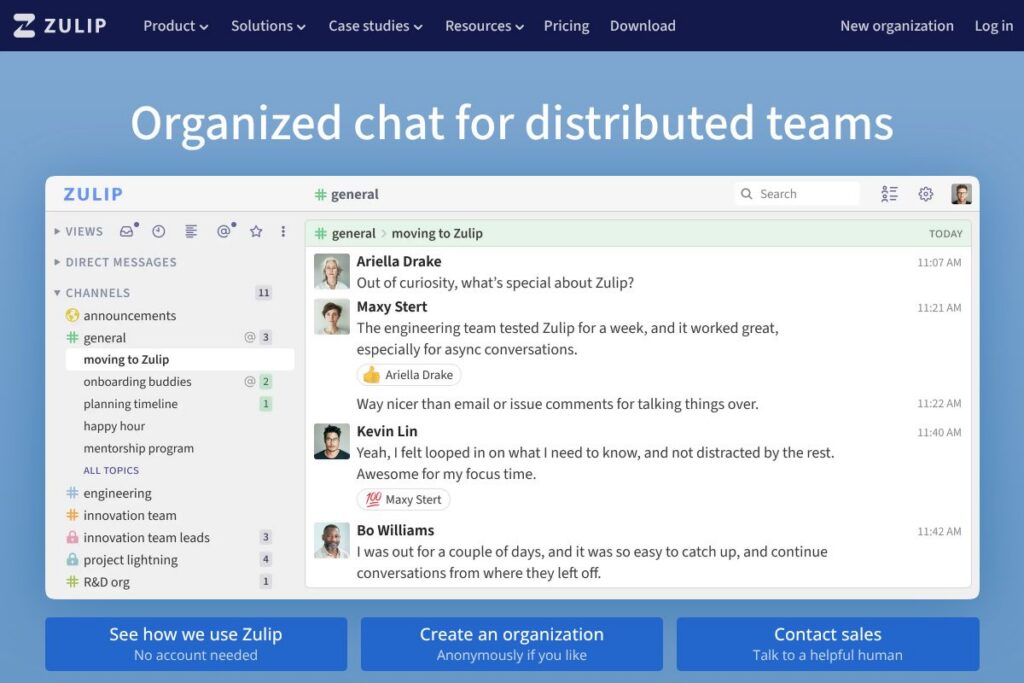
Zulip is a team chat platform organized around streams and topics so conversations stay in context even when participants are asynchronous. Each message belongs to a topic within a stream, which lets teams follow multiple concurrent discussions without losing thread continuity over days or weeks.
Compared with Slack, Zulip emphasizes topic-based threading rather than ephemeral channels, which helps teams that rely on long-running, asynchronous discussion. Compared with Microsoft Teams, Zulip is lighter on integrated office-suite features but stronger at preserving focused discussion threads. Compared with Discord, Zulip targets professional workflows with structured topics rather than voice-first or community moderation features.
Zulip is especially strong for distributed engineering and open source teams that need readable archives and predictable context. Its mix of self-hosting and hosted options makes it suitable for organizations that require full data control as well as teams that prefer a managed service. For examples of how organizations use it, see the Zulip case studies.
How Zulip Works
Zulip models conversations as streams (broad categories) and topics (specific threads) so every message has an explicit context. On desktop and mobile clients, your inbox surfaces unread messages across streams and topics, letting you triage what matters without scanning noisy channels.
In practice teams create streams for projects or functional areas, start topics for specific tasks or threads, and reply directly to a topic so the history remains organized. Zulip clients keep full message history searchable, and desktop, web, and mobile apps sync so team members can jump back into conversations where they left off.
What does Zulip do?
Zulip focuses on structured, threaded messaging that scales for asynchronous collaboration. Core capabilities include topic-based threading, a unified unread inbox, persistent searchable history, integration hooks, and both self-hosted and hosted deployment paths. Recent product updates emphasize improved mobile synchronization, enhanced message search, and more integration connectors.
Topic-based threading
Every message is attached to a topic within a stream, which keeps related replies grouped and readable even when conversations span many hours or different time zones. This reduces context switching and makes it easier to resume work without re-reading large channel histories.
Unified inbox and filtering
The inbox gives an overview of unread messages across streams and topics so users can triage quickly and focus on a single thread at a time. Thread filters and muting let teams reduce noise while preserving access to important conversations.
Search and message history
Zulip stores searchable archives so teams can find past decisions, links, and code references. Search supports operators and can be filtered by stream, topic, sender, or date to speed retrieval of specific content.
Integrations and bots
The platform supports webhooks, incoming/outgoing integrations, and community-built bots that connect to tools like GitHub, GitLab, Jira, and CI systems. Integrations post contextual updates into topics so automation and alerts are grouped with related discussions.
Cross-platform clients
Zulip provides native desktop apps for Windows, macOS, and Linux, plus mobile apps for iOS and Android, and a web client that offers near-feature parity. Clients synchronize read state and drafts so users can switch devices without losing context.
Permissions and access control
Stream-level permissions, guest accounts, and role settings let organizations control who can post, create streams, or access particular topics. These controls support both open team collaboration and tighter enterprise governance.
With Zulip you get clearer, longer-lived conversations that are easier to resume, making it a strong choice for teams that work across time zones and asynchronous schedules. The topic threading model is the feature that most differentiates Zulip from the usual channel-based chat apps.
Zulip pricing
Zulip offers an open-source, self-hosted edition that teams can run at no licensing cost, and a hosted cloud option with managed services and enterprise support. The pricing model therefore blends free self-hosting with paid hosted and enterprise offerings that are typically quoted per organization.
Self-hosted (Open source)
Self-hosted – Free (Zulip’s server and client source code is open-source). Organizations can install Zulip on their own infrastructure and manage upgrades, backups, and data retention. See the self-hosting documentation for setup and maintenance guidance.
Hosted cloud and enterprise
Hosted cloud and enterprise – Custom pricing (managed hosting, support, and optional service-level agreements). For teams that prefer a managed deployment or require enterprise features and support, contact Zulip for tailored plans and deployment options via the Zulip homepage.