What is Canvas
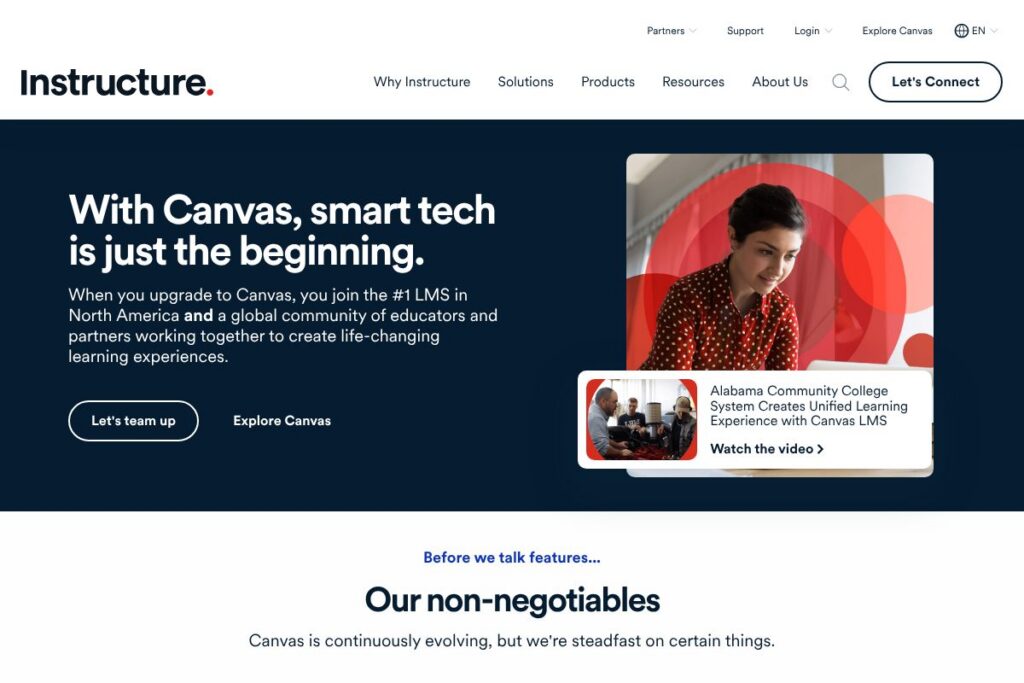
Canvas is a cloud-hosted learning management system that centralizes course content, assessments, grading, collaboration, and analytics for educators and students. It supports course authoring, multimedia content, quizzes and assignments, peer review, and gradebook features while providing role-based access for instructors, students, and administrators. Canvas is offered by Instructure and is used by institutions worldwide for fully online programs, blended learning, and classroom augmentation.
Compared with legacy enterprise LMS platforms such as Blackboard, Canvas emphasizes a cleaner, more modular user interface and a robust app ecosystem that simplifies integrations. Against open-source platforms like Moodle, Canvas provides a managed cloud service and enterprise support that reduce administrative overhead, though Moodle can be more cost-flexible for self-hosting. Compared with D2L Brightspace, Canvas typically competes on ease of course creation and a broad partner marketplace rather than highly prescriptive competency-based learning features.
Canvas does particularly well at combining a modern UI, strong third-party integration support, and accessible mobile apps, making it suitable for institutions that need a reliable, scalable LMS with active vendor support. The platform is most useful for colleges, K-12 districts, and training organizations that want a single system to handle course delivery, assessment, collaboration, and reporting at scale.
How Canvas Works
Canvas operates as a web application with companion mobile apps; instructors build courses in a visual course editor, add modules and content items, and assign assessments and graded activities to students. Students access course modules, submit assignments, take quizzes, and interact through discussions or integrated video tools; instructors manage grading with an online gradebook and can provide inline feedback on submissions.
At an institutional level, Canvas connects to student information systems (SIS) to automate roster and enrollment management, and it supports LTI and API-based integrations so third-party tools appear inside a course. Administrators provision accounts, set role permissions, configure authentication (including SAML/SSO), and monitor platform health and usage through built-in analytics and admin reports.
What does Canvas do?
Canvas focuses on course creation, delivery, assessment, collaboration, and learning analytics. Core capabilities include a modular course builder, a unified gradebook, quiz and assignment engines, discussion tools, multimedia support, mobile access, and integration frameworks for third-party educational apps. The platform continuously adds incremental improvements to mobile functionality, accessibility, and partner integrations.
Here are some of Canvas’s main Features
Course Design and Modules
Instructors assemble learning content into modular units that can include files, pages, quizzes, assignments, external tools, and prerequisites. Modules support a linear or open navigation flow and can enforce release conditions so instructors control pacing and sequencing of learning materials.
Gradebook and Assessment Tools
The gradebook aggregates scores from quizzes, assignments, and external tools, supports custom grading schemes and rubrics, and offers comment and annotation tools for inline feedback. It also includes features for grade weighting, missing assignment handling, and exporting records to institutional systems.
Quizzes and Question Banks
The quiz engine supports multiple question types, time limits, question banks, randomized delivery, and accommodations for accessibility and extended time. Instructors can reuse question banks across courses and set automatic grading for objective items while reserving manual grading for essays and complex tasks.
Collaboration and Communication
Canvas includes discussions, announcements, messaging, and integrated video conferencing options via partners so learners can collaborate synchronously or asynchronously. Group spaces allow team assignments, peer review workflows, and shared resource areas to support project-based learning.
Analytics and Outcomes
Built-in analytics surface student activity, submission patterns, and course-level outcomes so instructors and administrators can track engagement and intervene when learners fall behind. Outcome and mastery reporting helps align activities to learning objectives and accreditation requirements.
Integrations and App Center
Canvas supports LTI apps, API-based integrations, and a partner App Center to connect services such as Google Workspace, Microsoft 365, Zoom, and publisher content. These integrations allow external tools to launch within Canvas, sync grades, and exchange roster data where supported.
The biggest benefit of Canvas is its combination of a course-centered authoring experience with robust integration options and mobile access, which together simplify delivering consistent learning experiences across institutions and devices. That makes Canvas well suited to large-scale deployments that require support, uptime, and a broad ecosystem of educational tools.
Canvas pricing
Canvas uses a mix of institution-level subscriptions and managed cloud services rather than a single public per-user price; pricing is typically negotiated based on institution size, deployment model, and required services. Canvas also offers a free option for individual instructors, while enterprise customers receive custom quotes and contract terms.
Institution & District Plans
Institution plans: Custom pricing for full LMS deployments, support, and service-level agreements. These contracts usually include enterprise features such as SIS integration, SSO, dedicated onboarding, and higher-tier support.
Individual Teacher Options
Individual accounts: Free and low-commitment options exist for single instructors to run courses and test the platform; enterprise features are not part of the free offering. For detailed, institution-specific costs and licensing models, view the Canvas pricing and plan information.
What is Canvas Used For?
Canvas is used to create and deliver online and blended courses, run assessments, manage grades, and facilitate student interaction for K-12 schools, colleges, universities, and corporate training programs. It is commonly used to centralize learning materials, coordinate faculty workflows, and maintain records required for compliance or accreditation.
Institutions use Canvas for course catalogs, program delivery, learning analytics, and integration with campus systems like SIS, identity management, and content publishers. It is also used by continuing education and professional development teams to host workshops and certification programs.
Pros and cons of Canvas
Pros
- Modern, consistent UI: The interface is organized around courses and modules, making it straightforward for instructors to build and students to navigate. This reduces training time and lowers the barrier for faculty adoption.
- Extensive integrations: Canvas supports LTI and API integrations with Google Workspace, Microsoft 365, Zoom, and publisher platforms, which simplifies adding third-party tools to courses. This ecosystem approach reduces the need to move learners between multiple systems.
- Mobile-first access: Canvas has mature mobile apps for instructors and learners that support content access, assignment submission, and grading on the go. Offline reading and push notifications help maintain engagement for mobile learners.
Cons
- Custom pricing for institutions: Enterprise deployments require custom contracts and negotiations, which can be a hurdle for smaller institutions seeking clear, published pricing. Procurement cycles may be longer compared to off-the-shelf consumer apps.
- Advanced reporting limitations: Some institutions require deeper, more configurable analytics than the built-in reports provide, making additional third-party analytics or custom development necessary. This can increase implementation complexity and cost.
- Feature parity across deployments: Feature sets can differ between the managed cloud service and self-hosted or integrated solutions, which requires careful planning to ensure consistent experience across campuses or departments.
Does Canvas Have a Free Version?
Canvas offers a free plan for individual instructors plus institution-level trials and demos. Individual teachers can sign up for a free account to create and run courses with core LMS capabilities, while districts and universities engage with Instructure for enterprise trials, product demos, and custom contracts; explore the Canvas Free for Teacher option to get started.
Canvas API and Integrations
Canvas provides a developer-friendly REST API and extensive documentation so institutions and vendors can automate tasks, exchange SIS data, and build custom integrations; consult the Canvas API documentation for endpoints and examples. The platform also supports LTI, SCORM import, and standard authentication methods to integrate with common campus systems.
Key integrations include Google Workspace, Microsoft 365, Zoom, library systems, and numerous publisher tools available through the Canvas App Center; administrators can enable or restrict apps at the account or course level to control which third-party services are available.
10 Canvas alternatives
Paid alternatives to Canvas
- Blackboard — A long-established enterprise LMS with deep administrative controls, enterprise reporting, and institutional licensing models used by many large universities. Blackboard focuses on centralized administration and enterprise services.
- D2L Brightspace — A cloud LMS known for personalized learning and competency-based education features, with strong analytics and accessibility capabilities for larger institutions and specific program models.
- Schoology — An LMS targetting K-12 with a focus on curriculum management, parent communication, and district-wide adoption; often bundled with district services and training.
- Google Classroom — A lightweight classroom management tool tightly integrated with Google Workspace for Education, well suited to K-12 and small-scale deployments that prioritize simplicity and low cost.
- Microsoft Teams for Education — A collaboration-first platform with assignment and grading integrations tied to Microsoft 365, useful for institutions that standardize on Microsoft services.
- Edmodo — A classroom communication and learning platform used by K-12 educators for student engagement and content sharing, with simpler LMS features and social learning tools.
Open source alternatives to Canvas
- Moodle — A widely used open-source LMS with a large plugin ecosystem and flexible deployment options, suitable for institutions that want full control and self-hosting capabilities. Moodle is configurable but may require more technical resources to operate.
- Sakai — An open-source academic LMS focused on collaboration and research-oriented features, used primarily in higher education with community-driven development. Sakai can be self-hosted or obtained through third-party services.
- Open edX — An open-source learning platform designed for massive open online courses and micro-credentialing, providing strong authoring and course delivery tools for large-scale online programs.
- Chamilo — An open-source LMS with a streamlined interface and lightweight resource requirements, often adopted by smaller institutions or organizations that need a simple self-hosted LMS.
Frequently asked questions about Canvas
What is Canvas best used for?
Canvas is best used for delivering online and blended courses at scale. It centralizes course content, assessments, collaboration, and grading for K-12, higher education, and corporate training programs.
Does Canvas integrate with Google Workspace and Microsoft 365?
Yes, Canvas supports integrations with Google Workspace and Microsoft 365. These integrations allow users to embed documents, link accounts, and synchronize calendar items and files within courses.
Can Canvas connect to my student information system (SIS)?
Yes, Canvas supports SIS integrations through APIs and prebuilt connectors. Institutions typically synchronize rosters, enrollments, and course metadata to automate user provisioning and course setup.
Is Canvas accessible on mobile devices?
Yes, Canvas provides native mobile apps for iOS and Android. The mobile apps offer access to course content, assignment submission, grading, messaging, and push notifications for students and instructors.
How much does Canvas cost for institutions?
Canvas uses custom pricing for institutional deployments. Enterprise pricing varies by institution size, deployment model, and services required; contact Instructure or review the Canvas pricing and plan information for details.
Final verdict: Canvas
Canvas is a strong choice for institutions that need a stable, scalable LMS with a modern course authoring experience, broad integration support, and mature mobile applications. Its strengths are ease of course creation, an active ecosystem of third-party tools, and managed services that reduce in-house operational burden for campus IT teams.
Compared with Blackboard, which often requires enterprise licensing and longer procurement cycles, Canvas provides a cleaner user experience and easier access to partner tools, while both platforms typically rely on custom pricing for institutional deployments. For institutions evaluating LMS options, Canvas offers a balance between usability, integration breadth, and vendor-managed reliability that fits many higher education and K-12 contexts.