What is TalentLMS
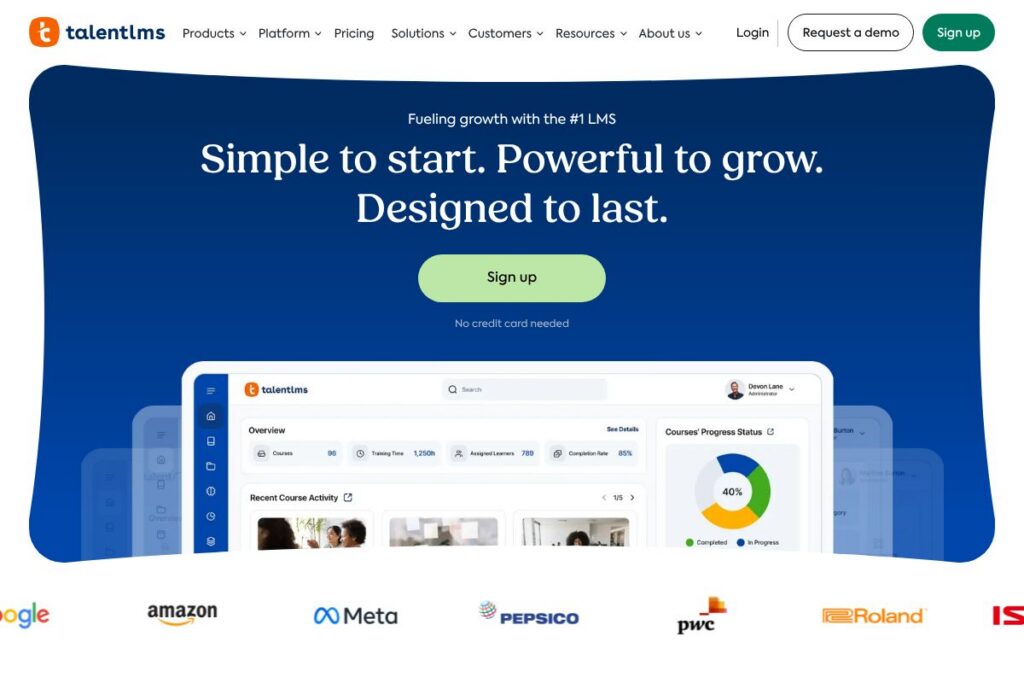
TalentLMS is a cloud learning management system designed to move workplace training online quickly and with minimal setup. It focuses on course creation, learner management, assessments, and reporting, and supports separate portals for employees, partners, and customers so organizations can deliver targeted learning without managing multiple platforms.
Compared with competitors, TalentLMS emphasizes ease of setup and multi-portal management. Compared to Docebo, which targets large enterprises with advanced AI and deep customization, TalentLMS is often faster to deploy for small and mid-size teams. Against LearnUpon, TalentLMS is typically easier to configure for multiple audiences, while LearnUpon focuses on enterprise-grade integrations and account management. Versus Moodle, an open source platform, TalentLMS provides a fully managed cloud service that reduces administrative overhead and hosting responsibilities.
What TalentLMS does particularly well is rapid deployment of training, simple course authoring with AI assistance, and scalable multi-portal delivery. It is a practical choice for HR teams, customer education groups, channel partner managers, and small to mid-size enterprises that need a managed LMS with straightforward administration and measurable reporting.
How TalentLMS Works
Course creation begins in a web-based authoring area where administrators add content modules, videos, SCORM packages, quizzes, and assignments. AI-assisted tools and templates speed up production, while staged release, prerequisites, and learning paths let administrators sequence learning for different roles or audiences.
Learners access training through branded portals that can be segmented for employees, partners, or customers. Administrators enroll users manually or via bulk import, automate enrollments with rules, and track completion with certificates and completion rules. Reporting dashboards provide course-level and user-level metrics that help measure progress, compliance, and learning outcomes.
TalentLMS features
TalentLMS centers on course design, learner management, multi-portal delivery, assessments, reporting, and integrations. Recent platform focus highlights faster onboarding, AI-assisted course creation, and a curated course library called TalentLibrary for ready-made content.
The platform includes several powerful capabilities:
AI-assisted course creation
AI-assisted tools help generate course outlines, produce content drafts, and suggest quiz items, which reduces the time required to author training. This speeds initial course launches and lowers the barrier for subject matter experts who are not instructional designers.
TalentLibrary course catalog
TalentLibrary provides a large collection of prebuilt courses on topics such as soft skills, leadership, and compliance, ready to add to portals and assign to learners. Using a curated catalog shortens time-to-launch for common training needs.
Multi-portal and multi-tenant management
Create and manage separate training portals for employees, partners, and customers while keeping administration centralized, which simplifies role-based access and content segregation. This model supports distinct branding, course catalogs, and enrollment rules per audience.
Assessments, certifications, and compliance tracking
Support for quizzes, surveys, assignments, and certificates lets organizations validate learning and enforce compliance requirements. Completion rules and automated certificate issuance help track mandatory training and maintain audit trails.
Reporting and analytics
Built-in dashboards and exportable reports provide course completion, learner progress, and assessment outcomes at granular and aggregated levels. Administrators can use these reports to evaluate training effectiveness and demonstrate ROI.
Integrations and SSO
Native integrations and single sign-on options connect TalentLMS to identity providers, video conferencing, payment gateways, and HR systems, which reduces friction when adding training to existing workflows. Connectors and integration options support scaling across enterprise systems.
Mobile learning and offline access
Learners can access courses on mobile devices through responsive web apps with offline download options, allowing training to continue when connectivity is limited. Mobile delivery supports distributed and remote teams with flexible learning paths.
With these capabilities, TalentLMS is strongest at helping organizations launch training quickly, manage multiple audiences within a single system, and measure learning outcomes through reporting.
TalentLMS pricing
TalentLMS uses a subscription-based SaaS pricing model with tiered plans and scalable options for teams and enterprises, plus paid upgrades for additional portals, seats, or advanced features. Enterprise customers can request custom pricing and volume discounts for large deployments.
For specific plan details and the latest pricing options, visit the TalentLMS homepage to review current tiers, features, and enterprise offerings.
What is TalentLMS Used For?
TalentLMS is used for employee onboarding, compliance training, skills development, partner enablement, and customer education. It supports structured learning paths, recurring compliance modules, and role-based course assignment to ensure learners receive relevant content.
Teams use TalentLMS to consolidate training that was previously fragmented across email, shared drives, and multiple platforms, enabling tracking and verification of learning. It is also suitable for companies that need separate branded portals for different audiences while retaining centralized administration and reporting.
Pros and cons of TalentLMS
Pros
- Fast setup and onboarding: The platform is designed to be configured quickly with templates, AI-assisted creation, and an intuitive admin interface, helping teams launch training without heavy IT involvement.
- Multi-portal management: Separate portals for employees, partners, and customers allow tailored experiences and content segregation while keeping administration centralized and consistent.
- TalentLibrary access: A ready-made course catalog reduces authoring time for common subjects like compliance and leadership, which accelerates deployment for recurring training needs.
- Scalable for growth: The system supports incremental scaling, from small teams to larger organizations, with enterprise features such as SSO and integration options.
Cons
- Advanced customization limits: Deep, enterprise-grade customization of UI and workflows can be more limited compared to larger LMS platforms that offer bespoke implementations. This can require trade-offs for organizations needing full custom development.
- Reporting depth for large enterprises: While reporting covers common needs, very large organizations with complex analytics requirements may find the built-in dashboards less flexible than dedicated BI integrations.
- Dependency on managed service model: Organizations that prefer full self-hosting and complete control over infrastructure will find the cloud-managed approach restrictive compared to open source LMS options.
Does TalentLMS Offer a Free Trial?
TalentLMS offers a free tier and options to try the platform without a credit card. The free access lets teams explore core course creation, learner enrollment, and basic reporting, with paid plans available to scale seat counts, portals, and advanced features. See the TalentLMS homepage for trial and plan details to evaluate options for your organization.
TalentLMS API and Integrations
TalentLMS provides developer APIs and integration options to automate user provisioning, enrollment, and data exchange with HR systems and third-party apps. Refer to the TalentLMS developer documentation for API endpoints, authentication, and example use cases.
Common integrations include single sign-on providers, video conferencing platforms, payment gateways, and connectors for popular productivity tools to embed training in existing workflows. Integrations help automate enrollment, sync user directories, and push completion data to other systems.
10 TalentLMS alternatives
Paid alternatives to TalentLMS
- Docebo — Enterprise-focused LMS with extensive AI features, marketplace, and deep customization for large organizations.
- LearnUpon — Scales across enterprise training programs with strong account management and multi-audience support.
- Absorb LMS — Feature-rich platform for corporate learning with strong analytics and professional services for implementation.
- Cornerstone — Comprehensive talent management suite that includes LMS functionality integrated with broader HR tools.
- Thinkific — Course creation and selling platform aimed at creators and businesses monetizing training.
- Teachable — Creator-focused platform for building and selling courses, with simpler course management than enterprise LMS products.
- Kajabi — Integrated marketing and course platform for businesses packaging paid online courses with marketing automation.
Open source alternatives to TalentLMS
- Moodle — Widely used open source LMS with extensive plugins and community support, suitable for organizations that want self-hosting and full control.
- Open edX — Scalable platform designed for large-scale course delivery and MOOC-style education with developer-focused customization.
- Chamilo — Lightweight open source LMS geared toward organizations seeking a simpler self-hosted solution.
- FormaLMS — Open source corporate LMS with features geared toward enterprise training and compliance.
Frequently asked questions about TalentLMS
What is TalentLMS used for?
TalentLMS is used for online training, including employee onboarding, compliance, partner enablement, and customer education. Organizations use it to centralize courses, track learner progress, and issue certifications.
Does TalentLMS offer integrations with HR systems?
Yes, TalentLMS supports integrations and SSO to connect with HR systems and identity providers. Integrations automate user provisioning, enrollment, and data syncing across systems.
How does TalentLMS handle course authoring?
TalentLMS provides a web-based authoring interface with templates and AI-assisted tools. Administrators can combine video, SCORM, quizzes, and assignments to build structured courses.
Can TalentLMS scale for multiple audiences like partners and customers?
Yes, TalentLMS supports multi-portal and multi-tenant setups for employees, partners, and customers. Separate portals allow distinct branding, catalogs, and access rules while keeping centralized administration.
Is there mobile access in TalentLMS?
TalentLMS supports mobile-friendly delivery and offline access for learners. Courses are accessible on phones and tablets, allowing learning on the go and for distributed teams.
Final Verdict: TalentLMS
TalentLMS stands out for rapid deployment, straightforward course creation, and pragmatic multi-portal management that suits organizations training employees, partners, and customers. Its managed cloud model reduces operational overhead, and the TalentLibrary shortens time-to-launch for common training programs.
Compared with LearnUpon, which emphasizes enterprise account management and custom pricing, TalentLMS is generally more accessible for small and mid-size teams due to its free tier and faster setup. In feature terms, LearnUpon may offer deeper enterprise integrations and account services, while TalentLMS focuses on ease of use and quick scaling across audiences.
Overall, TalentLMS is a solid choice for organizations that want a reliable, easy to manage LMS that delivers measurable training outcomes without heavy implementation timelines. For detailed plan comparisons and to choose the right tier for your needs, review the information on the TalentLMS homepage.