What is Teachable
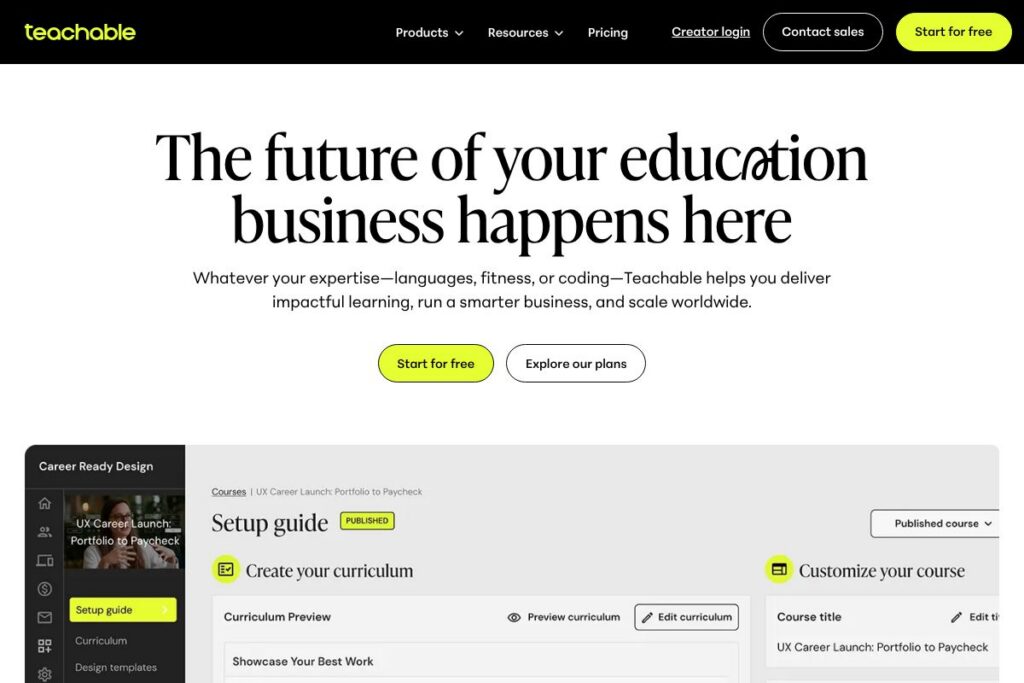
Teachable is a SaaS platform that helps creators and organizations build, deliver, and monetize online learning products including courses, coaching programs, memberships, and digital downloads. The platform centralizes content hosting, student enrollment, payments, tax handling, and analytics so instructors can focus on teaching rather than infrastructure.
Compared with Thinkific and Kajabi, Teachable emphasizes a straightforward course building experience and flexible pricing controls for instructors. Thinkific provides a comparable feature set with stronger built-in community features on some plans, while Kajabi bundles more marketing and funnel tools aimed at creators who want an all-in-one sales stack. Compared with Podia, Teachable offers more granular student management and reporting, while Podia focuses on a simpler storefront and email tools.
Teachable does particularly well at handling payment processing and tax compliance for global sales, supporting automated U.S. sales tax and EU/UK VAT remittance, and providing captioning and translation tools for video content. All of this makes the platform suited to independent creators, small education businesses, and teams that need a reliable, scalable classroom without building custom infrastructure.
How Teachable Works
Course creation on Teachable starts with a school, where you create programs by adding lectures, multimedia lessons, quizzes, and downloadable resources. Authors can structure content into modules, control access with drip schedules or prerequisites, and attach pricing options such as one-time purchases, subscriptions, or installment plans.
Student-facing pages are hosted by Teachable or can be embedded on a custom domain; the platform manages enrollments, access control, certificates, and student progress tracking. Payments flow through integrated gateways; Teachable supports native payment processing and optionally routes payments via third-party gateways while handling tax collection and remittance for applicable regions.
Business workflows include built-in coupons, affiliate tracking, bulk sales tools for teams, and reporting dashboards to track revenue, enrollments, and student engagement. Larger customers can add single sign-on, dedicated onboarding, and integration with CRM or automation stacks to fit enterprise workflows.
Teachable features
Teachable centers on content delivery, commerce, and student management. Core features include a lesson builder for multimedia content, flexible pricing and checkout options, tax and payment automation, student analytics, and multilanguage support via automatic subtitles and translations. The platform continues to expand integrations and enterprise capabilities to support larger education operations.
Let’s talk Teachable’s Features
Course Builder
The course builder organizes lessons, multimedia, quizzes, and files into modules and lectures with drag-and-drop sequencing. It speeds up content assembly, supports different lesson types, and helps instructors publish a structured curriculum quickly.
Student Management and Progress Tracking
Teachable provides student profiles, enrollment lists, progress indicators, and completion certificates. These tools allow instructors to monitor engagement, follow up with learners, and assess which content resonates.
Payments and Tax Handling
Teachable processes payments through native and third-party gateways and automatically collects U.S. sales tax and EU/UK VAT for transactions. This reduces manual tax compliance work for creators selling internationally, though standard payment processing fees may still apply.
Subscriptions, Memberships, and Payment Plans
You can sell recurring subscriptions, time-limited memberships, and installment plans from the same product catalog. This enables creators to experiment with pricing models and retain customers through membership access and ongoing coaching programs.
Video Hosting, Subtitles, and Translation
The platform supports video hosting with automatic subtitle generation and translation into multiple languages. These capabilities improve accessibility and expand courses to non-native speakers without manual subtitle workflows.
Affiliate and Coupon Tools
Built-in affiliate tracking and coupon codes let instructors create promotions and partner programs to drive conversions. Affiliate payouts and tracking metrics are available in the dashboard to manage performance.
Analytics and Reporting
Teachable includes revenue, enrollment, and student engagement reports to help creators measure course performance. Reports feed into marketing and product decisions and support financial reconciliation for businesses.
The biggest benefit of Teachable is the combination of content delivery and commerce tooling with automated tax handling, which streamlines selling paid educational products worldwide while keeping course creation straightforward.
Teachable pricing
Teachable uses a subscription-based SaaS model with tiered plans for creators and custom enterprise solutions for organizations. Pricing tiers vary by features such as transaction fees, white-label options, bulk-sales functionality, and access to a dedicated success manager. Enterprise customers receive custom quotes based on scale, integrations, and onboarding needs.
Individuals and Small Creators
Starter – 7.5% transaction fee for course sales when using certain gateways, with standard processing fees still applicable. This plan is intended for creators who want to start with low upfront cost and pay a percentage on sales.
Creator-level tiers (Builder/Growth/Advanced/Unlimited) – 0% transaction fees for users on the Builder, Growth, Advanced, and Unlimited plans when they use teachable:pay or the Monthly Payment Gateway, though standard processing fees from payment processors may still apply. These tiers lift transaction surcharges and add advanced features for scaling a business.
Teams and Enterprise
Enterprise – Custom pricing (includes bulk sales features, dedicated onboarding, priority support, and native integrations). Larger organizations can get a tailored plan with white-glove onboarding and a dedicated success manager to implement complex workflows. For details see the enterprise solutions and contact options on Teachable’s site.
For current plan availability and the latest plan features, view Teachable’s plan and product information.
What is Teachable Used For?
Teachable is commonly used to package instructor expertise into sellable online courses, cohort-based programs, and membership tiers that include ongoing coaching. Instructors use it to deliver video lessons, quizzes, and digital downloads, while automating enrollment, payments, and certificate issuance.
Organizations also use Teachable for internal training, continuing education, and professional development programs that require secure access controls, reporting, and bulk licensing. The platform suits creators who want a unified place to manage students and revenue without building custom systems.
Pros and cons of Teachable
Pros
- Automated tax and payment handling: Teachable automatically collects and remits U.S. sales tax and EU/UK VAT for transactions, which reduces administrative overhead when selling globally.
- Flexible monetization options: You can sell one-time courses, subscriptions, memberships, and payment plans, enabling a range of business models from single-course sales to recurring revenue.
- Accessible video tools: Automatic subtitle generation and translation into dozens of languages improves accessibility and helps courses reach international audiences.
- Enterprise readiness: The platform provides dedicated success managers, bulk-sales tooling, and white-glove onboarding for larger organizations that need a managed deployment.
Cons
- Transaction fees on entry plans: The Starter plan applies a 7.5% transaction fee for certain gateways, which can add up for creators with high sales volume. Standard processor fees may still apply across plans.
- Advanced marketing features are limited compared with all-in-one competitors: Compared with platforms that bundle CRM and funnel building, you may need additional tools for complex marketing automation and email sequencing.
- Limited freedom for marketplace discovery: Unlike marketplaces such as Udemy, Teachable focuses on creator-owned storefronts, so driving traffic and discovery is the instructor’s responsibility.
Does Teachable Offer a Free Trial?
Teachable offers a free plan and a free trial. Creators can start for free to explore course creation and basic features before selecting a paid plan; the platform encourages trying core functionality and switching plans at any time from the school admin. For specifics about what is included on the free tier and trial duration, see Teachable’s homepage.
Teachable API and Integrations
Teachable provides developer access and a public API for automations, user provisioning, and custom integrations; the API documentation describes endpoints for courses, users, enrollments, and webhooks. Developers can use the API to sync students and sales to CRM systems or custom dashboards.
The platform also integrates with payment processors and automation hubs such as Stripe, PayPal, and Zapier, and supports analytics and email providers like Google Analytics and Mailchimp to connect course delivery with marketing workflows.
10 Teachable alternatives
Paid alternatives to Teachable
- Thinkific: A course platform with flexible course building and stronger community features on some plans, suited to creators focused on engagement and branding.
- Kajabi: An all-in-one platform that combines course delivery with marketing funnels, email automation, and landing pages for creators who want built-in sales tools.
- Podia: A simpler storefront for courses, digital downloads, and memberships with a focus on ease of use and integrated messaging features.
- LearnWorlds: A platform with interactive video features and advanced assessment options, useful for educators needing richer learning activities.
- Udemy: A marketplace-style option that exposes courses to a large audience but operates under marketplace rules for pricing and promotions.
- Ruzuku: A course platform that emphasizes cohort-based delivery and simple course creation workflows for coaches and instructors.
Open source alternatives to Teachable
- Moodle: A mature, open source learning management system ideal for institutions and organizations that want full control and self-hosting.
- Open edX: A scalable open source platform used by universities and enterprises for professional learning and MOOC-style delivery.
- Chamilo: A lightweight open source LMS that supports course management, assessments, and certification for smaller deployments.
- Canvas LMS: An open source option used by many institutions, offering robust course management and integration capabilities.
Frequently asked questions about Teachable
What is Teachable used for?
Teachable is used to build, host, and sell online courses, memberships, and coaching programs. Creators use it to structure lessons, deliver multimedia content, manage students, and process payments.
Does Teachable charge transaction fees?
Yes, Teachable’s transaction fees depend on the plan. The Starter plan applies a 7.5% transaction fee for certain gateways while Builder/Growth/Advanced/Unlimited tiers can have 0% transaction fees when using teachable:pay or the Monthly Payment Gateway, though standard payment processor fees still apply.
Can Teachable handle international taxes?
Yes, Teachable can automatically collect and remit U.S. sales tax and EU/UK VAT for transactions. That functionality helps creators sell globally without managing those tax remittance workflows themselves.
Does Teachable have an API for integrations?
Yes, Teachable provides an API and developer documentation. The API documentation covers endpoints for users, enrollments, courses, and webhooks to build custom integrations.
Is Teachable suitable for enterprise training?
Yes, Teachable offers Enterprise plans with custom pricing and white-glove services. Enterprise features include bulk sales, native integrations, a dedicated success manager, and priority support for larger programs.
Final verdict: Teachable
Teachable is a pragmatic platform for creators and organizations that want a reliable combination of course delivery, commerce, and student management with automated tax handling. It simplifies global sales through built-in VAT and sales tax remittance, supports multilingual video accessibility, and provides the core tools most educators need to run a paid learning business.
Compared with Thinkific, Teachable leans into payment and tax automation while Thinkific may offer more out-of-the-box community tools; pricing-wise, Teachable relies on tiered subscriptions with transaction fee trade-offs such as the 7.5% fee on entry-level plans versus 0% on higher tiers when using certain payment gateways. For creators prioritizing straightforward monetization and compliance for international sales, Teachable is a solid choice that scales from solo instructors to enterprise learning programs.