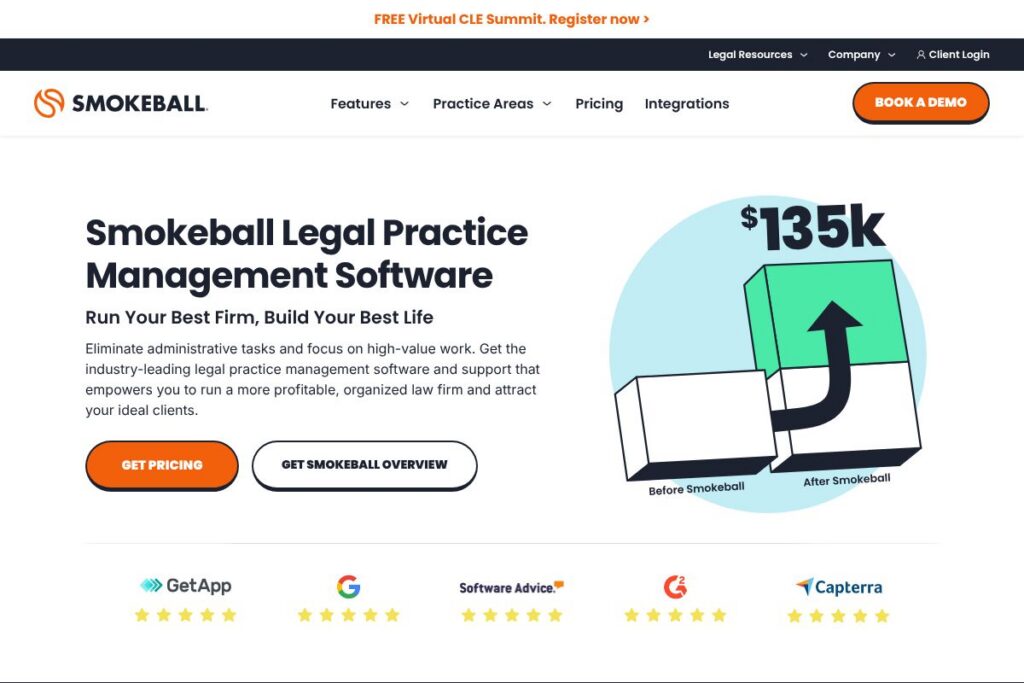
What is Smokeball
Smokeball is a cloud-based legal practice management system designed for small and mid-sized law firms. It combines automatic time tracking, document automation, matter management, and trust and billing tools into a single application so firms can reduce administrative overhead and capture more billable time.
Compared with Clio and MyCase, Smokeball emphasizes automatic background time capture and an extensive library of prebuilt forms, rather than simply providing case and document storage. Compared with PracticePanther, Smokeball typically highlights deeper document automation and built-in trust accounting in a single package, rather than relying on add-ons for billing and accounting.
All of this makes Smokeball particularly well suited for small firms and solo practitioners who handle high volumes of routine matter types and want to recover more time through automated capture, stronger billing controls, and integrated document workflows.
How Smokeball Works
Smokeball runs as a desktop-assisted cloud application that links matter records to documents, emails, and timers so work is automatically associated with the right file. Automatic time tracking runs in the background and captures activities that can be reviewed and approved before billing, reducing time lost to manual timers.
Document automation uses templates and a large forms library to populate pleadings, letters, and court forms from matter data, which speeds up drafting and reduces errors. Billing and trust accounting are built into the same system so firms can generate invoices, monitor trust balances, and manage receivables without exporting data to separate accounting software.
Implementation typically starts with migrating client and matter data, configuring matter templates for the firm’s practice areas, and setting up billing and trust rules. Firms often follow practical workflows such as intake to matter creation, template-driven document generation, automatic time capture during work, and invoice generation with trust checks before sending to clients.
Smokeball features
Smokeball centers on time capture, document automation, and billing controls, and has added AI-driven drafting and expanded forms coverage. Core capabilities include automatic time tracking, a large automated forms library, integrated billing and trust accounting, workflow automation, and integrations with common practice tools.
The Features That Make Smokeball Shine
Automatic time tracking
Smokeball captures time in the background by linking activities, documents, and emails to matters so attorneys can recover billable minutes without manual timers. The captured entries appear for review and editing before they are posted, which helps firms increase billable hours while maintaining control over description and rates.
Document automation and templates
Template-driven document generation pulls client and matter fields into letters, pleadings, and forms, reducing repetitive typing and mistakes. The platform’s templates can be customized for jurisdictional requirements and common matter types, speeding up routine drafting across the firm.
Built-in trust accounting and billing
Trust and operating account management are integrated with invoicing so firms can create bills, check trust balances, and apply funds according to legal requirements. The integrated flow reduces reconciliation work and lowers the risk of trust accounting errors when compared with separate billing and accounting systems.
Smokeball AI
AI capabilities assist with drafting, summarizing matters, and accelerating document review by suggesting language and extracting key facts from files. These features aim to reduce drafting time for routine documents and help teams standardize responses across similar matter types.
Forms library and matter coverage
Smokeball includes a large library of automated forms that covers many jurisdictional variations and more than 250 matter types, enabling faster start-to-finish handling of common cases. The library is useful for firms that handle repeatable matters such as family law, estate planning, real estate, and small claims.
Workflow and task automation
Built-in workflows let firms standardize intake, deadlines, and task checklists so everyone follows the same process for common matters. Automation of routine steps reduces missed deadlines and improves consistency across staff and locations.
Reporting and analytics
Reporting tools provide metrics for time, billing, receivables, and matter profitability so firms can spot under-billed matters and track collections. Reports can be scheduled or run on demand to support monthly financial reviews and partner-level performance tracking.
Integrations and mobility
Smokeball connects with common office tools and billing partners so data flows between email, accounting, and payment systems without duplicate entry. Mobile access and remote document sync let attorneys work from outside the office while keeping matter data up to date.
With these capabilities, Smokeball’s biggest benefit is combining automated time capture and document automation with billing controls so firms spend less time on administration and more time on substantive legal work.
Smokeball pricing
Smokeball uses a subscription model with tailored plans for law firms rather than publishing a standard public price list; pricing is typically expressed per firm or per user depending on required modules and support. Potential buyers should expect pricing to vary based on the number of users, enabled features such as AI and document libraries, and any onboarding or training services.
For current package options and to get a quote that matches your firm size and practice areas, see Smokeball’s main site at Smokeball’s homepage or contact their sales team through the same site for a customized estimate.
What is Smokeball Used For?
Smokeball is commonly used for day-to-day practice management tasks: client intake, matter organization, tracking time and expenses, producing forms and documents, and issuing invoices with trust accounting. It is especially useful for firms that handle many repeatable matter types because the templates and workflows reduce manual steps.
Ideal users include small to mid-sized plaintiff and defense firms, solo practitioners, and boutique specialty practices that need stronger automation in drafting and billing. Firms that bill hourly and want to capture more time with less administrative friction will see the most immediate impact.
Pros and Cons of Smokeball
Pros
- Automatic time capture: Smokeball records work activity in the background and links entries to matters, helping firms recover billable time that would otherwise be lost.
- Document automation and forms library: The platform includes many prebuilt forms and templates across jurisdictions which speeds drafting for routine matters.
- Integrated trust accounting and billing: Built-in trust controls streamline invoicing and reduce the need for external accounting exports.
- Workflow standardization: Configurable matter workflows and task checklists improve consistency and reduce missed deadlines.
Cons
- Learning curve for customization: Firms that need heavily customized templates and workflows may face a setup period that requires training and professional services.
- Windows-first desktop experience: Some users prefer a purely web-native interface; Smokeball’s desktop-assisted model can feel different from fully cloud-native competitors.
- Pricing by quote: Firms used to transparent per-user pricing may find the tailored pricing approach requires direct consultation with sales.
- Advanced reporting limitations: Larger firms with complex reporting needs sometimes rely on external BI tools for deeper financial analysis.
Does Smokeball Offer a Free Trial?
Smokeball offers a free trial and live demo options so firms can see automatic time capture, document automation, and billing workflows in action before committing. Trial and demo scheduling is handled through Smokeball’s site and typically includes a walkthrough of matter templates, time tracking, and billing features.
Smokeball API and Integrations
Smokeball provides integrations with common practice tools and payment processors so data flows between case records, accounting systems, and payment services. For a detailed list of supported connections and integration options, consult the information available on Smokeball’s integrations resources.
Where API access is required for custom automation, firms can discuss developer and integration options with Smokeball’s support or sales teams to enable connections to document stores, accounting software, and other back-office systems.
10 Smokeball alternatives
Paid alternatives to Smokeball
- Clio — Cloud practice management with matter management, time tracking, and a large partner ecosystem; known for transparent per-user subscription tiers and strong marketplace integrations. See Clio’s platform overview.
- MyCase — User-friendly case management with client portals, billing, and document storage designed for small firms that want a simple, unified system. View MyCase features.
- PracticePanther — Feature-rich practice management with automation, billing, and workflow tools aimed at small to mid-sized firms. Explore PracticePanther capabilities.
- Rocket Matter — Billing-first practice management with time and expense tracking and matter management that targets firms focused on profitability. Learn about Rocket Matter offerings.
- CosmoLex — All-in-one cloud solution that combines practice management with integrated law firm accounting and trust compliance. Check CosmoLex’s accounting focus.
- TimeSolv — Time and billing software that integrates with practice management tools, geared toward firms that need flexible billing and time capture. See TimeSolv billing features.
Open source alternatives to Smokeball
- Casebox — Open-source case and document management platform for organizing matters and templates, useful for small teams that can self-host and customize workflows.
- Odoo — Open-source ERP with CRM, document management, and project modules that can be adapted for legal workflow management with configuration and customization.
- CiviCRM — Open-source constituent relationship platform often used by nonprofit legal clinics for client management and case tracking, suitable for organizations willing to tailor modules.
Frequently asked questions about Smokeball
What is Smokeball used for?
Smokeball is used for legal practice management, document automation, and billing. Firms use it to manage matters, automate routine documents, capture time automatically, and handle invoicing and trust accounting.
Does Smokeball integrate with QuickBooks and payment processors?
Yes, Smokeball integrates with common accounting and payment tools. Firms typically connect Smokeball to accounting systems and payment processors to synchronize billing, payments, and trust transactions.
How much does Smokeball cost?
Smokeball uses tailored subscription pricing rather than fixed public tiers. Pricing depends on firm size, selected modules, and onboarding needs, so firms should request a quote through Smokeball’s site.
Can Smokeball track time automatically for attorneys?
Yes, Smokeball includes automatic background time tracking. Captured time is associated with matters and presented for review so attorneys can approve and edit entries before billing.
Does Smokeball have an API for custom integrations?
Smokeball supports integrations and offers options for custom connections. Firms that require API access or custom integrations should contact Smokeball’s support or sales team to review available developer options.
Final verdict: Smokeball
Smokeball stands out for combining background time capture, document automation, and integrated trust and billing in a single package that addresses the everyday needs of small and mid-sized law firms. Its strong forms library and automated time recovery are particularly valuable for practices that handle many routine matter types and want to reduce administrative tasks.
Compared with Clio, which offers clearly tiered per-user subscriptions and a large integrations marketplace, Smokeball focuses more on built-in automation and matter-specific templates while using a tailored pricing model. That makes Smokeball a compelling choice for firms that prioritize automatic time capture and document automation over picking and assembling separate add-ons, while firms that prefer transparent per-user pricing and a broader ecosystem may favor Clio instead.