Headnote: An Overview
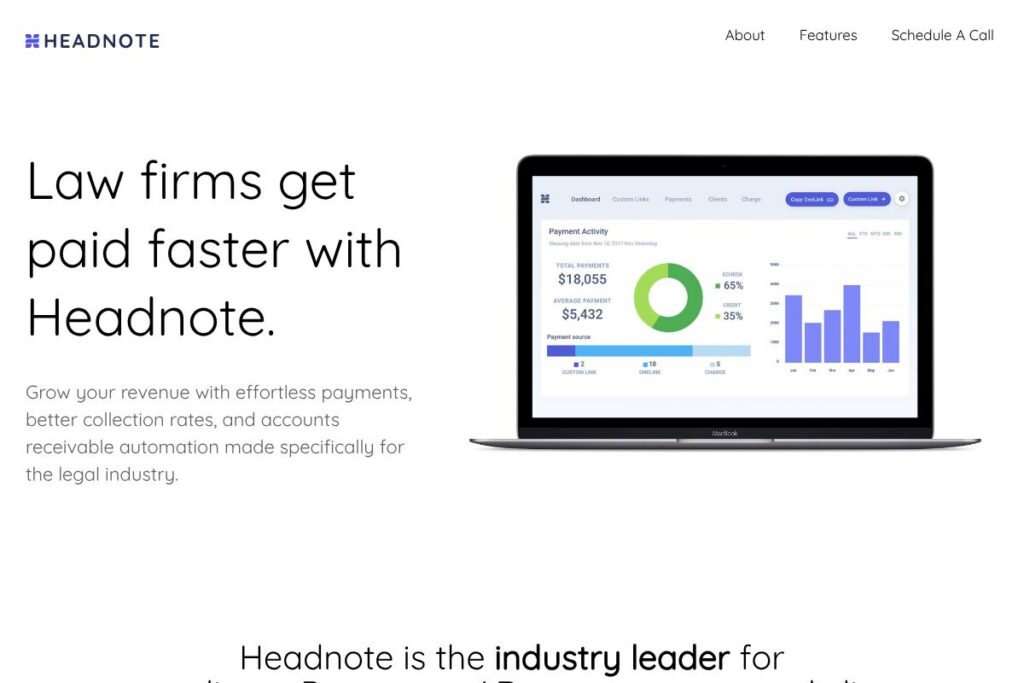
Headnote is a payments and AR automation platform designed specifically for the legal industry. It provides credit card and eCheck acceptance that follows ABA and IOLTA guidelines, a real-time AR dashboard, automated collection workflows, and built-in client satisfaction tracking so law firms can reduce follow-up calls and speed collections.
Compared with general-purpose processors such as PayPal Business or Stripe, Headnote emphasizes trust-account handling and workflows legal teams require. Against legal-focused competitors like LawPay and Clio Payments, Headnote positions itself on a combination of client-facing flat-fee payments, AR automation, and integrated NPS feedback rather than only payment acceptance.
Headnote does particularly well at combining compliance, receivables automation, and client feedback into a single dashboard, which makes it useful for solo attorneys through mid-size firms that need to modernize billing without sacrificing trust accounting rules. Its approach is aimed at firms that want to move from paper checks and spreadsheets to an auditable, automated receivables workflow.
How Headnote Works
Law firms create invoices in their practice management system or directly in Headnote, then send payment links or enable on-invoice pay buttons. Clients follow a secure link to pay by credit card or eCheck, and Headnote applies rules to route funds correctly when trust/IOLTA handling is required.
Payments are tracked in a personalized AR dashboard that shows invoice status, collection workflows, and payment funnels in real time. When invoices age, automated reminders and collection actions can be triggered so staff spend less time on manual outreach and more time on billable work.
Headnote also captures client feedback by prompting an optional single-question Net Promoter Score survey after successful payments. That feedback is tied to invoices, clients, and individual attorneys so firms can monitor satisfaction and referral likelihood alongside cash collection metrics.
What does Headnote do?
Let’s talk Headnote’s main features. The platform focuses on compliant ePayments, accounts-receivable automation, and client experience measurement. Recent additions highlighted by the company include integrated NPS tracking and expanded AR automation designed to replace spreadsheets and manual follow-up processes. Explore Headnote’s AR Automation via the Headnote homepage for feature context and demos.
Compliant ePayments
Headnote accepts credit card and eCheck payments while enforcing ABA, IOLTA, and state bar rules, including handling of trust vs operating funds. That compliance layer reduces manual accounting work and lowers the risk of misapplied trust funds during intake and settlement.
Accounts Receivable Automation
Automated workflows track invoices from issuance to payment, send scheduled reminders, and escalate collection steps based on firm-set rules. Firms see reduced days sales outstanding because routine follow-up is automated and actions are logged for audit purposes.
Net Promoter Score (NPS) Tracking
After a client pays, Headnote can show an optional one-question survey that captures an NPS score; results populate the firm dashboard immediately. Firms can benchmark NPS at the invoice, client, or attorney level to connect satisfaction trends with revenue and referral activity.
Trust and IOLTA Support
Headnote routes funds and records transactions to respect trust account rules for all 50 states, including splitting payments when necessary. That built-in handling simplifies reconciliation for firms that must manage client funds separately from operating receipts.
Security and PCI Compliance
The platform includes encryption, PCI-compliant processing, and security controls appropriate for payments handling. Built-in compliance features reduce the burden on internal IT and outside auditors while keeping payment data protected.
Reporting and Insights
Headnote provides on-demand AR reporting, payment funnel analysis, and dashboards that surface where invoices are stuck. These reports help finance teams prioritize collection efforts and make data-driven decisions about billing and client outreach.
Client Payment Options
Clients can choose credit card or eCheck and pay via secure links or an embedded payment flow, and firms benefit from a single view of pending and completed receipts. The flat-fee client payment model simplifies conversations with clients about processing costs.
With these capabilities Headnote helps firms move from manual receivables to an auditable, automated process that improves cash flow and captures client sentiment without separate tools.
Headnote pricing
Headnote uses a transaction-focused pricing approach rather than publishing simple per-seat subscription tiers on a dedicated pricing page. The company highlights client-facing flat fees for credit card and eCheck payments and emphasizes fee transparency within its onboarding and sales conversations.
For up-to-date details on processing fees, account setup, and any optional subscription components, review Headnote’s payment and pricing information on the Headnote homepage or contact their sales team directly through the site to request a pricing breakdown tailored to your firm.
What is Headnote Used For?
Headnote is used to accept and reconcile client payments while ensuring trust compliance and minimizing manual AR work. Typical workflows include replacing paper checks, converting invoice emails into clickable pay links, and automating collections for past-due invoices.
It is also used to measure client satisfaction immediately after payment, helping firms understand referral potential and attorney-level performance. The platform suits solo practitioners, small firms that want to reduce administrative overhead, and mid-size firms seeking centralized AR visibility with compliance baked in.
Pros and Cons of Headnote
Pros
- Compliance-first payments: Headnote enforces ABA and IOLTA rules so firms can accept cards and eChecks without separate trust-account workarounds, reducing compliance risk.
- AR automation: Automated reminders, funnel tracking, and on-demand reporting replace spreadsheets and manual follow-up, which typically shortens days-to-payment.
- Built-in NPS tracking: Automatic post-payment surveys provide immediate client feedback and allow firms to tie satisfaction to invoices, attorneys, and practice areas.
- Client-friendly checkout: Simple, modern payment experiences reduce friction for clients and raise collection rates.
Cons
- Pricing details not public: There is no dedicated public pricing page listing all fees and plans, so firms need to contact sales to get a tailored quote and fee schedule.
- Integration variability: Depending on a firm’s practice management and accounting stack, integrations may require configuration; smaller firms without standard systems may need custom setup.
- Feature overlap with PM systems: Some practice management platforms include native payments and NPS-like feedback, so firms should evaluate overlap before replacing existing tools.
Does Headnote Offer a Free Trial?
Headnote does not advertise a public free plan; demo and sales-led trials are available. Prospective customers can request a demonstration and work with Headnote to arrange onboarding or trial access that reflects their firm workflows, by contacting the team through the Headnote homepage.
Headnote API and Integrations
Headnote provides API and integration options to connect payments with practice management and accounting systems, enabling automatic posting of payment data and reconciliation. For implementation details and endpoints, see Headnote’s developer and integration resources linked from the Headnote homepage.
Common integrations include practice management software and accounting packages to keep invoices and ledgers synchronized, and firms can use those connections to automate bookkeeping and reduce manual data entry.
10 Headnote alternatives
Paid alternatives to Headnote
- LawPay — A legal-industry-focused payment processor known for trust-account compliance and broad practice management integrations, often chosen by firms that prioritize a payments-first solution.
- Clio Payments — Built into the Clio practice management suite, it provides seamless billing and payment flows for Clio customers with integrated posting to client ledgers.
- PayPal Business — A general payments platform with broad consumer familiarity and instant invoicing features, but without law-specific trust-account controls by default.
- Stripe — A developer-friendly payments platform that supports customizable checkout flows and subscriptions, suitable for firms that want deep technical control over payment experience.
- Square — Offers simple online and in-person payments with flat-fee processing and point-of-sale options; better for firms that need a blended in-office and online solution.
- QuickBooks Payments — Integrates directly with QuickBooks accounting to simplify reconciliation for firms using QuickBooks for bookkeeping.
Open source alternatives to Headnote
- Kill Bill — A self-hosted payment orchestration and billing platform that supports custom payment flows and multiple gateways, suitable for firms with developer resources.
- Solidus — An open-source e-commerce and payment processing framework that can be adapted for invoicing and custom payment scenarios with development effort.
- ERPNext — An open-source ERP that includes invoicing and payment modules; firms can self-host to manage billing and accounting in a single system.
- Apache OFBiz — A flexible open-source business automation suite that includes financial modules and can be extended to handle invoicing and payments for organizations with technical staff.
Frequently asked questions about Headnote
What is Headnote used for?
Headnote is used to accept compliant credit card and eCheck payments and automate accounts receivable for law firms. It also captures client feedback via NPS surveys tied to invoices and attorneys.
Does Headnote support IOLTA and trust account rules?
Yes, Headnote enforces trust and IOLTA handling according to ABA and state bar rules. The platform routes and documents payments appropriately so firms can reconcile trust versus operating funds.
How does Headnote charge fees?
Headnote highlights a flat-fee client payment model rather than posting only percentage-based merchant fees publicly. For firm-specific fee schedules and processing details, contact Headnote via the Headnote homepage.
Can Headnote integrate with practice management and accounting software?
Yes, Headnote offers integrations and API access to connect payment events to practice management and accounting systems. These integrations support automated ledger posting and reconciliation workflows.
Is Headnote PCI compliant and secure?
Headnote operates with PCI-compliant processing and encryption and includes security measures appropriate for payment handling. The platform is designed to minimize sensitive data exposure and simplify compliance for law firms.
Final verdict: Headnote
Headnote stands out for packaging compliant payments, accounts-receivable automation, and immediate client feedback into a single platform tailored to law firms. Its focus on trust-account handling, automated collection workflows, and NPS tracking makes it a practical choice for firms that want to streamline billing and measure client sentiment without stitching together multiple tools.
Compared with LawPay, which is a payments-first solution widely adopted for trust compliance, Headnote places additional emphasis on AR automation and client feedback alongside payment processing. While LawPay is established for payment acceptance and integrates with many practice management systems, Headnote differentiates by combining collection automation and real-time NPS visibility; pricing specifics for either provider should be confirmed through direct contact with their sales teams via their respective sites.
To evaluate whether Headnote fits your firm, request a demo and sample onboarding plan through the Headnote homepage so you can compare workflows, integration options, and fee structures against your current processes.