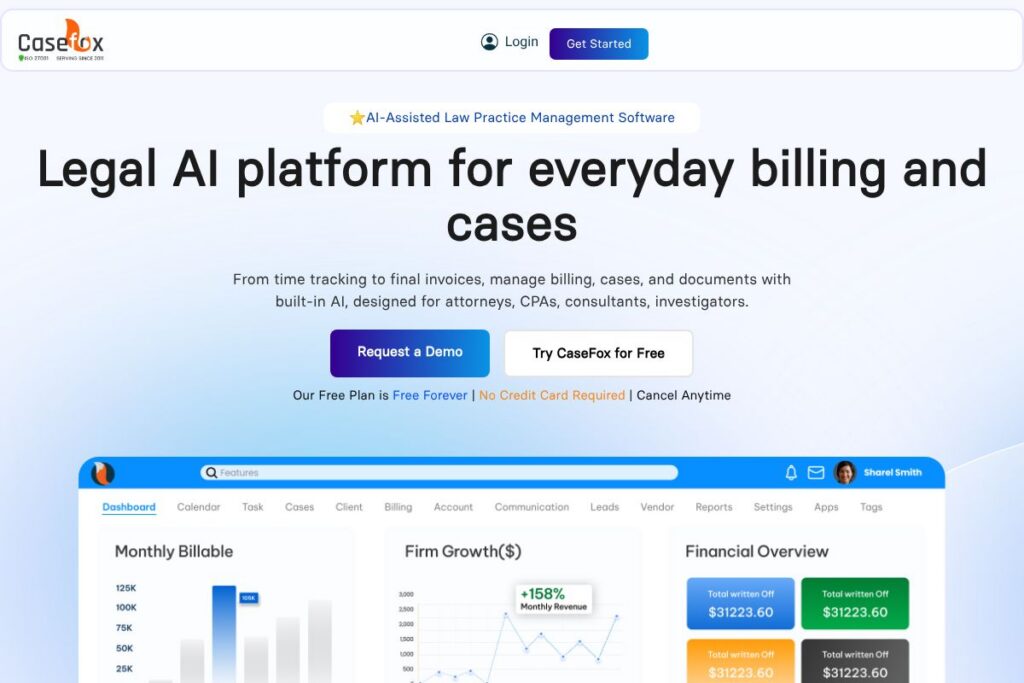
What is CaseFox
CaseFox is a cloud-based legal practice management system that brings together time tracking, case organization, billing, trust accounting, document generation, and client payments in a single interface. It targets solo practitioners, small firms, and specialty practices that need straightforward workflows for tracking billable time, producing compliant invoices, and managing client funds.
Compared with competitors, CaseFox focuses on an accessible, low-friction experience. Compared with Clio, which emphasizes a broad marketplace of integrations and advanced matter workflows, CaseFox trades depth of marketplace add-ons for a simpler setup and a free-forever entry point. Against MyCase, CaseFox presents a leaner interface and integrated AI drafting for quicker document generation, while PracticePanther typically targets firms wanting deeper automation and per-user pricing tiers.
All of this makes CaseFox well suited for firms that prioritize fast onboarding, integrated billing and trust accounting, and AI-assisted document work. It fits teams that want to reduce administrative overhead without a long implementation process, and firms that need straightforward integration with accounting tools and payment processors.
How CaseFox Works
The platform organizes legal work around matters, where each matter stores client details, time entries, expenses, documents, calendar events, and communications. Users start a timer or enter time manually, link that time to a matter, and apply billing rules for hourly, flat-fee, contingency, or retainer arrangements before generating invoices.
Document generation and summarization use built-in AI to accelerate drafting and file review; templates can be created, reused, and merged with matter data. Trust and operating accounts are managed with IOLTA-compliant tools and reconciliation workflows, and payments are collected through a secure client portal with integrations for PayPal and LawPay.
Workflows often look like: intake with conflict check and contact creation, assign tasks and start timers, draft documents from templates, run one-click batch billing with LEDES export if needed, and reconcile trust transactions with QuickBooks or Xero integration for accounting continuity.
CaseFox features
CaseFox combines core practice management features with AI-assisted drafting and reporting to cover the end-to-end life cycle of a matter. Core capabilities include automatic time capture and timers, client intake and conflict checks, document generation and summarization, LEDES and UTBMS-compliant billing, trust accounting, payment processing, and integrations with accounting and cloud storage platforms.
Let’s talk CaseFox’s Features
Time Tracking
Run automatic timers in the background or add manual entries to capture billable and non-billable work. The system supports billing rules, expense tracking, and vendor payments so every minute and cost associated with a matter is available for accurate invoicing and reporting.
Case Management
Store client details, correspondence, documents, deadlines, and tasks in a single matter-level view to track case progress. Linking tasks and time entries to a matter helps keep productivity data and case notes organized for audits and client updates.
Billing & Invoicing
Create customized invoices, use one-click batch billing, and support LEDES and UTBMS formats for e-billing compliance. Recurring bills, write-offs, discounts, and invoice sharing through the client portal simplify collections and maintain billing consistency.
Document Management & AI Drafting
Generate documents from templates, summarize long files, and use AI to speed drafting and review processes. Documents are stored in the cloud with optional integrations to Dropbox, Box, and Google Drive for broader file management consistency.
Legal Accounting and Trust Management
Handle multiple operating and trust accounts with IOLTA-friendly workflows, detailed ledgers, and reconciliation tools. Built-in integrations with QuickBooks and Xero reduce double-entry and make financial reporting and bookkeeping more reliable.
Payments and Client Portal
Accept retainers and client payments through a secure portal, with integrations for PayPal and LawPay to streamline collections. The client portal also lets clients view invoices, upload documents, and communicate securely with the firm.
Insights and Reporting
Track billable hours, realization rates, collections, cash flow, and staff performance with downloadable reports. Real-time dashboards and exportable reports support staffing decisions, revenue forecasting, and compliance reviews.
Integrations and Data Migration
Connect to accounting tools, cloud storage, and payment processors to keep existing systems synchronized. CaseFox offers complimentary data migration and onboarding services to move matters, clients, and historical billing data into the platform.
The biggest benefit of CaseFox is its combination of essential practice management functionality with low-friction setup and AI-assisted document tools, making it practical for firms that need to reduce administrative work quickly.
CaseFox pricing
CaseFox uses a freemium SaaS model with a free forever tier plus paid plans and enterprise options for firms that need advanced features and support. Pricing for paid tiers is not published on a dedicated pricing page, but the vendor promotes a free plan and personalized enterprise pricing conversations.
Free and Entry-level
Free (Forever): Free plan available (includes basic matters, timers, document generation demo access, and a client portal with limited features). View the free plan details on the CaseFox homepage for exact feature limits.
Paid Plans and Enterprise
Paid Plans: Subscription-based paid tiers exist for firms requiring advanced billing rules, unlimited matters, full AI document generation, and trust accounting capabilities. For current paid plan options and feature comparisons, check the current pricing options maintained by CaseFox.
Enterprise: Custom pricing is available for larger firms needing dedicated onboarding, priority support, and custom integrations; contact sales through the enterprise contact page for tailored quotes.
What is CaseFox Used For?
Law firms use CaseFox to centralize time tracking, billing, and matter-related documents so that billable time is captured, invoices are issued consistently, and trust funds are reconciled with IOLTA compliance. The system reduces reliance on spreadsheets by storing financial and case data in connected modules.
It is also used to speed document drafting and review through AI templates and summarization, to simplify client intake with conflict checks, and to provide basic practice analytics for staffing and revenue decisions. Firms that need integrated payments, LEDES billing, or QuickBooks/Xero connectivity rely on CaseFox to keep bookkeeping and collections aligned.
Pros and Cons of CaseFox
Pros
- Affordable entry point: The free forever plan provides a way for solo attorneys and new firms to start without upfront subscription costs, making it easier to test basic workflows. The free tier includes timers, matter management, and a client portal so small practices can try core features without commitment.
- Built-in trust accounting: IOLTA-compliant trust and operating account workflows remove a common compliance burden for small firms, and integrations with QuickBooks and Xero simplify bookkeeping. Firms can reconcile client funds, generate ledgers, and export accounting reports directly from the platform.
- AI document drafting and summarization: AI tools accelerate drafting and file review, saving billable time when generating routine pleadings, engagement letters, and client communications. Templates and AI-assisted summaries reduce repetitive work and help standardize firm documents.
- Fast onboarding and migration assistance: Complimentary data migration and onboarding reduce implementation time and training needs, which helps small teams move from spreadsheets or legacy systems quickly.
Cons
- Limited public pricing transparency: Paid plan details and tiered prices are not clearly published on a dedicated pricing page, so prospective buyers must contact sales or view the website for up-to-date plan information. This can complicate direct price comparisons when evaluating vendors.
- Less extensive marketplace than some competitors: Compared with larger vendors that maintain extensive app marketplaces, CaseFox offers a narrower set of native integrations, which may require custom work for advanced automation. Firms with complex multi-vendor stacks might find fewer out-of-the-box connectors.
- Feature depth varies by plan: Some advanced features such as full AI credit allocations, LEDES exports at scale, or enterprise-grade reporting are tied to paid tiers and enterprise plans. Firms should confirm which features are included at each subscription level before committing.
Does CaseFox Offer a Free Trial?
CaseFox offers a free forever plan and provides free demos for premium features. The free tier requires no credit card and allows firms to evaluate timers, matter management, and the client portal; prospective users can also request live demos and trial access to AI document generation through the CaseFox site.
CaseFox API and Integrations
CaseFox provides a range of native integrations for accounting and cloud storage, including QuickBooks, Xero, Google Drive, Dropbox, Box, PayPal, and LawPay to support payments and bookkeeping workflows. For details on available connectors and setup instructions, see the integration options listed by CaseFox.
The platform also supports data migration services and can be extended through partner integrations; firms with developer needs should contact CaseFox sales to discuss API access and custom integration pathways via the developer and support contact channels.
10 CaseFox alternatives
Paid alternatives to CaseFox
- Clio – Cloud-based practice management with a large integration marketplace, extensive reporting, and client intake workflows for firms of all sizes. Clio emphasizes a broad ecosystem and per-user subscription tiers.
- MyCase – Combines matter management, billing, and a client portal with simple workflows aimed at small to mid-size firms, plus integrated payments and document storage. MyCase focuses on ease of client communication and billing.
- PracticePanther – Offers automation, matter templates, and billing rules that scale for growing firms, with a focus on workflow automation and per-user licensing. It includes time-saving automations for repetitive tasks.
- Rocket Matter – Strong billing and timekeeping features with practice analytics and project-style matter views, suitable for firms that need robust billing controls and reporting. Rocket Matter often emphasizes performance metrics and collections.
- TimeSolv – Time and billing software that supports legal invoicing formats and integrates with accounting tools, geared toward firms and consultants who prioritize precise time capture and flexible billing models.
- Smokeball – Desktop and cloud hybrid with document automation and case management tailored for small law firms, providing strong document assembly and productivity features.
- LEAP – Comprehensive practice management with legal forms, workflow templates, and built-in accounting, aimed at small firms that want an all-in-one legal software with localized content in some markets.
Open source alternatives to CaseFox
- Casebox – Open source case and document management platform that combines document storage, collaboration, and matter organization; suitable for teams that can self-host and customize workflows. Casebox requires technical resources for setup and maintenance.
- OpenDocMan – Open source document management focused on file versioning, permissions, and storage; useful for firms that want a standalone document repository paired with a separate billing system. It does not include legal billing workflows out of the box.
- Odoo (Community Edition) – Open source ERP with modules that can be configured for CRM, project management, and invoicing; firms can build custom legal practice workflows using community modules, though it requires configuration and technical support.
Frequently asked questions about CaseFox
What does CaseFox do for law firms?
CaseFox centralizes matter management, time tracking, billing, trust accounting, document generation, and client payments. It helps firms capture billable time, produce compliant invoices, manage client funds, and accelerate document drafting with AI.
Does CaseFox have a free plan?
Yes, CaseFox offers a free forever plan with no credit card required. The free tier covers basic matter management, timers, and a client portal, and paid tiers unlock advanced billing, trust accounting, and AI document capabilities.
Can CaseFox integrate with QuickBooks or Xero?
Yes, CaseFox integrates with QuickBooks and Xero for bookkeeping and reconciliation. These integrations reduce duplicate entry by syncing invoices, payments, and account data with your firm’s accounting system.
Is CaseFox compliant with IOLTA trust accounting rules?
Yes, CaseFox includes IOLTA-compliant trust accounting tools. The platform supports multiple trust and operating accounts, detailed ledgers, and transaction tracking to help maintain compliance.
Can I migrate my existing data into CaseFox?
Yes, CaseFox provides complimentary data migration and onboarding services. Their migration process moves clients, matters, time entries, and historical invoices to the platform, with support from the CaseFox onboarding team.
Final verdict: CaseFox
CaseFox stands out as a practical, low-friction practice management option that balances essential billing, trust accounting, and AI-assisted document capabilities. It is particularly attractive to solo attorneys and small firms that want a free entry point and rapid onboarding without losing access to important features like LEDES invoicing and QuickBooks/Xero sync.
Compared with Clio, which publishes tiered per-user pricing and a large integration ecosystem, CaseFox offers a simpler route to core practice management plus a free-forever option; firms that prioritize an extensive app marketplace and enterprise-scale reporting may prefer Clio, while those seeking straightforward billing and built-in legal accounting often find CaseFox more cost-effective in practice. For firms that need quick setup, integrated trust workflows, and AI-assisted drafting without extensive configuration, CaseFox is a strong choice.