ShopKeep by Lightspeed: An Overview
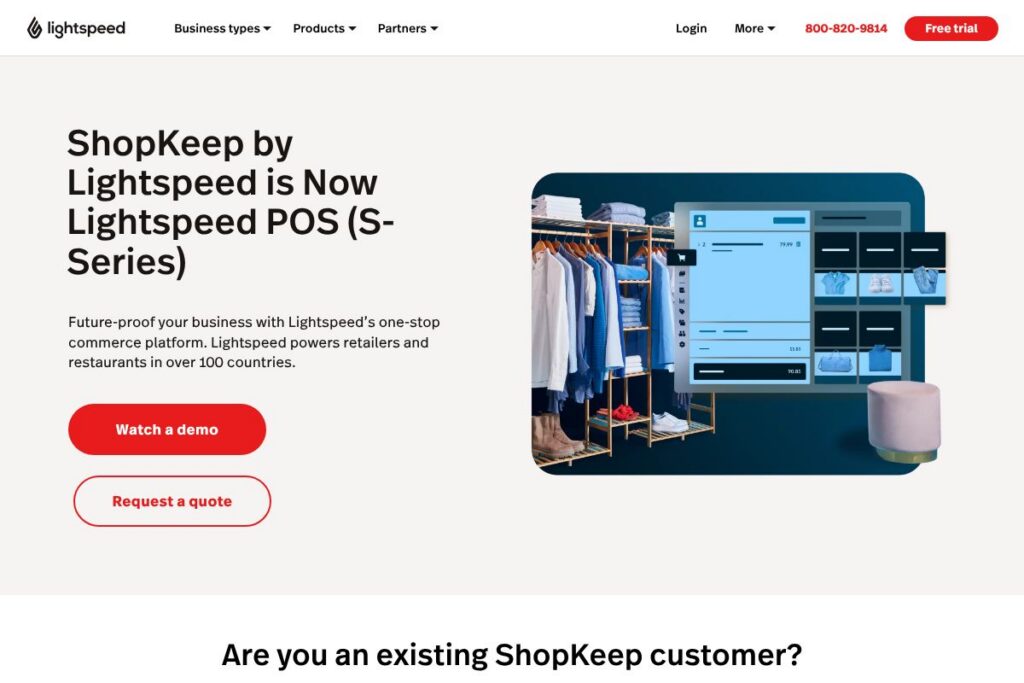
ShopKeep by Lightspeed is a point-of-sale system built for independent retailers and restaurants, now fully integrated into the Lightspeed commerce platform. It combines in-store sales, inventory control, reporting, and hardware support with Lightspeed’s broader ecosystem for ecommerce, payments, and analytics.
Compared with Square and Toast, ShopKeep by Lightspeed places more emphasis on granular inventory control and multi-location retail workflows, while Square focuses on ease of use and Toast is specialized for full-service restaurants. Compared with Shopify POS, ShopKeep by Lightspeed is geared toward brick-and-mortar operations that need deeper in-store workflows and 24/7 merchant support.
ShopKeep by Lightspeed works well for single-location shops scaling to multi-location retailers and for small restaurants that need a reliable, supported POS with integrated hardware options and back-office reporting. Its integration into Lightspeed gives merchants access to expanded ecommerce and payments features through a single vendor.
How ShopKeep by Lightspeed Works
ShopKeep by Lightspeed runs as a cloud-hosted POS with local apps for tablets and terminals that sync to a central BackOffice. Sales, customer data, and inventory changes sync in near real time so staff can process transactions offline and let the system reconcile when connectivity returns.
Typical workflows include ringing up sales at the register or tablet, accepting payments through Lightspeed Payments or third-party processors, and using the BackOffice to manage inventory counts, pricing, and employee permissions. Merchants can enable integrations to sync online orders, accounting systems, and customer engagement tools so reporting and fulfillment align across channels.
What does ShopKeep by Lightspeed do?
ShopKeep by Lightspeed provides core POS capabilities plus inventory management, reporting, hardware provisioning, and around-the-clock merchant support. Since integrating with Lightspeed, ShopKeep customers gain access to broader ecommerce and developer resources while retaining their familiar POS apps and BackOffice.
Let’s talk ShopKeep by Lightspeed’s Features
Point of sale
The POS apps let staff ring sales quickly on tablets or terminals, apply discounts, manage modifiers for hospitality, and print or email receipts. The interface is optimized for fast checkout and supports split checks, returns, and refunds to match typical retail and restaurant workflows.
Inventory management
Inventory tools let merchants track stock levels by SKU, receive purchase orders, and perform counts across locations to prevent stockouts. The system supports variants, bundles, and matrix items which benefits retailers with large assortments.
Payments and processing
ShopKeep works with Lightspeed Payments and other payment gateways to accept card-present and card-not-present transactions, including contactless and mobile wallets. Built-in payment reconciliation reduces manual accounting and speeds daily close-out processes.
BackOffice reporting and analytics
The BackOffice consolidates sales reports, labor metrics, and inventory movement into configurable dashboards and downloadable exports so owners can make data-driven decisions. Scheduled reports and real-time sales views help with daily operations and forecasting.
Hardware and peripherals
Lightspeed offers a hardware catalog for terminals, receipt printers, cash drawers, and barcode scanners that are certified for use with ShopKeep apps. Hardware bundles and upgrade options simplify outfitting a new store or replacing legacy equipment; see the Lightspeed hardware store for options.
Multi-location and user management
Support for multi-location setups lets managers push pricing, promotions, and inventory rules to individual stores while centralizing financial reporting. Role-based permissions and audit logs help control access and monitor staff activity.
With these capabilities, ShopKeep by Lightspeed gives merchants a complete in-store commerce stack, from checkout to inventory and reporting, with the added benefit of Lightspeed’s ecommerce and developer ecosystem.
ShopKeep by Lightspeed pricing
ShopKeep by Lightspeed uses a subscription and merchant services model tailored to business size and needs, with options that scale from single-location retailers to multi-site operations. For current plan details, available add-ons, and enterprise arrangements, review the ShopKeep product and pricing information on the official ShopKeep by Lightspeed site.
For tailored quotes or to discuss hardware bundles and payment processing fees, contact the ShopKeep by Lightspeed sales team through the Lightspeed contact page.
What is ShopKeep by Lightspeed Used For?
ShopKeep by Lightspeed is commonly used for in-person retail and quick-serve or small full-service restaurant operations that need reliable checkout, inventory tracking, and simple integrations to online storefronts. Merchants use it to centralize sales and inventory across one or multiple locations while keeping day-to-day operations fast for staff.
Small chains and growing independents use ShopKeep by Lightspeed when they need 24/7 support, certified hardware options, and the ability to extend functionality through Lightspeed’s ecommerce and developer tools. It is also suited to merchants who want to migrate from a legacy POS while retaining a similar register experience.
Pros and Cons of ShopKeep by Lightspeed
Pros
- 24/7 support: Customers have round-the-clock access to support channels, which is helpful for businesses that operate outside standard hours and need quick issue resolution.
- Robust inventory features: Multi-location stock controls, variants, bundles, and purchase order workflows reduce manual inventory work and help prevent stock discrepancies.
- Certified hardware ecosystem: Available hardware bundles and peripherals simplify setup and maintenance for stores replacing or upgrading equipment.
- Integration with Lightspeed ecosystem: Access to Lightspeed ecommerce, reporting, and developer APIs expands capabilities beyond a standalone POS.
Cons
- Subscription and services model: Businesses that prefer purely pay-as-you-go POS solutions may find a subscription-based product structure less flexible for low-volume operations.
- Migration complexity for large catalogs: Moving large SKU libraries and historical data from another POS can require planning and support to ensure accuracy during the transition.
- Feature overlap within Lightspeed products: Merchants evaluating multiple Lightspeed offerings should map required features carefully to avoid paying for overlapping capabilities.
Does ShopKeep by Lightspeed Offer a Free Trial?
ShopKeep by Lightspeed offers demo and trial options through sales and support channels. Merchants can request a live demo or trial access and discuss hardware bundles and payment processing during the sales conversation; contact the Lightspeed team to arrange a demo.
ShopKeep by Lightspeed API and Integrations
ShopKeep by Lightspeed benefits from Lightspeed’s developer platform and provides API access for integrations and custom workflows. The Lightspeed developer API documentation explains endpoints for products, orders, customers, and inventory synchronization for building custom connectors.
Key integrations include ecommerce platforms, accounting systems, and marketing tools such as Shopify, QuickBooks, Xero, and customer engagement apps, plus Lightspeed Payments for processing; check the Lightspeed developer resources for specific connector details.
10 ShopKeep by Lightspeed alternatives
Paid alternatives to ShopKeep by Lightspeed
- Square — A widely used POS with an easy setup, strong mobile checkout, and integrated payments for small merchants.
- Toast — Restaurant-focused POS with deep hospitality features including kitchen routing, tableside ordering, and specialized reporting.
- Shopify POS — Best for merchants prioritizing unified online and offline sales with tight Shopify ecommerce integration.
- Clover — A modular POS ecosystem with app-driven functionality and a range of hardware options for small businesses.
- Revel Systems — Enterprise-capable POS with advanced inventory, CRM, and reporting for larger multi-location retailers and restaurants.
- Lightspeed Retail — A Lightspeed-branded retail solution that emphasizes omnichannel commerce and advanced inventory management.
- Erply — POS and inventory system designed for complex retail environments and large catalogs.
Open source alternatives to ShopKeep by Lightspeed
- Odoo POS — Part of the Odoo business suite, offering POS integrated with open-source ERP modules for inventory and accounting.
- uniCenta — Open source POS with support for multiple terminals, basic inventory, and reporting suitable for small retailers.
- Chromis POS — Lightweight open source POS with touchscreen support and receipt printing, aimed at small shops and cafes.
- Floreant POS — Free, open source restaurant POS with table management, kitchen printing, and menu management.
Frequently asked questions about ShopKeep by Lightspeed
How do I contact ShopKeep by Lightspeed support?
Contact ShopKeep by Lightspeed via chat in the BackOffice or by phone at the Lightspeed support number. Existing customers can use BackOffice chat for immediate help, or reach out through the Lightspeed contact page for sales and hardware inquiries.
How will my ShopKeep by Lightspeed POS system change?
You should see continuity in day-to-day operations, with your existing apps and BackOffice remaining available. Integration with Lightspeed expands access to ecommerce, hardware options, and developer resources while retaining core POS functionality.
Can ShopKeep by Lightspeed handle both retail and hospitality businesses?
Yes, ShopKeep by Lightspeed is adaptable to both retail and hospitality environments. The system supports product-based retail workflows as well as modifiers, split checks, and order routing needed for restaurants.
Does ShopKeep by Lightspeed offer hardware purchases?
Yes, Lightspeed provides certified hardware bundles and peripherals for ShopKeep customers. Merchants can review available terminal packages and accessories through the Lightspeed hardware store.
How do I log into my ShopKeep by Lightspeed account?
You can log in through the ShopKeep login page or via the BackOffice link in your account menu. Use the ShopKeep login portal to access your register apps and BackOffice settings.
Final verdict: ShopKeep by Lightspeed
ShopKeep by Lightspeed is a strong choice for independent retailers and restaurants that need a dependable, supported POS with robust inventory controls and certified hardware options. Its 24/7 merchant support and integration into the broader Lightspeed ecosystem make it suitable for businesses that plan to scale across locations or expand into ecommerce.
Compared with Square, which targets merchants seeking a low-friction, entry-level POS with optional paid features, ShopKeep by Lightspeed targets merchants who need more advanced inventory workflows, multi-location reporting, and vendor-backed hardware bundles. For businesses prioritizing deeper retail controls and continuous support, ShopKeep by Lightspeed provides a more structured path for growth within the Lightspeed platform.