What is XWiki
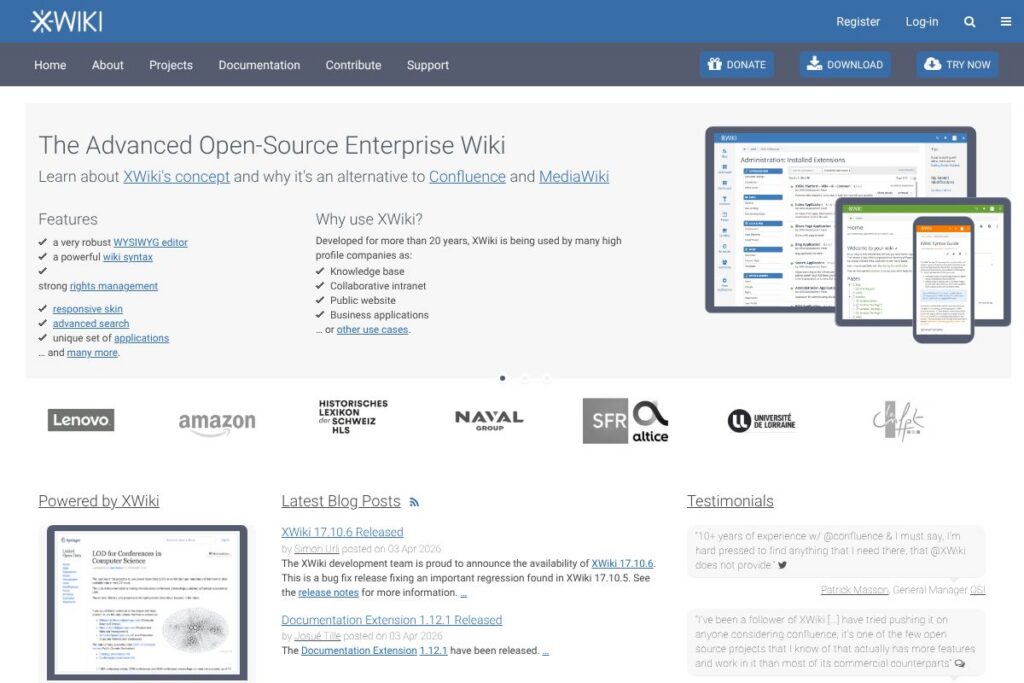
XWiki is an open source enterprise wiki platform that combines document collaboration, structured data, and application-building capabilities. It targets teams that need a hosted or self-managed knowledge base with fine-grained access control, customizable skins, and a modular extension system for adding features or building custom apps.
Compared with Confluence, XWiki emphasizes self-hosting and deeper customization through server-side scripting and extensions, making it a better fit when you need to adapt the platform to internal processes. Compared with lightweight wikis like MediaWiki, XWiki provides first-class support for structured content, application templates, and an integrated extension repository, which reduces the need for external tooling.
All of this makes XWiki a strong choice for organizations that require a highly configurable knowledge platform and the option to run software on their own infrastructure or obtain commercial support from the project maintainers. For downloads and release summaries see the XWiki development team’s release notes and downloads.
How XWiki Works
XWiki stores content as pages in a hierarchical and namespaced structure, where each page can include free text, structured objects, and embedded scripts. Pages are edited in a rich editor, can be versioned, and support inline comments, attachments, and templating for repeated layouts.
Extensions and applications are installed from the extensions repository or deployed as standard Java webapps, which lets administrators add functionality such as diagram rendering, charting, or third-party integrations. Typical workflows include using XWiki pages as living documentation, creating forms with structured objects for capturing metadata, and exposing those objects through search and REST APIs for automation.
What does XWiki do?
Let’s talk XWiki’s Features. At its core XWiki provides collaborative page editing, structured content types, versioning, access control, and an extension system. Recent updates include security fixes, improved REST APIs, and developer-facing enhancements that make it easier to build apps on top of the platform.
Page editing and versioning
The platform offers a WYSIWYG editor as well as source editing, with page version history, compare, and rollback capabilities that help teams track changes and recover content. Page templates and macros speed up creating consistent documentation and intranet pages.
Structured data and applications
Pages can embed structured objects, allowing XWiki to act as a lightweight application platform where pages store and display database-like records without a separate backend. This is useful for inventories, directories, and custom content types.
Extensions and apps
XWiki integrates with the XWiki Extensions Repository to add features such as visualization widgets, authentication providers, and editor plugins. Administrators can install or update extensions from the UI and manage dependencies centrally.
User management and permissions
The platform includes fine-grained rights management with groups, users, and per-page permission settings, plus support for external directories. This makes it practical for intranet use where sections of content must be restricted to specific teams.
REST APIs and automation
XWiki exposes REST endpoints for documents, users, rendering, and search, enabling automation, external indexing, and headless usage from other systems. Developers can script the platform using server-side scripting and call the same APIs that the UI uses.
Search and indexing
Full-text search and metadata indexing help teams find both free-text content and structured objects, with configurable analyzers and scopes to tune results for large knowledge bases.
With these capabilities XWiki works well as a single platform for documentation, internal apps, and structured knowledge management, while recent releases and extensions like Cristal and the LLM Extension expand accessibility and AI integration options. For extension details check the XWiki extensions repository.
XWiki pricing
XWiki follows an open source distribution model for the core platform and offers optional commercial services for hosting, support, and customization. The software itself can be downloaded and self-hosted without license fees, while enterprise support, managed hosting, and consulting are typically available under custom contracts.
Self-hosted / Open source
XWiki is available under an open source license and can be self-hosted at no software cost; administrators download installers or Docker images to run on their infrastructure. See the XWiki downloads and installation options for packages and images.
Enterprise services
Enterprise support is provided as a paid service with custom pricing for SLAs, upgrades, and development work; pricing depends on support level, number of instances, and deployment complexity. For details about managed hosting and consultancy contact the XWiki enterprise services team.
What is XWiki used for
XWiki is commonly used for internal knowledge bases, product and developer documentation, onboarding portals, and intranets where content needs structure and governance. Its application-building features also let teams create small internal tools such as asset trackers, directories, and approval workflows.
Organizations use XWiki when they need control over data residency, custom integrations with internal systems, or the ability to extend the platform with bespoke UI elements and scripts. The platform suits IT departments, R&D teams, and documentation groups that require granular permissions and structured content.
Pros and Cons of XWiki
Pros
- Highly customizable: The platform supports server-side scripting, custom skins, and extensions to adapt the system to complex workflows and UI requirements.
- Open source and self-hostable: You can run XWiki on your infrastructure without licensing fees and inspect or modify the source code as needed.
- Structured content and app building: Native support for structured objects and application templates reduces the need for separate app stacks when building simple internal tools.
- Enterprise-grade access control: Per-page permissions, groups, and external directory integration make it suitable for regulated environments.
Cons
- Operational overhead: Self-hosting and managing upgrades requires DevOps resources, which can be heavier than using a SaaS wiki solution.
- Learning curve for customization: Advanced customization via scripting and extension development requires Java or Groovy knowledge and familiarity with XWiki APIs.
- UI complexity for simple use cases: For teams that only need a basic wiki, XWiki’s feature set can feel heavyweight compared to minimal alternatives.
Does XWiki Offer a Free Trial?
XWiki is free and open-source with optional paid enterprise services. You can download and run the platform yourself at no software cost; commercial hosting and support are available from the XWiki team under custom contracts, which often include trial or pilot arrangements on request.
XWiki API and Integrations
XWiki provides a rich REST API for documents, users, rendering, and search; the XWiki REST API documentation outlines endpoints and usage examples. This makes it straightforward to integrate XWiki into CI pipelines, search indexes, and external applications.
Common integrations include LDAP and Active Directory for authentication, SSO providers for single sign-on, and connectors to office formats and import/export tools. Extensions further expand connectivity through the extensions repository.
10 XWiki alternatives
Paid alternatives to XWiki
- Confluence — A hosted knowledge and collaboration platform with deep integration into the Atlassian ecosystem and SaaS convenience.
- Microsoft SharePoint — Enterprise content and document management integrated with Microsoft 365, suited for organizations standardized on Microsoft tooling.
- Notion — A flexible, user-friendly workspace and documentation tool that emphasizes ease of use and visual organization.
- Slab — A knowledge base focused on clarity and team onboarding with a streamlined editor and integrations.
- Guru — A knowledge delivery platform that emphasizes verification and browser-based knowledge cards.
- Tettra — A team knowledge base that integrates tightly with Slack and other collaboration tools.
Open source alternatives to XWiki
- MediaWiki — The wiki engine that powers Wikipedia, strong for large public knowledge bases and community-driven projects.
- DokuWiki — A simple, file-based wiki well suited for small teams that want minimal infrastructure and straightforward syntax.
- BookStack — An easy-to-use open source platform for creating book-like documentation with a page and chapter structure.
- Wiki.js — A modern, Node.js-based wiki with a focus on performance and an attractive admin UI that supports multiple auth providers.
- Tiki Wiki CMS Groupware — A full-featured all-in-one wiki and CMS platform with extensive built-in modules.
Frequently asked questions about XWiki
What is XWiki used for?
XWiki is used for building knowledge bases, intranets, and internal web applications. Teams use it to centralize documentation, create structured content types, and build lightweight internal tools.
Does XWiki provide an API?
Yes, XWiki exposes a REST API for documents, users, rendering, and search. The API documentation explains available endpoints and examples for automation and integration.
Is XWiki free to use?
XWiki is free and open-source for self-hosting. Commercial hosting and enterprise support services are available from the XWiki team under custom pricing.
Can XWiki integrate with LDAP or SSO providers?
Yes, XWiki supports LDAP and common SSO providers. Integration options include external directory synchronization and single sign-on configurations for enterprise environments.
Does XWiki offer managed hosting or commercial support?
Yes, professional services and managed hosting are offered by the XWiki team and partners. Organizations can contact the XWiki services team to discuss SLAs, migration, and customization work.
Final verdict: XWiki
XWiki stands out as a feature-rich, open source enterprise wiki that balances collaborative documentation with application-building capabilities. It is particularly strong when organizations need structured content, tight access control, and the option to self-host or contract for enterprise support.
Compared with Confluence, which is often chosen for SaaS convenience and per-user subscription pricing, XWiki offers lower software licensing cost when self-hosted and greater flexibility for customization, while Confluence often reduces operational overhead by outsourcing hosting. If your priority is customization and control over your environment, XWiki is a compelling option; if your priority is an out-of-the-box hosted experience, evaluate SaaS competitors such as Confluence.
For downloads, installation options, and details about enterprise support see the XWiki downloads and services pages and XWiki enterprise services.