What is Zim
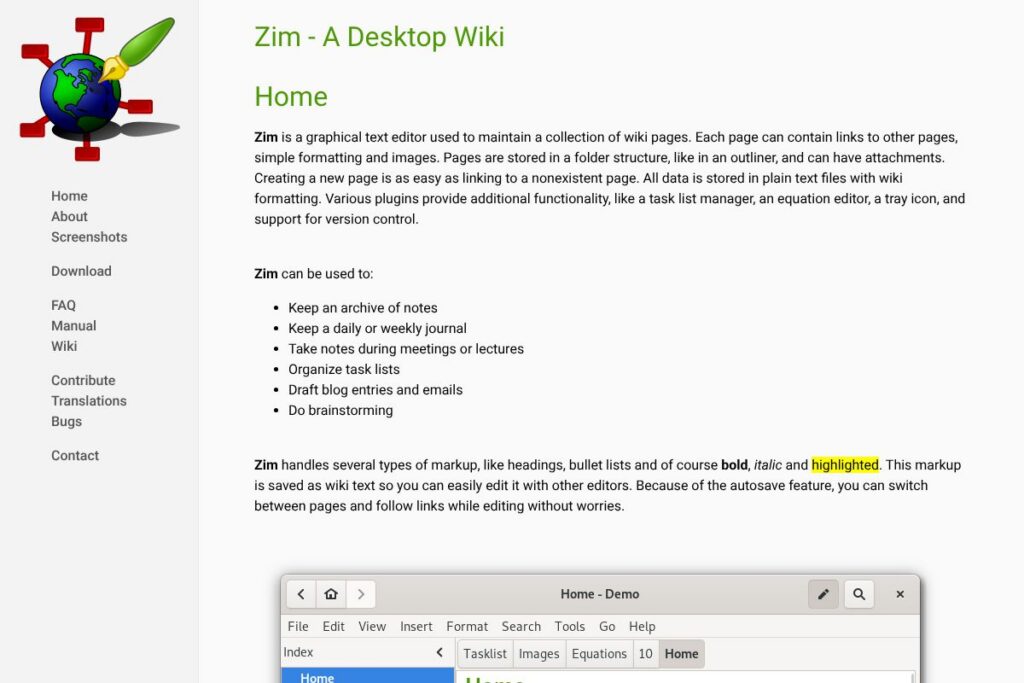
Zim is a desktop wiki and graphical text editor that stores notes as plain-text files using simple wiki markup. It organizes pages in a folder hierarchy so each page behaves like an outline node, while internal links make navigating between topics as easy as creating a link to a new page. Attachments, images, and simple formatting are supported, and a plugin system adds features such as task lists, equations, and version control integration.
Zim occupies a niche between traditional note apps and full wiki servers. Compared with Evernote, Zim keeps everything local in editable plain-text files rather than a remote, proprietary vault. Compared with Obsidian, Zim focuses on a lightweight desktop experience with GUI-driven page creation and built-in plugins rather than a graph-centric visualization and markdown-only workflow. Compared with browser-based wikis like TiddlyWiki, Zim provides a standalone desktop application that integrates with local files and external version control.
Zim does well when you need a fast, offline, file-based wiki for personal knowledge management, meeting notes, or journaling. It is especially useful for users who prefer editable plain-text storage and local control of their content, and for small teams or individuals who want a no-friction desktop wiki without a server component. Review Zim’s homepage to download the app or read more about its goals and features.
How Zim Works
Pages in Zim are individual text files saved in a folder structure that mirrors the wiki’s page hierarchy. You navigate and edit pages in a graphical editor, create links to new pages by typing a link to a nonexistent page, and attach images or files to pages so related resources stay with the content.
The app autosaves as you work so you can follow links and switch pages without losing edits, and plugins extend functionality for tasks like creating checklists, inserting equations, or committing to version control. Workflows typically center on quickly creating a page, linking it to related pages, and using search or the page index to find content later; the files remain accessible to other editors and tools because they are plain-text.
Zim features
Zim is organized around a simple desktop wiki model with a set of core editing, linking, and attachment capabilities plus optional plugins that add functionality like task management and version control. The project continues to improve integration with local file systems and to expand plugin options for common note-taking needs.
Wiki-style linking and plain-text storage
Zim saves pages as plain-text files using lightweight wiki markup, which means your notes are portable and editable with any text editor. Links between pages are easy to create and maintain, so building cross-referenced notes or an index-style wiki is straightforward and robust for long-term storage.
Folder-based organization and outliner view
Pages are stored in a folder hierarchy that acts like an outliner, letting you organize topics by directory and subpage structure. This approach keeps related pages together on disk and makes it simple to back up or sync a whole notebook using standard file tools or version control.
Attachments and images
You can attach files and embed images directly into pages so multimedia and supporting documents remain connected to the relevant notes. Attachments are stored alongside page files which makes portability and manual backups simple.
Autosave and edit-safe navigation
Zim autosaves your edits continuously so you can switch pages, follow links, or close the application without losing work. That behavior supports quick scratch notes and uninterrupted research sessions where users frequently hop between related pages.
Plugins and extendability
A plugin system enables additional capabilities such as a task list manager, equation editor, tray icon, and version control hooks. Plugins let you tailor the application to workflows like to-do management, academic note-taking, or keeping a journal without leaving the desktop environment.
Version control support
Zim can integrate with external version control systems to track changes, create commits, and maintain history for a notebook. That integration is useful for users who want auditability, rollback, or collaborative editing through a VCS workflow rather than a cloud service.
Search, index, and page list
Built-in search and a page index help you find content quickly across the wiki, even when it grows to hundreds of pages. Combined with linking and the folder structure, search provides a fast way to retrieve notes, tasks, or meeting minutes.
With these capabilities, Zim offers a compact set of features focused on local control, portability, and simple extensibility; it works best for people who prefer plain-text storage and a desktop-first note-taking experience.
Zim pricing
Zim uses a free and open-source distribution model rather than subscription plans or usage fees. The application can be downloaded and used at no cost, and the source code is available for review and contribution.
The project provides installers and source packages for common desktop platforms; check Zim’s download page for installers and the source repository to browse the code. Because Zim is distributed openly, there are no mandatory license fees, though organizations may choose to fund development or offer paid support independently.
What is Zim used for
Zim is commonly used to keep an archive of notes and to maintain a daily or weekly journal where each entry is a wiki page. Its folder-based organization and linking make it convenient for meeting notes, lecture notes, and research that benefits from cross-referenced pages and attachments.
People also use Zim to manage personal task lists, draft blog entries or emails, and do freeform brainstorming. The ability to store everything as plain text with attachments and plugin-driven tasks means Zim can serve as a lightweight personal knowledge base that remains portable and easy to back up.
Pros and Cons of Zim
Pros
- Local plain-text storage: Files are stored as readable wiki-formatted text, which makes export, manual editing, and backups straightforward.
- Simple wiki linking: Internal links and an outliner-style folder structure make building connected notes fast and intuitive.
- Extensible with plugins: A plugin system enables task lists, equations, tray integration, and version control without bloating the core app.
- Autosave and offline use: Continuous autosave and full offline operation suit users who need reliability without cloud dependency.
Cons
- Limited collaboration features: Zim is optimized for local or single-user use, so real-time collaboration and cloud sync require third-party solutions or manual workflows.
- No hosted sync service: Built-in synchronization across devices is not a central feature, requiring users to configure file-sync or VCS solutions.
- Desktop-focused UI: Users seeking full mobile apps or a web interface will find Zim’s desktop orientation limiting compared with some web-first note services.
Does Zim Offer a Free Trial?
Zim offers a free, fully functional desktop application rather than a time-limited trial. You can download installers and source packages for supported platforms at Zim’s download page, install the app, and use all core features without payment.
Zim API and Integrations
Zim does not provide a hosted web API; instead it integrates with other tools through plugins and by working with the underlying plain-text files. The plugin documentation describes how to enable built-in extensions and connect external tools like version control systems.
Common integration patterns include using Git or other VCS for change history, syncing notebooks with file-sync services, and exporting pages to HTML for publishing. These file-based integrations keep Zim flexible for desktop-centric workflows.
10 Zim alternatives
Paid alternatives to Zim
- Evernote — A cloud-first note-taking service with rich media capture, web clipping, and cross-device sync.
- Notion — An all-in-one workspace that combines notes, databases, and collaboration tools in a web-based environment.
- Microsoft OneNote — A free-to-use note app tightly integrated with Microsoft 365 and cloud sync for cross-device access.
- Bear — A writing-focused notes app for macOS and iOS with markdown support and a clean UI.
- Roam Research — A graph-style note-taking tool that emphasizes bidirectional links and networked thinking.
Open source alternatives to Zim
- TiddlyWiki — A single-file, browser-based personal wiki that can be run locally or hosted, highly customizable with plugins.
- Joplin — A note-taking app that supports notebooks, markdown, attachments, and optional encryption with sync options.
- Trilium Notes — A hierarchical note-taking application with rich editing, scripting, and synchronization features.
- Zettlr — A markdown editor aimed at researchers with citation management and project organization.
- MediaWiki — The engine behind Wikipedia, suitable for larger wiki deployments when a server-hosted platform is required.
Frequently asked questions about Zim
What is Zim used for?
Zim is used for local note-taking, journaling, task lists, and building a personal desktop wiki. Its folder-based pages and linking features make it suitable for organizing research, meeting notes, and personal knowledge.
Is Zim free to use?
Yes, Zim is free and open-source software. You can download and use it without subscription fees and access the source code via the project’s repository.
Can Zim sync notes between devices?
Zim does not include a proprietary sync service. Users typically sync notebooks between devices using file-sync tools or version control systems like Git.
Does Zim support attachments and images?
Yes, Zim supports attaching files and embedding images directly into pages. Attachments are stored alongside page files so related resources remain together with the content.
Does Zim support version control?
Yes, Zim can be used with external version control systems. Plugins and workflows are available to commit changes and maintain history through Git or similar tools.
Final verdict: Zim
Zim is a practical desktop wiki for users who want a local, file-based system with simple wiki markup and direct control over their notes. It excels at offline note-taking, journaling, and building a personal knowledge base where portability and plain-text storage matter more than cloud collaboration.
Compared to Obsidian, which emphasizes a markdown graph view and offers paid services like sync and publishing, Zim keeps the experience simple and fully free to use while relying on file-sync or VCS for collaboration. If you need a lightweight, no-cost desktop wiki with extensible plugins and strong local-file guarantees, Zim is a solid choice; if you prefer built-in cloud sync and a graph-oriented interface, consider Obsidian or a cloud-first note service instead.