Lucky Orange: An Overview
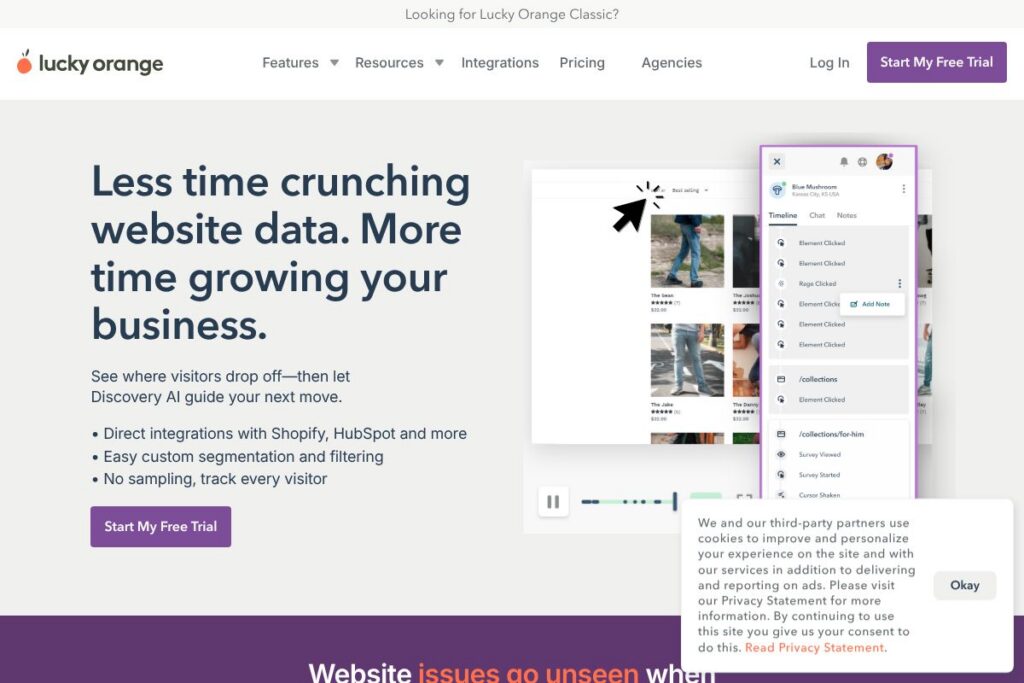
Lucky Orange is a suite of website optimization tools that combines heatmaps, session recordings, conversion funnels, and on-site surveys to help teams understand visitor behavior and diagnose friction. The product is delivered as a SaaS platform with a small snippet installed on pages to capture interactions, then surfaced in dashboards and visual reports for analysis.
Compared with Hotjar, Lucky Orange emphasizes continuous, unsampled tracking and deeper session search filters, which can make it easier to reproduce issues seen by a specific visitor segment. Versus FullStory, Lucky Orange focuses on simpler setup and integrated on-site feedback flows, while FullStory often targets larger enterprise teams with advanced analytics and governance features. Against Microsoft Clarity, Lucky Orange provides more built-in feedback and conversion tooling rather than only raw session capture and heatmaps.
All of this makes Lucky Orange well suited for small to mid-market teams and agencies that need visual, actionable insights quickly; product and UX teams can use its recordings and heatmaps for debugging and design changes, while marketing teams can validate A/B tests or landing page changes with concrete visitor evidence.
How Lucky Orange Works
Install a single JavaScript snippet on your site and Lucky Orange begins capturing clicks, scrolls, mouse movement, and page state for every visitor. Data is processed into heatmaps, session recordings, funnels, and funnels so you can move from a metric anomaly to a visual replay that explains why the anomaly happened.
Workflows commonly start with a metric alert in analytics, then use Lucky Orange heatmaps to check attention distribution, session recordings to replay affected visits, and surveys or on-page polls to gather direct visitor feedback. Teams can segment recordings by source, device, page, or custom attributes to target troubleshooting and prioritize fixes.
What does Lucky Orange do?
Lucky Orange bundles visitor behavior capture, visualizations, and feedback tools into a single interface so teams can locate issues, validate fixes, and measure impact. It has core capabilities for heatmaps, session replays, conversion funnels, and on-site surveys, and it recently highlighted an AI assistant to help interpret behavior and suggest next steps.
Let’s talk Lucky Orange’s Features
Heatmaps
Heatmaps visualize where visitors click, scroll, and move on a page so you can see which elements attract attention and which are overlooked. They are useful for optimizing layout, call-to-action placement, and above-the-fold content, and they support segmentation by traffic source or device to compare behaviors across audiences.
Session Recordings
Session Recordings replay full visitor journeys including clicks, scrolls, and navigation events, allowing teams to observe friction, errors, and UX confusion that raw analytics do not show. Recordings are searchable and filterable so you can replay sessions from a specific campaign, browser, or user behavior pattern to reproduce issues.
Conversion Funnels
Conversion Funnels let you map multi-step paths and see where visitors drop off in a flow, with funnel-level metrics and session links to inspect individual drop-offs. This feature helps prioritize fixes by showing the steps that lose the most users and tying visual evidence to each funnel stage.
Surveys and On-site Feedback
On-site Surveys, polls, and exit intent forms collect qualitative feedback directly from visitors to explain why behavior occurred. These tools can be targeted to specific pages or segments and are useful for validating hypotheses generated by heatmaps or recordings.
Real-time Dashboards and Live View
Real-time dashboards show current visitor activity and allow live monitoring of sessions as they occur, which is useful for diagnosing critical bugs during launches or monitoring campaign traffic spikes. Live View provides an immediate window into page performance and visitor interactions without waiting for aggregated reports.
Segmentation and Filtering
Custom segmentation and filtering let teams narrow data to traffic source, UTM parameters, device, location, and other attributes so analysis targets the right audience. Fine-grained filters reduce noise and speed up troubleshooting by focusing on relevant sessions and heatmap cohorts.
Integrations and Privacy Controls
Lucky Orange offers direct integrations with platforms like Shopify and HubSpot, plus connectors for analytics and tag managers to sync data and simplify setup. The platform is built to respect privacy requirements, offering CCPA and GDPR compliance options and avoiding collection of sensitive data by default.
Discovery AI
Discovery AI provides an assistant-style interface that helps interpret behavior patterns and suggests investigation steps based on session data and funnel trends. It is intended to reduce time spent translating visuals into action items by highlighting likely causes and next experiments to run.
With these features combined, Lucky Orange turns raw visitor interactions into visual evidence and prioritized actions that teams can use to reduce friction and improve conversion rates.
Lucky Orange Pricing
Lucky Orange uses a subscription-based SaaS pricing model with tiered plans tailored to different business sizes and needs, and it offers a free trial to evaluate the platform. Specific plan details are not published in this listing, but the company provides a trial and multiple plan options to accommodate individual sites, teams, and agencies.
For the most accurate and current plan breakdowns and seat or session limits, view the Lucky Orange pricing options. The site also includes trial signup and contact channels for custom or enterprise-level arrangements.
What is Lucky Orange Used For?
Lucky Orange is used to identify usability issues, reproduce bugs, and validate design or marketing changes by linking visual visitor behavior to conversion outcomes. Teams use heatmaps to assess content placement, recordings to debug checkout flow problems, and funnels to measure the impact of page adjustments.
It is ideal for product managers, UX designers, conversion rate optimization specialists, and marketing teams who need rapid, evidence-based insights without building a bespoke analytics stack. Agencies also use Lucky Orange to audit client sites and demonstrate the impact of optimization work through visual reports.
Pros and Cons of Lucky Orange
Pros
- Comprehensive visual tools: The heatmaps, session recordings, and funnels together provide both quantitative and qualitative evidence for troubleshooting and optimization, enabling teams to connect metrics with actual user behavior.
- No sampling for visitor tracking: Lucky Orange captures every visitor session rather than sampling, which helps in reproducing edge-case issues and understanding behavior patterns for smaller cohorts.
- Built-in feedback and AI assistance: On-site surveys and Discovery AI help teams gather direct insights and interpret behavior faster, cutting down manual analysis time.
- Privacy-focused controls: The platform includes CCPA and GDPR compliance features and limits collection of sensitive data to align with common privacy requirements.
Cons
- Limited public pricing transparency: Detailed plan limits and pricing are not published in this listing which means teams need to contact the vendor or trial the product to confirm cost and capacity needs.
- Feature depth varies by competitor: Some competitors provide deeper governance, advanced analytics, or enterprise-grade controls out of the box, which may matter for large organizations with strict data requirements.
- Potential data volume management: Capturing every session can increase data volume and may require plan considerations for high-traffic sites to manage recording retention and storage needs.
Does Lucky Orange Offer a Free Trial?
Lucky Orange offers a free 7-day trial with no credit card required. The trial provides access to core features like heatmaps, session recordings, funnels, and surveys so teams can evaluate the platform on live traffic before committing to a subscription.
Lucky Orange API and Integrations
Lucky Orange provides native integrations with platforms such as Shopify and HubSpot, plus connectors for analytics tools and tag managers to simplify implementation and data sharing. Explore the full list of platform connections on the integrations page.
For programmatic access or custom workflows, contact Lucky Orange support or sales to discuss developer access or data export options; teams with specific automation requirements can also use third-party automation platforms like Zapier to bridge Lucky Orange with other systems.
10 Lucky Orange alternatives
Paid alternatives to Lucky Orange
- Hotjar — Heatmaps, session recordings, and feedback tools with a popular freemium tier and clear upgrade paths for growing teams.
- FullStory — Session replay and product analytics with emphasis on detailed event capture and enterprise governance features.
- Crazy Egg — Click and scroll heatmaps with A/B testing insights and visual reporting aimed at conversion optimization.
- Smartlook — Recorder-focused platform that includes funnels and event tracking designed for product and marketing teams.
- Contentsquare — Enterprise-level digital experience analytics with deeper behavioral insights and large-scale data capabilities.
- Heap — Automatic event capture combined with user-level analytics and funnel analysis for product-led teams.
- Mouseflow — Session recordings, funnels, and form analytics with features targeted at improving form conversion and user flows.
Open source alternatives to Lucky Orange
- OpenReplay — An open source session replay solution you can self-host, suitable for teams that want full control over recordings and storage.
- Matomo — Self-hosted analytics platform with privacy controls and optional plugins for heatmaps and session recordings.
- Umami — Lightweight, open source web analytics focused on privacy and basic traffic insights, good for simple tracking needs.
- Ackee — Self-hosted, privacy-friendly analytics that provide basic visitor metrics without third-party tracking concerns.
Frequently asked questions about Lucky Orange
What is Lucky Orange used for?
Lucky Orange is used to visualize visitor behavior and diagnose UX or conversion issues. Teams use heatmaps, session recordings, funnels, and surveys to turn analytics anomalies into explainable visitor actions.
Does Lucky Orange provide heatmaps and session recordings?
Yes, Lucky Orange includes heatmaps, session recordings, and move maps. These features allow teams to see clicks, scroll depth, and mouse movement to assess attention and interaction across pages.
How much does Lucky Orange cost?
Lucky Orange uses subscription plans and offers a free 7-day trial, but detailed plan pricing is provided on their site. For current plan structures and any usage limits, check the Lucky Orange pricing options on their website.
Can Lucky Orange integrate with Shopify and HubSpot?
Yes, Lucky Orange offers direct integrations with platforms such as Shopify and HubSpot. Integrations simplify setup and allow data to flow between marketing and analytics tools for unified workflows.
Is Lucky Orange GDPR and CCPA compliant?
Yes, Lucky Orange supports GDPR and CCPA compliance features. The platform provides controls to limit sensitive data collection and to configure privacy settings in line with regional regulations.
Final verdict: Lucky Orange
Lucky Orange is a practical, visual analytics suite that combines heatmaps, session recordings, funnels, and on-site feedback to help teams find and fix website friction. Its unsampled session capture, integrated surveys, and Discovery AI assistance make it particularly useful for mid-market teams and agencies that need fast, evidence-based insights without heavy configuration.
Compared with Hotjar, Lucky Orange emphasizes no-sampling tracking and richer session filtering, which helps when reproducing specific visitor problems; Hotjar is known for a straightforward freemium entry point and clear tiered pricing. If you need immediate visual evidence, direct integrations with platforms like Shopify and HubSpot, and built-in feedback flows, Lucky Orange is a strong choice; if budget-conscious teams want a free tier to start with, evaluating Hotjar alongside Lucky Orange is a sensible next step.


