What is Smartlook
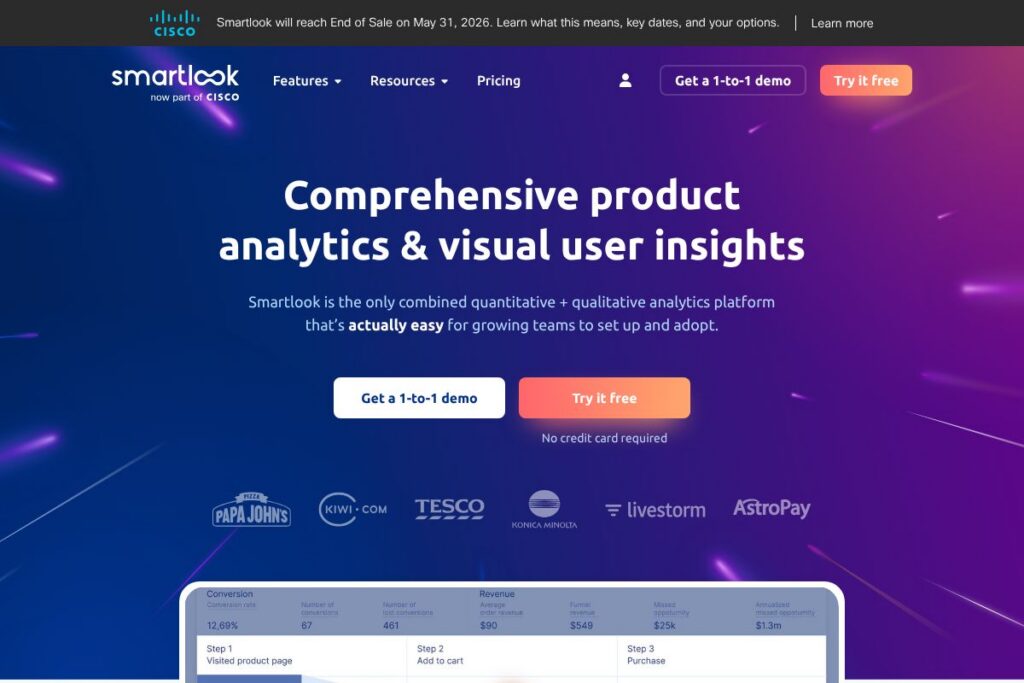
Smartlook is a product analytics platform that records user sessions and couples those recordings with event tracking, funnels, heatmaps, and crash analysis for web and native mobile apps. It is designed for product managers, UX designers, QA engineers, and growth teams who need visual, qualitative context to understand user behavior beyond raw metrics.
Compared with Hotjar, which focuses on lightweight session replay and feedback tools for small teams, Smartlook emphasizes event-driven recordings and deeper mobile SDK support. Against FullStory, Smartlook offers similar session replay and funnel features while positioning itself as an easier-to-use option for teams that want quick setup and mobile-first diagnostics. For broader analytics and behavioral cohorts, Amplitude and Mixpanel provide richer quantitative experimentation and cohort tooling; Smartlook is often used alongside those platforms to add visual context to quantitative findings.
Smartlook does particularly well at surfacing exact moments a problem occurs by linking events and funnels to session replays, and at diagnosing mobile crashes without reproducing issues in QA. This makes it a practical choice for teams that need fast, visual troubleshooting and conversion rate optimization for both websites and apps.
How Smartlook Works
Smartlook instruments your website or app with a snippet or SDK to capture session data, events, and UI interactions. It records screen activity and aggregates events so you can jump from a funnel or event report directly into the exact session recordings where those actions occurred.
Typical workflows include defining key events or funnels, filtering for sessions that match a pattern, and watching recordings to see the context around errors, drop-offs, or confusing UX. For mobile apps, Smartlook’s SDKs capture touch events, navigation, and crash moments so developers can see what led to a failure without recreating it locally.
Smartlook features
Smartlook centers on visual analytics that connect behavioral data to recordings and includes features aimed at both web and mobile products. Core capabilities include session recordings tied to event analytics, conversion funnels with one-click recordings of drop-offs, click and scroll heatmaps, mobile SDKs with crash context, and a library of integrations to connect data with other tools. The platform also offers advanced filtering to surface the most relevant sessions quickly.
Key functionality includes:
Session Recordings
Session recordings capture user interactions, page navigation, form inputs, and clicks so you can watch exactly what a user experienced. Recordings are searchable by events and filters, letting teams find problematic sessions without guessing.
Event-Based Analytics
Events let you instrument the actions that matter and quantify how often they occur, then use those events as filters for recordings and funnels. This ties quantitative metrics directly to qualitative visual context for faster root-cause analysis.
Funnels and Drop-off Analysis
Funnel reports show conversion steps and allow you to click into recordings for users who dropped off at a specific step. Teams use this to prioritize UX fixes and to validate whether flows behave as intended.
Heatmaps (Clicks and Scrolls)
Heatmaps provide aggregate visualizations of clicks, taps, and scroll depth so you can see which elements draw attention and where users stop engaging. This helps optimize page layout and CTAs based on real behavior.
Mobile SDK and Crash Recordings
Mobile SDKs for iOS and Android capture sessions, gestures, and the moments leading up to crashes so developers can reproduce and fix issues faster. Session context removes the need for complex QA reproduction in many cases.
Advanced Filtering and Segmentation
Filters let you narrow recordings and reports by events, device, OS, geography, and custom properties so teams can isolate issues for specific user segments. This speeds up debugging and A/B validation workflows.
Integrations and Data Export
Smartlook connects with analytics and collaboration tools to fit into existing stacks, and supports exporting data for further analysis or BI workflows. Integrations and SDK guides are available on Smartlook’s integrations and docs pages.
Privacy and Compliance Controls
Built-in options help manage personal data capture and consent, with features to mask inputs and respect privacy rules. These controls are useful for teams handling regulated or sensitive user data.
With Smartlook you get visual context attached to behavior metrics, making it faster to find why users fail a flow or experience a bug. That combined view of qualitative and quantitative data is the platform’s biggest practical benefit.
Smartlook pricing
Smartlook uses a subscription model with tiered plans tailored to different team sizes and data needs; detailed plan structures and current pricing are provided directly by the vendor. For custom enterprise requirements many organizations work with Smartlook sales to get a quote that covers seats, data volume, and retention.
For the most accurate and up-to-date options, view Smartlook’s homepage and contact sales through Smartlook’s main site to request details and a quote. For information on integrations and deployment needs, check Smartlook’s integrations and documentation pages as you evaluate plan fit.
What is Smartlook Used For?
Smartlook is commonly used to troubleshoot UX problems by watching real user sessions, diagnose crashes in mobile apps, and validate whether product changes actually improve conversion funnels. Product and growth teams use it to identify friction points and measure the impact of UX fixes.
It is also used for conversion optimization, user onboarding analysis, and bug triage workflows where visual context speeds time-to-fix. Engineering and support teams use recordings to see reproduction steps and reduce back-and-forth with customers.
Pros and Cons of Smartlook
Pros
- Visual session context: Watching recordings gives teams direct insight into user behavior and the exact sequence of events that led to errors or drop-offs, speeding root-cause analysis and reducing time spent reproducing bugs.
- Strong mobile support: Native SDKs and crash-focused recordings let mobile teams diagnose issues that are hard to capture with web-focused tools alone, improving app stability and onboarding flows.
- Event-driven approach: Events are first-class and can be used to filter recordings, build funnels, and measure conversions, which ties quantitative KPIs to qualitative evidence.
- Integrations ecosystem: A wide set of integrations lets teams connect Smartlook’s visual data to analytics, product, and collaboration tools for cross-functional workflows.
Cons
- Data retention and costs for high volume: Organizations with heavy traffic or long retention needs may encounter higher costs as session volume grows without careful sampling and retention policies.
- Learning curve for advanced queries: While basic setup is straightforward, building complex event schemas and filters can require planning and coordination between product and engineering teams.
- Potential privacy overhead: Masking and consent controls exist, but teams must configure them correctly to meet regional compliance requirements, which can add implementation steps.
Does Smartlook Offer a Free Trial?
Smartlook offers demo and trial options accessible through its website. Prospective users can sign up for trial access or request a demo on Smartlook’s homepage to evaluate features such as session recordings, funnels, and mobile SDK capabilities before committing to a paid plan.
Smartlook API and Integrations
Smartlook provides SDKs for web, iOS, and Android and exposes APIs and export options for programmatic access to events and recordings. The Smartlook documentation and SDK guides show how to instrument events and integrate with CI/CD or crash reporting workflows, see Smartlook’s developer documentation for endpoints and examples.
The product integrates with a wide range of tools including analytics, tag managers, and collaboration platforms; typical integrations include Google Analytics, Segment, Slack, and Firebase. View Smartlook’s integrations list to see connectors that match your stack.
10 Smartlook alternatives
Paid alternatives to Smartlook
- Hotjar — Session recordings, heatmaps, and feedback widgets for web teams that want simple UX research tools with straightforward tiered pricing.
- FullStory — Advanced session replay and behavioral analytics geared toward digital experience analytics with strong search and segmentation capabilities.
- Heap — Automatic event capture and behavioral analytics that focus on retroactive analysis without manual instrumentation.
- Mixpanel — Event-based analytics and cohort analysis with experimentation and messaging features for product growth teams.
- Amplitude — Product analytics platform tuned for behavioral cohorts, experimentation, and growth metrics at scale.
- Contentsquare — Enterprise-grade digital experience analytics with robust session analysis and path optimization features.
- Glassbox — Session replay and digital experience analytics with a focus on enterprise compliance and large-scale deployments.
Open source alternatives to Smartlook
- Matomo — Self-hosted analytics with heatmaps and session recording plugins that allow full control over data and retention.
- Open Web Analytics — Web analytics suite with click tracking and some replay capabilities suitable for self-hosted use.
- Plausible — Lightweight, privacy-focused analytics for simple event tracking and page-level metrics, without session replay features.
- Ackee — Self-hosted analytics focused on privacy and simple event tracking for smaller sites and teams.
Frequently asked questions about Smartlook
What is Smartlook used for?
Smartlook is used for visual product analytics and session replay to diagnose UX problems, measure funnels, and analyze mobile app behavior. Teams use it to connect event data to recordings and find the exact moments users experience friction.
Does Smartlook have mobile SDKs?
Yes, Smartlook provides SDKs for iOS and Android. These SDKs capture gestures, navigation, and the moments leading up to crashes so developers can inspect issues without reproducing them in QA.
Can Smartlook integrate with other analytics tools?
Yes, Smartlook supports a wide range of integrations with analytics, tag managers, and collaboration platforms. Check Smartlook’s integrations list for connectors like Google Analytics, Segment, and Firebase.
How does Smartlook help with conversion optimization?
Smartlook ties funnel steps and event data to session recordings so teams can watch exactly why users drop off. This visual feedback helps prioritize UX fixes and validate whether changes improved conversion.
Is Smartlook suitable for enterprise security and compliance?
Smartlook offers privacy controls, masking, and configuration options to support compliance needs. Larger organizations typically combine those controls with internal policies and custom retention settings to meet regulatory requirements.
Final Verdict: Smartlook
Smartlook stands out for combining session replays with event-focused analytics and strong mobile SDK support, making it particularly useful for teams that need to diagnose crashes, onboarding issues, and conversion drop-offs with visual evidence. Its ability to jump from funnels or event reports directly into the exact recordings speeds troubleshooting and reduces reliance on QA reproduction.
Compared with Hotjar, which provides simpler web-focused recordings and clear tiering for SMBs, Smartlook leans into mobile-first capabilities and event-driven workflows that benefit product and engineering teams working across web and native apps. While pricing structures vary by need, Smartlook’s feature set is best suited for teams that require deep, visual context for both web and mobile experiences and are willing to align instrumentation and retention strategy to control costs.