Line2: An Overview
Line2 is a cloud phone service that gives individuals and small businesses one or more dedicated phone lines on the same mobile device and in a browser. It combines calling, SMS and MMS, number management, voicemail, and a built-in video conferencing option called Line2 Meet so teams can communicate from phones, tablets, and desktop browsers without new hardware.
Compared with consumer VoIP options like Google Voice, Line2 positions itself for business use with multi-line management, toll-free options, and support oriented toward companies. Compared with small-business focused competitors such as Grasshopper and RingCentral, Line2 emphasizes quick setup on existing devices and straightforward texting capabilities rather than large-scale PBX features.
Line2 is best for small businesses, solo entrepreneurs, and distributed teams that need a separate business line for privacy and customer contact without buying new phones. Its combination of mobile apps, browser access, and a simple administration model makes it a practical choice for teams that need easy setup, reliable SMS/MMS, and occasional video meetings.
How Line2 Works
Line2 runs as a cloud phone service accessible via native apps on iOS and Android and through a browser-based softphone for desktop use. When you add a Line2 number to your account, the service handles routing via the internet and the public switched telephone network so calls and texts use your Line2 identity rather than your personal number.
Users manage calls, messages, call screening, and voicemail from the Line2 app or web console; features like call forwarding, simultaneous ringing on multiple devices, and block lists are configured in the account settings. For meetings, Line2 Meet lets participants join from the Line2 app or a browser, integrating video, screen sharing, and meeting controls into the same account workflow.
Practical workflows include giving sales and support teams a single toll-free or local number that rings on employees’ phones, using the mobile app to separate personal and business messages, and routing after-hours calls to voicemail or an external support line. Administrators can scale lines up or down and change routing settings without changing physical phones.
Line2 features
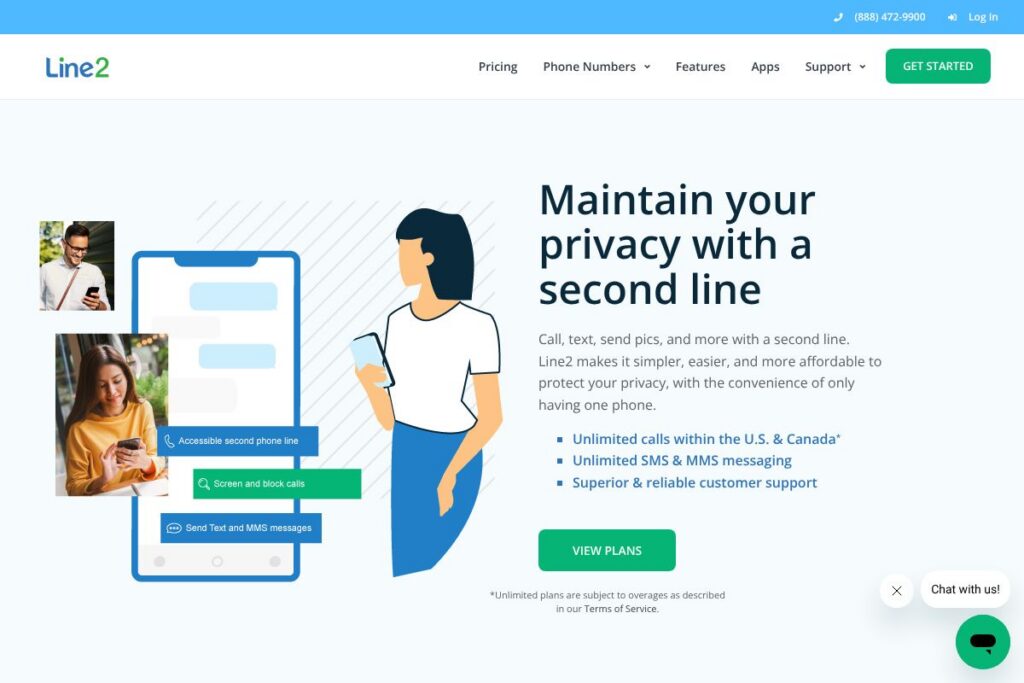
Line2 centers on phone line management for mobile-first teams, combining voice, messaging, and virtual meetings. Core capabilities include multiple business lines on one device, unlimited calling within the U.S. and Canada subject to terms, unlimited SMS and MMS, call screening and blocking, voicemail, and Line2 Meet for video conferencing.
Line2’s main Features
Multiple business lines
Assign more than one phone number to a single device so users can keep personal and business communications separate. This supports dedicated numbers per role or project and lets employees answer calls from the appropriate line without carrying separate phones.
Calling and messaging
Place and receive calls over WiFi or cellular networks and send SMS and MMS messages from your Line2 number. The service includes unlimited domestic calling and messaging policies for the U.S. and Canada, with usage governed by the provider’s terms of service.
Call screening, blocking, and voicemail
Screen incoming calls, block unwanted numbers, and manage voicemail from the app or web console. Voicemail messages are accessible from the account and can be managed by individuals or administrators who need shared access for business lines.
Line2 Meet video conferencing
Host unlimited virtual meetings with integrated video and screen sharing that works from desktop browsers and the mobile app. Line2 Meet is designed for customer calls, team check-ins, and product demos without requiring a separate meeting service.
Multi-device apps and browser access
Use Line2 on iOS, Android, Windows, and in a browser so calls and messages stay in sync across devices. The apps enable call controls, message history, and voicemail playback without relying on carrier-specific services.
Number options and portability
Choose toll-free or local numbers and port existing numbers into Line2 to maintain continuity for customers. Number management is handled within the account settings, making it easier to add or move numbers as business needs change.
Account administration and support
Add and remove lines, change routing rules, and adjust user settings from a central admin interface with assistance from Line2’s support team. Customer support focuses on account setup, number management, and troubleshooting across mobile and desktop clients.
With these features Line2 helps small teams keep personal and business communications separate, reach customers with a consistent business identity, and run meetings within the same platform.
Line2 pricing
Line2 uses a subscription model with tiered plans for individuals and businesses, plus options for toll-free numbers and additional lines. Exact plan names and rates are not published here, so you should review current offerings to match features and quantity of lines to your needs; you can view Line2 plans on the official site for the latest details.
For organizations that need custom deployments or a larger number of lines, Line2 can provide enterprise-style account management and support; contact the Line2 team directly through their site to discuss volume pricing and onboarding. To compare plan features, check the provider’s plan listings and support resources on the Line2 homepage.
What is Line2 Used For?
Line2 is commonly used to add a business phone presence without buying extra handsets, making it useful for solo entrepreneurs, consultants, and small customer-facing teams. Users rely on it to separate business voice and messaging from personal lines while keeping all communications on a single mobile device.
Other common use cases include setting up a dedicated sales or support number that rings multiple team members, providing a toll-free number for customers, and using Line2 Meet to handle remote consultations or demonstrations. Field workers and remote employees use the service to stay reachable on a consistent business number across different networks and devices.
Pros and Cons of Line2
Pros
- No new hardware required: Using existing phones, tablets, and browsers keeps setup simple and avoids equipment costs.
- Second line for privacy: Provides a separate business number for calls and texts so personal numbers remain private and uncluttered.
- Integrated video meetings: Line2 Meet combines calling and conferencing in the same account, reducing the need for multiple services.
- Multi-device sync: Messages, call logs, and voicemail stay synchronized across mobile apps and the web client for consistent records.
- Responsive customer support: Support is oriented to small business use cases, helping with number porting and account changes.
Cons
- Limited enterprise PBX features: Organizations that need advanced call center or complex PBX workflows may find Line2 less feature-rich than large-scale VoIP providers.
- Dependence on internet quality: Call and meeting quality depend on WiFi or cellular data performance, so poor networks can affect reliability.
- Pricing transparency: Public-facing plan details may change; businesses should confirm current pricing and any usage policies before committing.
Does Line2 Offer a Free Trial?
Line2 offers a free trial and paid plans. Trial availability and exact trial duration vary by promotion and region, so check the Line2 site to see current trial terms and which features are included while evaluating the service; view Line2 plans on the official site to get started.
Line2 API and Integrations
Line2 provides native apps for iOS, Android, Windows, and a browser client to integrate into daily workflows without additional middleware. For custom workflows and enterprise integrations, contact Line2 support or check the account resources on the Line2 site for developer and integration guidance.
If you need CRM, help desk, or calendar integrations, review Line2’s support documentation and account settings for native options or recommended third-party connectors; visit Line2 support for details and setup instructions.
10 Line2 alternatives
Paid alternatives to Line2
- Google Voice — A consumer and small-business voice and messaging service that integrates with Google Workspace and offers simple call forwarding and voicemail features. It is typically more budget-oriented for users already in the Google ecosystem.
- Grasshopper — Focused on small businesses, Grasshopper provides virtual phone numbers, extensions, and business-texting with emphasis on simple setup for entrepreneurs and single-owner companies.
- RingCentral — A full-featured cloud phone system with robust PBX capabilities, integrations with business apps, and advanced team collaboration features suited to larger SMBs.
- 8×8 — Offers unified communications with voice, meetings, and contact center features, aimed at businesses that need scalable global coverage and analytics.
- Nextiva — A business communications platform combining VoIP, contact center functions, and CRM-adjacent features for growing teams.
- Vonage Business — Cloud phone services with API options and integrations for sales and support teams needing programmable communications.
Open source alternatives to Line2
- Asterisk — A widely used open source telephony engine for building custom PBX systems and VoIP services with extensive flexibility for developers.
- FreeSWITCH — A scalable telephony platform suitable for building voice, video, and messaging systems for businesses with in-house engineering resources.
- Jitsi — An open source video conferencing solution that provides secure meetings and screen sharing and can be self-hosted for full control.
- Kamailio — A SIP server useful for routing and managing large volumes of VoIP traffic, commonly used in custom telephony infrastructures.
Frequently asked questions about Line2
What is Line2 used for?
Line2 provides business phone lines on existing devices for calling, texting, and meetings. It is used to separate business and personal communications, run customer-facing numbers, and host virtual meetings with Line2 Meet.
Does Line2 support toll-free numbers?
Yes, Line2 supports toll-free and local numbers. You can choose new toll-free or local numbers when you set up an account and you can port existing numbers into your Line2 account.
Can Line2 be used on multiple devices?
Yes, Line2 works across multiple devices and a browser. Calls, messages, and voicemail are synchronized across mobile apps and the web client so users can switch devices without losing context.
Does Line2 include video conferencing?
Yes, Line2 includes Line2 Meet for video conferencing. Line2 Meet supports video, screen sharing, and unlimited meetings suitable for customer calls and team collaboration.
How does Line2 handle number porting?
Line2 allows number porting into its service. Porting is managed through the account setup process and Line2’s support team can assist with transfer requirements and timelines.
Final verdict: Line2
Line2 does well at giving small businesses and mobile professionals a professional phone presence without new hardware, combining calling, messaging, and integrated meetings in one service. Its strengths are easy setup, multi-line management on a single device, and user-friendly apps that keep business communications separate from personal lines.
Compared to consumer options like Google Voice, Line2 provides more business-focused features and support at a higher service level, while larger platforms such as RingCentral offer deeper PBX and contact center capabilities at greater complexity and cost. For teams that need straightforward business numbers, reliable SMS/MMS, and built-in meeting tools without a full PBX rollout, Line2 is a practical, accessible choice.