What is Chanty
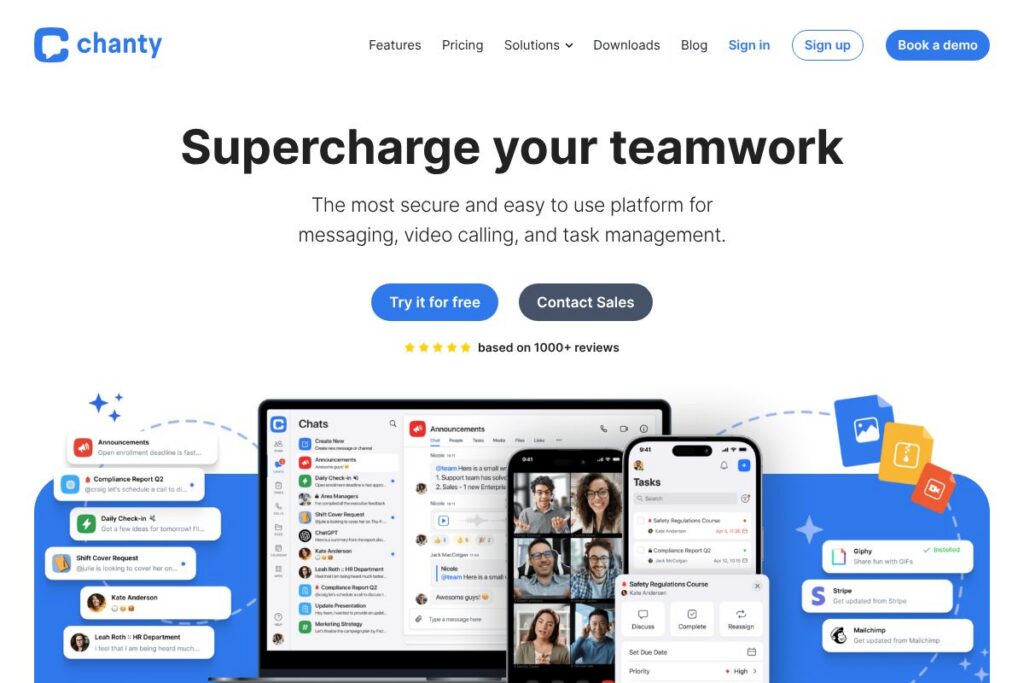
Chanty is a team communication and collaboration platform focused on combining chat, voice and video calls, and basic task management into one lightweight workspace. It offers persistent conversations, unlimited message history, and cross-platform apps for desktop and mobile so teams can stay connected from anywhere. The product emphasizes simple setup and an uncluttered interface compared with more complex suites.
Chanty competes directly with established collaboration tools such as Slack, Microsoft Teams, and Zoom. Compared with Slack, Chanty positions itself around lower per-user cost and a simpler interface while including built-in task boards; compared with Microsoft Teams, Chanty aims to offer easier deployment and less overhead for smaller teams; against Zoom, Chanty integrates calling and messaging in the same product rather than focusing solely on meetings.
Chanty works best for small to mid-size teams, startups, and distributed teams that need a single app for messaging plus occasional video conferencing and task tracking. Its feature mix and compliance options also make it a reasonable fit for organizations that need EU or regional data residency and basic governance controls.
How Chanty Works
Users sign up and create a workspace, invite teammates, and then use channels and direct messages to organize conversations. Channels can be public or private and support threaded or topic-based discussions to keep work organized across teams or projects.
Messages can be converted into tasks or to-do items which then appear on a task board with due dates, priorities, and a Kanban-style view. Voice and video calls start from a chat window so teams can escalate a conversation to a face-to-face meeting with screen sharing, recording options, and multi-user video layouts.
Chanty integrates with external apps so messages, files, and calendar events flow between tools. Admins can configure access controls, data retention, SSO, and compliance settings through the workspace administration panel to match organizational policies.
Chanty features
Chanty organizes communication, meetings, and simple project work in one app. Core features include team and direct messaging, unlimited searchable message history, group audio and video calls, task management with Kanban view, file sharing, and administrative controls for security and compliance. The platform also highlights cross-platform clients and integrations to connect with existing workflows.
Key functionality includes:
Team Messaging and Search
Persistent team channels and private chats let users exchange text, links, and attachments; messages are searchable across unlimited history so teams can find past discussions quickly. The search and message organization reduce context switching when tracking decisions over time.
Voice and Video Calls
Chanty supports one-to-one and group audio and video calls that can be started directly from a conversation. Features include screen sharing, multi-user video layout, and support for large meetings that make it possible to present work and discuss details without switching to a separate meeting app.
Tasks and Kanban Boards
Messages can be converted into tasks or created from scratch, then organized on a Kanban-style board with due dates, assignees, and priority controls. This keeps work and discussion linked in the same context and helps deadline-driven teams stay on track.
File Sharing and Collaboration
Users can attach documents, images, and other files directly in chats or to tasks, with searchable file history and simple previews. This centralizes documents related to a project and reduces reliance on email threads for file exchange.
Security and Compliance Controls
Chanty offers TLS-encrypted connections, customizable data retention policies, SSO and 2FA options, and compliance attestations intended for regulated environments. Enterprise-level plans include options for data residency and managed governance to meet organizational requirements.
Integrations and Extensibility
Built-in integrations and webhooks connect Chanty to calendars, storage, and productivity apps so conversations can trigger actions in other systems. Enterprise customers can extend functionality via APIs and custom integrations to automate common workflows.
With these capabilities, Chanty provides a compact collaboration stack that reduces tool sprawl by combining persistent chat, simple project tracking, and conferencing into one workspace.
Chanty pricing
Chanty uses a subscription pricing model with at least two main plan tiers, available for monthly or annual billing. The vendor publishes a low-cost Standard tier for teams and a Business/Enterprise tier with advanced governance, integrations, and support that requires contacting sales for a custom quote.
Monthly Billing:
Standard – $3/user/month (Unlimited group chats and channels, group audio and video calls, to-do lists and task boards, secure file sharing, announcements, basic admin controls)
Business – Contact sales (All Standard features plus white-labeling, directory sync, SAML SSO, advanced permissions, dashboards and reporting, Enterprise API, unlimited integrations, data residency options)
Annual Billing:
Standard – Annual billing is available with discounted rates for teams; contact sales for specific annual pricing and volume discounts. (Same feature set as monthly Standard)
Business – Enterprise annual agreements are available with custom pricing for support levels, on-premise options, and managed services; contact the Chanty sales team for tailored quotes and SLAs.
For details about compliance and enterprise features, see Chanty’s security and compliance overview and the integration catalog.
What is Chanty Used For?
Chanty is used for day-to-day team communication, including channel-based conversations, direct messaging, and quick decisions that benefit from persistent searchable history. Teams use Chanty to replace or reduce email and ad hoc messaging by consolidating discussions into organized channels.
It is also used for lightweight project and task management where converting messages into tasks and viewing work on a Kanban board keeps small projects moving. Remote and distributed teams use Chanty to combine messaging with video meetings so collaboration happens in one place.
Pros and Cons of Chanty
Pros
- Simple, uncluttered interface: Chanty presents messaging, calls, and tasks in a compact UI that is easy for new users to adopt and reduces training overhead.
- Low entry price: $3/user/month for the Standard tier makes Chanty an economical option for startups and small teams that need core collaboration features without high per-user costs.
- Built-in task management: The ability to convert messages into tasks and use a Kanban view keeps discussions and work items linked, reducing context switching between apps.
- Enterprise compliance features: Data residency, SSO, customizable retention, and compliance attestations support regulated organizations that need governance controls.
Cons
- Less extensive app ecosystem: Chanty’s integration catalog is smaller than that of larger platforms, which may require custom integrations for specialized workflows.
- Fewer advanced collaboration features: Teams that need robust document collaboration, advanced workflow automation, or extensive analytics may find Chanty’s capabilities more basic than enterprise suites such as Microsoft Teams or Slack.
Does Chanty Offer a Free Trial?
Chanty offers a free plan and a free trial that provide access to core messaging, group audio and video calls, and task boards; the paid Standard plan starts at $3/user/month for expanded admin and compliance options. For full enterprise features and dedicated support, organizations should contact the Chanty sales team.
Chanty API and Integrations
Chanty provides integrations with common productivity and calendar apps and supports webhooks for automation; you can explore the available connectors in the Chanty integrations catalog. For organizations that require deeper integration, an Enterprise API is available; review the API documentation and developer options for endpoints and authentication details.
10 Chanty alternatives
Paid alternatives to Chanty
- Slack – A widely adopted team messaging platform with a large integrations ecosystem, advanced workflow builders, and enterprise-scale admin controls.
- Microsoft Teams – An integrated communication and collaboration tool that bundles chat, meetings, and Office app integration for organizations using Microsoft 365.
- Zoom – Primarily a meetings and webinar platform with additional chat features and integrations for scheduling and conferencing at scale.
- Flock – Team messaging with native productivity features like shared to-dos and notes, aimed at small to mid-size businesses.
- Twist – Focused on asynchronous team communication and long-form discussions to reduce interruptions and help remote teams work across time zones.
- ClickUp – A work management platform that combines tasks, docs, chat, and reporting for teams that need deeper project and task features.
Open source alternatives to Chanty
- Mattermost – An open source messaging platform that can be self-hosted for teams that need full control over data and deployment.
- Rocket.Chat – A customizable open source chat server with real-time messaging, file sharing, and federation options for self-hosting.
- Zulip – An open source chat platform with a threaded conversation model that helps manage topic-based discussions at scale.
- Matrix / Synapse (Element client) – A federated open protocol and server implementation with clients like Element that support secure messaging and decentralization.
Frequently asked questions about Chanty
What platforms does Chanty support?
Chanty supports Windows, macOS, Linux, iOS, Android, and web browsers. Native apps are available for desktop and mobile so teams can join conversations and calls from any device.
Does Chanty offer unlimited message history?
Yes, Chanty provides unlimited searchable message history on paid plans. This makes it easier to find past decisions and files without worrying about message retention limits.
Can Chanty be used for video conferencing with large teams?
Yes, Chanty supports group video conferences with multi-user layouts and screen sharing. Enterprise options expand meeting capacity and add features such as recordings and stronger admin controls.
Is Chanty secure enough for regulated industries?
Chanty includes security and compliance features such as TLS encryption, SSO, data residency options, and compliance attestations. Enterprise plans provide additional governance controls and support for HIPAA and other standards where required.
Does Chanty integrate with third-party apps?
Yes, Chanty integrates with common calendar, storage, and productivity apps and offers webhooks for automation. Organizations needing deeper integrations can use the Enterprise API and custom connector options.
Final verdict: Chanty
Chanty is a compact collaboration tool that brings messaging, calls, and basic task management into a single, easy-to-use workspace. It delivers strong value for small and mid-size teams through a low-cost Standard plan at $3/user/month, unlimited message history, and a simple UI that reduces onboarding time compared with larger suites.
Compared with Slack at roughly $8/user/month on standard paid tiers, Chanty offers a lower-cost alternative with built-in task boards and simpler administration, while Slack provides a larger app ecosystem and more advanced workflow automation. For teams focused on affordability, straightforward collaboration, and compliance options without heavy customization needs, Chanty is a practical choice. For organizations that require extensive third-party integrations or advanced workflow automation, evaluating Slack or Microsoft Teams alongside Chanty is advisable.