
Luckyorange
Behavior analytics platform that records user sessions, generates heatmaps, runs polls and surveys, and provides conversion-focused funnels and form analytics for product teams, marketers, and UX researchers.
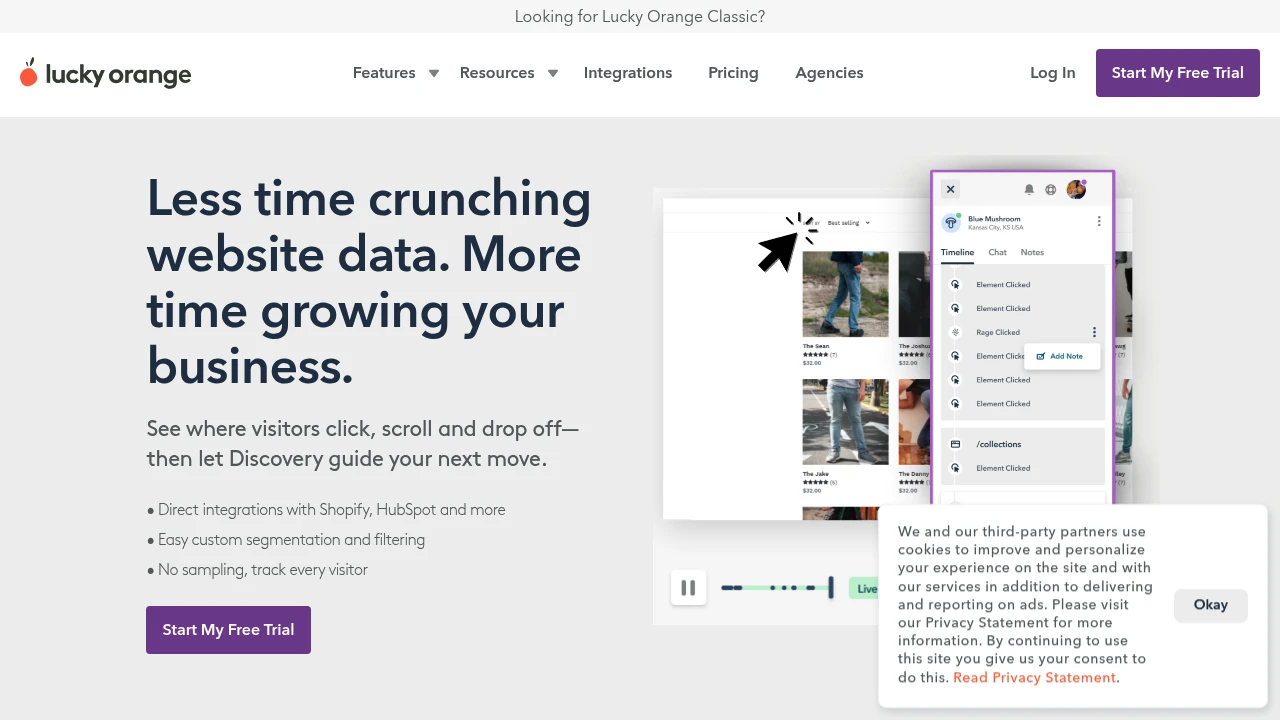
What is luckyorange
LuckyOrange is a behavior analytics suite focused on conversion optimization and visitor insight. The platform collects session recordings, dynamic heatmaps, live visitor lists, conversion funnels, form analytics, and on-site polling to help teams understand how real users interact with pages and flows. It is commonly used by product managers, UX researchers, ecommerce teams, and conversion rate optimization (CRO) specialists to diagnose usability problems and prioritize fixes.
LuckyOrange works by inserting a small JavaScript snippet into a site or by using a CMS/Commerce integration. That snippet captures pageviews, mouse movement, clicks, scroll depth, and form interactions. Those events are then surfaced through session replays, aggregated heatmaps, and conversion reports so teams can see both quantitative patterns and qualitative visitor behavior.
The product emphasizes practical, conversion-oriented features: quick access to recent visitor sessions, filtering to find problem sessions, and tools to capture visitor feedback in-context. It combines real-time monitoring (live visitor list and live chat) with retrospective analysis (recordings and funnels) so teams can both respond to visitors and continuously reduce friction in funnels.
LuckyOrange integrates with common analytics and marketing stacks and includes role-based controls and basic privacy options to mask sensitive fields. For up-to-date technical detail and deployment instructions, view LuckyOrange’s official product overview and feature listing.
Luckyorange features
LuckyOrange bundles a group of related behavior analytics features designed for conversion and UX work rather than general-purpose analytics. The main modules you’ll encounter are session recordings, heatmaps, funnels, form analytics, live chat, and on-site polling.
Session recordings capture full visitor sessions so you can watch exactly how someone navigated, where they hesitated, and what caused form abandonment. Recordings include timestamps, page URLs, device type, and session metadata so you can filter sessions by behavior (for example: sessions with an error, sessions leaving on a checkout page, sessions with repeated clicks).
Heatmaps aggregate click, move, and scroll activity across pages or page groups. Heatmaps show which regions receive attention and where visitors stop scrolling, helping prioritize layout and content changes. LuckyOrange typically supports separate heatmaps for clicks/taps, move maps for cursor movement, and scroll-depth maps to visualize content engagement.
Funnels and form analytics show conversion rates through multi-step flows and where users drop out of forms. Funnels let you define a sequence of pages or events and see conversion percentages and drop-off points; form analytics reports on field-level abandonment and average time to complete each form field. Those tools are central for diagnosing checkout and signup friction.
Live visitor list and live chat provide real-time engagement: you can see active visitors, inspect their current page and recent actions, and initiate chat or guided sessions. On-site polls and surveys let you capture self-reported reasons for behavior with targeted micro-surveys and exit intent prompts.
Other useful features include alerts for conversion or error spikes, filtering and segmentation by referrer, UTM tags, or device, integrations for forwarding events to other analytics platforms, and admin controls to mask or exclude sensitive fields for privacy compliance. For a current list of connectors and supported platforms, consult LuckyOrange’s integrations and developer documentation.
What does luckyorange do?
LuckyOrange provides a single interface to observe and analyze user behavior across web pages and funnels. It records individual sessions so teams can play back exactly what a visitor experienced, and it aggregates interactions into heatmaps and funnels for pattern detection. The combined qualitative and quantitative approach helps teams move from hypotheses (e.g., “users aren’t seeing the CTA”) to validated changes (e.g., repositioning the CTA leads to a measurable lift).
Operationally, LuckyOrange captures events client-side and associates them with metadata such as page URL, viewport size, browser, and referrer. Through its filtering and search features you can isolate sessions with particular traits—sessions originating from a campaign, sessions that triggered a JavaScript error, or sessions from a specific country. This makes troubleshooting targeted and efficient.
It also includes on-site feedback tools—polls, surveys, and live chat—so you can pair observed behavior with user-reported intent. That combination is useful in resolving ambiguous behaviors where recordings show hesitation but don’t explain the visitor’s motivation.
Finally, form analytics and funnel reports quantify where and how often users drop out of critical flows, enabling prioritized fixes and A/B testing of changes. Teams use LuckyOrange to reduce churn in ecommerce checkouts, increase signups in SaaS free trials, and uncover mobile usability issues that evade traditional page-level metrics.
Luckyorange pricing
LuckyOrange offers these pricing plans:
- Free Plan: $0/month with limited session recordings and test access for small sites
- Starter: $29/month billed monthly or $24/month when billed annually ($288/year) for basic recording limits and core features
- Professional: $99/month billed monthly or $79/month when billed annually ($948/year) with higher recording caps, funnels, and priority support
- Enterprise: Custom pricing with advanced retention, single sign-on, custom SLAs, and account management
Note: plan names and exact limits change frequently. Check LuckyOrange's current pricing tiers for the latest rates, seat counts, and session retention options. Many vendors in this category charge based on monthly pageviews or recorded sessions rather than a strict per-seat model; LuckyOrange’s tiers reflect those consumption measures in addition to feature gating.
How much is luckyorange per month
Luckyorange starts at $0/month for the Free Plan, which is intended for testing and very small projects. Paid plans commonly begin around the $29/month mark for Starter-level access with a modest recording allocation and essential features like heatmaps and live chat.
Monthly plans are convenient if you need short-term access or seasonal surge capacity, but they typically charge more per month compared with annual billing. If you plan ongoing analysis, annual billing usually reduces the monthly equivalent cost and can increase included recording quotas.
Organizations with higher traffic typically move to Professional or Enterprise where monthly fees can reach several hundred dollars depending on data retention and session counts. Contacting sales is standard for high-volume or custom-retention requirements.
How much is luckyorange per year
Luckyorange costs roughly $288/year for the Starter plan when billed annually (the equivalent of $24/month). Annual plans often provide a 10–25% discount compared with month-to-month billing and can include longer data retention or higher session caps.
For Professional tiers, annual commitments commonly fall in the $948/year range (equivalent to $79/month), but exact annual discounts and included quotas vary across vendors and over time. The Enterprise tier is quoted on a case-by-case basis and will typically include contractual terms, extended retention, and dedicated support.
Always verify the exact annual price, included session credits, and overage rates on LuckyOrange’s official pricing page before committing to a yearly plan.
How much is luckyorange in general
Luckyorange pricing ranges from $0 (free) to $199+/month. Small sites and startups can run on free or starter tiers, while larger commerce sites or enterprise customers with high session volume will move into higher-priced tiers or custom Enterprise contracts. Costs scale with the number of recorded sessions, retention duration, and whether you need live chat seat licenses or advanced integrations.
Budget planners should account for: Hosting costs: your site hosting, Analytics fees: the LuckyOrange tier, Data retention: longer retention costs more, and Integration/engineering time: to install and maintain tracking. Pairing LuckyOrange with an experimentation platform or A/B testing workflow adds incremental expense but supports measurement of the changes arrived at by using behavior signals.
What is luckyorange used for
LuckyOrange is used to analyze real visitor behavior and reduce friction in high-value flows like checkouts, signups, and lead capture. Product teams use session replays to reproduce bugs reported by customers and to prioritize fixes by observing how many users are impacted. UX researchers leverage heatmaps and scroll maps to decide whether page content is discoverable and whether CTAs are prominent.
Marketing teams use funnels and session filters to compare behavior across campaigns, landing pages, and referral sources. For example, they can compare conversion rates for visitors who come via a paid ad versus organic search and then watch representative sessions to understand quality differences.
Customer support and success teams use live visitor lists and recordings to diagnose individual issues quickly and to coach customers through complex flows via live chat. Support can also pull a user’s session recording to see the exact steps taken before a support ticket was submitted, which reduces back-and-forth troubleshooting.
CRO specialists and data analysts use LuckyOrange to spot recurring friction—such as form fields causing abandonment—and then drive A/B tests to validate fixes. The platform is often part of a combined workflow: use LuckyOrange to find issues, test solutions in an experimentation tool, and measure impact with primary analytics.
Pros and cons of luckyorange
Pros:
- Session replays combined with heatmaps and funnels provide both qualitative and quantitative evidence about user behavior.
- Real-time features (live visitor list, chat) allow immediate intervention for high-value visitors and faster troubleshooting.
- Form analytics and field-level abandonment reporting speed up diagnosis of dropout points in signup or checkout forms.
- Lightweight installation with common CMS and commerce integrations reduces engineering overhead for deployment.
Cons:
- Pricing typically scales with recorded sessions or pageviews, which can become expensive for high-traffic sites unless you tune what gets recorded.
- Client-side recording needs careful setup to avoid capturing sensitive data; teams must implement masking rules and privacy controls.
- Session recording data can create storage and retention management complexity if long-term archival is required.
- Analysis can be noisy without disciplined tagging, segmentation, and filters—teams need a process for surfacing representative sessions rather than watching random replays.
Luckyorange free trial
LuckyOrange commonly offers either a free tier or a time-limited free trial for new accounts so teams can evaluate session recordings, heatmaps, and chat. Trials let you test whether the recording cadence, retention windows, and heatmap aggregation match your investigation needs before committing to a paid plan.
During a trial you should validate three things: (1) that the recording rate and retention are sufficient to capture representative sessions for your traffic levels, (2) that you can reliably mask or exclude sensitive form fields to meet privacy requirements, and (3) that integrations with your stack (CMS, Tag Manager, Zapier) work without engineering friction.
Set up a quick evaluation plan during the trial: instrument the pages and flows you care about, create funnels for the top customer journeys, and schedule at least one team review where analysts and product owners watch recordings and identify at least 3 prioritized fixes. Trials are most valuable when used with clear goals; otherwise session replays can be overwhelming.
To confirm current trial availability and limits, view LuckyOrange’s trial details on their official pricing and trial information.
Is luckyorange free
Yes, LuckyOrange offers a Free Plan (limited) or a free trial option for new users to test core features like basic recordings and heatmaps. The free option is intended for small sites or for evaluation and typically includes lower retention and fewer recorded sessions than paid tiers.
If you need production-grade retention and high-volume recording, you’ll likely move to a paid Starter or Professional plan. The free plan is useful for validating technical compatibility and seeing the feature set in action before upgrading.
Luckyorange API
LuckyOrange provides developer resources and API-level integrations for forwarding events, managing account settings, and integrating with other analytics or CRM systems. The public documentation typically covers the JavaScript snippet, server-side event capture options, and how to exclude or mask fields in recordings.
Common API and integration patterns include sending custom events to LuckyOrange for session segmentation, using webhooks or Zapier connectors to trigger actions (for example, forwarding a session link to Slack or a CRM), and exporting limited datasets for aggregate analysis. Some customers forward session metadata into data warehouses for correlation with backend event streams.
For engineering teams, the key considerations are performance impact, privacy compliance (masking PII), and the event volume that will be recorded. Developers should consult LuckyOrange’s developer docs for API endpoints, client-side configuration, and the recommended methods for capturing custom events and metadata. See LuckyOrange’s developer resources and integration guides for specific endpoints and examples.
10 luckyorange alternatives
Paid alternatives to luckyorange
- Hotjar — A combined analytics and feedback tool offering session recordings, heatmaps, funnels, and on-site surveys designed for product and marketing teams.
- FullStory — High-fidelity session replay and analytics with robust event-based tooling and advanced search to find sessions by precise criteria.
- Crazy Egg — Heatmaps and A/B testing focused on visual analytics and click/scroll behavior with easy-to-use reports.
- Mouseflow — Session recordings, funnels, and form analytics with replay filtering and user segmentation for conversion optimization.
- Heap — Autocaptured event analytics with conversion funnels and the ability to retroactively analyze user behavior without manual event instrumentation.
- Contentsquare — Enterprise-grade digital experience analytics that combines aggregated behavioral metrics with session replay and AI-driven insights.
Open source alternatives to luckyorange
- Matomo — Self-hosted web analytics that can be extended with plugins for heatmaps and session recording; good for teams that require on-premises control.
- PostHog — Product analytics platform that includes session recordings, feature flags, and event-based analytics with a self-hosted option.
- Plausible — Lightweight, privacy-focused analytics; while it doesn’t provide session replay out-of-the-box, it’s an open-source alternative for simple page metrics.
- Ackee — Self-hosted analytics focused on privacy and simplicity; useful for teams who want control over tracking without third-party storage.
When evaluating alternatives, consider recording fidelity, retention policies, privacy controls (PII masking), integration ecosystem, and pricing model (per session vs. per user vs. flat fee).
Frequently asked questions about Luckyorange
What is Luckyorange used for?
LuckyOrange is used for behavior analytics and conversion optimization. Teams use its recordings, heatmaps, and funnels to identify usability issues, prioritize UX fixes, and increase conversion rates on signup and checkout flows. The combination of session replay and aggregated metrics helps convert observed problems into measurable experiments.
Does Luckyorange offer session recordings?
Yes, LuckyOrange provides session recordings. Recordings capture clicks, scrolls, mouse movement, and page navigation so you can replay a visitor’s experience and diagnose friction or errors that aren’t visible in aggregated analytics.
Is LuckyOrange free to try?
Yes, LuckyOrange typically offers a Free Plan or free trial so new users can evaluate recordings, heatmaps, and chat. Free access is limited in retention and recorded session volume compared with paid tiers but is sufficient for short-term evaluation.
How does LuckyOrange charge for usage?
LuckyOrange normally charges based on plan tier and recorded session volume. Entry-level plans include a set number of recordings or pageviews, while Professional and Enterprise tiers increase quotas and add features such as longer retention and dedicated support. Enterprise pricing is custom.
Can I mask sensitive fields in LuckyOrange?
Yes, LuckyOrange supports masking or excluding form fields. You can configure selectors or patterns to prevent collection of personally identifiable information and comply with privacy regulations such as GDPR. Proper configuration is essential to avoid accidental capture of sensitive data.
Does LuckyOrange integrate with Shopify and WordPress?
Yes, LuckyOrange integrates with popular CMS and commerce platforms. There are direct installation methods or plugins for platforms like Shopify, WordPress, and BigCommerce, and additional connectors via Tag Managers and Zapier for workflow automation.
Can I search sessions by campaign or UTM parameters?
Yes, LuckyOrange lets you filter sessions by referrer and UTM parameters. You can segment sessions by marketing campaign, source, medium, and other metadata to compare behavior across acquisition channels and landings.
Does LuckyOrange have an API or webhooks?
Yes, LuckyOrange provides developer documentation and integration endpoints. Teams can forward session links to external tools, capture custom events, and use webhooks or connectors to integrate with CRMs and communication platforms. Refer to LuckyOrange’s developer docs for endpoints and examples.
How long does LuckyOrange keep recordings?
Recording retention varies by plan and is configurable. Entry-level tiers typically retain fewer days of recordings, while higher tiers and Enterprise contracts offer extended retention. Check the plan details for exact retention windows and archival options.
Is LuckyOrange suitable for enterprise use?
Yes, LuckyOrange offers Enterprise-level plans with custom retention, SLAs, single sign-on, and account management. Enterprises should evaluate security features, compliance options, and contractual terms before selecting an Enterprise contract.
luckyorange careers
LuckyOrange is a technology company that hires across product, engineering, customer success, and sales roles common to SaaS organizations. Career pages typically list openings for frontend and backend engineers, product managers, data analysts, and customer experience professionals who support onboarding and churn reduction.
A role at LuckyOrange often requires experience with web performance, client-side instrumentation, and privacy controls because those topics are core to the product. Customer-facing roles need a combination of technical fluency and communication skills to help customers interpret recordings and apply insights.
To explore current positions and application requirements, review LuckyOrange’s corporate site or their careers listings often posted on the company domain and public hiring platforms.
luckyorange affiliate
LuckyOrange supports partner and referral programs in many markets through reseller or affiliate arrangements. Affiliates typically receive a commission or referral credit for customers who convert to paid plans after a trial.
If you operate an agency or consultancy focusing on CRO, digital marketing, or UX, an affiliate relationship can be a way to bundle LuckyOrange into your services and to receive referral compensation. Contact LuckyOrange’s partnership team for program details and qualification criteria.
Where to find luckyorange reviews
You can find user reviews and ratings for LuckyOrange on major software review sites and marketplace directories. Look for hands-on accounts on platforms such as G2, Capterra, and TrustRadius where users describe use cases, pain points, and ROI.
When reading reviews, compare comments about recording fidelity, data retention, privacy controls, and support responsiveness, and correlate those opinions with your own trial evaluation. Real customer case studies and independent comparison articles also help place LuckyOrange against alternatives in the behavior analytics space.

Similar to Luckyorange


